The world of smart home technology is constantly evolving, with innovations designed to make our lives safer, more convenient, and seamlessly integrated. Among these advancements, smart locks have emerged as a cornerstone of modern home security, offering a sophisticated alternative to traditional keys. For those seeking a blend of cutting-edge security and unparalleled convenience, the Lockly Secure Pro smart lock stands out. This comprehensive review delves into its standout features, focusing on the patented Pincode Shuffle technology, and explores how this device redefines residential access and peace of mind.
What is the Lockly Secure Pro? An Overview
The Lockly Secure Pro is a premium smart lock designed as a replacement deadbolt, representing the pinnacle of Lockly’s offerings with its extensive feature set. It transcends the limitations of conventional locking mechanisms by integrating multiple access methods and smart functionalities, making it a robust solution for securing homes, offices, and even rental properties. At its core, the Lockly Secure Pro aims to provide not just security, but an intelligent and adaptable access experience.
Compared to traditional locks, the Lockly Secure Pro offers significant advantages in convenience, enhanced security, and streamlined management. Users can grant or revoke access remotely, monitor entry logs, and integrate the lock into their broader smart home ecosystem. Its versatility makes it suitable for various applications, from providing secure access for family members and trusted guests to managing entry for service providers or short-term renters. The Secure Pro simplifies daily routines while fortifying your entry points with advanced digital protection.
Key Features of the Lockly Secure Pro
The Lockly Secure Pro distinguishes itself through a suite of advanced features, thoughtfully engineered to provide both robust security and user-friendly operation. This lock moves beyond simple keyless entry, offering a multi-faceted approach to home access.
Pincode Shuffle Technology: A Game Changer for Keypad Security
|
Our Picks for the Best Smart Lock in 2026
As an Amazon Associate I earn from qualifying purchases.
|
||
| Num | Product | Action |
|---|---|---|
| 1 | Philips Wi-Fi Door Lock, WiFi Smart Lock Keyless Entry Deadbolt for Front Door, Remote Control, Built-in WiFi, APP Fingerprint Passcode Unlock, Auto Locking |

|
| 2 | TEEHO TE001 Keyless Entry Door Lock with Keypad - Smart Deadbolt Lock for Front Door with 2 Keys - Auto Lock - Easy Installation - Oil-Rubbed Bronze |
|
| 3 | Electronic Passwords Keyless Entry Door Locks Smart Deadbolt Metal Lock Auto Time Delay Locking Secure Durable Low Battery Alert Type-C Port for Emergency Charging |
|
| 4 | TEEHO TE001 Keyless Entry Door Lock with Keypad - Smart Deadbolt Lock for Front Door with 2 Keys - Auto Lock - Easy Installation - Satin Nickel |
|
| 5 | eufy Security Smart Lock C220, Fingerprint Keyless Entry Door Lock, Built-in Wi-Fi, App Remote Control, Front Door Smart Deadbolt, IP53 Waterproof, 8-Months Battery, Nickel |
|
| 6 | eufy Security Smart Lock C220, Fingerprint Keyless Entry Door Lock, Built-in Wi-Fi, App Remote Control, Front Door Smart Lock Deadbolt, 8Months Battery, Reliable Power, IP53 Waterproof, BHMA Grade 3 |
|
| 7 | ULTRALOQ U-Bolt Pro WiFi Smart Lock with Door Sensor, 8-in-1 Keyless Entry Door Lock with Fingerprint ID, App Remote Control, Built-in WiFi Keypad Deadbolt, Auto Unlock, IP65 Waterproof, Easy Install |
|
| 8 | TEEHO TE001 Keyless Entry Door Lock with Keypad - Smart Deadbolt Lock for Front Door with 2 Keys - Auto Lock - Easy Installation - Matte Black |
|
| 9 | Philips Wi-Fi Door Lock, WiFi Smart Lock Keyless Entry Deadbolt for Front Door, Compatible with Alexa & Google Assistant, Remote Control, Built-in WiFi, APP Fingerprint Passcode Unlock, Auto Locking |
|
| 10 | Schlage Encode Smart WiFi Deadbolt Lock for Front Door - Keyless Entry with App or Touchscreen - Works with Alexa, Hey Google, & Airbnb - Create Codes for Guests - Matte Black |
|
One of the Lockly Secure Pro’s most innovative and lauded features is its patented Pincode Shuffle (PIN Genie Technology). This revolutionary system dynamically shuffles the numerical keypad display every time someone approaches the door to enter a code. Instead of static numbers, the digital touch screen presents a unique arrangement of three numbers within each of four buttons, with two numbers repeated.
This constant randomization makes it virtually impossible for “shoulder surfers” to guess your access code by observing your finger movements or for potential intruders to decipher your PIN from visible wear patterns on the keypad. While your actual access code remains the same, the location of each digit constantly changes, adding a significant layer of “peep-proof” security.
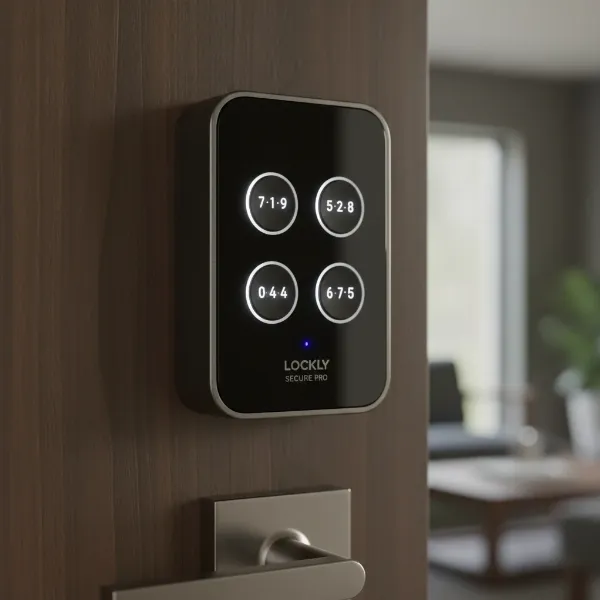 Lockly Secure Pro smart lock keypad showing dynamically shuffled numbers for security.
3D Biometric Fingerprint Access
Beyond the innovative keypad, the Lockly Secure Pro incorporates a highly responsive 3D biometric fingerprint sensor. Located conveniently on the right side of the lock’s exterior, this scanner allows for quick and secure entry with a simple touch. It can store up to 99 unique fingerprints, making it ideal for families and small businesses. While generally fast and accurate, some users note it can be less forgiving than smartphone fingerprint readers, occasionally requiring multiple attempts if hands are wet or improperly placed. It’s also worth noting that the sensor is optimized for users aged 12 and up due to finger size and print development.
Smart Keypad and App Control
The Lockly Secure Pro offers comprehensive control through its intuitive smartphone application. Via Bluetooth or the included Secure Link Wi-Fi Hub, users can remotely lock or unlock their door, monitor real-time entry and exit logs, and check the door’s open/close status (with the included door sensor). The app also facilitates the creation and management of various access codes, including permanent codes for residents, temporary codes for guests with specified durations, and one-time use codes for deliveries or service personnel. This flexible eKey management ensures you’re always in control of who enters your home and when.
Traditional Key Access
For those who appreciate the tried-and-true or as a failsafe, the Lockly Secure Pro includes two physical 6-pin keys. These traditional keys provide a reliable backup, ensuring access even in the rare event of a complete system failure or dead batteries.
Offline Access Codes (OAC)
A standout convenience feature is the ability to generate Offline Access Codes (OACs). These 9-digit codes can be created through the app and shared with guests, allowing them to gain entry using the keypad even if the lock is not connected to Wi-Fi. The OACs are time-sensitive, expiring after a predetermined duration, offering a secure and practical solution for guests without requiring them to download an app or have internet access.
Installation and Design
Installing the Lockly Secure Pro is a process designed for accessibility, catering to both DIY enthusiasts and those who prefer professional assistance. Its robust construction and thoughtful aesthetics also ensure it complements various home styles.
Installation Process
Replacing an existing deadbolt with the Lockly Secure Pro is generally straightforward, often taking around an hour with basic tools like a Phillips head screwdriver. Lockly provides detailed instructions, and some users find the interactive 3D video guide available via the Bilt app particularly helpful. The deadbolt is adjustable to fit standard door preparations. While most installations are smooth, some minor carpentry, such as enlarging the strike plate opening on the door jamb, might be necessary for a perfect fit. The lock’s two halves often come with adhesive strips that aid in stabilization during mounting, ensuring a secure and stable installation without requiring additional drilling.
Build Quality and Aesthetics
The Lockly Secure Pro boasts a premium design, with a hefty and well-built exterior that exudes quality. Available in various finishes like Matte Black, Satin Nickel, and Venetian Bronze, it is designed to blend seamlessly with existing door hardware. The front keypad display is bright and clear, visible even in direct sunlight, and blends nicely with the outer housing. While the exterior components feel solid and durable, the interior housing is typically constructed from high-quality plastic, matching the exterior finish. Users generally praise the lock’s sturdy construction and attractive appearance, which enhances the curb appeal of their homes.
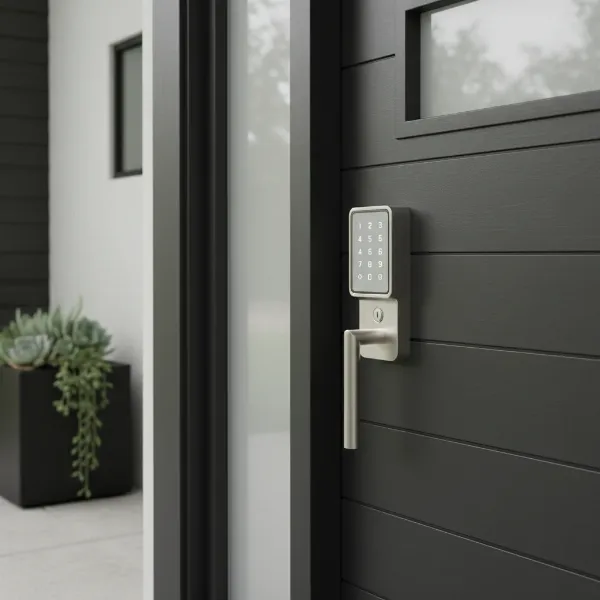 Lockly Secure Pro smart lock in satin nickel finish on a modern front door.
Security and Connectivity
The Lockly Secure Pro integrates a multi-layered approach to security and offers flexible connectivity options, ensuring your home remains protected and accessible from virtually anywhere.
Advanced Security Measures
Security is paramount for any smart lock, and the Lockly Secure Pro excels in this regard. Beyond the innovative Pincode Shuffle, which actively thwarts visual hacking attempts, the lock incorporates robust encryption protocols to secure communication between the lock and the app. It also features tamper alerts, notifying users of any attempts to force or damage the lock. The use of 6-pin keys for traditional access further enhances physical security compared to standard 5-pin keys. An internal switch also allows users to temporarily disable the exterior keypad for added privacy or when extended security is desired.
Connectivity Options and Smart Home Integration
The Secure Pro offers versatile connectivity:
- Bluetooth: For direct, close-range control and initial setup via the Lockly Home app.
- Wi-Fi: Enabled by the included Secure Link Wi-Fi Hub, this allows for remote access and control from anywhere with an internet connection. The hub typically needs to be placed within 10 feet of the lock for optimal performance.
- Wireless Door Sensor: Also included, this sensor communicates with the hub to provide real-time updates on whether the door is open or closed, adding another layer of monitoring capabilities.
For smart home enthusiasts, the Lockly Secure Pro integrates seamlessly with popular voice assistants such as Amazon Alexa and Google Assistant. Users can ask about the lock’s status or issue commands to lock and unlock the door. For enhanced security, unlocking via voice command typically requires a verbal PIN code, preventing unauthorized access from simple voice commands.
User Experience and Performance
The true test of a smart lock lies in its daily performance and how effortlessly it integrates into a user’s routine. The Lockly Secure Pro generally delivers a positive and reliable experience, though some nuances are worth noting.
Daily Use: Speed and Reliability
Most users find the Lockly Secure Pro to be fast and reliable in daily operation. The fingerprint reader is often the preferred method for quick entry, offering near-instantaneous unlocking. The Pincode Shuffle keypad, while requiring a few extra seconds to visually locate the numbers, still provides swift access once accustomed to the dynamic display. The auto-lock feature, which can be set to engage the deadbolt automatically after a predetermined time (5 seconds to 5 minutes) or disabled, offers an added layer of peace of mind, ensuring the door is never left unlocked inadvertently.
App Functionality and User Interface
The Lockly Home app is central to managing the Secure Pro and is generally praised for its comprehensive features and intuitive interface. It allows users to:
- Monitor: View activity logs, check battery levels, and see the door’s locked/unlocked and open/closed status.
- Manage Access: Create, modify, and revoke passcodes and eKeys for various users, including temporary and one-time access.
- Control: Lock and unlock the door remotely.
- Customize: Adjust settings like auto-lock duration, audio alerts, and integrate with smart home platforms.
While the app’s features are robust, some users have reported occasional lag in connectivity or specific requirements for Wi-Fi setup, such as avoiding special characters in the Wi-Fi network name. Customer support is often cited as responsive in helping resolve such issues.
Battery Life and Power Options
The Lockly Secure Pro is powered by four AA batteries, which are included in the package. Lockly estimates a battery life of approximately one year, though actual duration can vary based on usage frequency and environmental factors. The app provides battery level monitoring, and the keypad will display a low-battery indicator when power is running low. A thoughtful emergency feature is the inclusion of two contact points on the underside of the exterior unit, allowing users to temporarily power the lock with a standard 9V battery if the internal batteries die, enabling entry via keypad or fingerprint until the AA batteries can be replaced.
Lockly Secure Pro vs. The Competition
In a crowded smart lock market, the Lockly Secure Pro carves out a niche with its unique combination of features. While brands like August, Yale, and Samsung offer excellent smart lock solutions, the Secure Pro’s strengths lie in its distinct security and convenience aspects.
Many competing smart locks offer app control, fingerprint access, and traditional key backups. However, the Lockly Secure Pro’s patented Pincode Shuffle feature provides an unmatched level of keypad security against visual hacking, which is a significant differentiator. Its inclusion of a Wi-Fi hub and door sensor in the Pro package means a complete smart access solution right out of the box, whereas some competitors require separate purchases for remote connectivity and door status monitoring. While the fingerprint sensor is a premium feature, some high-end competitors like certain Samsung models also offer advanced biometric options. For those prioritizing advanced keypad security and a comprehensive suite of access methods, Lockly Secure Pro often presents a compelling and unique value proposition.
Essential Smart Lock Accessories
While the Lockly Secure Pro is a complete system, certain accessories can enhance its functionality and user experience.
- Extra Keys: Though two physical keys are included, having spares for family members or trusted contacts can be beneficial. Note that the 6-pin (Type 97) keys may require specific locksmith services if rekeying to match existing 5-pin household keys.
- Backup 9V Batteries: Keeping a 9V battery readily available, perhaps in your car or a designated safe spot, can be a lifesaver for emergency power.
- Smart Home Hub (if not included or for specific integrations): While the Secure Link Wi-Fi Hub is included, if you have a complex smart home ecosystem or specific integration requirements not natively supported, an additional hub might be considered, though less likely for the Pro version.
- Weather Protection: For doors highly exposed to the elements, additional weather stripping or an awning can help protect the lock’s electronics, prolonging its lifespan.
Using these accessories ensures you’re prepared for any scenario, maximizing the convenience and reliability of your Lockly Secure Pro.
“The Lockly Secure Pro truly redefines keypad security with its Pincode Shuffle. This feature, combined with its robust fingerprint reader and comprehensive app control, offers a multi-layered approach to home access that sets a new standard for intelligent security.” – Admin, smartlockchoice.com
Conclusion
The Lockly Secure Pro smart lock stands as a formidable contender in the smart home security landscape, offering a sophisticated and secure solution for modern access control. Its innovative Pincode Shuffle technology, combined with a highly accurate fingerprint reader, comprehensive app control, and robust connectivity options, addresses key concerns around both convenience and security. From remote management of access codes to emergency power solutions, the Lockly Secure Pro demonstrates a commitment to thoughtful design and user empowerment.
While the Lockly Secure Pro may come with a premium price tag, the breadth of its features, its focus on advanced security, and its overall reliability make it a worthwhile investment for those prioritizing top-tier home protection and seamless smart home integration. It’s a smart lock that doesn’t just grant access, but intelligent control over your most valuable space. Are you ready to shuffle your way to a more secure and convenient home?
Frequently Asked Questions
How does Lockly’s Pincode Shuffle feature actually work?
The Pincode Shuffle feature dynamically rearranges the numerical digits on the keypad’s display every time you use it. Instead of static numbers, a random set of three numbers appears within four buttons, with two numbers repeating. This constant scrambling prevents onlookers from memorizing your code by observing finger placement or from deducing it by worn keypad buttons.
Can I control my Lockly Secure Pro remotely when I’m away from home?
Yes, the Lockly Secure Pro comes with a Secure Link Wi-Fi Hub that enables remote control. Once the lock is paired with the hub and connected to your home Wi-Fi network, you can lock or unlock your door, monitor its status, and manage access codes from anywhere using the Lockly Home app on your smartphone.
What happens if the batteries in my Lockly Secure Pro die?
The Lockly Secure Pro is designed with an emergency power option. If the internal AA batteries completely drain, you can temporarily power the lock by touching a standard 9V battery to the two contact points located on the underside of the exterior unit. This will provide enough power for you to enter your code or use your fingerprint to unlock the door.
Is the Lockly Secure Pro compatible with smart home systems?
Yes, the Lockly Secure Pro seamlessly integrates with popular smart home ecosystems, including Amazon Alexa and Google Assistant. This allows for voice control commands, such as checking the lock’s status or locking the door. For security, unlocking via voice typically requires a verbal PIN.
Can I give temporary access to guests or service providers?
Absolutely. The Lockly Home app allows you to generate temporary access codes with specific start and end dates and times. You can also create one-time use codes for single entries or utilize Offline Access Codes (OACs) which work even without an internet connection, offering flexible and secure guest management.
How many fingerprints can the Lockly Secure Pro store?
The Lockly Secure Pro’s 3D biometric fingerprint sensor has the capacity to store up to 99 unique fingerprints, making it suitable for larger families, small businesses, or properties with multiple regular users.
Is installation difficult for the Lockly Secure Pro?
Installation is generally straightforward for most homeowners, especially when replacing an existing deadbolt. Lockly provides detailed instructions, and some users find the Bilt app’s 3D video guidance helpful. While basic tools are usually sufficient, minor adjustments to the door frame may occasionally be needed.
