Smart locks have transformed how we secure and access our homes, offering unparalleled convenience and peace of mind. But with new models constantly emerging, choosing the right one can be daunting. Enter the SwitchBot Lock Pro, an eagerly anticipated upgrade designed to build upon the success of its predecessor. If you’re wondering if this “updated and stronger” smart lock lives up to its name and is the ideal choice for modernizing your home security, this comprehensive review will guide you through its features, performance, and overall value.
What is the SwitchBot Lock Pro and Why Consider It?
The SwitchBot Lock Pro is a retrofit smart lock, meaning it installs over your existing deadbolt without requiring you to replace the entire lock mechanism. This design makes it a versatile solution for many homeowners, blending smart capabilities with your current setup. At its core, the Lock Pro leverages Bluetooth technology to allow for app-based control of your door.
This smart lock offers significant advantages over traditional keyed locks, bringing a new level of convenience, enhanced security features, and easier access management. Imagine granting temporary access to a guest or service provider remotely, or simply walking away knowing your door will automatically lock behind you. The Lock Pro addresses these modern needs, making physical keys a thing of the past for daily use. A major highlight of the Pro version is its substantial improvement over the original SwitchBot Lock, boasting a more robust aluminum body compared to its predecessor’s plastic build, along with noticeably quieter operation.
Key Features of the SwitchBot Lock Pro
The SwitchBot Lock Pro is packed with features that aim to enhance your home’s security and your daily convenience. Its design and diverse functionalities make it a strong contender in the smart lock market.
Robust Design and Installation
|
Our Picks for the Best Smart Lock in 2026
As an Amazon Associate I earn from qualifying purchases.
|
||
| Num | Product | Action |
|---|---|---|
| 1 | Philips Wi-Fi Door Lock, WiFi Smart Lock Keyless Entry Deadbolt for Front Door, Remote Control, Built-in WiFi, APP Fingerprint Passcode Unlock, Auto Locking |

|
| 2 | Schlage Encode Smart WiFi Deadbolt Lock for Front Door - Keyless Entry with App or Touchscreen - Works with Alexa, Hey Google, & Airbnb - Create Codes for Guests - Matte Black |
|
| 3 | TEEHO TE001 Keyless Entry Door Lock with Keypad - Smart Deadbolt Lock for Front Door with 2 Keys - Auto Lock - Easy Installation - Matte Black |
|
| 4 | Electronic Passwords Keyless Entry Door Locks Smart Deadbolt Metal Lock Auto Time Delay Locking Secure Durable Low Battery Alert Type-C Port for Emergency Charging |
|
| 5 | eufy Security Smart Lock C220, Fingerprint Keyless Entry Door Lock, Built-in Wi-Fi, App Remote Control, Front Door Smart Deadbolt, IP53 Waterproof, 8-Months Battery, Nickel |
|
| 6 | Philips Wi-Fi Door Lock, WiFi Smart Lock Keyless Entry Deadbolt for Front Door, Compatible with Alexa & Google Assistant, Remote Control, Built-in WiFi, APP Fingerprint Passcode Unlock, Auto Locking |
|
| 7 | TEEHO TE001 Keyless Entry Door Lock with Keypad - Smart Deadbolt Lock for Front Door with 2 Keys - Auto Lock - Easy Installation - Satin Nickel |
|
| 8 | ULTRALOQ U-Bolt Pro WiFi Smart Lock with Door Sensor, 8-in-1 Keyless Entry Door Lock with Fingerprint ID, App Remote Control, Built-in WiFi Keypad Deadbolt, Auto Unlock, IP65 Waterproof, Easy Install |
|
| 9 | eufy Security Smart Lock C220, Fingerprint Keyless Entry Door Lock, Built-in Wi-Fi, App Remote Control, Front Door Smart Lock Deadbolt, 8Months Battery, Reliable Power, IP53 Waterproof, BHMA Grade 3 |
|
| 10 | TEEHO TE001 Keyless Entry Door Lock with Keypad - Smart Deadbolt Lock for Front Door with 2 Keys - Auto Lock - Easy Installation - Oil-Rubbed Bronze |
|
One of the immediate distinctions of the Lock Pro is its construction. It features a solid, high-quality aluminum body, marking a significant upgrade in durability and feel from its earlier version. However, this robust build does result in a “plus-sized” design that some might find quite large or even “brutalist” on their door. Despite its size, the lock feels sturdy and capable of withstanding daily use.
Installation is designed to be straightforward for most common locking systems. The accompanying SwitchBot app provides clear, step-by-step instructions, often including videos, to guide you through the setup process. While the overall installation is generally easy, some users have noted that the calibration step, particularly when dealing with the door latch, might require a bit of patience to get just right.
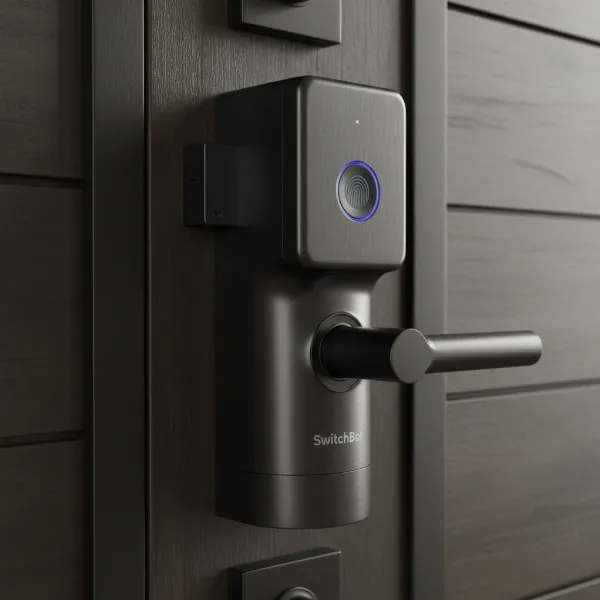 Close-up of SwitchBot Lock Pro, highlighting its aluminum body and large size.
Diverse Unlocking Methods and Connectivity
The SwitchBot Lock Pro offers a variety of ways to access your home, catering to different preferences and situations:
- App Control: You can lock and unlock your door directly from the SwitchBot app via Bluetooth when you are nearby. For remote control, such as when you’re away from home, the SwitchBot Hub Mini Matter Enabled (sold separately) is required.
- Manual Control: A large, integrated knob on the front of the lock allows for manual locking and unlocking. This knob can also be pressed to toggle the lock state, offering a quick and tactile option.
- Optional Keypad Touch: For an even more versatile experience, the optional SwitchBot Keypad Touch accessory is a game-changer. This unit combines a numeric keypad for PIN entry with a fingerprint reader, providing swift and secure access without needing your phone. It’s a newer product shipping in June 2024, enhancing the access options significantly.
- Matter Support: A standout feature is its integration with Matter, the universal smart home standard, when paired with the SwitchBot Hub Mini Matter Enabled. This allows the Lock Pro to seamlessly connect with major smart home ecosystems like Apple Home, Google Assistant, Amazon Alexa, SmartThings, Homey Pro, and Hubitat. Reviewers have highlighted that its Matter integration is exceptionally reliable, a notable achievement in the nascent Matter ecosystem.
- Built-in Door Sensor: The Lock Pro includes a magnetic door sensor that attaches to your door frame. This sensor provides crucial information, enabling features like automatic locking when the door closes and sending notifications if the door is left ajar or unlocked for too long.
Performance and Battery Life
In terms of performance, the SwitchBot Lock Pro generally delivers a quick and reliable response to commands. Users appreciate its quiet operation, with the sound of unlocking being significantly less disruptive than many other smart locks on the market. This can be a major plus, especially in quiet households.
The lock is powered by four AA batteries, which are expected to last up to nine months. For added convenience, a rechargeable Battery Pack is also available as a separate purchase, offering a sustainable power solution.
SwitchBot Lock Pro in Comparison: How Does It Stack Up?
When evaluating the SwitchBot Lock Pro, it’s essential to understand its position relative to both its predecessor and other smart locks available.
The Lock Pro represents a substantial upgrade from the original SwitchBot Lock. Its transition from a largely plastic build to a premium aluminum body enhances both its durability and aesthetic appeal. Furthermore, improvements in motor design contribute to quieter operation and a more refined user experience.
Compared to established brands like Nuki and Yale, the SwitchBot Lock Pro offers a compelling alternative, particularly as a retrofit option. Some reviewers even suggest it surpasses Nuki’s offerings in certain aspects, especially with the addition of the Keypad Touch for enhanced access methods. While the market is ever-evolving, with upcoming competitors like the Aqara U200 (which may include Apple HomeKey and a keypad as standard), the Lock Pro holds its own with robust features and reliable Matter integration.
Regarding pricing, the SwitchBot Lock Pro is competitively positioned. The lock itself typically retails around $119.99. However, SwitchBot often provides attractive bundles that include the essential Keypad Touch and Hub Mini Matter Enabled. These bundles can offer significant savings, making the complete smart lock ecosystem more accessible and presenting a strong value proposition for a feature-rich smart lock.
Is the SwitchBot Lock Pro Right for Your Home? (Buying Guide)
Choosing the perfect smart lock involves more than just looking at features; it’s about finding the right fit for your specific needs and lifestyle. Here’s how to determine if the SwitchBot Lock Pro is suitable for you.
Assessing Your Needs
Before making a purchase, consider what you truly need from a smart lock. Think about your door type, as retrofit locks are highly compatible but some unique door configurations might require careful measurement. What level of security are you aiming for? While smart locks enhance convenience, they should also meet your security expectations. Your budget will also play a crucial role, especially since the full functionality of the Lock Pro often requires additional accessories. If remote access, seamless Matter integration, and multiple entry methods like fingerprint scanning are high priorities, then investing in the Lock Pro and its ecosystem makes sense.
Understanding Essential Features
Focus on the core capabilities that matter most to you. The SwitchBot Lock Pro’s diverse unlocking methods—from app control and manual operation to the optional fingerprint and PIN access via the Keypad Touch—offer flexibility. Its strong connectivity, particularly with Matter support through the Hub, is a key consideration for those invested in a smart home ecosystem. Also, look into security certifications and encryption technologies (though specific certifications for Lock Pro were not detailed in available reviews, SwitchBot products typically prioritize secure communication). Reading reviews from other users can provide valuable insights into real-world performance and any potential quirks.
Considering the Ecosystem
It’s important to understand that while the SwitchBot Lock Pro is functional on its own via Bluetooth, its full potential is unlocked when integrated with other SwitchBot accessories. The SwitchBot Hub Mini Matter Enabled is virtually essential for remote access, Matter compatibility, and advanced smart home automations. Similarly, the SwitchBot Keypad Touch significantly expands entry options with fingerprint and PIN access, offering a more complete and convenient experience. Factor these additional purchases into your decision to get a clear picture of the total cost for the desired functionality.
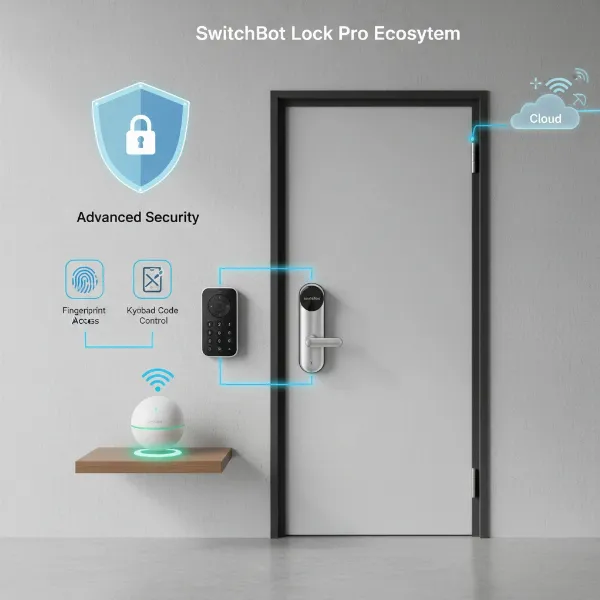 SwitchBot Lock Pro, Hub Mini, and Keypad Touch working together for smart home access.
Tips for Getting the Most Out of Your SwitchBot Lock Pro
Once you’ve decided on the SwitchBot Lock Pro, a few best practices can help you optimize its performance and longevity.
Installation Best Practices
While the in-app instructions are helpful, take your time during installation. Pay close attention to the door latch calibration step, as this can sometimes require multiple attempts to ensure smooth and reliable operation. Ensure the magnetic door sensor is properly aligned with the lock for accurate door status detection and efficient auto-locking functions. A precise installation is key to avoiding common issues and maximizing the lock’s responsiveness.
Maximizing Smart Features
To fully leverage the Lock Pro’s capabilities, explore the SwitchBot app’s automation options. You can set up schedules for locking and unlocking, create rules based on the door sensor (e.g., auto-lock after a set time if the door is closed), or integrate it with other SwitchBot devices. With the Hub Mini Matter Enabled, you can link your lock to your preferred smart home ecosystem (Apple Home, Alexa, Google Home) to include it in broader routines, such as turning off lights when the door locks. Utilize the Keypad Touch to create temporary or permanent PINs for family members, guests, or service providers, and enroll fingerprints for quick, keyless entry.
Maintenance and Troubleshooting
Regular maintenance can extend the life of your smart lock. Keep an eye on the battery level through the app and replace the four AA batteries as needed, or switch to the rechargeable battery pack for convenience. If you encounter occasional app hanging or connectivity issues, ensure your SwitchBot app is updated, and check the Hub’s connection. Basic troubleshooting, like restarting the app or re-pairing devices, often resolves minor glitches. The SwitchBot support resources can also be helpful for more persistent problems.
Conclusion
The SwitchBot Lock Pro stands out as a formidable contender in the retrofit smart lock category. Its “updated and stronger” designation is well-earned, thanks to its robust aluminum construction, quieter operation, and significantly improved feature set, especially with reliable Matter integration via the Hub. While its “plus-sized” design might not appeal to everyone and the full smart home experience requires additional accessories, the Lock Pro offers a compelling blend of convenience, security, and advanced connectivity. For those seeking an easy-to-install smart lock that brings modern access control and works seamlessly within a growing smart home ecosystem, the SwitchBot Lock Pro is a worthwhile investment to consider for enhancing your home’s protection and daily life.
What aspect of a smart lock matters most to you: ultimate convenience or maximum security?
Frequently Asked Questions
What are the main upgrades in the SwitchBot Lock Pro compared to the original?
The SwitchBot Lock Pro features a more durable aluminum alloy body, a significant upgrade from its predecessor’s plastic design. It also offers quieter operation and improved overall functionality, including enhanced compatibility with smart home ecosystems through Matter support via the SwitchBot Hub Mini.
Does the SwitchBot Lock Pro support Matter?
Yes, the SwitchBot Lock Pro supports Matter, but it requires the SwitchBot Hub Mini Matter Enabled to enable this functionality. With the Hub, it can integrate seamlessly with Apple Home, Google Home, Amazon Alexa, and other Matter-compatible platforms for unified smart home control.
Is the SwitchBot Keypad Touch necessary for the Lock Pro?
The SwitchBot Keypad Touch is not strictly “necessary” for the Lock Pro to function, as you can still control it via the app or manually. However, it is highly recommended as it greatly enhances convenience by adding fingerprint recognition and PIN code entry, offering more diverse and convenient access methods.
What is the battery life of the SwitchBot Lock Pro?
The SwitchBot Lock Pro is powered by four AA batteries and is designed to last up to nine months on a single set. For continuous usage, a rechargeable Battery Pack is also available for separate purchase, providing a convenient alternative to disposable batteries.
Is the SwitchBot Lock Pro easy to install?
Yes, the SwitchBot Lock Pro is generally easy to install due to its retrofit design and the comprehensive, step-by-step instructions provided within the SwitchBot app. Most users can install it over their existing deadbolt without professional help, although calibrating the lock mechanism might require a bit of patience.
