The jingle of a lost key, the frantic search for a spare under a planter, or the logistical dance of coordinating key handovers – these are familiar frustrations for anyone managing access to their property. In today’s fast-paced world, traditional keys often fall short, especially when dealing with temporary visitors like guests, cleaners, or contractors. This is where the innovation of digital keys transforms the landscape of property access, offering unparalleled convenience, enhanced security, and complete control at your fingertips. Imagine granting access to your home or office with a few taps on your smartphone, setting precise time limits, and revoking entry just as easily. This guide will walk you through everything you need to know about sharing digital keys, ensuring a smooth and secure experience for everyone involved.
The Power of Digital Keys: Revolutionizing Access Management
Digital keys, typically managed through a smart lock system and a corresponding mobile application, represent a significant leap forward in how we control entry to our spaces. They are not physical objects but encrypted credentials transmitted wirelessly, usually via Bluetooth or Wi-Fi, to a smart lock. These systems replace traditional keyholes and deadbolts with electronically controlled mechanisms that unlock doors upon receiving an authenticated signal.
Why are digital keys indispensable for managing temporary access? They eliminate the physical exchange of keys, a process often prone to delays, losses, or security breaches. Digital key sharing offers peace of mind through features like remote management, customizable access schedules, and real-time activity logs. For guests, it means hassle-free check-ins without coordinating arrival times. For contractors, it provides secure, limited-time access, reducing the need for supervision or constant communication. In essence, digital keys empower property owners with dynamic control, transforming an old problem into a seamless digital solution.
Beyond mere convenience, digital keys enhance security significantly. They often employ advanced encryption methods, making them difficult to duplicate or hack. Unlike physical keys, which can be lost or copied, digital keys can be instantly revoked, ensuring that access is terminated precisely when needed. This level of granular control is something traditional locks simply cannot offer.
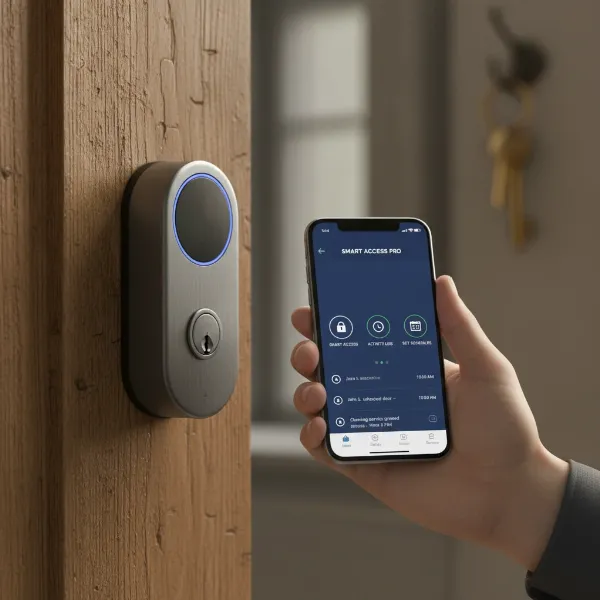 A smartphone showing a smart lock app interface next to a smart lock on a door.
Scenarios Where Digital Key Sharing Shines
The versatility of digital key sharing makes it an ideal solution for a multitude of modern living and working situations. It streamlines access management, enhances security, and improves the overall experience for both property owners and those needing temporary entry.
Vacation Rentals & Short-Term Stays
|
Our Picks for the Best Smart Lock in 2026
As an Amazon Associate I earn from qualifying purchases.
|
||
| Num | Product | Action |
|---|---|---|
| 1 | ULTRALOQ U-Bolt Pro WiFi Smart Lock with Door Sensor, 8-in-1 Keyless Entry Door Lock with Fingerprint ID, App Remote Control, Built-in WiFi Keypad Deadbolt, Auto Unlock, IP65 Waterproof, Easy Install |

|
| 2 | Philips Wi-Fi Door Lock, WiFi Smart Lock Keyless Entry Deadbolt for Front Door, Compatible with Alexa & Google Assistant, Remote Control, Built-in WiFi, APP Fingerprint Passcode Unlock, Auto Locking |
|
| 3 | Schlage Encode Smart WiFi Deadbolt Lock for Front Door - Keyless Entry with App or Touchscreen - Works with Alexa, Hey Google, & Airbnb - Create Codes for Guests - Matte Black |
|
| 4 | TEEHO TE001 Keyless Entry Door Lock with Keypad - Smart Deadbolt Lock for Front Door with 2 Keys - Auto Lock - Easy Installation - Satin Nickel |
|
| 5 | TEEHO TE001 Keyless Entry Door Lock with Keypad - Smart Deadbolt Lock for Front Door with 2 Keys - Auto Lock - Easy Installation - Oil-Rubbed Bronze |
|
| 6 | eufy Security Smart Lock C220, Fingerprint Keyless Entry Door Lock, Built-in Wi-Fi, App Remote Control, Front Door Smart Lock Deadbolt, 8Months Battery, Reliable Power, IP53 Waterproof, BHMA Grade 3 |
|
| 7 | eufy Security Smart Lock C220, Fingerprint Keyless Entry Door Lock, Built-in Wi-Fi, App Remote Control, Front Door Smart Deadbolt, IP53 Waterproof, 8-Months Battery, Nickel |
|
| 8 | Philips Wi-Fi Door Lock, WiFi Smart Lock Keyless Entry Deadbolt for Front Door, Remote Control, Built-in WiFi, APP Fingerprint Passcode Unlock, Auto Locking |
|
| 9 | Electronic Passwords Keyless Entry Door Locks Smart Deadbolt Metal Lock Auto Time Delay Locking Secure Durable Low Battery Alert Type-C Port for Emergency Charging |
|
| 10 | TEEHO TE001 Keyless Entry Door Lock with Keypad - Smart Deadbolt Lock for Front Door with 2 Keys - Auto Lock - Easy Installation - Matte Black |
|
For Airbnb hosts and short-term rental owners, digital keys are a game-changer. They solve the perennial problem of key handoffs, allowing guests to check in at any time without requiring a host to be physically present. Hosts can issue unique digital keys for each booking, setting precise check-in and check-out times. Once a guest departs, their access automatically expires, eliminating concerns about lost keys or unauthorized re-entry. This not only boosts guest satisfaction by offering flexibility but also significantly reduces the operational burden on hosts.
Home Services (Cleaners, Pet Sitters, Maintenance)
Granting access to trusted service providers like housekeepers, pet sitters, or gardeners becomes effortless with digital keys. Instead of hiding a spare key or waiting around, you can issue a temporary digital key that works only during scheduled service hours. For example, a pet sitter could have access every weekday between 10 AM and 2 PM, while a cleaner might have a one-time key for a specific appointment. This level of control ensures that service providers can enter when needed but no longer than necessary, enhancing both security and convenience.
Contractors & Tradespeople
When renovations, repairs, or installations are underway, contractors and various tradespeople require access to your property. Digital keys offer a secure way to manage this. You can provide a specific digital key that is active only for the duration of their work, or even for specific days and times. This eliminates the risk associated with physical keys being misplaced or falling into the wrong hands during a project. Upon completion of the work, access can be instantly revoked, providing immediate security.
Family, Friends, and Occasional Visitors
Beyond professional services, digital keys simplify sharing access with family and friends. Whether it’s a relative visiting from out of town, a neighbor checking on your home while you’re away, or a child needing to get in after school, a digital key offers a flexible solution. You can grant temporary access for a weekend visit or a recurring schedule for a trusted family member, all managed easily from your phone. This means no more worrying about forgotten keys or rushing to meet someone at the door.
Choosing the Right Smart Lock System for Your Needs
Selecting the ideal smart lock system is crucial for a smooth digital key sharing experience. The market offers a variety of options, each with unique features and connectivity methods. Understanding these differences will help you choose a system that best fits your security requirements, budget, and desired level of smart home integration.
Understanding Connectivity: Bluetooth vs. Wi-Fi Enabled Locks
Smart locks primarily connect to your smartphone or smart home network via Bluetooth or Wi-Fi, and sometimes both.
- Bluetooth-enabled smart locks typically require you to be within a certain proximity (usually 10-30 feet) of the lock to control it with your smartphone. They are often simpler to install and consume less battery power. However, sharing digital keys remotely (when you are not home) or receiving real-time notifications about entry/exit usually requires an additional Wi-Fi bridge or hub, which plugs into an outlet near the lock. Brands like August are well-known for their Bluetooth-first approach, often with optional Wi-Fi bridges.
- Wi-Fi connected smart locks link directly to your home’s Wi-Fi network, allowing you to control and monitor your lock from anywhere in the world, as long as you have an internet connection. This provides full remote management capabilities, including sharing digital keys, setting schedules, and receiving instant alerts. While more convenient for remote access, Wi-Fi locks tend to consume more battery power due to continuous connection. Popular examples include Yale Assure and Kwikset Halo. Many newer models now offer integrated Wi-Fi.
Keypad vs. App-Only Access Options
The method of entry for guests and contractors is another important consideration.
- App-only access means users must have the smart lock’s dedicated mobile app installed on their smartphone to unlock the door. This is often the most secure method, as it leverages app-based authentication and encryption. However, it might not be ideal for all guests or contractors who may not want to download an app or might not have a smartphone.
- Keypad smart locks offer a convenient alternative by allowing entry using a unique numerical code. Many smart locks combine both keypad and app access, providing flexibility. You can generate temporary or recurring codes for different users, which can be easily shared via text message or email. This eliminates the need for an app, making it highly suitable for one-time visitors or those less tech-savvy. The ability to manage and revoke these codes remotely is a key benefit.
Integration with Smart Home Platforms
For a truly integrated smart home experience, consider how your chosen smart lock interacts with other platforms like Apple HomeKit, Google Home, Amazon Alexa, or specific rental management platforms like Airbnb. Deep integration allows for broader automation, such as turning on lights when the door unlocks or disarming a security system. Some locks also offer direct integration with Airbnb Connect, streamlining key management for rental properties.
Top Smart Lock Brands for Digital Key Sharing
Several brands stand out for their robust digital key sharing capabilities:
- August Smart Lock: Known for its easy installation over existing deadbolts and seamless integration with Airbnb. Excellent for guest access and activity tracking.
- Yale Assure Lock: Offers a wide range of models with keypad and app access, often with Wi-Fi bridge options for remote functionality. Known for reliability.
- Schlage Encode: A popular choice with built-in Wi-Fi, offering remote access, easy code management, and compatibility with Amazon Key.
- Alfred Locks: Offers stylish and secure options with Bluetooth and Wi-Fi capabilities, known for flexible access scheduling for various user types like family, guests, and contractors.
- Kwikset Halo: Features built-in Wi-Fi, allowing remote control and code management without an additional hub.
When choosing, prioritize features like robust security, ease of use for both the owner and the recipient, battery life, and compatibility with your existing smart home ecosystem.
A Step-by-Step Guide to Sharing Digital Keys
Sharing digital keys is a straightforward process designed to be intuitive, but understanding the steps can ensure a seamless experience for everyone.
Setting Up Your Smart Lock and App
Before you can share digital keys, your smart lock must be correctly installed and paired with its dedicated mobile application. Follow the manufacturer’s instructions for installation, which typically involves replacing your existing deadbolt. Once installed, download the companion app from your smartphone’s app store and follow the on-screen prompts to pair your lock. This usually involves creating an account, registering your device, and configuring initial settings. Ensure your smart lock has a strong Wi-Fi connection (if applicable) and sufficient battery life.
Granting Access: A Walkthrough
The core of digital key sharing lies in the ability to grant specific, controlled access to individuals.
- Identifying the recipient: In your smart lock app, navigate to the “Users,” “Guests,” or “Share Access” section. You’ll typically be prompted to enter the recipient’s contact information, usually their email address or phone number. This is how the invitation and digital key will be delivered.
- Selecting access type: Most advanced smart lock apps allow you to categorize users (e.g., family, guest, contractor, administrator). These categories often come with default permission levels. For instance, a “family” member might have indefinite access, while a “guest” might have temporary access.
- Defining access schedules: This is a powerful feature for managing temporary access.
- Temporary access: Ideal for short-term guests or one-time service calls. You can set a specific start date and time, and an end date and time, after which the digital key or code will automatically expire.
- Recurring access: Perfect for regular service providers like cleaners or dog walkers. You can define specific days of the week and time windows (e.g., Mondays and Thursdays, 10 AM to 1 PM) during which the key will be active.
- Indefinite access: Best for permanent residents or trusted family members who need unrestricted entry.
“The beauty of digital keys is the precision they offer. You can grant access for a matter of hours, days, or weeks, ensuring security without the hassle of physical key exchanges.” – Maria Chen, Smart Home Security Expert
Activating the Digital Key for the Recipient
Once you’ve sent the invitation, the recipient will receive a notification, usually via text message or email. This message typically contains a link to download the smart lock’s app (if they don’t already have it) and instructions for activating their digital key. They may need to create an account, enter a temporary PIN, and accept the shared access. Some systems, like those mentioned in our research, even allow app-less access via a QR code for ultimate simplicity. It’s crucial for the recipient to follow these instructions to ensure their access is properly set up.
Revoking Access: Quick and Secure
One of the most significant advantages of digital keys is the ability to revoke access instantly. If a guest overstays, a contractor finishes early, or a situation arises where access needs to be terminated, you can do so immediately from your smart lock app. Simply navigate to the user management section, select the individual, and choose the “revoke access” or “delete user” option. The digital key will be deactivated in real-time, rendering it useless. This immediate control offers unparalleled security and peace of mind.
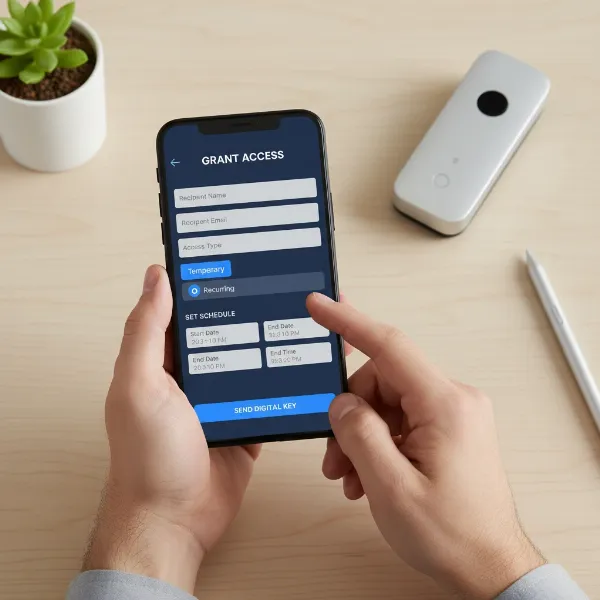 A person's hand using a smartphone app to grant temporary digital key access.
Maximizing Security and Control with Digital Key Features
Beyond simply granting and revoking access, modern smart lock systems come equipped with a suite of features designed to enhance security, provide greater control, and offer insightful monitoring capabilities. Leveraging these features is key to truly maximizing the benefits of digital key sharing.
Real-time Activity Logs and Notifications
Most smart locks with digital key sharing capabilities maintain a detailed activity log. This log records every entry and exit, noting who unlocked the door and when. This feature is invaluable for monitoring who accesses your property, especially when you have multiple guests or contractors. Furthermore, many systems offer real-time push notifications to your smartphone whenever the lock is used. You can receive an alert when a contractor arrives, when your pet sitter leaves, or if there’s any unauthorized attempt to access the lock. This constant oversight provides peace of mind, knowing you’re always aware of what’s happening at your door.
Customizing Access Permissions
Digital keys allow for highly granular control over who can do what. Beyond setting time-based access, you can often customize other permissions. For instance, you might grant a family member the ability to create and manage their own guest keys, while a contractor is only allowed entry and nothing more. Some advanced systems even allow you to restrict access to certain days of the week, limit the number of entries, or even control which specific doors within a property a digital key can unlock. This level of customization ensures that each user has precisely the access they need, no more, no less.
Ensuring Privacy and Data Security
The security of digital keys relies heavily on robust encryption and data protection. Reputable smart lock manufacturers employ industry-standard encryption protocols to protect the digital keys as they are transmitted and stored. When sharing digital keys, always ensure you are using the official app provided by your smart lock manufacturer. Be cautious about sharing your own login credentials and educate your guests/contractors about not sharing their digital keys or access codes with unauthorized individuals. Regularly update your smart lock’s firmware and mobile app to benefit from the latest security patches.
Battery Management and Backup Plans
Smart locks, especially Wi-Fi-enabled models, rely on battery power. It’s crucial to monitor your lock’s battery status through the app and replace batteries proactively before they run out. Most apps will provide low-battery alerts well in advance. However, even with diligent monitoring, batteries can fail. Therefore, a reliable backup plan is essential. This typically includes a traditional physical key override, a hidden emergency keypad, or external battery jumpstart options (e.g., a 9V battery terminal on the lock). Always ensure you or a trusted individual has access to these backup methods to avoid being locked out.
Best Practices for Seamless Digital Key Sharing
To ensure a smooth and secure experience when sharing digital keys, adopting a few best practices can make a significant difference. From clear communication to routine maintenance, these tips will help you leverage the full potential of your smart lock system.
Clear Communication with Guests/Contractors
One of the most critical aspects of successful digital key sharing is clear and proactive communication. Before their arrival or scheduled service, inform your guests or contractors that you use a smart lock system and explain how they will receive and activate their digital key. Provide them with the necessary app names, account creation instructions, and any unique codes or links they might need. This preemptive approach minimizes confusion and reduces the likelihood of access issues upon arrival.
Providing Detailed Instructions
Don’t assume everyone is familiar with smart locks. Furnish clear, concise, and easy-to-follow instructions. This might include:
- Step-by-step activation guide: How to download the app, create an account, and activate their digital key.
- Usage guide: How to lock and unlock the door using the app or keypad.
- Troubleshooting tips: What to do if they encounter common issues like app connectivity problems or a dead phone battery.
- Emergency contact information: Who to call if they run into problems they can’t resolve.
Consider creating a simple digital handout or a small laminated card with this information.
Regular Security Audits
Periodically review your smart lock’s access logs and user list. Ensure that all temporary access permissions have expired as intended and that there are no unauthorized users. If you’ve had a high turnover of guests or contractors, it’s a good practice to delete old user profiles or revoke any indefinite access that is no longer needed. Changing your primary access codes occasionally, even if not strictly necessary, can also add an extra layer of security.
Troubleshooting Common Issues
Even with the most robust systems, occasional issues can arise. Knowing how to troubleshoot them can save time and frustration.
- Connectivity Problems: If a digital key isn’t working, check your home’s Wi-Fi network (for Wi-Fi locks) or ensure the user is within Bluetooth range (for Bluetooth locks). Sometimes, a simple restart of the smart lock or the user’s phone can resolve temporary glitches.
- User Error: Confirm the recipient has followed all activation steps correctly. Ensure they’ve downloaded the right app and are using the correct credentials.
- Battery Depletion: This is a common culprit. Check the battery status via your app and guide the user to an emergency backup method if available.
- App-Related Glitches: Ensure both your and the recipient’s smart lock apps are updated to the latest version. Clear the app cache or reinstall if persistent issues occur.
A prepared owner, equipped with these best practices, can navigate the world of digital key sharing with confidence and ease.
Essential Smart Lock Accessories
While a smart lock is the core of your keyless entry system, certain accessories can enhance its functionality, convenience, and reliability, providing a more comprehensive access control solution.
- Wi-Fi Bridge/Hub: For Bluetooth-only smart locks, a Wi-Fi bridge is essential for remote access and digital key sharing when you’re not physically near the lock. It connects your Bluetooth lock to your home’s Wi-Fi network, unlocking global control.
- External Keypads: If your smart lock doesn’t have a built-in keypad, a standalone wireless keypad can be a valuable addition. It allows guests and contractors to enter using a code, bypassing the need for a smartphone or app. This is particularly useful for those without smartphones or for emergency access.
- Extra Batteries/Rechargeable Packs: Smart locks run on batteries. Keeping a supply of fresh batteries on hand, or investing in rechargeable battery packs specifically designed for your lock, ensures you’re never caught off guard by a dead battery.
- Door Sensors: Integrating door/window sensors with your smart lock system can provide additional security and insights. These sensors can notify you if a door is left ajar or if there’s unauthorized entry, adding another layer to your activity monitoring.
- Smart Home Hubs: If you have multiple smart devices, a central smart home hub (like Apple HomePod, Google Nest Hub, or Amazon Echo) can unify control. Integrating your smart lock allows you to manage it alongside other devices, create routines, and even use voice commands for locking and unlocking.
The right accessories can transform your smart lock from a standalone device into a robust, integrated, and highly convenient access management system, perfectly suited for sharing digital keys with anyone you need to grant entry to.
Conclusion
The evolution of smart locks and digital key sharing has unequivocally transformed how we manage access to our properties. No longer are we tethered to the vulnerabilities and inconveniences of physical keys. Digital keys offer unparalleled flexibility, allowing you to grant, manage, and revoke access for guests, contractors, and family members with remarkable ease and precision. The enhanced security, real-time monitoring, and customizable permissions provide a level of control that was once unimaginable.
Embracing this technology means stepping into a future where property access is not just secure, but also intelligent and effortlessly managed. It simplifies operations for rental hosts, provides peace of mind for homeowners, and ensures seamless entry for anyone who needs it, precisely when they need it. Explore the smart lock options available today and discover how digital key sharing can simplify your life.
Are you ready to unlock a smarter way to manage your property’s access?
Frequently Asked Questions
How secure are digital keys compared to traditional keys?
Digital keys are generally more secure than traditional keys. They use advanced encryption to prevent duplication and can be instantly revoked, unlike physical keys which can be lost, stolen, or copied without your knowledge. Many smart locks also feature activity logs, adding an extra layer of security monitoring.
Can I share digital keys without Wi-Fi?
Yes, some smart locks primarily use Bluetooth for local control and sharing. However, to manage digital keys remotely (when you’re not home) or receive real-time notifications, a Wi-Fi bridge or a smart lock with built-in Wi-Fi is typically required.
What happens if the guest’s phone battery dies?
Most smart locks offer backup entry methods for such situations. These often include a traditional physical key override, a hidden emergency keypad where a code can be entered, or external terminals for a 9V battery to temporarily power the lock. Always ensure a backup is available.
How quickly can I revoke a digital key?
Access to a digital key can typically be revoked almost instantly through your smart lock’s mobile application. As soon as you remove a user or disable their access, their digital key becomes inactive, providing immediate control over your property’s security.
Are there smart locks that don’t require an app for guests?
Yes, many smart locks offer keypad access in addition to or instead of app-based entry. You can generate temporary or recurring numerical codes for guests and contractors, which they can use directly on the lock’s keypad without needing to download any app.
