In the ever-evolving landscape of smart home technology, the smart lock stands as a cornerstone of convenience and security. For over a decade, smart locks have transformed how we interact with our homes, offering a blend of robust protection and effortless access. Among the myriad options, the Yale Assure Lock 2 emerges as a compelling contender, promising versatility and reliability for discerning homeowners. This in-depth review explores whether the Yale Assure Lock 2 truly lives up to its claim as the most versatile smart lock on the market.
What is a Smart Lock? Why Should You Use One?
A smart lock is an electronic and mechanical locking device that allows for keyless entry and remote control over your door’s security. It integrates with your home’s network, leveraging technologies like Bluetooth, Wi-Fi, or Z-Wave to offer advanced functionalities beyond traditional deadbolts. These locks provide a modern approach to home security, allowing users to lock and unlock doors via a smartphone app, keypad, fingerprint, or even voice commands.
The benefits of upgrading to a smart lock are numerous and significant compared to conventional locks. Smart locks offer unparalleled convenience, eliminating the need for physical keys and allowing you to grant access to guests or service providers remotely. They enhance security through features like auto-locking, tamper alarms, and detailed activity logs. Furthermore, their integration with smart home ecosystems means you can manage your home’s security from a unified platform, creating automated routines that simplify daily life. Smart locks are increasingly popular in various settings, from private residences to vacation rentals and small offices, providing flexible and secure access management.
Exploring the Yale Assure Lock 2: Features and Functionality
The Yale Assure Lock 2 series represents a significant leap forward in smart lock technology, blending Yale’s legacy of security with modern smart home capabilities. This lineup features a sleek design that is up to 30% smaller than its predecessors, making it an aesthetically pleasing addition to any door. All models include Bluetooth connectivity, working seamlessly with the Yale Access app and Apple HomeKit, even in their base configurations.
The true versatility of the Assure Lock 2 lies in its modular approach and diverse access options. Users can choose between key-free models for ultimate digital convenience or keyed versions that provide a traditional physical key backup. Depending on the model, interaction methods include a responsive touchscreen keypad, physical buttons, or for the Assure Lock 2 Touch, an integrated fingerprint scanner for biometric access. The Yale Access app serves as the central hub for managing the lock, enabling users to lock/unlock, create and share custom PIN codes for guests with customizable schedules, and view a comprehensive activity timeline of door events. The lock also features Yale’s DoorSense technology, which uses a magnetic sensor to detect if the door is open or closed, enhancing security and enabling smart automations like auto-lock functionality.
For enhanced connectivity and remote management, the Yale Assure Lock 2 offers optional Wi-Fi or Z-Wave Smart Modules. These modules allow users to control the lock from anywhere, receive real-time notifications, and integrate with a broader range of smart home platforms like Amazon Alexa, Google Assistant, Samsung SmartThings, and Airbnb. The Wi-Fi module no longer requires a separate bridge, simplifying setup and reducing clutter. While Bluetooth-only models offer remote access through an Apple Home Hub (like an Apple TV or HomePod) for Apple HomeKit users, the Wi-Fi module is essential for remote control via the Yale Access App.
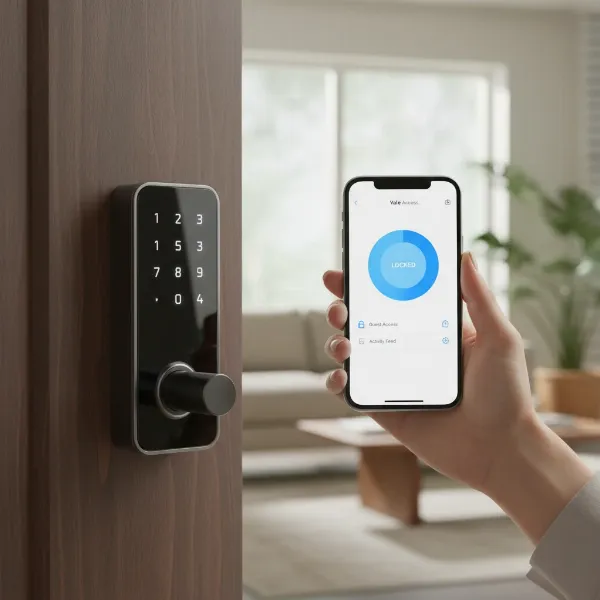 Close-up of Yale Assure Lock 2 showing keypad and smartphone controlling it.
“The Yale Assure Lock 2’s modular design and broad compatibility truly make it a standout, offering a tailored smart home experience that adapts to individual needs and existing ecosystems.” – SmartLockChoice.com Admin, Smart Lock Expert
Different Models of the Yale Assure Lock 2
The Yale Assure Lock 2 series is designed to cater to a variety of preferences and security needs, offering several distinct models:
Yale Assure Lock 2 (Standard)
This is the foundational model, available with either a physical button keypad or a touchscreen. It comes in both keyed and key-free configurations.
- Pros: Offers traditional key backup (keyed models), simple keypad access, works with Bluetooth and Apple HomeKit out of the box. Can be upgraded with Wi-Fi or Z-Wave modules for remote access and broader smart home integration.
- Cons: Remote access and advanced smart home features require an optional module or Apple Home Hub.
- Ideal for: Users seeking a reliable smart lock with essential features, the flexibility of a physical key, and the option to upgrade connectivity later.
|
Our Picks for the Best Smart Lock in 2026
As an Amazon Associate I earn from qualifying purchases.
|
||
| Num | Product | Action |
|---|---|---|
| 1 | eufy Security Smart Lock C220, Fingerprint Keyless Entry Door Lock, Built-in Wi-Fi, App Remote Control, Front Door Smart Deadbolt, IP53 Waterproof, 8-Months Battery, Nickel |

|
| 2 | Philips Wi-Fi Door Lock, WiFi Smart Lock Keyless Entry Deadbolt for Front Door, Remote Control, Built-in WiFi, APP Fingerprint Passcode Unlock, Auto Locking |
|
| 3 | ULTRALOQ U-Bolt Pro WiFi Smart Lock with Door Sensor, 8-in-1 Keyless Entry Door Lock with Fingerprint ID, App Remote Control, Built-in WiFi Keypad Deadbolt, Auto Unlock, IP65 Waterproof, Easy Install |
|
| 4 | Schlage Encode Smart WiFi Deadbolt Lock for Front Door - Keyless Entry with App or Touchscreen - Works with Alexa, Hey Google, & Airbnb - Create Codes for Guests - Matte Black |
|
| 5 | TEEHO TE001 Keyless Entry Door Lock with Keypad - Smart Deadbolt Lock for Front Door with 2 Keys - Auto Lock - Easy Installation - Satin Nickel |
|
| 6 | TEEHO TE001 Keyless Entry Door Lock with Keypad - Smart Deadbolt Lock for Front Door with 2 Keys - Auto Lock - Easy Installation - Oil-Rubbed Bronze |
|
| 7 | Philips Wi-Fi Door Lock, WiFi Smart Lock Keyless Entry Deadbolt for Front Door, Compatible with Alexa & Google Assistant, Remote Control, Built-in WiFi, APP Fingerprint Passcode Unlock, Auto Locking |
|
| 8 | TEEHO TE001 Keyless Entry Door Lock with Keypad - Smart Deadbolt Lock for Front Door with 2 Keys - Auto Lock - Easy Installation - Matte Black |
|
| 9 | eufy Security Smart Lock C220, Fingerprint Keyless Entry Door Lock, Built-in Wi-Fi, App Remote Control, Front Door Smart Lock Deadbolt, 8Months Battery, Reliable Power, IP53 Waterproof, BHMA Grade 3 |
|
| 10 | Electronic Passwords Keyless Entry Door Locks Smart Deadbolt Metal Lock Auto Time Delay Locking Secure Durable Low Battery Alert Type-C Port for Emergency Charging |
|
Yale Assure Lock 2 Touch
This model incorporates a fingerprint scanner for quick and convenient biometric access, alongside keypad entry.
- Pros: Fast and secure fingerprint recognition (under half a second), multiple entry methods (fingerprint, keypad, app, traditional key on keyed models). Enhances convenience by eliminating the need for codes or phones for everyday entry.
- Cons: Keypad visibility can be challenging in direct sunlight, and this model does not support Apple Home Key.
- Ideal for: Those who prioritize biometric entry for speed and ease, especially for families or individuals who prefer not to use keys or remember codes constantly.
Yale Assure Lock 2 Plus
Specifically designed for Apple users, this model integrates Apple Home Key functionality, allowing users to tap their iPhone or Apple Watch to unlock the door.
- Pros: Seamless “tap-and-go” entry with Apple Home Key, Wi-Fi built-in for remote access and smart home integrations. Offers an extremely convenient experience for Apple ecosystem users.
- Cons: Key-free only (no physical key backup). Keypad visibility can be an issue in direct sunlight on touchscreen variants.
- Ideal for: Apple enthusiasts deeply integrated into the HomeKit ecosystem who desire the ultimate in convenience and are comfortable foregoing a physical key.
All models in the Assure Lock 2 collection are powered by four AA batteries and are compatible with doors 1-3/8 to 2-1/4 inches thick, with standard bore holes.
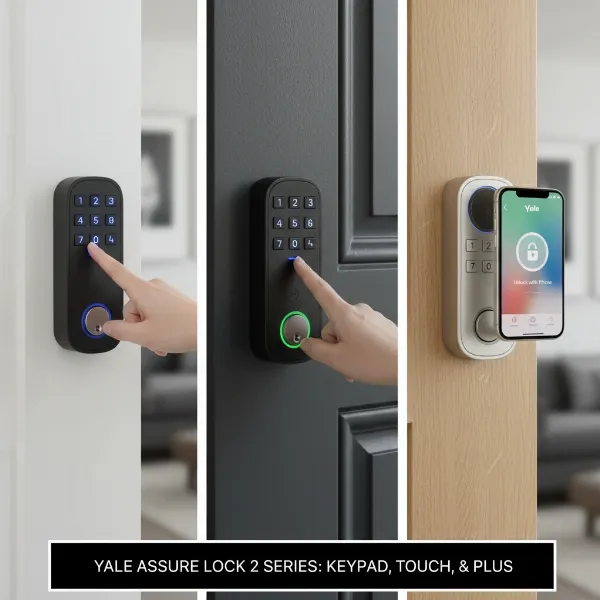 Three distinct Yale Assure Lock 2 models side-by-side demonstrating entry methods.
Comparing Leading Smart Lock Brands
When considering a smart lock, understanding how the Yale Assure Lock 2 stacks up against its competitors is crucial. Here’s a comparison with some other prominent brands:
| Feature/Brand | Yale Assure Lock 2 | August Wi-Fi Smart Lock | Ultraloq U-Bolt Pro Wi-Fi |
|---|---|---|---|
| Connectivity | Bluetooth (standard), optional Wi-Fi/Z-Wave modules | Wi-Fi (built-in), Bluetooth | Wi-Fi, Bluetooth |
| Access Methods | Keypad (physical/touchscreen), app, fingerprint (Touch model), Apple Home Key (Plus model), physical key (keyed models) | App, traditional key (retains existing deadbolt), keypad (with August Keypad) | Fingerprint, keypad, app, physical key, shake-to-open, magic-touch |
| Remote Access | Via Wi-Fi module/Apple Home Hub (Bluetooth only) | Built-in Wi-Fi | Built-in Wi-Fi |
| DoorSense | Yes, included | Yes, included | No (similar functionality via door sensor in some models) |
| Battery Life | 6-9 months (Bluetooth), ~3 months (Wi-Fi) | 3-6 months | ~6-8 months |
| Smart Home Integrations | Apple HomeKit, Amazon Alexa, Google Assistant, Samsung SmartThings, Airbnb, ecobee, Philips Hue, Z-Wave systems | Apple HomeKit, Amazon Alexa, Google Assistant, Samsung SmartThings | Apple HomeKit, Amazon Alexa, Google Assistant, IFTTT |
| Backup Entry | Physical key (keyed models), 9V battery terminal (key-free models) | Physical key | Physical key, 9V battery terminal |
| Security Rating | ANSI/BHMA Grade 2 (Touch model) | N/A (converts existing deadbolt) | ANSI/BHMA Grade 1 |
| Price Range | $159.99 – $309.99 (depending on model and connectivity) | ~$149 – $249 | ~$249 |
- Yale Assure Lock 2: Known for its sleek design, broad compatibility, and modular approach to connectivity. The inclusion of Apple Home Key in the Plus model and a fingerprint option in the Touch model highlight its versatility. However, Wi-Fi models can have shorter battery life.
- August Wi-Fi Smart Lock: Excellent for those who want to retain their existing deadbolt and keys. It offers seamless auto-unlock and DoorSense. Its primary drawback is the relatively short battery life, especially with Wi-Fi.
- Ultraloq U-Bolt Pro Wi-Fi: Stands out with its robust security and numerous entry methods, including a highly-rated fingerprint scanner. It’s often an Editors’ Choice for its comprehensive features, though its aesthetics might not be as minimal as Yale’s.
For users prioritizing seamless integration with the Apple ecosystem and a clean, modern aesthetic, the Yale Assure Lock 2 Plus is a compelling choice. If biometric access is key, the Assure Lock 2 Touch offers a reliable solution. For those seeking to preserve their traditional keys while adding smart capabilities, August remains a strong contender.
Comprehensive Buying Guide: Choosing the Right Smart Lock
Selecting the perfect smart lock involves more than just picking a brand. It’s about aligning features with your specific lifestyle and home environment.
1. Determine Your Usage Needs
- Door Type: Identify your door thickness and existing bore holes. The Yale Assure Lock 2 fits doors 1-3/8 to 2-1/4 inches thick with standard 2-1/8 inch bore holes or 1-1/2 inches, and a backset of 2-3/8 or 2-3/4 inches.
- Security Level: Consider the level of security you desire. Yale Assure Lock 2 Touch, for instance, boasts an ANSI/BHMA Grade 2 rating, indicating good residential security.
- Budget: Smart locks range widely in price. The Yale Assure Lock 2 models typically fall between $159.99 and $309.99, offering various features at different price points.
- Keyed vs. Key-Free: Decide if you want a physical key backup. Yale offers both options. Some users prefer key-free for ultimate convenience, while others value the peace of mind of a traditional key. Remember, key-free models like the Assure Lock 2 can be powered by a 9V battery for emergency access if the internal batteries die.
2. Research Key Features
- Unlocking Methods: Do you prefer a keypad, fingerprint, smartphone app, voice control, or Apple Home Key? The Assure Lock 2 series provides options for all these.
- Connectivity: Bluetooth is standard. For remote access and broader smart home integration, consider models with built-in Wi-Fi or optional Wi-Fi/Z-Wave modules. A Wi-Fi connection also enables remote monitoring and control.
- Smart Features: Look for auto-lock, auto-unlock (geofencing), DoorSense (door open/close status), and guest code management. The Yale Access app provides comprehensive control over these features.
- Compatibility: Ensure the lock works with your existing smart home ecosystem (Apple HomeKit, Amazon Alexa, Google Assistant, etc.). Yale Assure Lock 2 offers wide compatibility.
3. Consider Security Aspects
- Certifications: Check for industry certifications like ANSI/BHMA ratings, which indicate the lock’s durability and security against forced entry.
- Encryption: Understand the encryption standards used to protect your data and communications between the lock and your devices. Yale emphasizes two-layer encryption and two-factor authentication.
- Backup Options: Always have a plan for battery failure. Physical keys or external 9V battery terminals are crucial backup methods.
4. Read User Reviews
Before making a final decision, consult reviews from other users. These often provide valuable insights into real-world performance, ease of installation, battery life, and any common issues. Pay attention to feedback regarding app stability and responsiveness.
5. Choose a Reputable Provider
Opt for a reputable manufacturer and retailer. This ensures you receive a quality product, reliable customer support, and a solid warranty. Yale, as an iconic brand in locks, offers established trust and support.
Installation and Usage Guide for Your Yale Assure Lock 2
Installing and getting the most out of your Yale Assure Lock 2 is a straightforward process, designed for user convenience.
Basic Installation Steps
- Remove Existing Deadbolt: Carefully remove your old deadbolt, ensuring you note the door’s existing measurements (thickness, backset, bore holes).
- Install Deadbolt Latch: Insert the new deadbolt latch, ensuring it’s properly aligned and adjusted for your door’s backset.
- Install Exterior Keypad: Route the wire cable through the door and position the exterior keypad.
- Install Mounting Plate: Secure the interior mounting plate, ensuring the cable is routed correctly.
- Connect Wire Cable: Attach the wire cable to the interior lock assembly.
- Install Interior Lock: Mount the interior lock, ensuring the tailpiece aligns correctly with the deadbolt.
- Test Thumbturn: Manually test the thumbturn to ensure smooth operation.
- Install Smart Module (Optional): If you have a Wi-Fi or Z-Wave module, insert it into the designated slot.
- Install DoorSense (Optional): Attach the DoorSense sensor to your door frame, potentially requiring a small drill hole.
- Insert Batteries & App Setup: Install the four AA batteries. Then, download the Yale Access app, create an account, and follow the in-app instructions to calibrate the lock, set up entry codes, and connect to your home network. The app will guide you through connecting to Wi-Fi if you have the module and even assist with HomeKit setup for iOS users.
Most installations can be completed with a standard Phillips-head screwdriver. While the process is generally manageable, careful attention to detail, especially regarding cable routing and door alignment, is crucial. Yale provides a detailed written guide and in-app video tutorials to assist users.
Using Smart Features
- Auto-Lock/Auto-Unlock: Enable these features in the Yale Access app. Auto-lock ensures your door locks automatically after a set time, while auto-unlock uses geofencing to detect your approach and unlock the door hands-free.
- Guest Access: Easily create unique, temporary, or scheduled entry codes for friends, family, or service providers directly through the app. You can also grant full app access to trusted individuals.
- Activity Feed & Notifications: Monitor who enters and exits your home with a 24/7 activity log. Set up smart alerts to receive real-time notifications for specific events, such as manual locks/unlocks, specific user entries, or if the door is left ajar.
- Voice Control: Integrate with Amazon Alexa, Google Assistant, or Apple Siri to control your lock using voice commands.
Maintenance and Troubleshooting
- Battery Life: Be mindful of battery life. Bluetooth-only models typically last longer (6-9 months) than Wi-Fi enabled versions (~3 months). The Yale Access app provides low-battery warnings, though it’s advisable to check battery levels periodically. Keep a 9V battery handy for key-free models in case of emergency power loss.
- Cleaning: Gently wipe the keypad or touchscreen with a soft, dry cloth. Avoid abrasive cleaners.
- Common Issues:
- Auto-Unlock failure: This can sometimes occur with the Wi-Fi module. Ensure good Wi-Fi signal strength and that your phone’s location services are enabled.
- Keypad not visible: On touchscreen models, direct sunlight can make the display hard to see. If this is a frequent issue, consider models with physical buttons or rely on the app/fingerprint access.
- Installation difficulties: If you encounter significant issues, consult the Yale installation guides or consider professional assistance.
Essential Smart Lock Accessories
To maximize the functionality and convenience of your Yale Assure Lock 2, several accessories can enhance your smart home experience:
- Wi-Fi or Z-Wave Smart Modules: These are crucial for remote access and integrating your Bluetooth-only Assure Lock 2 with various smart home ecosystems and voice assistants. If not purchased as part of a bundle, they can be added later.
- Backup 9V Batteries: For key-free models, a 9V battery can provide temporary power to the external keypad if the internal AA batteries die, allowing you to enter your code. Keeping one readily accessible is a smart precaution.
- Extra AA Batteries: Always have a fresh set of four AA alkaline batteries on hand for replacements, especially for Wi-Fi-enabled locks that consume power faster.
- Door/Window Sensors (beyond DoorSense): While DoorSense tracks the lock’s immediate door, additional sensors can provide broader home security monitoring, indicating if other entry points are open or closed.
- Smart Home Hubs: For Bluetooth-only Yale Assure Lock 2 models, an Apple Home Hub (like an Apple TV or HomePod) is necessary for remote control via HomeKit. If you have a Z-Wave module, a compatible Z-Wave hub is required.
These accessories provide added layers of convenience, security, and peace of mind, ensuring your smart lock system operates seamlessly and reliably.
Conclusion
The Yale Assure Lock 2 series offers a compelling blend of security, style, and smart functionality, making a strong case for its versatility in the smart lock market. With its array of models—including keypad, touchscreen, fingerprint, and Apple Home Key options—and flexible connectivity via Bluetooth, optional Wi-Fi, or Z-Wave, it caters to a diverse range of user preferences and smart home ecosystems. While considerations like Wi-Fi battery life and potential keypad visibility in direct sunlight exist, its robust feature set, reliable performance, and integration with leading smart home platforms position it as an excellent choice for modern homeowners.
Whether you’re looking for simplified keyless entry, advanced biometric security, or seamless integration with your Apple devices, the Yale Assure Lock 2 provides a secure and convenient solution. Ready to elevate your home’s security and convenience? Which Yale Assure Lock 2 model best fits your smart home vision?