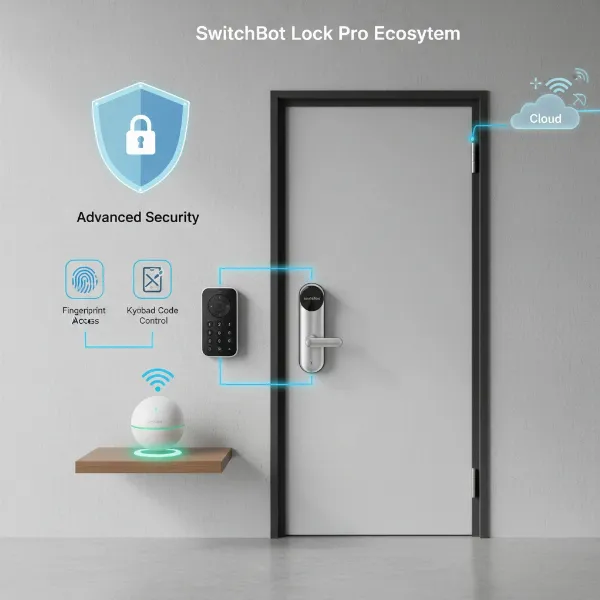
The landscape of home security has transformed dramatically with the advent of smart locks, offering a blend of convenience and advanced protection that traditional locks simply cannot match. From keyless entry to remote monitoring, these devices empower homeowners with unprecedented control over their front doors. However, the true “smartness” of a lock hinges on its connectivity protocol—the invisible language it uses to communicate with your smartphone, smart home hub, or the wider internet.
Choosing the right communication protocol for your smart lock is a crucial decision that impacts everything from battery life and range to overall reliability and security. With Wi-Fi, Bluetooth, and Z-Wave dominating the market, understanding their core differences is essential to selecting a system that aligns with your specific needs and lifestyle. This comprehensive guide delves into each protocol, comparing their advantages and disadvantages to help you make an informed choice for securing your home.
Understanding Smart Lock Connectivity: Why It Matters
A smart lock is more than just a keyless entry device; it’s an integral part of your connected home ecosystem. It allows for advanced features like remote locking and unlocking, granting temporary access to guests, and receiving real-time notifications about your door’s status. The underlying connectivity protocol is the backbone of these capabilities, dictating how seamlessly and reliably your smart lock integrates into your daily life.
The choice of protocol directly influences critical aspects such as the lock’s power consumption, its range of operation, its susceptibility to interference, and its security posture. Without a stable and appropriate connection, even the most feature-rich smart lock can fall short of expectations, highlighting why understanding these technologies is paramount.
Wi-Fi Smart Locks: Direct Power, Constant Connection
Wi-Fi smart locks offer direct access to your home’s existing wireless network, making them a popular choice for their straightforward integration into many households. Operating on the ubiquitous 2.4 GHz or 5 GHz bands, Wi-Fi enables smart locks to connect directly to the internet via your router.
How Wi-Fi Works with Smart Locks
|
Our Picks for the Best Smart Lock in 2026
As an Amazon Associate I earn from qualifying purchases.
|
||
| Num | Product | Action |
|---|---|---|
| 1 | TEEHO TE001 Keyless Entry Door Lock with Keypad - Smart Deadbolt Lock for Front Door with 2 Keys - Auto Lock - Easy Installation - Satin Nickel |

|
| 2 | Philips Wi-Fi Door Lock, WiFi Smart Lock Keyless Entry Deadbolt for Front Door, Compatible with Alexa & Google Assistant, Remote Control, Built-in WiFi, APP Fingerprint Passcode Unlock, Auto Locking |
|
| 3 | TEEHO TE001 Keyless Entry Door Lock with Keypad - Smart Deadbolt Lock for Front Door with 2 Keys - Auto Lock - Easy Installation - Oil-Rubbed Bronze |
|
| 4 | Philips Wi-Fi Door Lock, WiFi Smart Lock Keyless Entry Deadbolt for Front Door, Remote Control, Built-in WiFi, APP Fingerprint Passcode Unlock, Auto Locking |
|
| 5 | ULTRALOQ U-Bolt Pro WiFi Smart Lock with Door Sensor, 8-in-1 Keyless Entry Door Lock with Fingerprint ID, App Remote Control, Built-in WiFi Keypad Deadbolt, Auto Unlock, IP65 Waterproof, Easy Install |
|
| 6 | TEEHO TE001 Keyless Entry Door Lock with Keypad - Smart Deadbolt Lock for Front Door with 2 Keys - Auto Lock - Easy Installation - Matte Black |
|
| 7 | Schlage Encode Smart WiFi Deadbolt Lock for Front Door - Keyless Entry with App or Touchscreen - Works with Alexa, Hey Google, & Airbnb - Create Codes for Guests - Matte Black |
|
| 8 | eufy Security Smart Lock C220, Fingerprint Keyless Entry Door Lock, Built-in Wi-Fi, App Remote Control, Front Door Smart Deadbolt, IP53 Waterproof, 8-Months Battery, Nickel |
|
| 9 | Electronic Passwords Keyless Entry Door Locks Smart Deadbolt Metal Lock Auto Time Delay Locking Secure Durable Low Battery Alert Type-C Port for Emergency Charging |
|
| 10 | eufy Security Smart Lock C220, Fingerprint Keyless Entry Door Lock, Built-in Wi-Fi, App Remote Control, Front Door Smart Lock Deadbolt, 8Months Battery, Reliable Power, IP53 Waterproof, BHMA Grade 3 |
|
Wi-Fi smart locks leverage your home’s Wi-Fi network to communicate, typically using IEEE 802.11 standards. This direct connection means they don’t require an additional hub or bridge to connect to the internet. As long as your home Wi-Fi is operational, you can control and monitor your lock from virtually anywhere in the world using your smartphone.
Advantages of Wi-Fi Smart Locks
The primary benefit of Wi-Fi smart locks is their unlimited remote access. Whether you’re at work, on vacation, or simply in another room, you can lock or unlock your door, check its status, and receive instant notifications. This capability is ideal for managing rental properties, allowing entry to service providers, or simply providing peace of mind. Wi-Fi locks also integrate seamlessly with popular smart home platforms like Amazon Alexa, Google Home, and Apple HomeKit, enabling voice control and complex automation routines. Their high bandwidth, while more critical for video streaming devices, ensures quick command responses for lock operations.
Disadvantages of Wi-Fi Smart Locks
The most significant drawback of Wi-Fi smart locks is their high power consumption. Maintaining a constant Wi-Fi connection is energy-intensive, leading to a much shorter battery life, typically ranging from 2 to 6 months. This means more frequent battery changes or recharges. Wi-Fi locks are also internet-dependent for their remote features; if your internet goes down, you lose remote control, although local access methods like PIN codes or physical keys usually still work. Furthermore, constant internet exposure can pose higher theoretical security risks if not properly managed, and these devices are often reliant on cloud services provided by the manufacturer. If a company discontinues support for its cloud service, your lock’s remote functionality could cease.
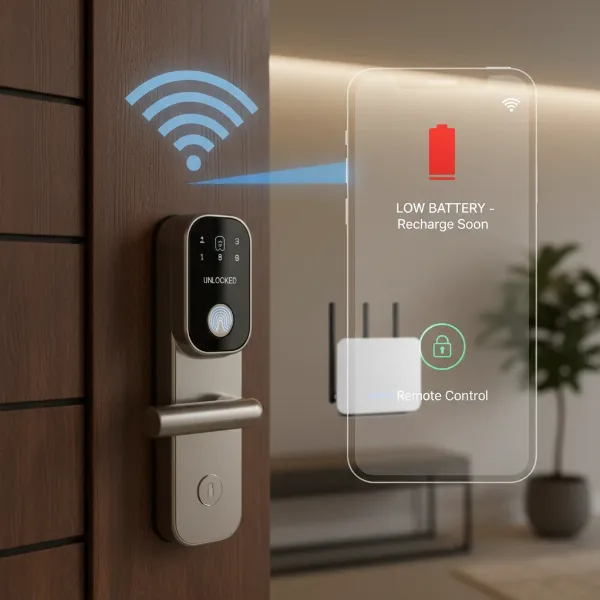 Wi-Fi smart lock connected to a router with a phone showing remote access and battery indicator.
Bluetooth Smart Locks: Local Control, Long-Lasting Power
Bluetooth smart locks prioritize energy efficiency and local control, communicating directly with your smartphone or a paired key fob when you are within close proximity. This makes them a great option for users who value simplicity and extended battery life.
How Bluetooth Works with Smart Locks
Bluetooth smart locks use short-range wireless technology, typically Bluetooth Low Energy (BLE), to establish a direct connection with your mobile device. This connection is usually effective within a range of about 25-30 feet. When you’re near your door, your phone “shakes hands” with the lock, authenticates your identity, and grants access.
Advantages of Bluetooth Smart Locks
A standout feature of Bluetooth smart locks is their outstanding battery life, often lasting 6 to 12 months, and sometimes even over a year, on a single set of batteries. This is due to BLE’s design, which keeps devices in a low-power state for most of the time, activating only when needed. They offer enhanced local security since they don’t rely on constant internet connectivity for basic functions, making them less susceptible to remote hacking attempts. Installation is generally simpler, requiring no complex network configuration. Crucially, Bluetooth locks provide reliable operation during internet outages, as their core functions are independent of your home’s internet connection. Many also offer a “hands-free” experience, automatically unlocking as you approach.
Disadvantages of Bluetooth Smart Locks
The primary limitation of Bluetooth smart locks is their limited range. You must be within about 30 feet of the lock to control it, meaning no checking your door’s status from work or unlocking for a delivery person when you’re away. For remote access, a separate Wi-Fi bridge or hub is required, adding to the cost and complexity of your setup. While modern smartphones handle Bluetooth efficiently, keeping Bluetooth active on your phone can still contribute to battery drain. Additionally, managing access for multiple users can sometimes be more tedious, requiring individual pairing processes.
Z-Wave Smart Locks: The Mesh Network Advantage
Z-Wave smart locks are designed for robust smart home integration, utilizing a mesh networking protocol that excels in reliability, range, and energy efficiency. They are often considered a “professional grade” option for those building a comprehensive smart home ecosystem.
How Z-Wave Works with Smart Locks
Z-Wave creates a secure mesh network where each mains-powered device acts as a repeater, strengthening and extending the signal throughout your home. This protocol operates on lower radio frequencies (e.g., 908 MHz in the US, 868 MHz in Europe), which significantly reduces interference from common household wireless devices like Wi-Fi routers. A dedicated smart home hub (also known as a controller) is essential for a Z-Wave network to function, facilitating communication between devices and providing internet connectivity for remote access.
Advantages of Z-Wave Smart Locks
Z-Wave locks boast excellent battery life due to their low power consumption design, often comparable to or exceeding Bluetooth devices. The mesh network architecture ensures high reliability and extended range, making them ideal for larger homes where a direct signal might be weak. Their operation on a less congested frequency band makes them less prone to interference. Z-Wave protocols are known for robust security measures and, critically, offer interoperability across different brands; any Z-Wave certified product should seamlessly integrate into your existing Z-Wave network. Moreover, Z-Wave networks can offer local control even if your internet is down via the hub, ensuring essential functions remain operational.
Disadvantages of Z-Wave Smart Locks
The main hurdle for Z-Wave smart locks is the requirement for a dedicated smart home hub. This represents an additional initial cost and setup complexity that Wi-Fi locks often bypass. While hubs offer powerful automation capabilities, they are a necessary component. The specific radio frequencies used by Z-Wave can lead to limited availability or compatibility in certain regions if products are not certified for local bands. Additionally, some common smart speakers (like Amazon Echo or Google Home devices) do not directly support Z-Wave without an integrated or compatible hub.
Comparative Overview: Wi-Fi vs. Bluetooth vs. Z-Wave
Choosing the right protocol often boils down to balancing convenience, battery life, and integration needs. Here’s a comparative table to help visualize the key differences:
| Feature | Wi-Fi Smart Lock | Bluetooth Smart Lock | Z-Wave Smart Lock |
|---|---|---|---|
| Remote Access | Direct (from anywhere) | With Bridge/Hub | With Hub |
| Battery Life | Poor (2-6 months) | Excellent (6-12+ months) | Excellent |
| Range | Unlimited (internet-dependent) | Local (25-30 feet) | Extended (mesh network) |
| Hub Required | No | For Remote Access | Yes |
| Reliability | Can suffer from network congestion | High (local) | High (mesh, low interference) |
| Security | Higher internet exposure | Enhanced local security | Robust (designed for smart home) |
| Installation | Network configuration required | Simple (no network setup) | Hub setup, device pairing |
| Cost | Often higher for advanced features | Generally lower (without bridge) | Mid-range + hub cost |
Ultimately, the decision comes down to a trade-off. Wi-Fi offers unparalleled remote convenience but at the expense of battery life and potential internet dependency. Bluetooth provides exceptional battery life and local security but lacks remote capabilities without an additional bridge. Z-Wave, while requiring a hub, delivers a highly reliable and energy-efficient solution for integrated smart homes.
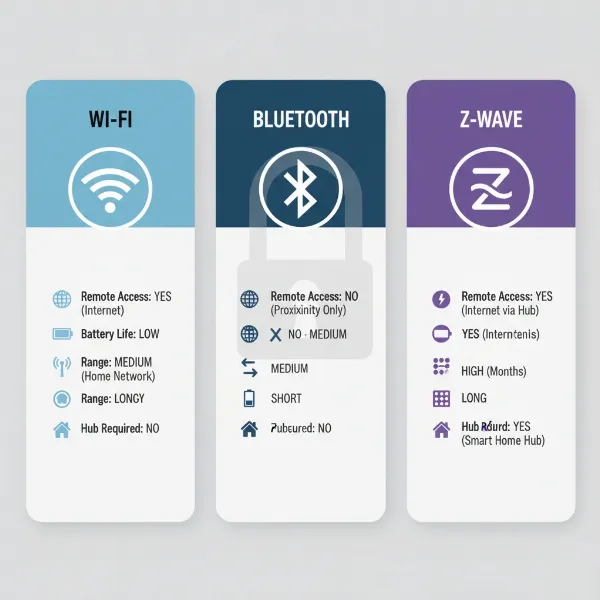 Infographic comparing Wi-Fi, Bluetooth, and Z-Wave smart lock connectivity protocols.
Choosing the Best Protocol for Your Smart Lock
Selecting the ideal smart lock protocol involves a careful assessment of your specific needs, existing smart home ecosystem, and priorities.
Assess Your Lifestyle Needs
Consider how you intend to use your smart lock. Do you travel frequently or manage rental properties, making remote access and monitoring a top priority? If so, a Wi-Fi lock or a Bluetooth/Z-Wave lock with a reliable bridge/hub is essential. For those who primarily need keyless convenience when arriving home and less remote interaction, a Bluetooth lock might be perfectly adequate.
Evaluate Your Current Smart Home Setup
If you already have a smart home hub like SmartThings or Hubitat, or frequently use voice assistants like Amazon Alexa or Google Home, look for locks that offer seamless integration. Wi-Fi locks often connect directly, while Z-Wave locks are designed to work within hub-centric ecosystems. Compatibility is key to a cohesive smart home experience.
Consider Battery Management Preferences
Are you averse to frequently changing batteries? If so, Bluetooth and Z-Wave locks with their extended battery life (6-12+ months) will be more appealing than Wi-Fi locks, which often require battery replacement every 2-6 months. The convenience of less frequent maintenance can be a significant factor.
Prioritize Security
All smart lock protocols incorporate security measures, but their approaches differ. Bluetooth’s local-only operation can offer enhanced security against remote attacks, while Wi-Fi locks from reputable manufacturers employ advanced encryption. Z-Wave is specifically engineered for robust security in smart home environments. Consider your comfort level with internet exposure versus local control.
Determine Your Technical Comfort Level
The installation and setup complexity can vary. Bluetooth locks are generally the simplest for DIY installation. Wi-Fi locks require network configuration, while Z-Wave locks involve setting up a dedicated hub and pairing devices. If you prefer a “set it and forget it” experience, simplicity might steer your choice.
Installation and Maintenance Tips for Smart Locks
Proper installation and regular maintenance are crucial for the longevity and reliable performance of any smart lock, regardless of its connectivity protocol.
Basic Installation Steps
While specific steps vary by model and protocol, basic installation typically involves removing your old lock, installing the new smart lock hardware, and then configuring the electronic components. For Wi-Fi locks, this means connecting to your home network. For Bluetooth, it’s pairing with your phone. For Z-Wave, it involves adding the device to your smart home hub. Always refer to the manufacturer’s instructions, and consider professional installation if you’re unsure.
Smart Lock Battery Management
For all battery-powered smart locks, regular battery checks are vital. Most smart lock app provide battery status notifications. Replace batteries with high-quality brands as recommended by the manufacturer. Avoid mixing old and new batteries or different types.
Troubleshooting Common Issues
- Connectivity Problems: For Wi-Fi, check your router, signal strength, and internet connection. For Bluetooth, ensure you’re within range and your phone’s Bluetooth is on. For Z-Wave, verify your hub is online and the lock is properly paired.
- App Glitches: Try restarting the app or your smartphone. Ensure the app is updated to the latest version.
- Physical Malfunctions: Ensure the door frame and strike plate are aligned correctly to prevent binding, which can strain the lock’s motor. Lubricate moving parts as per manufacturer guidelines.
“The unsung hero of smart lock reliability is often the mundane task of battery replacement. A ‘smart’ device is only as smart as its power source.” – Alex Chen, Smart Home Integration Specialist
Conclusion
The choice between Wi-Fi, Bluetooth, and Z-Wave for your smart lock ultimately depends on your individual priorities. There is no single “best” protocol, but rather the best fit for your unique home and lifestyle. If unparalleled remote access and seamless integration with mainstream voice assistants are your top priority, and you don’t mind more frequent battery changes, a Wi-Fi smart lock might be your ideal solution. For those who value extended battery life, robust local security, and straightforward local control, Bluetooth offers a compelling, simple alternative, often requiring a bridge for remote capabilities. Meanwhile, if you’re building a comprehensive, reliable smart home ecosystem and are willing to invest in a central hub, Z-Wave provides a powerful, secure, and energy-efficient mesh network solution.
By carefully considering factors like remote control needs, battery maintenance, existing smart home devices, and security preferences, you can confidently select the smart lock protocol that will best protect and enhance your home. Which connectivity option will unlock the future of your home security?
Frequently Asked Questions
Do smart locks work without Wi-Fi?
Yes, many smart locks, particularly Bluetooth and Z-Wave models, can function without a Wi-Fi connection for their core features. Bluetooth locks provide local control via your smartphone, and Z-Wave locks can often be controlled locally via their hub even if the internet is down. Wi-Fi is primarily needed for remote access from outside the home.
How long do smart lock batteries last?
Battery life varies significantly by protocol. Wi-Fi smart locks typically last 2-6 months due to high power consumption. Bluetooth and Z-Wave smart locks, designed for low energy use, often last 6-12 months, and some Bluetooth models can even exceed a year.
Is a smart home hub necessary for a smart lock?
A smart home hub is essential for Z-Wave locks and for gaining remote access to most Bluetooth locks. Wi-Fi smart locks usually connect directly to your home Wi-Fi router, eliminating the need for a separate hub for remote control.
Which smart lock protocol is the most secure?
All three protocols offer strong security, but their vulnerabilities differ. Bluetooth locks are generally secure against remote attacks due to their local-only operation (without a bridge). Z-Wave is designed with robust security measures for smart home devices. Wi-Fi locks, while using encryption, have more internet exposure, making the reputation of the manufacturer and their cloud security crucial.
Can I control my smart lock when the internet is down?
For Wi-Fi smart locks, remote control features will cease during an internet outage, but local access methods like keypads, fingerprints, or physical keys will still work. Bluetooth locks continue to function locally, and Z-Wave locks can often be controlled via their hub even when the internet is down.