Securing your home no longer requires a jingle of keys or a hefty investment. Smart locks have transformed how we protect our spaces, offering convenience, enhanced security, and peace of mind. But with a myriad of options flooding the market, finding one that balances cutting-edge features with an affordable price can be a challenge. Enter the Wyze Lock Bolt V2, a compelling contender in the budget smart lock arena that promises advanced access methods and newfound connectivity without breaking the bank. This review dives deep into the Wyze Lock Bolt V2, exploring its features, performance, ease of installation, and overall value to help you decide if it truly is the best budget keypad lock for your home.
What is the Wyze Lock Bolt V2 and Why Choose It?
The Wyze Lock Bolt V2 is a smart deadbolt replacement designed to offer modern keyless entry solutions at an accessible price point. It combines multiple convenient unlocking methods, including a lightning-fast fingerprint reader, a secure keypad, and control via the Wyze app, now enhanced with built-in Wi-Fi for remote access. Unlike traditional deadbolts, which rely solely on physical keys, the Wyze Lock Bolt V2 ushers in an era of enhanced flexibility and control, allowing homeowners to manage access more dynamically.
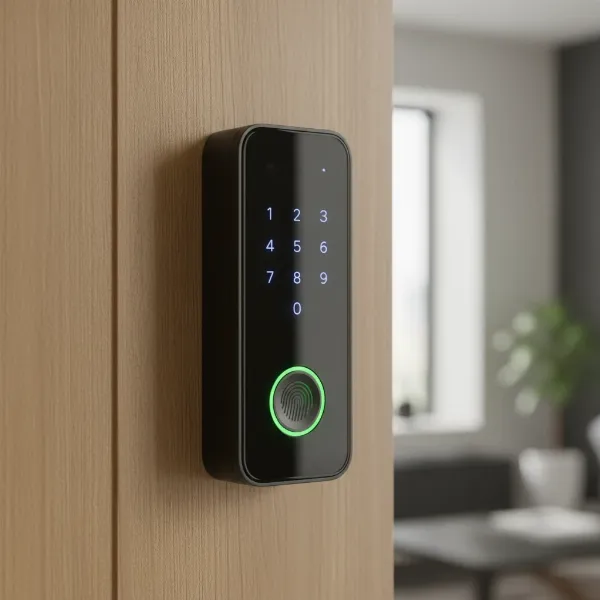 Wyze Lock Bolt V2 front view with keypad and fingerprint scanner.
Choosing a smart lock like the Wyze Lock Bolt V2 means embracing a blend of security and effortless convenience. Imagine arriving home with arms full of groceries and simply touching your finger to the lock for instant entry, or granting temporary access to a dog walker from anywhere with your smartphone. For budget-conscious buyers and smart home enthusiasts alike, the Lock Bolt V2 presents an undeniable value proposition, offering premium features typically found in much more expensive models for under $100. It’s an ideal upgrade for anyone seeking robust security, modern design, and smart functionality without a significant financial outlay.
Unlocking Convenience: Features and Performance
The Wyze Lock Bolt V2 stands out with a suite of features designed to make daily access simpler and more secure. Its thoughtful design and upgraded capabilities aim to deliver a seamless user experience.
Blazing Fast Fingerprint Recognition
|
Our Picks for the Best Smart Lock in 2026
As an Amazon Associate I earn from qualifying purchases.
|
||
| Num | Product | Action |
|---|---|---|
| 1 | TEEHO TE001 Keyless Entry Door Lock with Keypad - Smart Deadbolt Lock for Front Door with 2 Keys - Auto Lock - Easy Installation - Satin Nickel |

|
| 2 | TEEHO TE001 Keyless Entry Door Lock with Keypad - Smart Deadbolt Lock for Front Door with 2 Keys - Auto Lock - Easy Installation - Oil-Rubbed Bronze |
|
| 3 | eufy Security Smart Lock C220, Fingerprint Keyless Entry Door Lock, Built-in Wi-Fi, App Remote Control, Front Door Smart Lock Deadbolt, 8Months Battery, Reliable Power, IP53 Waterproof, BHMA Grade 3 |
|
| 4 | ULTRALOQ U-Bolt Pro WiFi Smart Lock with Door Sensor, 8-in-1 Keyless Entry Door Lock with Fingerprint ID, App Remote Control, Built-in WiFi Keypad Deadbolt, Auto Unlock, IP65 Waterproof, Easy Install |
|
| 5 | Schlage Encode Smart WiFi Deadbolt Lock for Front Door - Keyless Entry with App or Touchscreen - Works with Alexa, Hey Google, & Airbnb - Create Codes for Guests - Matte Black |
|
| 6 | Philips Wi-Fi Door Lock, WiFi Smart Lock Keyless Entry Deadbolt for Front Door, Remote Control, Built-in WiFi, APP Fingerprint Passcode Unlock, Auto Locking |
|
| 7 | Electronic Passwords Keyless Entry Door Locks Smart Deadbolt Metal Lock Auto Time Delay Locking Secure Durable Low Battery Alert Type-C Port for Emergency Charging |
|
| 8 | eufy Security Smart Lock C220, Fingerprint Keyless Entry Door Lock, Built-in Wi-Fi, App Remote Control, Front Door Smart Deadbolt, IP53 Waterproof, 8-Months Battery, Nickel |
|
| 9 | TEEHO TE001 Keyless Entry Door Lock with Keypad - Smart Deadbolt Lock for Front Door with 2 Keys - Auto Lock - Easy Installation - Matte Black |
|
| 10 | Philips Wi-Fi Door Lock, WiFi Smart Lock Keyless Entry Deadbolt for Front Door, Compatible with Alexa & Google Assistant, Remote Control, Built-in WiFi, APP Fingerprint Passcode Unlock, Auto Locking |
|
The most striking feature of the Wyze Lock Bolt V2 is its AI self-learning fingerprint scanner. This technology allows for rapid, 0.5-second unlocks, improving its accuracy with each use by learning subtle finger patterns, angles, and even skin shifts. The scanner can store up to 50 unique fingerprints, making it incredibly convenient for family members and trusted individuals. This instant, keyless access eliminates the need to fumble for keys or remember complex codes, providing quick entry when you need it most.
Secure Keypad Entry
Complementing the fingerprint reader is a sleek, backlit keypad. This illuminating glass touchscreen replaces the physical buttons of its predecessor, offering a modern aesthetic and tactile feedback. Users can program up to 50 distinct 4-8 digit access codes, including permanent, recurring, or one-time codes that can expire on a set schedule. This flexibility is perfect for guests, service providers, or temporary visitors, allowing you to manage access without ever sharing a physical key.
Remote Control with Built-in Wi-Fi
A significant upgrade in the V2 model is the integrated Wi-Fi (2.4GHz only). This built-in connectivity means you no longer need an additional hub to gain remote functionality. Through the Wyze app, you can lock or unlock your door from anywhere, check the lock’s status, receive real-time alerts, and manage access codes remotely. This newfound control transforms the Lock Bolt V2 into a truly intelligent part of your smart home ecosystem, offering unparalleled convenience for busy homeowners.
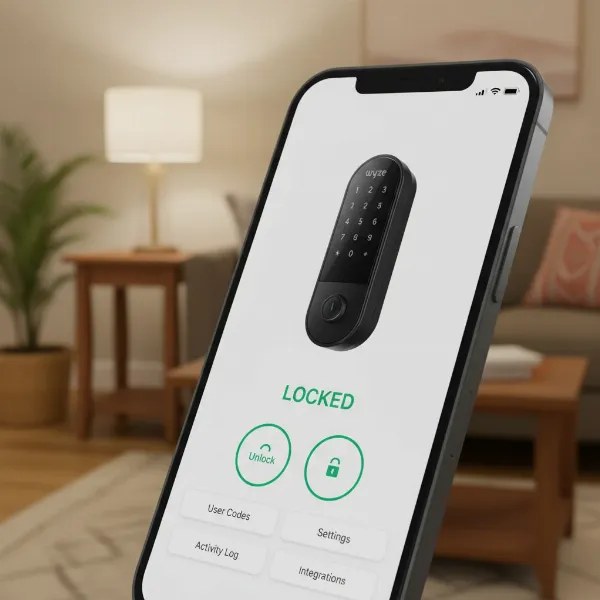 Smartphone displaying Wyze app controlling Wyze Lock Bolt V2 remotely.
Traditional Key Backup
Addressing a common desire for traditional backup, the Wyze Lock Bolt V2 now includes a mechanical key option. This physical key slot provides an essential safeguard, ensuring you always have an alternative entry method in case of power outages, battery depletion, or electronic malfunctions. This blend of modern technology and classic reliability offers comprehensive peace of mind.
Battery Life and Durability
The Lock Bolt V2 is powered by eight AA alkaline batteries (included), which Wyze rates for an impressive eight months of continuous use. For emergency situations, a USB-C charging port is conveniently located on the underside of the exterior escutcheon, allowing for temporary power. In terms of physical resilience, the lock boasts an IP53 weather protection rating, making it suitable for most front doors, and holds a commercial ANSI Level 2 certification, indicating robust physical security comparable to many traditional deadbolts.
Installation Made Simple: A DIY Dream
Installing the Wyze Lock Bolt V2 is designed to be a straightforward process, often taking less than 20 minutes for DIY enthusiasts. It replaces your existing deadbolt and typically requires only a few basic tools. The package includes all necessary hardware and a detailed guide.
The process generally involves removing your old deadbolt, installing the new deadbolt mechanism, attaching the exterior keypad assembly, connecting the internal wiring, and finally securing the interior assembly. Once the hardware is in place, the Wyze app guides you through the software setup, including pairing the lock, calibrating it, creating your master access code, and enrolling fingerprints. While one reviewer noted that the screw holes for the interior escutcheon were narrow, potentially requiring a smaller screwdriver, the overall sentiment points to a user-friendly installation experience.
Wyze Lock Bolt V2 vs. the Competition: Is it the Best Budget Pick?
In a crowded market of smart locks, the Wyze Lock Bolt V2 distinguishes itself by offering a remarkable set of features at an incredibly competitive price. Many smart locks with comparable fingerprint and keypad access, let alone built-in Wi-Fi, often cost two to three times more.
| Feature | Wyze Lock Bolt V2 | Ultraloq U-Bolt Pro (Budget pick for durability) | Aqara Smart Lock U50 (Apple focus) | Schlage Encode Smart Wi-Fi Deadbolt (Premium Wi-Fi) |
|---|---|---|---|---|
| Price | ~$80 | ~$120 | ~$104 | ~$230+ |
| Unlock Methods | Fingerprint, Keypad, App, Mechanical Key | Fingerprint, Keypad, App, Bluetooth, eKeys | Keypad, App, Bluetooth, Home Key/Apple Watch | Keypad, App, Voice Assistant |
| Wi-Fi | Built-in | Built-in | Hub Required | Built-in |
| Smart Home Comp. | Google Home, Amazon Alexa | Google Assistant, Amazon Alexa, SmartThings, IFTTT | Matter, Apple Home/Siri, Google Home/Assistant, Amazon Alexa, IFTTT | Amazon Alexa, Google Assistant |
| Battery Life | ~8 months (8 AA) | ~8 months (4 AA) | Not as great (4 AA) | ~6 months (4 AA) |
| Security Rating | BHMA Grade 2 | BHMA Grade 1 | BHMA Level 3 | BHMA Grade 1 |
| Mechanical Key | Yes | Yes | Yes | Yes |
The Wyze Lock Bolt V2 consistently emerges as a top contender for the “best budget” title. While it might not offer the full breadth of integrations and advanced smart home automations found in premium locks like some Schlage or Yale models (which can cost $200-$300), it provides core smart lock functionality—fast fingerprint access, secure keypad, and remote Wi-Fi control—at an unbeatable price. It offers Grade 2 security, which is perfectly adequate for residential use, and its integrated Wi-Fi eliminates the need for an additional hub, further reducing cost and complexity. While some competitors boast higher durability ratings (BHMA Grade 1) or broader smart home ecosystems (like Aqara with Matter), the Wyze Lock Bolt V2 delivers a solid, feature-rich experience that far exceeds its modest price tag, making it an exceptional value for homeowners.
Security and Privacy Considerations
When it comes to home security, trust is paramount. Wyze has faced scrutiny in the past regarding security vulnerabilities and privacy breaches. However, newer reviews from 2025 and 2026 indicate that Wyze has actively worked on addressing these issues and has made significant improvements, leading experts to feel more confident in recommending their products.
The Wyze Lock Bolt V2 incorporates several security measures. Its BHMA Grade 2 certification ensures a good level of physical resistance against forced entry, matching or exceeding many traditional deadbolts. For digital security, the AI-powered fingerprint scanner stores all biometric data locally on the device, rather than in the cloud, which is a crucial privacy benefit. While the lock is Wi-Fi enabled, it’s essential for users to maintain a secure home network with a strong, unique password to prevent unauthorized access. The ability to generate temporary and one-time access codes also enhances security by limiting access duration for visitors.
“The Wyze Lock Bolt V2 demonstrates how companies can evolve, addressing past criticisms to deliver genuinely valuable products. Its focus on core security features and local biometric data storage at an affordable price point is commendable.” – Rafa Santos, Smart Home Enthusiast & Product Researcher
While the Wyze ecosystem might not integrate as broadly with other third-party smart home devices as some premium options, its support for Amazon Alexa and Google Home offers convenient voice control for many users. The balance between affordability, practical features, and ongoing security improvements makes the Wyze Lock Bolt V2 a trustworthy option for budget-minded consumers.
Conclusion
The Wyze Lock Bolt V2 stands out as a formidable player in the smart lock market, especially for those prioritizing value without compromising essential features. Its combination of a lightning-fast AI fingerprint scanner, a responsive backlit keypad, and the crucial addition of built-in Wi-Fi for remote control truly makes it a compelling option. Easy to install and boasting solid security certifications, it offers a level of convenience and protection that belies its budget-friendly price.
While it might not have every high-end smart home integration found in pricier alternatives, the Wyze Lock Bolt V2 excels at its core mission: providing accessible, intelligent home security. It proves that you don’t need to spend a fortune to enjoy the benefits of a keyless, connected entryway. For homeowners seeking a reliable, feature-rich, and affordable smart deadbolt, the Wyze Lock Bolt V2 is undoubtedly a top contender. Are you ready to upgrade your home security with smart features that deliver everyday convenience?
Frequently Asked Questions
Does the Wyze Lock Bolt V2 require a Wi-Fi hub?
No, the Wyze Lock Bolt V2 features built-in Wi-Fi connectivity, allowing it to connect directly to your home’s 2.4GHz Wi-Fi network for remote access and control via the Wyze app without the need for an additional hub.
Can I use a physical key with the Wyze Lock Bolt V2?
Yes, the Wyze Lock Bolt V2 includes a mechanical key slot, providing a traditional key backup option for manual unlocking, which is a significant improvement over the original version.
How long does the battery last on the Wyze Lock Bolt V2?
The Wyze Lock Bolt V2 uses eight AA batteries and is rated for approximately eight months of battery life with typical usage. The Wyze app will also notify you when the battery level is low.
Is the Wyze Lock Bolt V2 waterproof?
The Wyze Lock Bolt V2 has an IP53 weather protection rating, meaning it is protected from dust and spraying water, making it suitable for most outdoor applications on a front door.
Does the Wyze Lock Bolt V2 integrate with smart home systems like Alexa or Google Assistant?
Yes, the Wyze Lock Bolt V2 supports integration with both Amazon Alexa and Google Home ecosystems, allowing for voice control and basic smart home commands.
