In an increasingly connected world, the way we secure our homes is evolving. Traditional keys are slowly being replaced by innovative smart lock technology, offering unparalleled convenience and enhanced security. Among the many options available, the Sifely Keyless Entry Door Lock has emerged as a popular choice, promising a seamless blend of advanced features and user-friendly design. But does it truly live up to the hype? Let’s delve into a comprehensive review of the Sifely smart lock to help you decide if it’s the right upgrade for your home.
What is a Smart Lock? Why Should You Use One?
At its core, a smart lock is an electromechanical lock designed to perform locking and unlocking operations on a door when it receives instructions from an authorized device using a wireless protocol and a cryptographic key. These devices are a significant upgrade from conventional locks, integrating various technologies like Bluetooth, Wi-Fi, and biometric scanners to offer a range of access methods.
The benefits of embracing smart lock technology are manifold. Imagine never fumbling for keys again, granting temporary access to a pet sitter while you’re away, or checking if your door is locked from miles away. Smart locks provide superior convenience through keyless entry options such as fingerprints, passcodes, or smartphone control. They often bolster security with features like real-time access logs, tamper alarms, and dynamic encryption protocols. Furthermore, smart locks simplify access management for various applications, from residential homes and apartments to bustling offices and short-term rental properties.
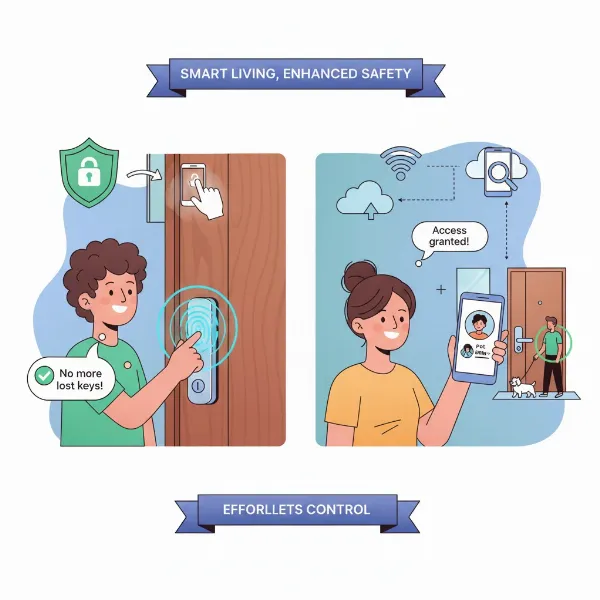 a diverse group of people benefiting from smart lock technology with icons for security, convenience, and access sharing
Diving Deep into Sifely Smart Lock Features
The Sifely Keyless Entry Door Lock is engineered to provide a robust and versatile security solution. It typically offers an impressive array of unlocking methods, ensuring flexibility for every user and situation.
Diverse Unlocking Methods
Sifely locks stand out with their multiple access options. The primary methods often include:
- Fingerprint Recognition: Utilizing advanced 3D fingerprint technology, many Sifely models allow for swift and secure entry with just a touch. The locks are capable of storing numerous unique fingerprints, providing quick access in less than half a second.
- Passcode Entry: Users can program a variety of passcodes, including permanent, timed, one-time, and recurring options, which are especially useful for guests or service providers. An “anti-peep” function allows you to input random numbers before or after your actual code, deterring watchful eyes.
- Key Fob (RFID): For quick tap-and-go access, Sifely locks often include RFID key fobs, offering another convenient entry method.
- Smartphone App Control: Through the dedicated Sifely Smart Lock app, you can lock and unlock your door via Bluetooth when in close proximity. With the addition of an optional Wi-Fi Gateway (sold separately), this functionality extends to remote control from anywhere in the world.
- Physical Key: Despite its advanced features, Sifely locks retain a traditional physical keyhole, serving as a reliable backup in case of battery depletion or electronic issues.
|
Our Picks for the Best Smart Lock in 2026
As an Amazon Associate I earn from qualifying purchases.
|
||
| Num | Product | Action |
|---|---|---|
| 1 | Philips Wi-Fi Door Lock, WiFi Smart Lock Keyless Entry Deadbolt for Front Door, Remote Control, Built-in WiFi, APP Fingerprint Passcode Unlock, Auto Locking |

|
| 2 | ULTRALOQ U-Bolt Pro WiFi Smart Lock with Door Sensor, 8-in-1 Keyless Entry Door Lock with Fingerprint ID, App Remote Control, Built-in WiFi Keypad Deadbolt, Auto Unlock, IP65 Waterproof, Easy Install |
|
| 3 | eufy Security Smart Lock C220, Fingerprint Keyless Entry Door Lock, Built-in Wi-Fi, App Remote Control, Front Door Smart Deadbolt, IP53 Waterproof, 8-Months Battery, Nickel |
|
| 4 | TEEHO TE001 Keyless Entry Door Lock with Keypad - Smart Deadbolt Lock for Front Door with 2 Keys - Auto Lock - Easy Installation - Matte Black |
|
| 5 | TEEHO TE001 Keyless Entry Door Lock with Keypad - Smart Deadbolt Lock for Front Door with 2 Keys - Auto Lock - Easy Installation - Oil-Rubbed Bronze |
|
| 6 | Philips Wi-Fi Door Lock, WiFi Smart Lock Keyless Entry Deadbolt for Front Door, Compatible with Alexa & Google Assistant, Remote Control, Built-in WiFi, APP Fingerprint Passcode Unlock, Auto Locking |
|
| 7 | eufy Security Smart Lock C220, Fingerprint Keyless Entry Door Lock, Built-in Wi-Fi, App Remote Control, Front Door Smart Lock Deadbolt, 8Months Battery, Reliable Power, IP53 Waterproof, BHMA Grade 3 |
|
| 8 | Electronic Passwords Keyless Entry Door Locks Smart Deadbolt Metal Lock Auto Time Delay Locking Secure Durable Low Battery Alert Type-C Port for Emergency Charging |
|
| 9 | TEEHO TE001 Keyless Entry Door Lock with Keypad - Smart Deadbolt Lock for Front Door with 2 Keys - Auto Lock - Easy Installation - Satin Nickel |
|
| 10 | Schlage Encode Smart WiFi Deadbolt Lock for Front Door - Keyless Entry with App or Touchscreen - Works with Alexa, Hey Google, & Airbnb - Create Codes for Guests - Matte Black |
|
Connectivity and Remote Management
While Bluetooth connectivity enables local control, the true power of a Sifely smart lock is unleashed with the optional Sifely Wi-Fi Gateway. This accessory bridges your lock to your home Wi-Fi network, allowing for comprehensive remote management. From generating passcodes and monitoring real-time access logs to locking or unlocking your door from afar, the gateway transforms your smart lock into a truly connected security hub. The app also provides low-battery alerts, keeping you informed.
Design and Build Quality
Sifely smart locks typically boast a sleek, modern design that complements various door styles. Constructed from durable materials like stainless steel or zinc alloy, they offer a sturdy and substantial feel, often weighing around 4 pounds. Many models are designed with a reversible handle, making them suitable for both left and right-handed doors. Furthermore, some Sifely locks are rated with IP65 weather resistance, indicating protection against dust and water, making them suitable for exterior use within a wide temperature range.
Enhanced Security Measures
Security is paramount, and Sifely integrates several features to protect your home. This includes advanced encryption protocols and dynamic key codes that enhance protection against unauthorized access. Additionally, a built-in alarm system can detect and alert users to attempted tampering or forced entry, providing an extra layer of peace of mind. Some Sifely locks also carry BHMA/ANSI certification, indicating adherence to industry standards for security and durability.
Battery Life and Emergency Options
Smart locks rely on battery power, and Sifely models are designed for efficiency. They typically use long-lasting batteries, with reported lifespans of up to one year depending on usage. A low-battery indicator in the app ensures you’re aware when it’s time for a change. In emergencies, beyond the physical key, some models feature a hidden USB port or 9V battery contacts for temporary power to gain entry.
Types of Sifely Smart Locks
Sifely offers a range of models, each designed to cater to slightly different needs and door types. Common variations include:
- Sifely S Smart Lock (Latch/Lever): A popular choice for standard doors, integrating multiple unlock methods within a lever handle design.
- Sifely E Deadbolt: Designed to replace or augment an existing deadbolt, offering robust keyless entry features.
- Sifely X Smart Lock (Latch/Lever): An advanced lever handle model, often featuring enhanced biometric capabilities and smart home integration.
- Sifely O Deadbolt: Another deadbolt option, typically offering similar core smart functionalities with a focus on simplicity.
- Sifely St Smart Lock (Latch/Lever): Similar to the S model, providing comprehensive smart lock features.
While specific features might vary slightly between models (e.g., whether it’s a latch/lever or deadbolt, or the exact fingerprint sensor type), most Sifely locks maintain a consistent suite of keyless entry methods and app control capabilities.
Sifely Smart Lock Pros and Cons
Like any technology, Sifely smart locks come with their own set of advantages and disadvantages.
Pros:
- Versatile Entry Options: With fingerprint, passcode, key fob, app, and physical key access, Sifely locks offer unmatched flexibility for everyone.
- Quick and Reliable Fingerprint Sensor: The advanced 3D fingerprint technology allows for rapid unlocking, making entry effortless.
- Easy DIY Installation: Many users report that Sifely locks are simple to install with just a Phillips screwdriver, often taking minutes without the need for a locksmith.
- Robust Build Quality: Constructed from durable materials, the locks feel solid and are built to withstand daily use and varying weather conditions (IP65 rated for some models).
- Excellent for Rental Properties: The ability to generate temporary, remote passcodes and monitor access logs makes Sifely ideal for Airbnb hosts and property managers.
- Comprehensive App Control: The Sifely app, especially with the Wi-Fi Gateway, provides powerful remote management features, including user administration and access history.
- Long Battery Life with Backup: Up to a year of battery life with a low-battery alert and physical key override ensures you’re never locked out.
Cons:
- Wi-Fi Gateway Sold Separately: Full remote functionality requires the separate purchase of a Wi-Fi Gateway, which adds to the overall cost.
- Occasional Fingerprint Misreads: While generally reliable, some users report needing a second attempt for fingerprint recognition.
- Door Compatibility: Due to their size, Sifely locks may not be compatible with all door types, such as some screen or storm doors. It’s crucial to measure your door’s dimensions carefully.
- General Smart Lock Security Concerns: Some security professionals express a general skepticism toward residential smart locks, suggesting they might not match the robust security standards of high-end commercial access control systems. However, Sifely’s encryption and alarm features aim to mitigate these risks for residential use.
Installation and Setup: Getting Started with Your Sifely Lock
One of the most appealing aspects of Sifely smart locks is their straightforward installation process, often designed for the average homeowner to complete.
Pre-installation Checks
Before you begin, ensure your door is compatible. Sifely locks typically fit standard door thicknesses (1⅜” to 2¼” / 35mm to 55mm) and boreholes (2⅜” or 2¾” / 60mm to 70mm). You’ll generally only need a Phillips head screwdriver for the entire process.
Basic Installation Steps
The installation process usually involves replacing your existing lock components with the Sifely front panel, latch, mounting plate, and interior assembly. Clear step-by-step instructions, often accompanied by video tutorials, guide you through adjusting the latch, connecting cables, and securing the components. It’s important to pay attention to details like cable routing and ensuring the handle direction is set correctly for your door’s swing. For example, the handle typically needs to be in a horizontal position when tightening screws.
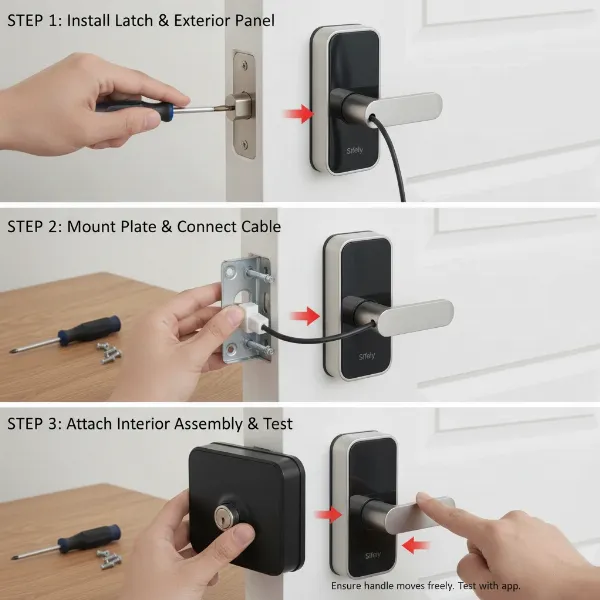 step by step guide for installing a Sifely smart lock with tools and components
App Setup and User Management
Once the physical lock is installed, the next step is setting it up with the Sifely Smart Lock app. This involves:
- Downloading the App: Available on Google Play and the App Store.
- Pairing the Lock: Following in-app instructions to connect your smartphone to the lock via Bluetooth.
- Adding Users and Access Methods: Registering fingerprints (usually requiring multiple scans for accuracy), setting up permanent or temporary passcodes, and pairing key fobs.
- Connecting the Wi-Fi Gateway (Optional): If you desire remote access, you’ll connect the gateway to your home Wi-Fi and link it to your lock through the app.
Maintenance and Troubleshooting
To ensure your Sifely lock performs optimally, regular maintenance is key. This primarily involves monitoring battery life through the app and replacing batteries when alerted. In case of issues like a slow fingerprint sensor or connectivity problems, checking the app for updates, restarting the lock, or consulting the Sifely support resources (such as their help center or email support) can often resolve minor glitches. An issue with screw size for Sifely S and St models was noted in January 2026, for which direct customer support contact was recommended.
Comparing Sifely to Other Smart Locks
While the smart lock market is crowded with reputable brands like Yale, August, and Schlage, Sifely has carved a niche for itself, often receiving praise for its feature-rich design at a competitive price point. Unlike some “big-name” smart locks that might focus heavily on a single biometric feature or smart home ecosystem, Sifely offers a broad spectrum of entry methods as standard. Some reviews even suggest Sifely has garnered “overwhelmingly more positive reviews” than some established players.
When compared to more budget-friendly alternatives like the Teeho lock, Sifely typically offers more unlocking methods and advanced features like fingerprint recognition, justifying a potentially higher cost for enhanced convenience and security. Its robust build quality and comprehensive app features make it a strong contender for homeowners and especially rental property managers seeking a balance of functionality, reliability, and value.
Essential Sifely Smart Lock Accessories
To fully optimize your Sifely smart lock experience, consider these key accessories:
- Sifely Wi-Fi Gateway: This is arguably the most crucial accessory. While the lock functions via Bluetooth locally, the gateway enables true remote access and control, allowing you to manage your door from anywhere with an internet connection. It’s essential for features like generating passcodes remotely and checking access logs in real-time.
- Additional Key Fobs: For family members or frequent guests who prefer a simple tap-to-unlock method, extra key fobs can be easily programmed and provide a convenient alternative to fingerprints or passcodes.
The benefits of these accessories primarily revolve around maximizing the convenience and remote management capabilities of your smart lock. They extend the reach of your home security, giving you greater control and peace of mind.
Conclusion
The Sifely Keyless Entry Door Lock represents a compelling solution for modern home security, blending advanced technology with user-centric design. Its diverse unlocking methods, including a responsive fingerprint sensor, versatile passcode options, and seamless app control (especially with the Wi-Fi Gateway), offer a level of convenience and flexibility that traditional locks simply cannot match. While the separate purchase of the Wi-Fi Gateway and minor compatibility considerations are points to note, the lock’s robust build quality, strong security features, and easy installation make it a valuable investment for homeowners and rental property hosts alike.
Are you ready to embrace the future of home security and step into a world without keys?
Frequently Asked Questions
Is the Sifely smart lock secure against hacking?
Sifely smart locks incorporate advanced security measures such as encryption protocols and dynamic key codes to protect against unauthorized access. While any smart device carries some inherent risk, Sifely’s design includes features like tamper alarms to enhance security.
What happens if the Sifely smart lock runs out of battery?
Sifely locks are designed with a long battery life (up to a year) and provide low-battery alerts via the app. In the event of complete battery depletion, you can always use the physical backup key. Some models also offer emergency power options like a USB-C port or 9V battery contacts.
Can I manage multiple Sifely smart locks with one app?
Yes, the Sifely Smart Lock app allows you to manage multiple Sifely locks from a single interface, making it convenient for homes with several smart locks or for property managers overseeing various units.
Is the Sifely smart lock compatible with smart home systems like Alexa or Google Assistant?
Yes, Sifely smart locks are compatible with popular smart home platforms like Amazon Alexa and Google Assistant, though this functionality typically requires the optional Sifely Wi-Fi Gateway for seamless integration and voice control.
How durable is the Sifely keyless entry door lock?
Sifely locks are generally built with sturdy materials like stainless steel or zinc alloy and often have an IP65 weather-resistant rating, indicating good durability against environmental factors and daily use. Many users report a premium, solid feel.