In an era where home security meets cutting-edge convenience, the smart lock has become a cornerstone of modern living. But with countless options available, finding a device that balances advanced features with reliability can be a challenge. If you’ve been searching for a robust, feature-rich smart lock that simplifies access and enhances security, the Nyboer Smart Door Lock has likely crossed your radar. This comprehensive review dives deep into its functionalities, design, and overall user experience to help you decide if it’s the right fit for your home or business.
What is a Smart Lock and Why Should You Consider One?
A smart lock is an electromechanical lock designed to perform locking and unlocking operations when it receives instructions from an authorized device using a wireless protocol and cryptographic key to execute the authorization process. Unlike traditional locks that rely solely on physical keys, smart locks offer multiple access methods, integrating seamlessly with your smartphone and smart home ecosystem. They provide unparalleled convenience, enhanced security features like access logs and temporary codes, and easier management of entry for family, guests, or service providers. From residential homes to bustling offices and short-term rental properties, smart locks offer a versatile and secure solution for modern access control.
A Closer Look at the Nyboer Smart Door Lock
The Nyboer Smart Door Lock stands out with its versatile functionality and thoughtful design. It typically offers a “7-in-1” access solution, providing users with multiple ways to unlock their doors. This includes fingerprint recognition, access via a smartphone app, a traditional passcode keypad, a convenient key fob, a mechanical key for backup, and WiFi remote control (though a separate WiFi gateway is usually required for this feature). Additionally, with the necessary gateway, the lock can be integrated with smart assistants like Alexa or Google Assistant for voice control.
A notable design element of the Nyboer smart lock is its extended panel, which often measures around 9 1/4 inches. This feature is particularly beneficial as it provides complete coverage over existing traditional lockset holes. This means that for many users, installing the Nyboer lock acts as an ideal replacement, eliminating the need to fill in old holes or leave exposed areas on the door, simplifying the installation process significantly.
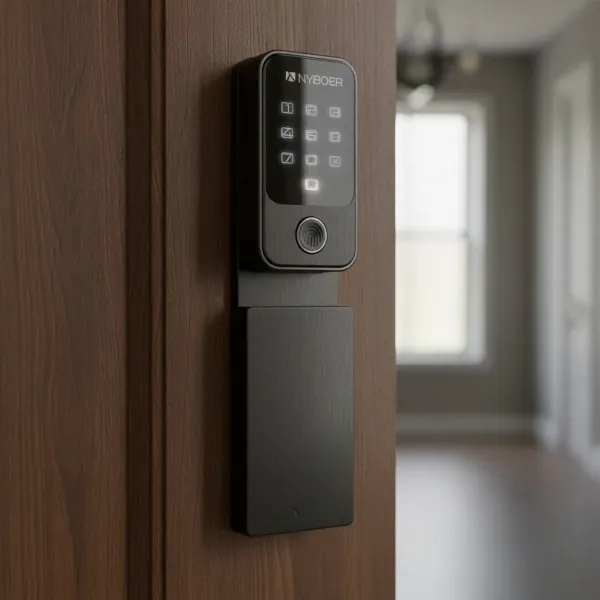 Nyboer smart lock installed, showing its extended panel covering door holes.
Nyboer Smart Lock: Pros and Cons
Like any technology, the Nyboer Smart Door Lock comes with its own set of advantages and disadvantages. Understanding these can help you weigh its suitability for your specific needs.
Advantages:
- Robust Build Quality: Users frequently praise the Nyboer smart door handle for its solid and well-built hardware. The handle feels sturdy and durable, instilling confidence in its long-lasting performance due to high-quality materials and excellent craftsmanship.
- Versatile Access Methods: With up to seven ways to unlock—fingerprint, smartphone app, passcode, key fob, mechanical key, and WiFi remote control (with gateway)—the Nyboer lock offers exceptional flexibility, catering to diverse preferences and situations.
- Extended Panel Design: The ultra 9 1/4-inch extended panel is a significant advantage, covering existing traditional lock holes completely. This makes it an ideal replacement for most front locksets, simplifying installation by removing the need for door repairs.
- Comprehensive App Control: The companion app allows for full control, including remote locking/unlocking, generating temporary access codes for guests or service providers, and viewing detailed access logs to monitor who enters and when.
- Modern Aesthetic: Many appreciate the sleek, modern design of the Nyboer lock, noting that it’s often hard to find something so contemporary in the smart lock market.
- Reliable Battery Life: The lock operates on batteries that are generally long-lasting, and it provides a warning before they go dead, preventing unexpected lockouts.
|
Our Picks for the Best Smart Lock in 2026
As an Amazon Associate I earn from qualifying purchases.
|
||
| Num | Product | Action |
|---|---|---|
| 1 | Electronic Passwords Keyless Entry Door Locks Smart Deadbolt Metal Lock Auto Time Delay Locking Secure Durable Low Battery Alert Type-C Port for Emergency Charging |

|
| 2 | Schlage Encode Smart WiFi Deadbolt Lock for Front Door - Keyless Entry with App or Touchscreen - Works with Alexa, Hey Google, & Airbnb - Create Codes for Guests - Matte Black |
|
| 3 | ULTRALOQ U-Bolt Pro WiFi Smart Lock with Door Sensor, 8-in-1 Keyless Entry Door Lock with Fingerprint ID, App Remote Control, Built-in WiFi Keypad Deadbolt, Auto Unlock, IP65 Waterproof, Easy Install |
|
| 4 | eufy Security Smart Lock C220, Fingerprint Keyless Entry Door Lock, Built-in Wi-Fi, App Remote Control, Front Door Smart Lock Deadbolt, 8Months Battery, Reliable Power, IP53 Waterproof, BHMA Grade 3 |
|
| 5 | TEEHO TE001 Keyless Entry Door Lock with Keypad - Smart Deadbolt Lock for Front Door with 2 Keys - Auto Lock - Easy Installation - Satin Nickel |
|
| 6 | Philips Wi-Fi Door Lock, WiFi Smart Lock Keyless Entry Deadbolt for Front Door, Remote Control, Built-in WiFi, APP Fingerprint Passcode Unlock, Auto Locking |
|
| 7 | TEEHO TE001 Keyless Entry Door Lock with Keypad - Smart Deadbolt Lock for Front Door with 2 Keys - Auto Lock - Easy Installation - Oil-Rubbed Bronze |
|
| 8 | TEEHO TE001 Keyless Entry Door Lock with Keypad - Smart Deadbolt Lock for Front Door with 2 Keys - Auto Lock - Easy Installation - Matte Black |
|
| 9 | eufy Security Smart Lock C220, Fingerprint Keyless Entry Door Lock, Built-in Wi-Fi, App Remote Control, Front Door Smart Deadbolt, IP53 Waterproof, 8-Months Battery, Nickel |
|
| 10 | Philips Wi-Fi Door Lock, WiFi Smart Lock Keyless Entry Deadbolt for Front Door, Compatible with Alexa & Google Assistant, Remote Control, Built-in WiFi, APP Fingerprint Passcode Unlock, Auto Locking |
|
Disadvantages:
- WiFi Gateway Requirement: For full remote access via WiFi and integration with voice assistants like Alexa or Google Assistant, a separate WiFi gateway is typically required. The Wi-Fi functionality is not always built directly into the lock itself, which can be an additional purchase and setup.
- Lack of Manual Override for Auto-Lock (in some models): Some users have noted that certain models might miss a physical switch to temporarily disable the automatic locking feature. This could be inconvenient for instances when you want the door to remain unlocked for an extended period, such as during a party or moving furniture.
Installation and User Experience
Installing and living with a smart lock should enhance your daily routine, not complicate it. The Nyboer Smart Door Lock aims to provide a straightforward experience from setup to daily use.
Installation Process:
The Nyboer smart lock is designed for a relatively easy installation process. It typically comes as a complete kit with everything required for mounting. A key advantage, as highlighted earlier, is its extended panel, which is tall enough to cover both traditional doorknob and deadbolt holes. This design minimizes the need for door repair or modification, making it a good fit for upgrading existing doors without leaving unsightly gaps.
Day-to-Day Use:
In daily operation, the Nyboer lock excels in convenience. The fingerprint sensor allows for quick, keyless entry—a simple touch is all it takes. The smartphone app provides a command center for managing access from anywhere, letting you grant virtual keys or timed passcodes to visitors with ease. For those who prefer, key fobs offer another swift entry method, while the traditional keypad and mechanical key provide reliable alternatives. The long-lasting battery life, coupled with low-battery warnings, ensures you’re rarely caught off guard.
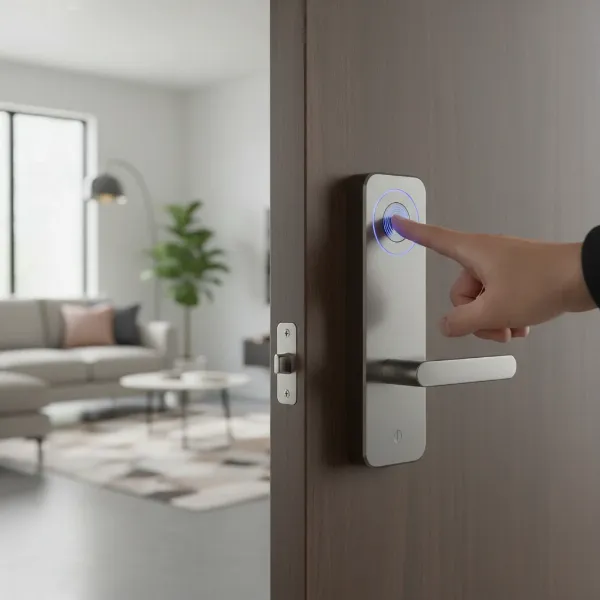 Person using a fingerprint sensor on a Nyboer smart lock for keyless entry.
Common Issues & Solutions:
While generally robust, smart locks can encounter occasional issues. The most common concern for battery-powered smart locks is a drained battery. The Nyboer lock provides warnings, but in an emergency where batteries die, a power bank can be plugged into a port on the lock to temporarily power it and gain entry. For any app-related issues, ensuring your smartphone and the lock’s firmware are updated can often resolve connectivity problems.
Who is the Nyboer Smart Lock For?
The versatility and features of the Nyboer Smart Door Lock make it suitable for a variety of users and applications.
- Homeowners: Ideal for families seeking a modern upgrade to their home security, offering convenience, multiple access options, and peace of mind with remote monitoring.
- Rental Property Owners (Airbnb Hosts): Its ability to generate temporary passcodes and view access logs makes it perfect for managing guest entry and exit without the hassle of physical key exchanges.
- Small Offices: Businesses can benefit from controlled access, easy management of employee entry, and improved security without the need for traditional keys.
How Does Nyboer Compare to Other Smart Locks?
While a direct, detailed comparison table to specific brands like Yale, Samsung, or August would require more precise product specifications, the Nyboer Smart Door Lock carves out its niche through a few key differentiators. Its “7-in-1” access methods are more extensive than many entry-level smart locks that might only offer two or three ways to unlock. The extended panel design is a significant competitive advantage, particularly for retrofit installations where aesthetics and ease of replacement are crucial. Many competing models require more precise drilling or leave existing holes exposed. In terms of app functionality and integration with voice assistants, it aligns with industry standards, offering robust remote management once the optional WiFi gateway is in place.
“The Nyboer smart lock hits a sweet spot for users looking for comprehensive access options without extensive modifications during installation. Its diverse entry methods and thoughtful design make it a strong contender in the mid-range smart lock market.”
Conclusion
The Nyboer Smart Door Lock offers a compelling blend of modern design, versatile access options, and robust construction, making it an attractive choice for enhancing home or business security. Its intuitive app control, multiple entry methods, and thoughtful installation-friendly design collectively contribute to a highly positive user experience. While the need for a separate WiFi gateway for full remote connectivity is a consideration, its overall feature set provides significant value and convenience.
Considering an upgrade to your entry system? Could the Nyboer Smart Door Lock be the key to simplifying your daily access and securing your space?
Frequently Asked Questions
What are the main ways to unlock the Nyboer Smart Door Lock?
The Nyboer Smart Door Lock typically offers seven ways to unlock: fingerprint, smartphone app, numeric passcode, key fob, mechanical key, and remote access via a WiFi gateway and voice assistants like Alexa or Google Assistant. This provides exceptional flexibility for various user preferences and situations.
Is the Nyboer Smart Door Lock easy to install on an existing door?
Yes, it is often designed for easy installation. A standout feature is its extended panel, which typically covers existing traditional doorknob and deadbolt holes, minimizing the need for door modifications or repairs during the upgrade process.
Does the Nyboer Smart Door Lock require a WiFi gateway for all features?
No, not for all features. You can use fingerprint, passcode, key fob, and mechanical key access without a WiFi gateway. However, for full remote control via the smartphone app and integration with smart home voice assistants like Alexa or Google Assistant, a separate WiFi gateway is generally required.
How long do the batteries last in the Nyboer Smart Door Lock?
The Nyboer Smart Door Lock generally offers good battery life. It also includes a low-battery warning system to alert you when the batteries are running low, allowing you ample time to replace them before they completely drain.
Can I grant temporary access to guests or service providers with the Nyboer Smart Door Lock?
Absolutely. Through its dedicated smartphone app, you can easily generate and manage temporary passcodes or virtual keys. These can be timed for specific durations, providing secure and convenient access for guests, cleaners, or delivery personnel without sharing permanent credentials.
