In an increasingly connected world, the traditional key is quickly becoming a relic of the past. Smart locks offer a blend of convenience, control, and enhanced security that modern homeowners demand. Among the many options available, the Kwikset Halo Touchscreen Wi-Fi Smart Lock stands out as a popular choice, promising direct Wi-Fi connectivity and a sleek, keyless entry experience. But does it live up to the hype? This comprehensive review dives deep into the Kwikset Halo Touchscreen, exploring its features, performance, and real-world usability to help you decide if it’s the right smart lock for your home.
Kwikset Halo Touchscreen Wi-Fi Smart Lock: An Overview
The Kwikset Halo Touchscreen Wi-Fi Smart Lock represents a significant leap from traditional deadbolts, integrating advanced technology to offer keyless entry and remote access. At its core, it’s a deadbolt lock that connects directly to your home’s Wi-Fi network, eliminating the need for a separate smart home hub or bridge. This direct connection simplifies setup and allows you to control your door from virtually anywhere using your smartphone.
Why consider the Kwikset Halo Touchscreen over a traditional lock? The benefits extend beyond mere convenience. With the ability to manage access remotely, track entry and exit, and receive real-time notifications, it transforms your front door into an intelligent security gateway. It offers a stylish, contemporary design that complements modern aesthetics, moving away from bulky, purely utilitarian hardware. For homeowners, landlords, and Airbnb operators alike, the Kwikset Halo offers a robust solution for managing property access with unparalleled ease.
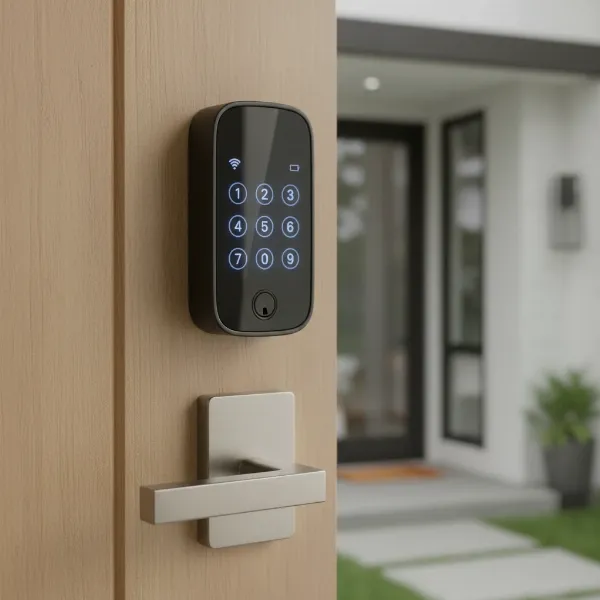 Kwikset Halo Touchscreen Wi-Fi Smart Lock installed on a modern front door.
The Kwikset Halo Touchscreen is designed for standard doors and provides multiple ways to lock and unlock, including a personalized code on its responsive touchscreen, through the Kwikset mobile app, with voice commands via Amazon Alexa or Google Assistant, or using a traditional physical key as a backup. This versatility ensures you always have a way to access your home, even if your Wi-Fi is down or your phone battery dies.
Unpacking the Features: Kwikset Halo Touchscreen in Detail
The Kwikset Halo Touchscreen Wi-Fi Smart Lock is packed with features designed to enhance your home’s security and your daily convenience. Its capabilities stretch from smart connectivity to robust physical protection, all wrapped in a user-friendly package.
Connectivity & Control: Wi-Fi, App, and Voice
One of the most appealing aspects of the Kwikset Halo Touchscreen is its integrated Wi-Fi connectivity. This means you don’t need an extra hub to connect it to your home network, simplifying installation and reducing clutter. The lock supports both Bluetooth for close-range pairing and Wi-Fi for remote control.
- Remote Access via Kwikset App: The intuitive Kwikset mobile app (for Android and iOS) allows you to lock or unlock your door from anywhere, manage user codes, view activity history, and receive real-time notifications.
- Voice Assistant Integration: For hands-free control, the Halo Touchscreen integrates seamlessly with Amazon Alexa and Google Assistant, allowing you to lock your door with simple voice commands. However, for security, unlocking typically requires a PIN code confirmation.
- Geofencing: Some users have reported success with the geofencing feature, which can automatically unlock the door upon your arrival home and auto-lock when you leave, although reliability can vary.
|
Our Picks for the Best Smart Lock in 2026
As an Amazon Associate I earn from qualifying purchases.
|
||
| Num | Product | Action |
|---|---|---|
| 1 | eufy Security Smart Lock C220, Fingerprint Keyless Entry Door Lock, Built-in Wi-Fi, App Remote Control, Front Door Smart Lock Deadbolt, 8Months Battery, Reliable Power, IP53 Waterproof, BHMA Grade 3 |

|
| 2 | TEEHO TE001 Keyless Entry Door Lock with Keypad - Smart Deadbolt Lock for Front Door with 2 Keys - Auto Lock - Easy Installation - Oil-Rubbed Bronze |
|
| 3 | eufy Security Smart Lock C220, Fingerprint Keyless Entry Door Lock, Built-in Wi-Fi, App Remote Control, Front Door Smart Deadbolt, IP53 Waterproof, 8-Months Battery, Nickel |
|
| 4 | TEEHO TE001 Keyless Entry Door Lock with Keypad - Smart Deadbolt Lock for Front Door with 2 Keys - Auto Lock - Easy Installation - Matte Black |
|
| 5 | TEEHO TE001 Keyless Entry Door Lock with Keypad - Smart Deadbolt Lock for Front Door with 2 Keys - Auto Lock - Easy Installation - Satin Nickel |
|
| 6 | Schlage Encode Smart WiFi Deadbolt Lock for Front Door - Keyless Entry with App or Touchscreen - Works with Alexa, Hey Google, & Airbnb - Create Codes for Guests - Matte Black |
|
| 7 | Electronic Passwords Keyless Entry Door Locks Smart Deadbolt Metal Lock Auto Time Delay Locking Secure Durable Low Battery Alert Type-C Port for Emergency Charging |
|
| 8 | Philips Wi-Fi Door Lock, WiFi Smart Lock Keyless Entry Deadbolt for Front Door, Compatible with Alexa & Google Assistant, Remote Control, Built-in WiFi, APP Fingerprint Passcode Unlock, Auto Locking |
|
| 9 | Philips Wi-Fi Door Lock, WiFi Smart Lock Keyless Entry Deadbolt for Front Door, Remote Control, Built-in WiFi, APP Fingerprint Passcode Unlock, Auto Locking |
|
| 10 | ULTRALOQ U-Bolt Pro WiFi Smart Lock with Door Sensor, 8-in-1 Keyless Entry Door Lock with Fingerprint ID, App Remote Control, Built-in WiFi Keypad Deadbolt, Auto Unlock, IP65 Waterproof, Easy Install |
|
Security Features: Protecting Your Home
Security is paramount for any lock, and the Kwikset Halo Touchscreen includes several features to safeguard your property.
- SecureScreen™ Technology: This innovative feature helps prevent “smudge attacks” by requiring you to tap two random numbers before entering your actual access code. This disperses fingerprint smudges, making it harder for potential intruders to guess your PIN.
- SmartKey® Security: A patented Kwikset technology, SmartKey Security allows you to re-key your lock yourself in a matter of seconds using a simple tool and an existing Kwikset key. This is particularly beneficial for landlords or after moving into a new home, as it eliminates the need for a locksmith for re-keying.
- User Code Management: You can create up to 250 unique user codes, offering granular control over who has access and when. Codes can be set for full-time, limited (by date or time), or even one-time use (some one-time codes may expire after 24 hours).
- Tamper Alerts: The lock features a built-in alarm and sends push notifications or emails if three consecutive incorrect codes are entered, or if someone attempts to tamper with the lock.
- Auto-Lock Feature: For peace of mind, the Auto-Lock feature can be enabled to automatically lock your door after a pre-set period of time (e.g., 30 seconds to 10 minutes), ensuring your home is always secure.
Convenience & Design: Touchscreen and Aesthetics
The touchscreen interface is central to the Halo’s user experience. The bright, LED-backlit keypad is easy to see day or night and is designed to be weather-resistant, even responsive to wet fingers. Its sleek, contemporary design is available in various finishes like Matte Black, Polished Chrome, Satin Nickel, and Venetian Bronze, allowing it to blend seamlessly with your home’s exterior.
Power & Battery Life: A Critical Consideration
The Kwikset Halo Touchscreen is powered by four AA batteries. While Kwikset advertises a battery life of 6-12 months, real-world user experiences often tell a different story. Many users report battery life ranging from 2 to 6 months, sometimes even as short as weeks, especially in colder climates or if the door is misaligned. This discrepancy is a significant point of consideration, as frequent battery changes can be inconvenient and costly. Factors like door alignment (which causes the motor to work harder), Wi-Fi signal strength, and environmental temperatures heavily influence actual battery longevity. The Kwikset app will send low battery notifications, providing a heads-up before the lock completely dies.
Kwikset Halo Touchscreen: Pros and Cons
Like any smart home device, the Kwikset Halo Touchscreen Wi-Fi Smart Lock comes with its own set of advantages and disadvantages. Understanding these can help you make an informed decision.
Pros:
- Direct Wi-Fi Connectivity (No Hub Required): This simplifies installation and setup, connecting directly to your home network for remote control.
- Multiple Access Options: Enjoy keyless entry via touchscreen code, smartphone app, voice commands (Alexa, Google Assistant), or a traditional physical key backup.
- High User Code Capacity: Supports up to 250 unique user codes with flexible scheduling options (full-time, limited, one-time access), ideal for families, guests, and service providers.
- SmartKey® Security: Allows for quick and easy re-keying to match existing Kwikset keys without professional help.
- SecureScreen™ Technology: Enhances security by preventing fingerprint smudges from revealing your PIN code.
- Stylish Design: Features a sleek, modern aesthetic available in multiple finishes to complement various home styles.
- Relatively Easy Installation: Many users find the installation straightforward, often guided by the Kwikset app.
- Real-time Notifications: Receive alerts for locking/unlocking events and incorrect code entries, providing excellent monitoring capabilities.
Cons:
- Inconsistent Battery Life: Despite advertised longevity, real-world battery life is often significantly shorter (2-6 months) and highly dependent on environmental factors and door alignment. This is a frequently reported concern among users.
- Limited Third-Party Integration (Original Halo): Does not support Apple HomeKit or IFTTT applets, which might be a drawback for users invested in those ecosystems. (Note: The newer Halo Select model adds Matter support).
- Touchscreen Performance in Extreme Temperatures: The capacitive touchscreen can become unresponsive in freezing weather (below 32°F) and may struggle in very hot, direct sunlight.
- App Connectivity Issues: Some users report random disconnections or delayed status updates in the Kwikset app, requiring troubleshooting or factory resets.
- Alarm Volume: The built-in tamper alarm is effective but could be louder, according to some reviews.
- Physical Design Elements: The plastic cover hiding internal buttons can be difficult to remove, potentially leading to scratches.
How Kwikset Halo Touchscreen Stacks Up Against Competitors
When considering a smart lock, it’s natural to compare the Kwikset Halo Touchscreen with other leading brands, particularly the Schlage Encode, which is often seen as a direct competitor. Both offer Wi-Fi connectivity and keyless entry, but they cater to slightly different priorities.
| Feature | Kwikset Halo Touchscreen Wi-Fi Smart Lock | Schlage Encode Smart Wi-Fi Deadbolt |
|---|---|---|
| Security Rating | ANSI/BHMA Grade 2 (Moderate) | ANSI/BHMA Grade 1 (Highest) |
| User Codes | Up to 250 | Up to 100 |
| Rekeying | SmartKey® Security (DIY rekeying) | No physical SmartKey-style rekeying |
| Price Point | More budget-friendly | Higher-end |
| Integrations | Alexa, Google Assistant | Alexa, Google Assistant, Amazon Key, Ring (Encode Plus supports Apple HomeKit) |
| Durability | Good for typical residential use | Excellent, very rugged, solid metal construction |
| Battery Life | 2-6 months (user reported), 4 AA | Up to 9 months (with low battery alert), 4 AA |
| Best For | Budget-friendly rentals, frequent turnovers, homeowners prioritizing convenience and cost. | High-security homes, premium rentals, homeowners prioritizing maximum durability and robust smart home integration. |
Key Differences:
- Security & Durability: Schlage Encode generally holds an edge with its ANSI Grade 1 security rating and robust metal construction, making it more resistant to forced entry. Kwikset Halo, while secure with its Grade 2 rating and SmartKey technology, is often considered less physically robust than Schlage.
- User Code Capacity & Rekeying: The Kwikset Halo boasts a higher user code capacity (250 vs. 100) and the convenience of SmartKey re-keying, which is a significant advantage for rental properties or situations requiring frequent key changes.
- Smart Home Ecosystems: While both support Alexa and Google Assistant, Schlage often offers broader compatibility with other smart home platforms and, in newer models like the Encode Plus, includes Apple HomeKit and Apple Wallet key support. The Kwikset Halo (original) lacks HomeKit, though the Halo Select adds Matter.
- Battery Life: Schlage Encode typically offers better battery performance compared to the Kwikset Halo, which is a common point of contention for Halo users.
In essence, if your priority is maximum security, robust build quality, and extensive smart home integration (especially with Apple HomeKit), the Schlage Encode might be the better choice. However, if affordability, high user code capacity, easy re-keying, and direct Wi-Fi are your primary concerns, the Kwikset Halo Touchscreen presents a compelling option, particularly for rental properties or those who appreciate its specific feature set.
Choosing the Kwikset Halo Touchscreen: A Buying Guide
Deciding if the Kwikset Halo Touchscreen Wi-Fi Smart Lock is the right fit for your home involves evaluating your specific needs, existing setup, and priorities.
1. Determine Your Usage Needs and Environment
- Door Type: Ensure your door meets the standard thickness requirements (1-3/8 to 2 inches) and has appropriate boreholes for a deadbolt.
- Security Level: The Kwikset Halo offers ANSI/BHMA Grade 2 security, which is good for residential use. If you require the absolute highest level of physical security (Grade 1), you might consider alternatives like the Schlage Encode.
- User Management: If you need to manage access for a large number of people (e.g., a bustling family home, rental property, or small office), the Halo’s capacity for up to 250 user codes is a significant advantage.
- Climate: Be aware of the touchscreen’s reported sensitivity to extreme cold (below 32°F) and direct, intense heat. If you live in an area with harsh winters or scorching summers, consider this operational limitation.
- Smart Home Ecosystem: If you are primarily an Amazon Alexa or Google Assistant user, the Halo integrates well. However, if Apple HomeKit is central to your smart home, the original Halo is not compatible, and even the Matter-enabled Halo Select has limited HomeKit functionality compared to dedicated HomeKit locks.
2. Prioritize Important Features
- Wi-Fi Connectivity: The Halo’s built-in Wi-Fi is excellent if you want remote control without needing an additional hub.
- Keyless Entry Methods: If you value a responsive touchscreen keypad, app control, and voice commands, the Halo delivers.
- SmartKey® Security: If you often need to re-key your locks (e.g., rental turnovers) and want to do it yourself quickly, SmartKey is a standout feature.
- Notifications and Logging: The ability to receive real-time alerts and view an activity history can be crucial for security monitoring.
3. Consider Price and Value
The Kwikset Halo Touchscreen is generally considered a more budget-friendly option compared to some higher-end competitors. While its feature set is robust for the price, factor in the potential need for more frequent battery replacements, which adds to the long-term cost. The newer Halo Select, with Matter support and improved battery efficiency, comes at a higher price point, so weigh if those enhancements justify the increased investment for your specific needs.
4. Read User Reviews
Always supplement professional reviews with extensive user feedback. Pay close attention to experiences regarding battery life, app reliability, and touchscreen performance in various weather conditions, as these are commonly cited areas of concern.
5. Choose a Reputable Retailer
Purchase from authorized dealers to ensure you receive a genuine product with a valid warranty and access to Kwikset’s customer support. Inquire about their return policy, especially given the varying user experiences.
Choosing the Kwikset Halo Touchscreen means embracing modern convenience and control. By aligning its strengths with your needs and understanding its limitations, you can make an intelligent choice for your home security.
Installation and Day-to-Day Use of the Kwikset Halo Touchscreen
Installing and integrating the Kwikset Halo Touchscreen Wi-Fi Smart Lock into your daily routine is designed to be straightforward, thanks to Kwikset’s user-friendly approach.
Basic Installation Steps
Installing the Kwikset Halo Touchscreen is generally considered a DIY-friendly task that typically takes 30-45 minutes with just a Phillips head screwdriver. The Kwikset app offers an interactive, step-by-step guide with animations, making the process much easier than relying solely on a printed manual.
- Remove Existing Hardware: Carefully remove your old deadbolt, latch, and strike plate.
- Install the Latch and Strike Plate: Slide in the new latch, ensuring it’s centered, and secure it with screws. Then install the strike plate on the door frame. Proper alignment here is crucial for optimal battery life and smooth operation.
- Install Exterior Assembly: Route the data cable through the center hole of the door and under the latch, then attach the exterior escutcheon to the mounting plate.
- Install Interior Assembly: Connect the data cable to the interior escutcheon, ensuring a tight connection, and then secure the interior assembly to the mounting plate. Make sure the turnpiece shaft fully engages with the interior mechanism.
- Install Batteries and Handing: Insert four AA batteries into the battery pack. The lock will perform an automatic door “handing” procedure, retracting and extending the bolt to learn the door’s orientation.
- App Setup & Wi-Fi Connection: Download the Kwikset app, create an account, and follow the on-screen instructions to pair the lock via Bluetooth and connect it to your home’s Wi-Fi network. This is also where you’ll create your Master Access Code.
“The Kwikset Halo was among the easiest smart lock installations I’ve encountered, requiring only a Phillips screwdriver. However, proper door alignment is critical for battery life and reliable operation.” – PropelRC Team, Smart Lock Reviewers
Using Smart Features with the Kwikset App
Once installed, the Kwikset app becomes your command center for the Halo Touchscreen:
- Remote Locking/Unlocking: Lock or unlock your door from anywhere with a tap.
- User Management: Easily add, edit, or delete up to 250 user codes. Set permanent, time-limited, or recurring access schedules for guests, family, or service providers.
- Activity History: View a detailed log of who used the lock, when, and how (code, app, voice), along with any incorrect code entries.
- Notifications: Customize push and email alerts for lock activity, low battery warnings, and security breaches.
- Auto-Lock & SecureScreen™: Configure the auto-lock timer and enable/disable SecureScreen™ directly from the app.
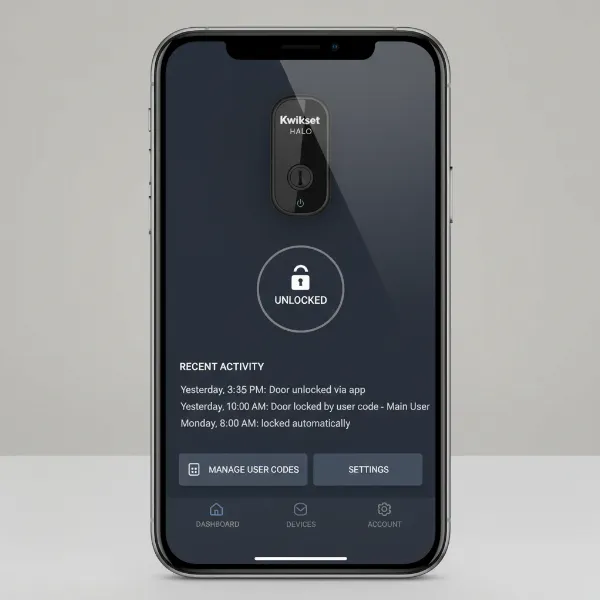 Kwikset mobile app interface showing smart lock controls and activity log.
Maintenance, Troubleshooting, and Maximizing Lifespan
- Battery Replacement: Kwikset advertises 6-12 months of battery life, but expect 2-6 months in real-world usage. Replace the four AA batteries when you receive a low battery notification. Using high-quality alkaline batteries (like Duracell Quantum) can extend life by 2-3x compared to generic brands.
- Door Alignment: This is critical for battery longevity. A slightly misaligned door forces the motor to work harder, draining batteries faster. Adjust your strike plate if necessary to ensure smooth bolt extension and retraction.
- Wi-Fi Signal Strength: Ensure your lock has a strong, stable Wi-Fi connection. A weak signal will cause the lock to work harder to maintain connectivity, accelerating battery drain.
- Cleaning: Gently clean the touchscreen with a soft, damp cloth to remove smudges and dirt, avoiding abrasive cleaners.
- Troubleshooting Common Issues:
- Unresponsive Touchscreen in Cold: In freezing temperatures, the capacitive touchscreen may not respond. Use the app or physical key as a backup.
- App Disconnections: If the lock frequently appears offline or fails to respond to commands, try a factory reset, but be aware this requires re-entering all user codes. Ensure your Wi-Fi is stable.
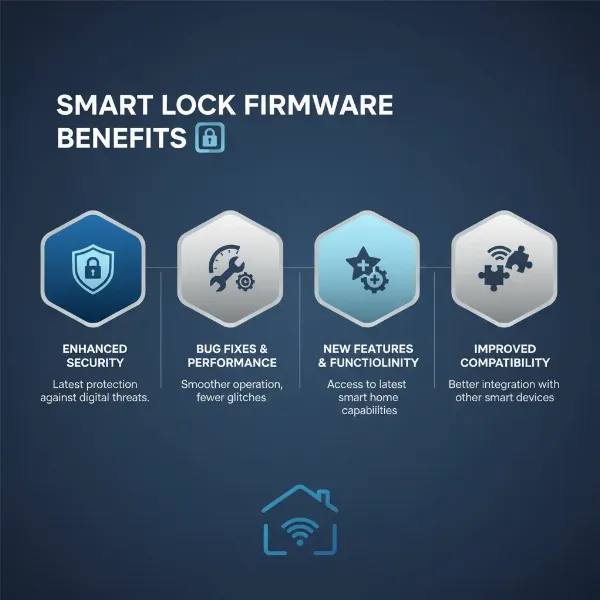
- Firmware Updates: Regularly check for and install firmware updates via the Kwikset app, as these can improve performance and reliability.
By following these guidelines, you can ensure your Kwikset Halo Touchscreen provides reliable security and convenience for years to come.
Enhancing Your Smart Home with Kwikset Halo Touchscreen
The Kwikset Halo Touchscreen Wi-Fi Smart Lock is designed to be a central part of a convenient and secure smart home ecosystem. Its direct Wi-Fi connectivity makes it easy to integrate with popular voice assistants.
- Amazon Alexa and Google Assistant: The Halo Touchscreen works seamlessly with both Amazon Alexa and Google Assistant, allowing you to lock your door with simple voice commands. This is perfect for when your hands are full or you’re already in bed. While locking can be done directly, unlocking usually requires a voice PIN for added security, preventing unauthorized access through voice commands alone.
- Kwikset App Ecosystem: The Kwikset app is the primary interface for managing your lock, from setting user codes and schedules to viewing activity logs and receiving notifications. It’s designed to be user-friendly, putting comprehensive control at your fingertips.
- Future-Proofing with Matter (Halo Select): While the original Kwikset Halo does not support Apple HomeKit, the newer Kwikset Halo Select model includes Matter support. Matter is a unified smart home standard that aims to improve interoperability between devices from different brands. When using the Halo Select in Matter mode, users report improved battery efficiency, though some advanced features (like time-restricted PINs) might be less robust compared to Wi-Fi mode. This makes the Halo Select a more attractive option for those building a Matter-compatible smart home.
While the Kwikset Halo (original) might have limitations in its third-party integration beyond Alexa and Google Assistant, its core functionality delivers a valuable layer of smart security. By leveraging its robust app control and voice assistant compatibility, you can truly integrate your front door into a larger, more automated smart home experience.
Conclusion
The Kwikset Halo Touchscreen Wi-Fi Smart Lock offers a compelling package for homeowners seeking modern convenience and enhanced security without the complexity of a separate hub. Its direct Wi-Fi connection, sleek touchscreen interface, comprehensive user code management, and SmartKey® re-keying capability make it a strong contender in the smart lock market. It excels in providing remote access, real-time alerts, and a sense of control over your home’s entry points.
However, potential buyers should be mindful of the reported battery life discrepancies, which often fall short of advertised claims, and the touchscreen’s sensitivity to extreme temperatures. While the original Halo has limited third-party integration beyond Alexa and Google Assistant, the newer Halo Select addresses some of these concerns with Matter support and improved battery efficiency. For those prioritizing affordability, high user code capacity for rental properties, and a direct Wi-Fi setup, the Kwikset Halo Touchscreen presents a valuable solution. Will the Kwikset Halo Touchscreen be the upgrade that brings true peace of mind and convenience to your smart home?
Frequently Asked Questions
How long do Kwikset Halo batteries actually last?
While Kwikset advertises up to 12 months, real-world battery life for the Kwikset Halo Touchscreen typically ranges from 2 to 6 months. Factors such as door alignment, Wi-Fi signal strength, and extreme temperatures can significantly impact longevity, sometimes reducing it to just weeks.
Is the Kwikset Halo Touchscreen compatible with Apple HomeKit?
The original Kwikset Halo Touchscreen Wi-Fi Smart Lock does not support Apple HomeKit. However, the newer Kwikset Halo Select model offers Matter compatibility, which can provide some integration with Apple Home, though with potentially limited features compared to dedicated HomeKit devices.
What should I do if my Kwikset Halo touchscreen stops working in cold weather?
In freezing temperatures (below 32°F), the capacitive touchscreen of the Kwikset Halo may become unresponsive. As a backup, you can still use the Kwikset app for remote control or the physical key to unlock your door.
Can I remotely lock or unlock my Kwikset Halo Touchscreen?
Yes, the Kwikset Halo Touchscreen Wi-Fi Smart Lock connects directly to your home’s Wi-Fi, allowing you to remotely lock or unlock your door from anywhere using the Kwikset mobile app on your smartphone. You will also receive real-time notifications about its status.
How does Kwikset’s SmartKey Security work?
SmartKey Security allows you to re-key your Kwikset Halo lock yourself in seconds. Using a special tool and an existing Kwikset key, you can quickly change the lock’s internal pins to accept a new key, eliminating the need for a locksmith. This feature is particularly useful for managing access in rental properties or after losing a key.