In an era where home security and convenience are paramount, smart locks have emerged as a revolutionary solution, offering advanced protection and effortless access. As an experienced technician in smart lock technology, I’ve witnessed firsthand the evolution and refinement of these devices. Among the myriad of options available, the Kaadas K9 Push Pull Smart Lock, particularly its Wi-Fi-enabled K9-5W model, consistently stands out as a top-tier choice for homeowners seeking a reliable, feature-rich, and user-friendly security upgrade. This comprehensive review will delve into its functionalities, benefits, and what makes it a compelling investment for your modern home.
What is the Kaadas K9 Push Pull Smart Lock and Why Should You Consider It?
The Kaadas K9 Push Pull Smart Lock represents a sophisticated advancement in door security, integrating multiple access methods with a distinctive, ergonomic push-pull design. This isn’t just a lock; it’s a complete smart entry system designed to simplify your daily life while fortifying your home against unauthorized access. Compared to traditional mechanical locks, the K9 offers unparalleled convenience, superior security, and effortless management, making keys a relic of the past.
The core of its appeal lies in its “push-pull” mechanism, which transforms door operation into a seamless, intuitive action. Instead of turning a handle, you simply push to open from the inside or pull to open from the outside, once authenticated. This design is particularly beneficial when your hands are full. The K9-5W model further enhances its capabilities with integrated Wi-Fi, allowing for remote management and real-time monitoring directly from your smartphone. Whether for a bustling family home, a rental property, or a modern office space, the Kaadas K9 provides a robust and intelligent security solution.
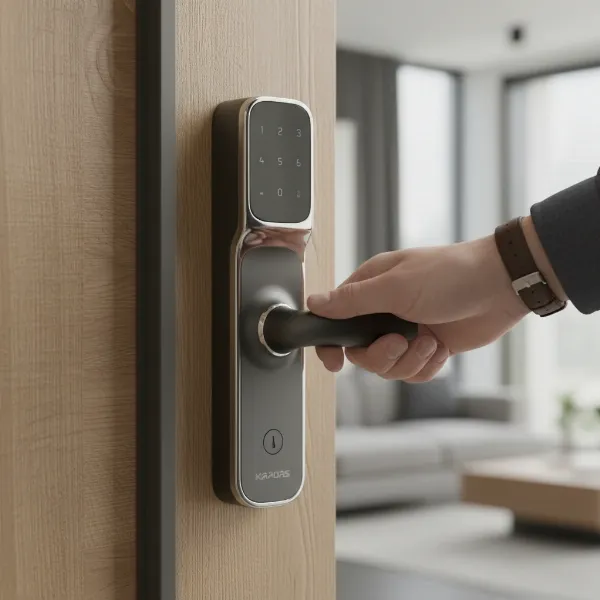 Kaadas K9 smart lock with push-pull handle design for easy door opening.
Unlocking Methods: Versatility at Your Fingertips
The Kaadas K9 Push Pull Smart Lock offers a comprehensive suite of unlocking methods, ensuring that you and your authorized users always have a convenient way to enter, even in unexpected situations. This multi-modal approach provides flexibility while maintaining stringent security.
Fingerprint Access
|
Our Picks for the Best Smart Lock in 2026
As an Amazon Associate I earn from qualifying purchases.
|
||
| Num | Product | Action |
|---|---|---|
| 1 | Philips Wi-Fi Door Lock, WiFi Smart Lock Keyless Entry Deadbolt for Front Door, Compatible with Alexa & Google Assistant, Remote Control, Built-in WiFi, APP Fingerprint Passcode Unlock, Auto Locking |

|
| 2 | Philips Wi-Fi Door Lock, WiFi Smart Lock Keyless Entry Deadbolt for Front Door, Remote Control, Built-in WiFi, APP Fingerprint Passcode Unlock, Auto Locking |
|
| 3 | ULTRALOQ U-Bolt Pro WiFi Smart Lock with Door Sensor, 8-in-1 Keyless Entry Door Lock with Fingerprint ID, App Remote Control, Built-in WiFi Keypad Deadbolt, Auto Unlock, IP65 Waterproof, Easy Install |
|
| 4 | eufy Security Smart Lock C220, Fingerprint Keyless Entry Door Lock, Built-in Wi-Fi, App Remote Control, Front Door Smart Deadbolt, IP53 Waterproof, 8-Months Battery, Nickel |
|
| 5 | Electronic Passwords Keyless Entry Door Locks Smart Deadbolt Metal Lock Auto Time Delay Locking Secure Durable Low Battery Alert Type-C Port for Emergency Charging |
|
| 6 | TEEHO TE001 Keyless Entry Door Lock with Keypad - Smart Deadbolt Lock for Front Door with 2 Keys - Auto Lock - Easy Installation - Matte Black |
|
| 7 | Schlage Encode Smart WiFi Deadbolt Lock for Front Door - Keyless Entry with App or Touchscreen - Works with Alexa, Hey Google, & Airbnb - Create Codes for Guests - Matte Black |
|
| 8 | TEEHO TE001 Keyless Entry Door Lock with Keypad - Smart Deadbolt Lock for Front Door with 2 Keys - Auto Lock - Easy Installation - Satin Nickel |
|
| 9 | TEEHO TE001 Keyless Entry Door Lock with Keypad - Smart Deadbolt Lock for Front Door with 2 Keys - Auto Lock - Easy Installation - Oil-Rubbed Bronze |
|
| 10 | eufy Security Smart Lock C220, Fingerprint Keyless Entry Door Lock, Built-in Wi-Fi, App Remote Control, Front Door Smart Lock Deadbolt, 8Months Battery, Reliable Power, IP53 Waterproof, BHMA Grade 3 |
|
At the heart of the Kaadas K9’s convenience is its rapid and highly secure fingerprint recognition system. Equipped with a Sweden FPC semiconductor sensor, the lock boasts an identification speed of less than 0.5 seconds. This advanced sensor recognizes human skin temperature and capacitance values, making it incredibly accurate and virtually impossible to fool with duplicated or fake fingerprints. The K9 can store up to 100 different fingerprints, making it ideal for large families or small offices.
PIN Code
Beyond biometrics, the Kaadas K9 supports PIN code entry, offering both a master PIN for administrative control and user PINs for daily access. For enhanced security, it includes a “Fake Pincode Feature” that allows you to input random digits before or after your actual PIN, preventing onlookers from discerning your true code. Additionally, One-Time Passcodes (OTPs) can be generated for temporary access for visitors or service providers, expiring after a specified duration for optimal control.
RFID Card
For those who prefer a physical access method without the bulk of traditional keys, the Kaadas K9 comes with RFID cards. The lock can register and recognize up to 100 different RFID cards, providing a quick and easy tap-and-go entry option.
Mechanical Key
Despite its advanced digital features, the Kaadas K9 retains the reliability of a traditional lock with a mechanical key override. Two mechanical keys are typically provided as an emergency backup, ensuring access even in the event of a complete power failure or system malfunction. This crucial feature provides peace of mind for any unforeseen circumstances.
Smart Connectivity (Bluetooth & Wi-Fi)
The Kaadas K9-5W model elevates smart lock capabilities with integrated Wi-Fi, eliminating the need for a separate bridge. This built-in connectivity allows you to control and monitor your lock remotely via a smartphone app. You can receive real-time unlocking records, manage user access, generate temporary PINs on the go, and check the lock’s status from anywhere. For situations where Wi-Fi might be unavailable or preferred, Bluetooth access offers local control via your smartphone.
Design, Build Quality, and Security Features
The Kaadas K9 Push Pull Smart Lock is not just intelligent; it’s engineered for durability, aesthetics, and robust security, providing a tangible sense of protection.
Constructed from a sturdy zinc alloy, the lock is designed to withstand daily wear and tear while offering a premium feel. Its triple bolt cast iron locking mechanism significantly deters forced entry attempts, providing a formidable barrier against intruders. The elegant push-pull design integrates seamlessly with modern door aesthetics, featuring a responsive touchpad that is both intuitive to use and visually discreet.
 Kaadas K9 smart lock showing its robust zinc alloy construction and security features.
Beyond its physical resilience, the K9 is packed with intelligent security features:
- Fire-Rated Digital Lock: This certification means the lock has been tested to withstand certain fire conditions, adding an extra layer of safety to your home.
- Auto-Locking: Once the door is closed, the K9 automatically engages its locking mechanism, eliminating worries about forgetting to lock up.
- Tamper Alerts: The lock is equipped to detect and alert you to any attempts at tampering or forced entry, providing an immediate warning.
- Double Authentication: For heightened security, you can enable a double authentication mode, requiring two different access methods (e.g., fingerprint and PIN) for entry.
- In-Home Security (Double-Locking): An internal double-locking function provides an additional layer of security when you are inside your home, preventing external access even with valid credentials.
- Defense Mode: This feature can be activated when leaving your home for extended periods, triggering an alarm if the door is opened from the inside without authorization.
Kaadas K9 vs. Other Smart Locks: What Sets It Apart?
In a crowded market of smart locks, the Kaadas K9 Push Pull Smart Lock distinguishes itself through a combination of thoughtful design and advanced technology. While many brands like Yale, Samsung, August, Nuki, and Xiaomi offer compelling smart lock solutions, the Kaadas K9-5W particularly shines with its seamless integration of Wi-Fi, making remote management incredibly straightforward without the need for additional bridges.
Its Sweden FPC fingerprint sensor is renowned for its speed and accuracy, providing a frustration-free biometric experience that some competitors may struggle to match. The robust zinc alloy construction paired with a triple bolt cast iron locking mechanism emphasizes its commitment to physical security, often surpassing the build quality of more budget-oriented options. Furthermore, its ergonomic push-pull handle design is a standout feature that prioritizes user convenience and effortless operation, setting it apart from traditional lever-handle smart locks. The comprehensive array of access methods—fingerprint, PIN, RFID, mechanical key, Bluetooth, and Wi-Fi—ensures it caters to diverse user preferences and security needs, offering a well-rounded and highly reliable smart entry solution in its class.
Your Buying Guide: Choosing the Right Smart Lock
Selecting a smart lock is a significant decision that impacts your home’s security and your daily convenience. To ensure the Kaadas K9 Push Pull Smart Lock (or any smart lock) is the right fit, consider these crucial factors.
Assess Your Needs
Begin by evaluating your specific requirements. What type of door do you have (wood, metal, inward/outward opening)? What level of security are you seeking—basic convenience or advanced protection? And importantly, what is your budget? The Kaadas K9 is generally suitable for standard wooden doors, offering high-level security.
Key Features to Look For
Prioritize the features that matter most to you. For example, if quick, keyless entry is paramount, the Kaadas K9’s fast fingerprint scanner and push-pull handle are significant advantages. If remote management and monitoring are essential, the K9-5W’s integrated Wi-Fi connectivity will be a top consideration. Other important features include the number of user capacities, temporary access options, and battery life indicators.
Prioritize Security
Always place security at the forefront. Look for locks with robust physical construction (like the K9’s zinc alloy and triple bolt mechanism), advanced encryption for digital communications, and certifications from recognized security standards bodies. Features like tamper alarms, fake pincode, and double authentication, all present in the K9, contribute significantly to overall security.
Read Reviews from Other Users
Real-world user experiences offer invaluable insights. Look for reviews that discuss ease of installation, everyday performance, battery longevity, and responsiveness of customer support. These insights can highlight practical advantages or potential drawbacks not immediately apparent from product specifications.
Choose a Reputable Provider
Purchase from authorized dealers who offer professional installation services, comprehensive warranties, and reliable technical support. This ensures that you receive genuine products and have assistance if any issues arise. Kaadas, as a brand, typically works with established distributors.
Installation, Usage, and Maintenance Tips
Getting the most out of your Kaadas K9 Push Pull Smart Lock involves proper installation, understanding its features, and consistent maintenance.
Basic Installation Overview
While some homeowners might attempt DIY installation, it’s highly recommended to have the Kaadas K9 installed by a professional. This ensures proper alignment, secure fitting, and correct configuration of all locking mechanisms and sensors. Incorrect installation can compromise both the security and functionality of the lock. Professionals ensure the mortise lock integrates perfectly with your door frame.
Everyday Use & Smart Features
Using the Kaadas K9 is designed to be intuitive. For entry, simply present your registered fingerprint, enter your PIN, tap your RFID card, or use the app. From the inside, the push-pull mechanism allows for effortless exit. Leverage the mobile app for generating one-time passcodes for guests, monitoring entry and exit logs, and remotely locking/unlocking your door (with the K9-5W model). Practice using the “fake pincode” feature to maximize privacy.
Maintenance and Extending Lifespan
- Battery Management: The Kaadas K9 typically uses 8 AA alkaline batteries, often divided into two groups for extended life. The lock provides low battery warnings when the voltage drops below 4.8V, alerting you with voice prompts. Replace all batteries promptly when warned, and avoid mixing old and new batteries.
- Emergency Power: If batteries run completely flat, you can use a 5V power bank to provide emergency power via the Micro USB port on the outdoor unit.
- Cleaning: Regularly wipe the fingerprint sensor and keypad with a soft, dry cloth to remove dust and grime, which can affect recognition accuracy. Avoid harsh chemicals or abrasive materials.
- Firmware Updates: Periodically check for any available firmware updates via the mobile app, as these can improve performance, add new features, and patch security vulnerabilities.
Common Issues and How to Resolve Them
- Low Battery: The most frequent issue. Replace all 8 AA batteries immediately upon warning. Use the Micro USB port with a power bank for emergency access.
- Fingerprint Not Recognized: Ensure your finger and the sensor are clean and dry. Re-enroll your fingerprint if issues persist, as changes to fingerprints can occur over time.
- Keypad Unresponsive: Clean the keypad. If it remains unresponsive, a soft reset might be needed (refer to the user manual).
- Connectivity Problems (Wi-Fi/Bluetooth): Ensure your Wi-Fi router is working and within range for the K9-5W. Restarting your router or the lock can often resolve temporary glitches.
- Forgotten PIN: Use your master PIN to access the settings menu and reset user PINs, or use your mechanical key for emergency entry. A factory reset (as detailed in the user manual) will clear all user data and reset the master PIN to default.
Enhancing Your Setup: Essential Smart Lock Accessories
While the Kaadas K9 Push Pull Smart Lock is a standalone powerhouse, a few essential accessories can further enhance your smart home security ecosystem.
The most critical accessory is a portable power bank for emergency power supply. Should your lock’s batteries completely deplete, a standard 5V power bank connected via the Micro USB port on the K9 can provide enough power for a single entry, preventing lockout. Beyond this, for homes with gates, a compatible Kaadas smart gate lock (like the R6G mentioned in search results) can often be paired with the K9 for synchronized unlocking, offering a holistic smart entry experience. Some users might also find a door closer beneficial to ensure their door always shuts fully for the auto-lock feature to engage reliably. However, ensure the door closer’s speed is adjusted to avoid impacting the lock’s automatic engagement.
Conclusion
The Kaadas K9 Push Pull Smart Lock (K9-5W) offers a compelling combination of style, convenience, and robust security, making it an excellent upgrade for any modern home. Its versatile access methods—from the lightning-fast Sweden FPC fingerprint sensor and secure PIN codes to RFID cards, mechanical keys, and smart app control—provide unparalleled flexibility. Coupled with its durable zinc alloy construction, triple bolt locking mechanism, and advanced security features like tamper alerts and auto-locking, the K9 stands as a formidable guardian for your entryway.
Choosing the Kaadas K9 means investing in peace of mind, simplifying daily routines, and embracing a smarter way to protect what matters most. Are you ready to transform your home security with the effortless elegance and advanced protection of the Kaadas K9 Push Pull Smart Lock?
Frequently Asked Questions
How long do the batteries last in the Kaadas K9 Smart Lock?
The Kaadas K9 uses 8 AA alkaline batteries, typically providing about 12 months of battery life. The lock features a low battery warning system that alerts you with voice prompts when the voltage is low, ensuring you have ample time to replace them before they completely drain.
Can I remotely control the Kaadas K9 Smart Lock?
Yes, the Kaadas K9-5W model features integrated Wi-Fi, allowing you to control and monitor the lock remotely via a smartphone app. You can unlock/lock the door, generate one-time passcodes, and view unlocking history from anywhere with an internet connection.
What happens if the Kaadas K9 Smart Lock’s battery dies completely?
If the batteries fully deplete, you can still gain emergency access using the provided mechanical backup keys. Additionally, the lock has a Micro USB port on the exterior unit, allowing you to power it temporarily with a standard 5V power bank for a single entry.
Is the Kaadas K9 Smart Lock difficult to install?
While experienced DIY enthusiasts might be able to install it, professional installation is highly recommended to ensure proper fit, functionality, and maximum security. This is especially important for mortise-style locks to guarantee correct alignment and operation.
Can the Kaadas K9 detect fake fingerprints?
Yes, the Kaadas K9 utilizes a Sweden FPC semiconductor fingerprint sensor that identifies human skin temperature and capacitance values. This advanced technology makes it highly secure and effective in preventing access from duplicated, copied, or imitated fake fingerprints.
