In an age where smart technology seamlessly integrates into every aspect of our lives, home security is no exception. Traditional keys are fast becoming relics, replaced by sophisticated smart locks that promise enhanced safety and unparalleled convenience. Among the myriad of options available, the Hornbill Smart Lock, with its robust fingerprint and Bluetooth capabilities, has emerged as a compelling choice for homeowners seeking a modern security upgrade without breaking the bank. This comprehensive review dives deep into its features, explores its practical applications, guides you through installation, and weighs its pros and cons to help you decide if it’s the right fit for your home.
What is the Hornbill Smart Lock and Why Consider It?
The Hornbill Smart Lock is an electronic door lock designed to provide keyless entry and advanced access management for your home or property. It integrates multiple unlocking methods, primarily focusing on biometric fingerprint recognition and Bluetooth connectivity via a smartphone app. This innovative lock combines security with smart home convenience, offering a significant upgrade over conventional mechanical locks.
At its core, the Hornbill Smart Lock utilizes an advanced semiconductor fingerprint sensor for rapid biometric authentication and Bluetooth technology to connect with your smartphone for control and monitoring. Beyond these, it often includes a touch keypad for passcodes, support for IC cards (key fobs), and a traditional physical key for emergency backup. The integration of these technologies aims to simplify daily access while bolstering security.
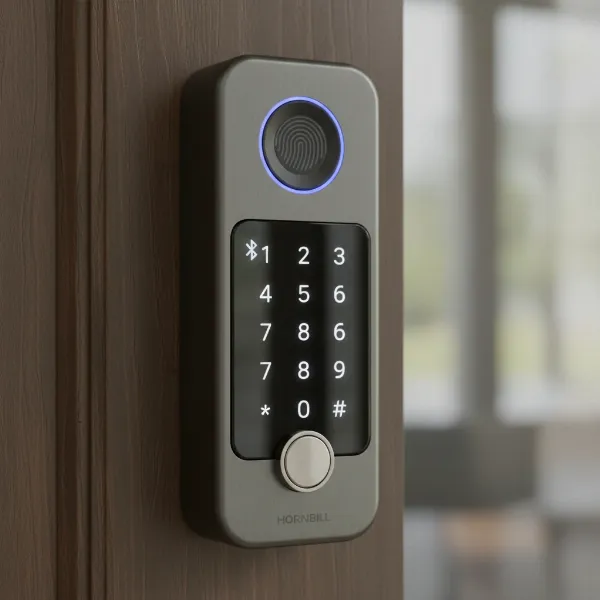 Close-up of Hornbill smart lock with fingerprint sensor and keypad.
The benefits of choosing a Hornbill Smart Lock over a traditional lock are numerous. It offers unparalleled convenience by eliminating the need for physical keys, preventing lockouts, and simplifying access for family members, guests, or service providers. From a security standpoint, features like anti-peep passcodes, auto-lock functionality, and comprehensive access logs provide greater control and peace of mind. This makes the Hornbill Smart Lock an ideal solution for a variety of applications, including private residences, Airbnb rentals, small offices, and even apartment bedrooms, where flexible and secure access management is crucial.
Hornbill Smart Lock (Fingerprint & Bluetooth) Key Features
The Hornbill Smart Lock is packed with features designed to make accessing your home simpler and more secure. Its combination of advanced entry methods and robust design stands out in the budget-friendly smart lock market.
Multiple Ways to Unlock
One of the most appealing aspects of the Hornbill Smart Lock is its versatile entry options, ensuring you’re never truly locked out.
- Fingerprint Recognition: The lock boasts an advanced semiconductor fingerprint sensor that recognizes your finger in as little as 0.1 to 0.3 seconds. Most models can store up to 50-300 unique fingerprints with a recognition rate often exceeding 98%. This biometric method offers swift and secure access, eliminating the need to fumble for keys or remember codes.
- Passcode Entry: A responsive touchscreen keypad allows you to set up multiple passcodes. The anti-peep function enhances security by letting you enter random digits before or after your actual code, preventing onlookers from guessing your entry sequence. You can generate various types of codes—permanent, custom, temporary, cyclic, or one-time—offering immense flexibility for guests, cleaners, or delivery services. Many models support 100-300 unique passcodes.
- Bluetooth App Control: Using the dedicated “Next Lock” or “Smart Life” app, you can lock and unlock your door directly from your smartphone when within Bluetooth range (typically around 2 meters). The app serves as a central hub for managing users, adding new fingerprints and passcodes, and viewing real-time access logs, providing detailed insights into who enters and exits your home.
- IC Cards/Fobs: For quick and easy entry, especially for children or individuals who prefer not to use fingerprints or passcodes, the lock often includes IC cards (key fobs). These can be registered via the app, with support for up to 100-1000 cards depending on the model.
- Physical Key: As a fail-safe, a traditional mechanical key is always provided. This serves as an essential backup method in case of electronic malfunction, battery depletion, or smart device issues.
|
Our Picks for the Best Smart Lock in 2026
As an Amazon Associate I earn from qualifying purchases.
|
||
| Num | Product | Action |
|---|---|---|
| 1 | TEEHO TE001 Keyless Entry Door Lock with Keypad - Smart Deadbolt Lock for Front Door with 2 Keys - Auto Lock - Easy Installation - Oil-Rubbed Bronze |

|
| 2 | Philips Wi-Fi Door Lock, WiFi Smart Lock Keyless Entry Deadbolt for Front Door, Compatible with Alexa & Google Assistant, Remote Control, Built-in WiFi, APP Fingerprint Passcode Unlock, Auto Locking |
|
| 3 | Schlage Encode Smart WiFi Deadbolt Lock for Front Door - Keyless Entry with App or Touchscreen - Works with Alexa, Hey Google, & Airbnb - Create Codes for Guests - Matte Black |
|
| 4 | eufy Security Smart Lock C220, Fingerprint Keyless Entry Door Lock, Built-in Wi-Fi, App Remote Control, Front Door Smart Deadbolt, IP53 Waterproof, 8-Months Battery, Nickel |
|
| 5 | Electronic Passwords Keyless Entry Door Locks Smart Deadbolt Metal Lock Auto Time Delay Locking Secure Durable Low Battery Alert Type-C Port for Emergency Charging |
|
| 6 | TEEHO TE001 Keyless Entry Door Lock with Keypad - Smart Deadbolt Lock for Front Door with 2 Keys - Auto Lock - Easy Installation - Matte Black |
|
| 7 | ULTRALOQ U-Bolt Pro WiFi Smart Lock with Door Sensor, 8-in-1 Keyless Entry Door Lock with Fingerprint ID, App Remote Control, Built-in WiFi Keypad Deadbolt, Auto Unlock, IP65 Waterproof, Easy Install |
|
| 8 | eufy Security Smart Lock C220, Fingerprint Keyless Entry Door Lock, Built-in Wi-Fi, App Remote Control, Front Door Smart Lock Deadbolt, 8Months Battery, Reliable Power, IP53 Waterproof, BHMA Grade 3 |
|
| 9 | Philips Wi-Fi Door Lock, WiFi Smart Lock Keyless Entry Deadbolt for Front Door, Remote Control, Built-in WiFi, APP Fingerprint Passcode Unlock, Auto Locking |
|
| 10 | TEEHO TE001 Keyless Entry Door Lock with Keypad - Smart Deadbolt Lock for Front Door with 2 Keys - Auto Lock - Easy Installation - Satin Nickel |
|
While the base Hornbill Smart Lock offers excellent local control via Bluetooth, adding a separate Wi-Fi Gateway (often sold separately or included in specific bundles) unlocks even more functionalities. With the gateway, you can achieve true remote control, locking or unlocking your door from anywhere with an internet connection. It also enables integration with smart home ecosystems like Amazon Alexa and Google Home for voice control, and provides real-time notifications and remote access logs.
Robust Design and Durability
The Hornbill Smart Lock is not just about smart features; it’s also built to last. Many models feature a sleek, minimalist design, often available in a matte black or silver finish, which complements modern home aesthetics.
Constructed from durable materials such as zinc alloy or aluminum alloy, the lock feels substantial and resistant to tampering. It’s designed to withstand various environmental conditions, with some models boasting an IP65 waterproof rating and operational temperature ranges from -4°F to 158°F (-20℃ to 70℃). This makes it suitable for many outdoor-facing doors, ensuring reliable performance in diverse climates.
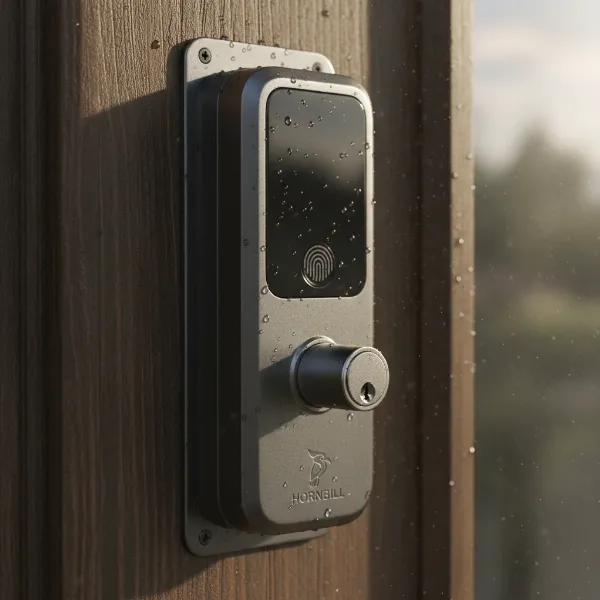 Hornbill smart lock on a door, showing durable construction and weather resistance.
Power is supplied by four standard AA batteries, which typically offer a long lifespan—anywhere from 6-8 months or 20,000-250,000 lock/unlock cycles, depending on usage. The lock provides low battery alerts via the app and on the lock itself, giving you ample time to replace them. For emergencies, a Type-C USB backup port allows for temporary power in case the batteries unexpectedly die, preventing you from being locked out.
Advanced Security Functions
Beyond the convenience of keyless entry, Hornbill prioritizes your home’s security.
- Anti-Peep Keypad: This smart feature allows you to input random digits before or after your actual passcode, making it nearly impossible for onlookers to discern your secret code.
- Auto-Lock Feature: For added peace of mind, the Hornbill Smart Lock can be configured to automatically lock itself after a predetermined period (typically 1 to 900 seconds) once the door is closed, ensuring your home is always secured even if you forget.
- Access Logs: The companion app maintains a detailed record of all entry and exit attempts, including the method used (fingerprint, passcode, IC card) and the timestamp. This provides a clear audit trail and enhances monitoring capabilities.
- Security Lockout Mode: As a defense against brute-force attacks, the lock enters a security lockout mode after multiple consecutive failed entry attempts (e.g., 4-5 incorrect passcodes or fingerprints). During this 5-minute suspension, all electronic methods are temporarily disabled, requiring a physical key or waiting period for access.
Installation and Setup: A DIY-Friendly Experience
One of the standout advantages of the Hornbill Smart Lock is its straightforward installation process, often hailed as surprisingly easy and DIY-friendly. You typically won’t need a professional locksmith, saving you time and money.
Pre-installation Check and Door Compatibility
Before you begin, ensure your door meets the necessary specifications. The Hornbill Smart Lock is generally designed to fit most US standard wooden doors. Key compatibility factors include:
- Door Thickness: Typically between 1.49 to 1.97 inches (38-50mm).
- Door Hole Diameter: Standard 2-1/8 inches (54mm).
- Backset: Adjustable latches usually accommodate both 2-3/8 inches (60mm) and 2-3/4 inches (70mm) backsets.
- Handing: The reversible handle design ensures compatibility with both left and right-handed doors.
The only tool generally required for installation is a screwdriver. The package usually includes all necessary screws, a detailed manual, and often a template for drilling if new holes are needed (though many installations only require replacing an existing deadbolt).
Step-by-Step Installation Process
The installation can often be completed in 15-30 minutes by following these general steps:
- Remove Old Lock: Carefully uninstall your existing deadbolt and/or door handle.
- Install Deadbolt: Insert the new deadbolt mechanism into the door edge. Ensure the concave side faces outwards, aligning with the keypad direction.
- Attach Exterior Panel: Mount the exterior keypad unit, ensuring its spindle passes through the deadbolt.
- Secure Mounting Plate: Route the IC wire through the door and attach the interior mounting plate, securing it with screws.
- Connect Wires & Install Interior Unit: Connect the IC wire from the front panel to the interior unit’s circuit board. Then, attach the interior unit and secure it, taking care not to pinch any wires.
- Insert Batteries: Load four AA batteries into the interior unit’s battery compartment.
- Test Mechanism: Manually test the deadbolt to ensure it retracts and extends smoothly.
App Configuration and User Enrollment
Once the physical installation is complete, the next step is setting up the smart functionalities via the app:
- Download App: Download the “Next Lock” or “Smart Life” app from your smartphone’s app store.
- Create Account: Register and log in to your account.
- Bluetooth Pairing: Ensure your phone’s Bluetooth is enabled. In the app, select “Add Device” or a similar option. Touch the lock’s keypad to activate it, and the app should discover your lock. Follow the in-app prompts to pair.
- User Enrollment:
- Fingerprints: Navigate to the fingerprint management section in the app. Select “Add Fingerprint” and follow the instructions to scan your finger multiple times from different angles for accurate registration.
- Passcodes: Go to the passcode management section. You can generate permanent, timed, or one-time codes and assign them to specific users.
- IC Cards: In the IC card management section, select “Add IC Card” and tap the card against the lock’s sensor to register it.
- Optional Gateway Setup: If you purchased the Wi-Fi gateway, plug it into a power source within 16 feet of the lock. Follow the app’s instructions to pair the gateway with your Wi-Fi network (typically 2.4GHz) and then link it to your Hornbill Smart Lock for remote access and smart home integration.
User Experience: Pros and Cons of the Hornbill Smart Lock
Understanding the practical experience of using the Hornbill Smart Lock is crucial for making an informed decision. Users generally find it to be a reliable and feature-rich option, especially given its competitive price point.
Advantages
- Ease of Use: The multitude of entry methods—fingerprint, passcode, app, IC card, and key—ensures convenient access for everyone. The fingerprint sensor is particularly praised for its speed and accuracy, making daily entry effortless.
- Reliable Performance: Users often report stable Bluetooth connectivity for local control and consistent performance of the fingerprint scanner and keypad. The auto-lock feature is a frequently appreciated safety measure.
- Excellent Value for Money: For its comprehensive feature set, the Hornbill Smart Lock is often positioned as a budget-friendly alternative to higher-priced smart locks, offering significant smart home capabilities without a premium cost.
- User-Friendly App: The “Next Lock” or “Smart Life” app is generally intuitive, allowing for easy management of users, passcodes, and access logs. Generating temporary codes for visitors is particularly simple and useful for Airbnb hosts or those with frequent guests.
- Solid Build Quality: Despite its affordability, many reviews highlight the lock’s sturdy construction from zinc or aluminum alloy, giving it a premium feel and suggesting good durability. The IP65 weather rating on some models adds to its robustness.
“The Hornbill Smart Lock exceeded my expectations for its price. The fingerprint scanner is incredibly fast, and the app makes managing access codes a breeze.” – A Smart Home Enthusiast
Disadvantages/Considerations
- Limited Remote Functionality Without Gateway: The primary drawback for some users is that true Wi-Fi remote access, voice control (Alexa/Google Home), and off-site access logs are only available with the purchase of a separate Wi-Fi gateway. Without it, the lock is limited to Bluetooth range.
- Bluetooth Range Limitations: Like all Bluetooth devices, the range for direct app control is limited, usually to about 2 meters. This means you need to be in close proximity to the door to lock/unlock via your phone.
- Battery Dependency: While battery life is generally good, it still relies on AA batteries. Users must monitor battery levels and replace them proactively, though low battery alerts help mitigate this.
- Potential App Connectivity Issues: Like any smart device, occasional glitches or connectivity delays with the app can occur, though these are typically resolved with app updates or by restarting the app/phone.
- No Native Smart Home Hub: Unlike some high-end smart locks that have built-in Wi-Fi or Z-Wave/Zigbee, the Hornbill requires the additional gateway for broader smart home integration.
Troubleshooting Common Hornbill Smart Lock Issues
Even with user-friendly devices, occasional issues can arise. Here’s a quick guide to troubleshooting common problems with your Hornbill Smart Lock.
Fingerprint Not Recognized
- Clean Sensor: Ensure the fingerprint sensor is clean and dry. Use a soft, dry cloth.
- Proper Placement: Make sure your finger covers the sensor completely and is placed correctly.
- Re-register Fingerprint: If problems persist, try deleting and re-registering your fingerprint in the app, scanning from different angles for better accuracy.
- Multiple Fingerprints: Register multiple fingers or multiple scans of the same finger for improved reliability.
Passcode Entry Problems
- Verify Passcode: Double-check that you are entering the correct passcode.
- Check Validity: For temporary or cyclic codes, confirm they are still within their valid timeframes via the app.
- Confirm
#Press: Always ensure you press the#symbol after entering the passcode to confirm. - Anti-Peep Feature: Remember that random digits before or after the actual code are allowed, but the correct sequence must be embedded.
Bluetooth Connectivity Failures
- Enable Bluetooth: Ensure Bluetooth is enabled on your smartphone.
- App Update: Make sure your “Next Lock” or “Smart Life” app is updated to the latest version.
- Proximity: Move closer to the lock, ideally within 2 meters, to ensure a strong Bluetooth signal.
- Restart: Try restarting the app or your phone.
- Check Gateway (if applicable): If using a gateway for Wi-Fi, ensure it’s powered on, connected to your 2.4GHz Wi-Fi network, and within 16 feet of the lock. Restarting the gateway can also help.
Lock Mechanism Malfunctions
- Battery Check: Ensure the batteries are fresh and correctly inserted. Low batteries can affect motor function.
- Re-check Installation: Review the installation steps, paying close attention to screw tightness and deadbolt alignment. Over-tightening or misalignment can obstruct the mechanism.
- Internal Obstruction: If the lock motor sounds strained, there might be an internal obstruction or cable issue. If you’re comfortable, take the back panel off to check the IC wire connection and ensure nothing is impeding the bolt’s movement.
Emergency Access and Reset Procedures
- Physical Key: Always keep your physical backup keys in a safe, accessible location outside the home (e.g., with a trusted neighbor or in your car).
- USB-C Emergency Power: If batteries die, connect a power bank to the USB-C port on the exterior unit to temporarily power the lock and gain entry.
- Security Lockout: If you face a security lockout (after multiple failed attempts), wait 5 minutes before trying again.
- Factory Reset: As a last resort, a factory reset can resolve persistent software issues. This usually involves deleting the lock from the app, then locating a small reset pinhole on the interior assembly (often near the battery bay). Hold the reset button with a paperclip for about 10 seconds until you hear a beep, then re-pair the lock as a new device in the app and re-add all users.
Hornbill Smart Lock vs. Competitors: What Sets It Apart?
The smart lock market is competitive, with brands like Yale, Samsung, August, Nuki, Ultraloq, and Sifely offering various solutions. The Hornbill Smart Lock carves out its niche by striking an impressive balance between features, reliability, and affordability, particularly in the budget segment.
While higher-end brands like Yale or August might offer more advanced integrations with specific smart home ecosystems or proprietary features, they often come with a significantly higher price tag. The Hornbill Smart Lock, on the other hand, provides a comprehensive suite of keyless entry options—fingerprint, passcode, IC card, and Bluetooth app control—that rival many mid-range and even some premium locks.
Its notable differentiators include:
- Budget-Friendly Price: Hornbill is frequently cited as one of the best value smart locks, making advanced security accessible to a wider audience.
- High-Speed Fingerprint Recognition: The biometric sensor’s speed and accuracy are often highlighted as a premium feature at a non-premium price.
- Extensive User Capacity: With the ability to store hundreds of fingerprints, passcodes, and IC cards, it offers robust access management suitable for families, multi-tenant properties, or small businesses.
- DIY Installation: The ease of installation, requiring only a screwdriver for most standard doors, makes it a hassle-free upgrade compared to some more complex systems.
- Versatile App Control (with gateway option): While Bluetooth is standard, the optional Wi-Fi gateway provides the flexibility to expand to full remote control and voice assistant integration as needs evolve, giving users a clear upgrade path.
In comparison to other budget smart locks, Hornbill often stands out for its solid metal construction and reliable performance, rather than feeling flimsy or prone to failure. It generally offers a more robust feature set than many basic keypads or purely Bluetooth-only locks. For homeowners prioritizing keyless convenience and security on a sensible budget, the Hornbill Smart Lock presents a compelling and well-rounded solution.
Conclusion
The Hornbill Smart Lock (Fingerprint & Bluetooth) delivers an exceptional blend of modern security and everyday convenience, making it a compelling choice for anyone looking to upgrade their home’s entry system. Its versatile unlocking methods—from rapid fingerprint recognition and customizable passcodes to Bluetooth app control and emergency physical keys—ensure flexible and reliable access. Coupled with a durable design, straightforward installation, and an affordable price point, Hornbill effectively democratizes smart lock technology, bringing advanced features within reach for many households.
While the necessity of a separate Wi-Fi gateway for full remote capabilities is a consideration, its robust local functionality and the option for future expansion make it a flexible investment. For homeowners, Airbnb hosts, or small businesses seeking a dependable, feature-rich smart lock that offers significant value, the Hornbill Smart Lock stands as a highly recommended solution. Are you ready to embrace a smarter, more secure way to protect your home?
Frequently Asked Questions
Is the Hornbill Smart Lock waterproof?
Many Hornbill Smart Lock models are designed with durability in mind and feature an IP65 waterproof rating, indicating strong resistance to dust and water splashes. This makes them suitable for use on exterior doors where they may be exposed to varying weather conditions, ensuring reliable operation in rain or shine.
Does Hornbill Smart Lock work with Alexa/Google Home?
Yes, the Hornbill Smart Lock can integrate with Amazon Alexa and Google Home for voice control, but this functionality requires an additional accessory: the Hornbill Wi-Fi Gateway. Once the gateway is installed and connected to your home Wi-Fi and the lock, you can link it to your smart assistant for convenient voice commands.
How long do the batteries last in a Hornbill Smart Lock?
The Hornbill Smart Lock typically uses four AA batteries, and its battery life is generally long-lasting. Depending on usage frequency, batteries can last anywhere from 6 to 8 months, or even up to 20,000-250,000 lock/unlock cycles. The lock also provides low battery alerts to notify you when a replacement is needed.
Can I install the Hornbill Smart Lock myself?
Absolutely. The Hornbill Smart Lock is designed for easy DIY installation, with most users able to replace an existing deadbolt or handle set in about 15-30 minutes using only a screwdriver. Detailed manuals and instructional videos are usually provided to guide you through each step.
What app does Hornbill Smart Lock use?
The Hornbill Smart Lock primarily uses the “Next Lock” app or the “Smart Life” app, depending on the specific model. These apps allow you to manage your lock, add fingerprints and passcodes, view access logs, and control the lock via Bluetooth when you are within proximity.