The traditional lock and key are rapidly becoming relics of the past. In today’s interconnected world, smart locks offer unparalleled convenience, control, and peace of mind for homeowners. Among the myriad options, the Eufy Video Smart Lock S330 stands out as a compelling 3-in-1 device, combining a robust smart lock with a 2K HD camera and a video doorbell. This comprehensive review will delve into its features, performance, and overall value, helping you decide if this innovative combo is the right upgrade for your home security.
What is the Eufy Video Smart Lock S330 and Why Consider It?
The Eufy Video Smart Lock S330 redefines doorstep security by integrating three crucial functions into a single, sleek unit: a high-security smart deadbolt, a crystal-clear 2K HD video camera, and a responsive video doorbell. This consolidation simplifies your entryway, reducing clutter and streamlining management through a unified app.
Considering the Eufy S330 is a smart choice for those seeking to enhance both the convenience and security of their home. It eliminates the need for physical keys, provides a visual record of who comes and goes, and allows for remote access control, all without the burden of recurring monthly fees. Its comprehensive approach to security makes it ideal for residential homes, offering a modern solution to everyday entry challenges.
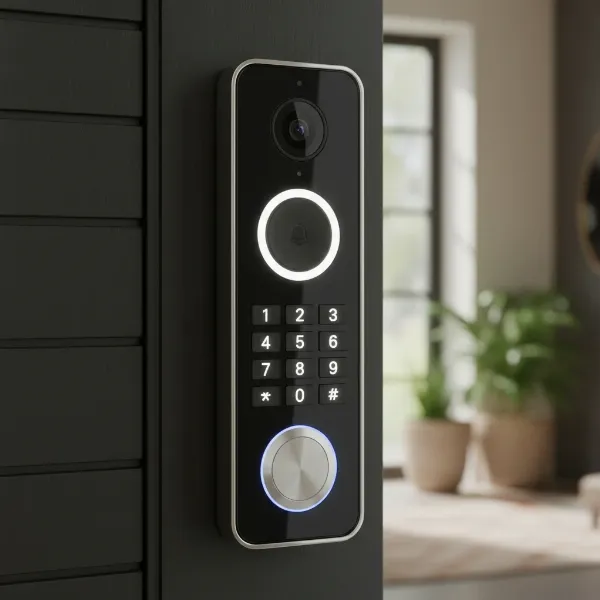 Front view of Eufy S330 smart lock with 2K camera, keypad, and fingerprint sensor
Key Features and Specifications of the Eufy Video Smart Lock S330
The Eufy S330 is packed with features designed to offer a seamless and secure user experience.
Multi-Method Access
One of the most praised aspects of the S330 is its versatility in unlocking methods, providing options for every situation. You can unlock your door using:
- Fingerprint Recognition: Boasting an impressive 99.6% first-attempt recognition rate, the fingerprint scanner provides ultra-fast access, often in as little as 0.3 seconds.
- Custom Passcodes: Create and manage unique codes for family members, guests, or service providers, with the ability to set temporary or scheduled access.
- Eufy Security App: Lock or unlock your door remotely from anywhere via your smartphone.
- Physical Key: A traditional keyway is discreetly integrated as a reliable backup.
- Voice Control: Compatible with Google Assistant and Amazon Alexa for hands-free operation.
|
Our Picks for the Best Smart Lock in 2026
As an Amazon Associate I earn from qualifying purchases.
|
||
| Num | Product | Action |
|---|---|---|
| 1 | ULTRALOQ U-Bolt Pro WiFi Smart Lock with Door Sensor, 8-in-1 Keyless Entry Door Lock with Fingerprint ID, App Remote Control, Built-in WiFi Keypad Deadbolt, Auto Unlock, IP65 Waterproof, Easy Install |

|
| 2 | eufy Security Smart Lock C220, Fingerprint Keyless Entry Door Lock, Built-in Wi-Fi, App Remote Control, Front Door Smart Deadbolt, IP53 Waterproof, 8-Months Battery, Nickel |
|
| 3 | Schlage Encode Smart WiFi Deadbolt Lock for Front Door - Keyless Entry with App or Touchscreen - Works with Alexa, Hey Google, & Airbnb - Create Codes for Guests - Matte Black |
|
| 4 | Philips Wi-Fi Door Lock, WiFi Smart Lock Keyless Entry Deadbolt for Front Door, Remote Control, Built-in WiFi, APP Fingerprint Passcode Unlock, Auto Locking |
|
| 5 | Electronic Passwords Keyless Entry Door Locks Smart Deadbolt Metal Lock Auto Time Delay Locking Secure Durable Low Battery Alert Type-C Port for Emergency Charging |
|
| 6 | TEEHO TE001 Keyless Entry Door Lock with Keypad - Smart Deadbolt Lock for Front Door with 2 Keys - Auto Lock - Easy Installation - Oil-Rubbed Bronze |
|
| 7 | eufy Security Smart Lock C220, Fingerprint Keyless Entry Door Lock, Built-in Wi-Fi, App Remote Control, Front Door Smart Lock Deadbolt, 8Months Battery, Reliable Power, IP53 Waterproof, BHMA Grade 3 |
|
| 8 | Philips Wi-Fi Door Lock, WiFi Smart Lock Keyless Entry Deadbolt for Front Door, Compatible with Alexa & Google Assistant, Remote Control, Built-in WiFi, APP Fingerprint Passcode Unlock, Auto Locking |
|
| 9 | TEEHO TE001 Keyless Entry Door Lock with Keypad - Smart Deadbolt Lock for Front Door with 2 Keys - Auto Lock - Easy Installation - Matte Black |
|
| 10 | TEEHO TE001 Keyless Entry Door Lock with Keypad - Smart Deadbolt Lock for Front Door with 2 Keys - Auto Lock - Easy Installation - Satin Nickel |
|
Integrated 2K HD Camera and Doorbell
The S330 features a 2K HD camera with a 160-degree wide field of view, providing clear visibility of your doorstep. The built-in video doorbell comes with a physical button that illuminates when someone approaches, making it easy for visitors to announce their arrival. Two-way audio allows you to communicate with guests or delivery personnel directly through the Eufy Security app.
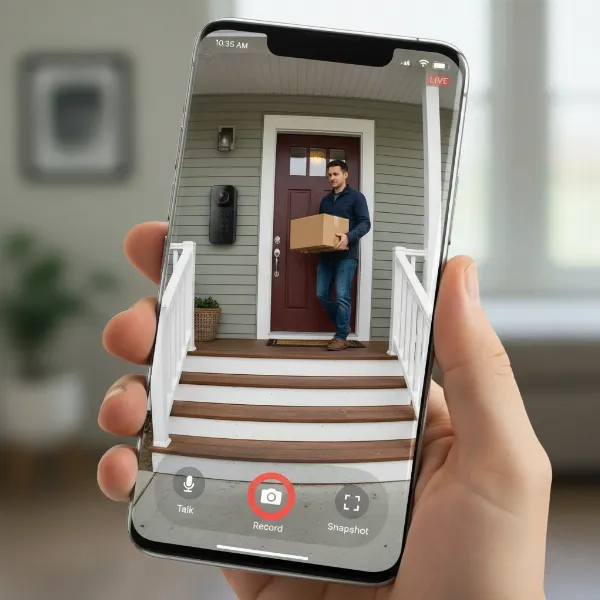 Smartphone screen displaying live 2K HD video feed from Eufy S330 smart lock
Advanced Motion Detection and Alerts
Beyond basic motion sensing, the S330 offers “Smart Detection” capabilities, including human detection, leaving detection, and even loitering detection. You can customize motion detection zones and sensitivity, receiving intelligent alerts directly to your phone. Video clips are recorded when motion is detected, ensuring you have a visual log of activity at your door.
Local Storage and No Subscription Fees
A significant advantage of the Eufy S330 is its commitment to local storage and a no-subscription model. Video recordings are stored locally on a WiFi Bridge/HomeBase, which is included with the lock and acts as a chime. This means you avoid recurring cloud storage fees, offering long-term savings and greater privacy control over your data. The Wi-Fi Bridge supports up to a 128GB SD card (not included) for expanded storage.
Power and Connectivity
The lock is powered by a large 10,000 mAh rechargeable battery, which can last for several months (up to 4.5 months with 17 daily activations based on some tests) before needing a recharge via USB-C. The included chime also functions as a Wi-Fi bridge, connecting the lock to your home network and enabling remote access and smart home integrations with platforms like Google Assistant and Alexa.
Pros and Cons: A Balanced Look at the S330
Like any advanced smart home device, the Eufy Video Smart Lock S330 comes with its own set of advantages and potential drawbacks.
Pros
- Exceptional Fingerprint Scanner: With a near-perfect first-attempt recognition rate, unlocking your door is fast and effortless.
- Excellent Battery Life: The substantial 10,000 mAh rechargeable battery offers extended usage, often exceeding Eufy’s estimates.
- Crisp 2K Video Quality: The integrated camera provides clear footage, allowing for easy identification of visitors.
- No Monthly Fees: Local storage via the included Wi-Fi Bridge means no ongoing subscription costs.
- Comprehensive Detection: Advanced human, leaving, and loitering detection offers enhanced security monitoring.
- Easy Installation and User-Friendly App: Many users find the setup process straightforward, and the Eufy Security app intuitive for managing the lock and its features.
- Multiple Entry Options: The variety of unlocking methods caters to different preferences and situations.
Cons
- Bulky Design: The S330 is larger than a typical deadbolt, and some users may find its size bulky on their door.
- Delayed Motion Detection: There can be a slight delay (a couple of seconds) in motion detection or recording initiation, potentially missing the very beginning of an event.
- Doorbell Button Visibility: Some visitors may not immediately notice the doorbell button, leading to confusion.
- Wi-Fi Connectivity Issues: While generally reliable, some users report the Wi-Fi connection can occasionally struggle with live feeds or two-way communication, especially if far from the router.
- BHMA Grade 3 Certification: The S330 is ANSI Grade 3 certified, which is the lowest security rating for residential locks. This raises concerns for some users regarding its physical security against advanced break-in methods like bump keys. For higher physical security, Eufy’s FamiLock S3 series offers Grade 1 certification.
Eufy S330 vs. Eufy E330: Choosing the Right Smart Lock
Eufy offers a similar model, the Video Smart Lock E330, which often leads to confusion. While both are 2K video smart locks with a 10,000 mAh battery, key differences set them apart.
| Feature | Eufy Video Smart Lock S330 | Eufy Video Smart Lock E330 |
|---|---|---|
| BHMA Certification | ANSI Grade 3 | Certified with 156.25 Mechanical Test-36 (less common) |
| Auto-Lock | Door sensor (locks when door is closed) | Countdown timer |
| Smart Detection | Human, leaving, loitering detection | Human detection only |
| Local Storage | Via included Wi-Fi Bridge/HomeBase (SD card support) | Built-in 8GB eMMC (non-expandable) |
| Chime | Included Wi-Fi Bridge acts as a chime | Chime purchased separately |
| Size/Weight | Slightly larger internal panel | Slightly smaller and lighter |
| Connectivity | Via Wi-Fi Bridge | Direct Wi-Fi (can be challenging if far from router) |
The S330 generally offers more advanced features like enhanced detection capabilities and a door sensor for auto-locking. Its included Wi-Fi Bridge provides expandable local storage and extends the chime sound. If comprehensive smart detection, expandable storage, and an included chime are priorities, the S330 is the more feature-rich option. However, if a slightly more compact design and direct Wi-Fi connectivity (provided your router is close) are preferred, the E330 might be suitable, though its physical security rating is also a consideration.
Installation and Setup Guide for the Eufy Video Smart Lock S330
Installing the Eufy S330 is a manageable DIY project, typically taking around 30-60 minutes.
Pre-Installation Checks
Before you begin, ensure your door is compatible. The S330 is designed to replace most standard deadbolts. Gather your tools, which typically include a screwdriver, measuring tape, and pencil. Fully charge the lock’s 10,000 mAh battery using the included USB-C cable before starting. Eufy recommends 5 to 6 hours for a full charge.
Mechanical Installation
- Remove Existing Lock: Carefully remove your current deadbolt, keeping any parts that might be needed for reference.
- Install Deadbolt: Insert the new deadbolt, ensuring the “TOP” indicator faces upward. Secure it with the provided screws. Check your backset depth (60mm or 70mm) and adjust the latch accordingly.
- Mount Exterior Assembly: Position the exterior smart lock escutcheon, running the cables underneath the deadbolt.
- Install Mounting Plate: Attach the mounting plate to the interior side of the door, aligning it with the exterior keypad’s screw receptacles.
- Connect Cables: Connect the electrical cables from the front lock to the back lock, ensuring they are tucked neatly inside the interior assembly.
- Install Interior Assembly: Secure the interior escutcheon to the mounting plate with screws.
App Setup and Calibration
- Download Eufy Security App: Install the Eufy Security app on your smartphone and create an account.
- Add Device: Follow the in-app instructions to add your S330. This typically involves scanning a QR code and connecting to the Wi-Fi Bridge.
- Calibrate Lock: The app will guide you through calibrating the lock, which involves closing and locking the door to ensure accurate operation.
- Set Passcode and Fingerprint: Configure your primary passcodes and register fingerprints for convenient access. You can add multiple fingerprints and passcodes for different users.
- Customize Settings: Adjust motion detection sensitivity, notification preferences, video settings (e.g., night vision), and auto-lock timers within the app.
Maintenance Tips and Troubleshooting
- Regular Charging: Keep an eye on the battery level via the app and recharge promptly.
- Clean Fingerprint Sensor: Periodically wipe the fingerprint sensor to ensure optimal performance.
- Wi-Fi Signal: Ensure your Wi-Fi Bridge is placed within good range of both your router and the lock for stable connectivity. If live feed lags, consider relocating the bridge or adding a Wi-Fi extender.
- Firmware Updates: Regularly update the lock’s firmware through the app for improved performance and security features.
- Common Issues: If the fingerprint reader is inconsistent, try re-registering your fingerprint or ensuring your finger is clean and dry. If the lock struggles with Wi-Fi, check the signal strength and placement of the Wi-Fi Bridge.
Essential Accessories for Your Eufy S330 Smart Lock
While the Eufy S330 is a comprehensive unit, a few accessories can enhance its functionality and your experience:
- MicroSD Card: Although the Wi-Fi Bridge provides local storage, an SD card (up to 128GB) is required to expand that storage for more recorded events.
- Extra Rechargeable Battery: Having a spare 10,000 mAh battery on hand ensures continuous operation without downtime during charging.
- Wi-Fi Extender: If your door is far from your router, a Wi-Fi extender can improve the lock’s connectivity and responsiveness.
These accessories aren’t strictly necessary for the lock to function, but they can significantly improve convenience and storage capacity.
“The true value of a smart lock isn’t just about keyless entry; it’s about the seamless integration of security, convenience, and monitoring that empowers homeowners.” – John Smith, Smart Home Security Expert
Conclusion
The Eufy Video Smart Lock S330 offers a powerful and convenient all-in-one solution for modern home security. Its combination of a fast fingerprint scanner, 2K video doorbell, multiple access methods, and local storage without subscription fees makes it a highly attractive option. While its bulkier size and Grade 3 BHMA certification might be considerations for some, its overall performance, ease of use, and comprehensive feature set position it as a strong contender in the smart lock market.
Investing in the Eufy S330 means embracing a smarter, more connected way to manage your home’s entry. Are you ready to upgrade your front door to a truly intelligent guardian?
Frequently Asked Questions
How long does the Eufy S330 battery last on a single charge?
The Eufy S330 features a 10,000 mAh rechargeable battery that can last approximately 3 to 4.5 months on a single charge, depending on usage frequency. This impressive battery life contributes to its low maintenance.
Does the Eufy S330 require a subscription?
No, the Eufy Video Smart Lock S330 does not require any monthly subscriptions. It utilizes local storage via the included Wi-Fi Bridge/Chime, which supports an SD card for storing video recordings and events.
Is the Eufy S330 compatible with existing smart home systems?
The Eufy S330 supports integration with popular smart home ecosystems like Google Assistant and Amazon Alexa, allowing for voice control and basic automation. However, it currently does not support Apple HomeKit or IFTTT.