The evolution of home security has brought us sophisticated smart locks, promising unparalleled convenience and robust protection. With features like keyless entry, remote access, and biometric scanning, many homeowners wonder if the traditional physical key has become obsolete. This question delves into the very core of smart lock reliability and security. Understanding whether a physical key backup remains necessary for your smart lock involves weighing modern technology against time-tested mechanical safeguards, ensuring you can always access your home, no matter the circumstance.
The Evolution of Home Security: Why Smart Locks?
Smart locks represent a significant leap forward from conventional deadbolts, integrating advanced technology to redefine home access. These intelligent devices connect to your home network, allowing for a suite of features designed to enhance both security and convenience. Beyond simply locking and unlocking a door, smart locks offer remote control via smartphones, customizable access codes for guests or service providers, real-time activity logs, and seamless integration with broader smart home ecosystems. The primary appeal lies in eliminating the need for traditional keys, reducing the risk of lost or duplicated keys, and providing greater control over who enters and exits your property. This technological shift promises a more flexible and responsive security solution for the modern homeowner.
The Core Dilemma: Physical Keys in a Keyless World
The fundamental promise of a smart lock is a future free from fumbling with keys. Imagine arriving home with groceries, unlocking your door with a fingerprint, or granting temporary access to a delivery driver from your office. This vision is a major draw for countless users. However, the integration of electronics introduces new potential failure points not present in purely mechanical locks. This reality forces a crucial question: does true keyless living mean abandoning the physical key entirely, or does a mechanical backup remain a vital safety net in an increasingly digital world? The debate centers on balancing cutting-edge convenience with fundamental reliability.
Arguments FOR a Physical Key Backup
Despite the allure of fully keyless living, many experts and manufacturers advocate for retaining a physical key backup in smart lock designs. This isn’t a sign of technological weakness, but rather a pragmatic approach to ensure access under any condition.
Unforeseen Circumstances: Battery Failures and System Glitches
|
Our Picks for the Best Smart Lock in 2026
As an Amazon Associate I earn from qualifying purchases.
|
||
| Num | Product | Action |
|---|---|---|
| 1 | Philips Wi-Fi Door Lock, WiFi Smart Lock Keyless Entry Deadbolt for Front Door, Compatible with Alexa & Google Assistant, Remote Control, Built-in WiFi, APP Fingerprint Passcode Unlock, Auto Locking |

|
| 2 | Philips Wi-Fi Door Lock, WiFi Smart Lock Keyless Entry Deadbolt for Front Door, Remote Control, Built-in WiFi, APP Fingerprint Passcode Unlock, Auto Locking |
|
| 3 | TEEHO TE001 Keyless Entry Door Lock with Keypad - Smart Deadbolt Lock for Front Door with 2 Keys - Auto Lock - Easy Installation - Oil-Rubbed Bronze |
|
| 4 | TEEHO TE001 Keyless Entry Door Lock with Keypad - Smart Deadbolt Lock for Front Door with 2 Keys - Auto Lock - Easy Installation - Satin Nickel |
|
| 5 | ULTRALOQ U-Bolt Pro WiFi Smart Lock with Door Sensor, 8-in-1 Keyless Entry Door Lock with Fingerprint ID, App Remote Control, Built-in WiFi Keypad Deadbolt, Auto Unlock, IP65 Waterproof, Easy Install |
|
| 6 | eufy Security Smart Lock C220, Fingerprint Keyless Entry Door Lock, Built-in Wi-Fi, App Remote Control, Front Door Smart Deadbolt, IP53 Waterproof, 8-Months Battery, Nickel |
|
| 7 | TEEHO TE001 Keyless Entry Door Lock with Keypad - Smart Deadbolt Lock for Front Door with 2 Keys - Auto Lock - Easy Installation - Matte Black |
|
| 8 | eufy Security Smart Lock C220, Fingerprint Keyless Entry Door Lock, Built-in Wi-Fi, App Remote Control, Front Door Smart Lock Deadbolt, 8Months Battery, Reliable Power, IP53 Waterproof, BHMA Grade 3 |
|
| 9 | Schlage Encode Smart WiFi Deadbolt Lock for Front Door - Keyless Entry with App or Touchscreen - Works with Alexa, Hey Google, & Airbnb - Create Codes for Guests - Matte Black |
|
| 10 | Electronic Passwords Keyless Entry Door Locks Smart Deadbolt Metal Lock Auto Time Delay Locking Secure Durable Low Battery Alert Type-C Port for Emergency Charging |
|
The most common and immediate concern for any electronic device is power. Smart locks are battery-powered, and while they often provide low-battery warnings weeks in advance, these alerts can be missed. A completely drained battery renders the electronic locking mechanism inoperable. Similarly, software glitches, firmware errors, or even unforeseen hardware malfunctions can disable the smart features, leaving you locked out. In such scenarios, a mechanical key offers a simple, reliable override, ensuring entry when digital systems fail. This failsafe transforms a potentially frustrating or even dangerous situation into a minor inconvenience.
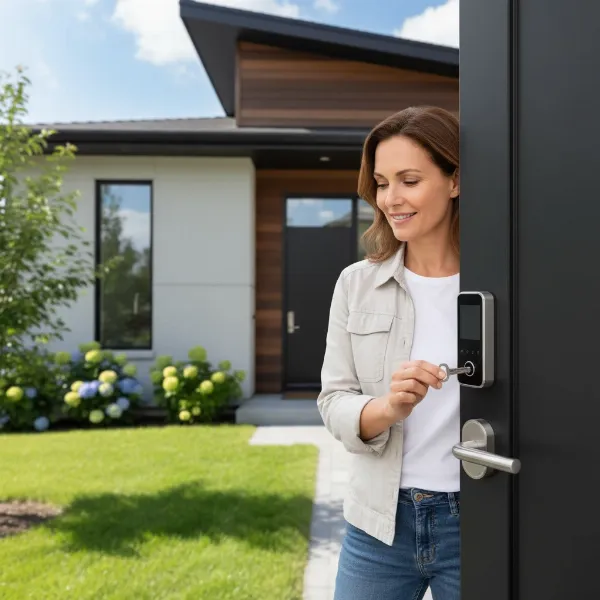 Homeowner using physical key to open smart lock with dead battery, emphasizing backup solution.
Regulatory Compliance and Peace of Mind
Many public safety standards and building codes actually mandate the inclusion of an emergency unlocking method for door locks, which often translates to a mechanical key. This regulatory requirement reflects a broader understanding that even the most advanced technology needs a fallback. Beyond compliance, a physical key provides significant psychological comfort for many homeowners. Knowing there’s a tangible, analog way to unlock your door, independent of power or Wi-Fi, offers a sense of security and control that purely electronic systems might not. It serves as an ultimate safeguard, a last resort that ensures you’re never truly stranded.
Traditional Security Layer
While smart locks introduce advanced digital security, the physical key backup integrates a traditional layer of mechanical security. Many smart locks conceal the keyhole, making it less visible and thus less susceptible to casual tampering. Furthermore, high-quality smart locks equipped with C-grade lock cylinders are designed to resist picking for extended periods, far exceeding the capabilities of most opportunistic burglars. This means that while the smart features offer convenience, the underlying mechanical structure, even with a keyway, remains robust. The physical key, when properly managed and secured, functions as a familiar and proven method of entry, complementing the digital aspects without necessarily compromising overall integrity.
Arguments AGAINST a Physical Key Backup
While the benefits of a physical key backup are clear, some argue that its inclusion can undermine the very principles of smart lock security and convenience. The push towards truly keyless designs highlights the perceived drawbacks of retaining mechanical vulnerabilities.
Potential Security Vulnerability
The most significant argument against a physical key backup is the potential security vulnerability it introduces. A lock, whether smart or traditional, is only as secure as its weakest point. A standard pin-tumbler keyway, even when concealed, can be susceptible to traditional lock-picking techniques or, more commonly, “bump key” attacks that can defeat many locks in seconds. If an intruder can bypass the mechanical keyway, the advanced electronic security features of the smart lock become irrelevant. For homeowners investing in smart technology for superior security, the presence of a pickable keyhole can feel like a step backward, creating a glaring chink in the digital armor.
Counteracting Keyless Convenience
One of the primary advantages of a smart lock is the freedom from carrying, losing, or duplicating physical keys. The need to keep a backup physical key, even if stored discreetly, somewhat diminishes this core benefit. Users might still find themselves searching for the backup key during an emergency, or simply facing the psychological burden of managing an additional physical item that the smart lock was supposed to replace. For those who fully embrace the keyless lifestyle, the physical key backup can feel like an unnecessary relic, a compromise that dilutes the ultimate convenience and simplicity that smart locks promise.
Advanced Alternatives for Emergency Access
Modern smart locks are increasingly sophisticated, offering multiple electronic backup methods that can negate the need for a physical key. Many models feature external power ports, such as USB-C or 9V battery terminals, allowing users to temporarily power the lock with a portable battery pack or even a standard phone charger. This means that even with a dead internal battery, a temporary power boost can enable electronic access. Furthermore, advanced smart locks provide explicit low-battery warnings through companion apps or LED indicators, often weeks before the battery completely drains, allowing ample time for replacement. Some high-security, fully keyless digital locks eschew the mechanical keyway entirely, relying solely on robust electronic and power backup systems, arguing that this offers a more secure and truly modern solution.
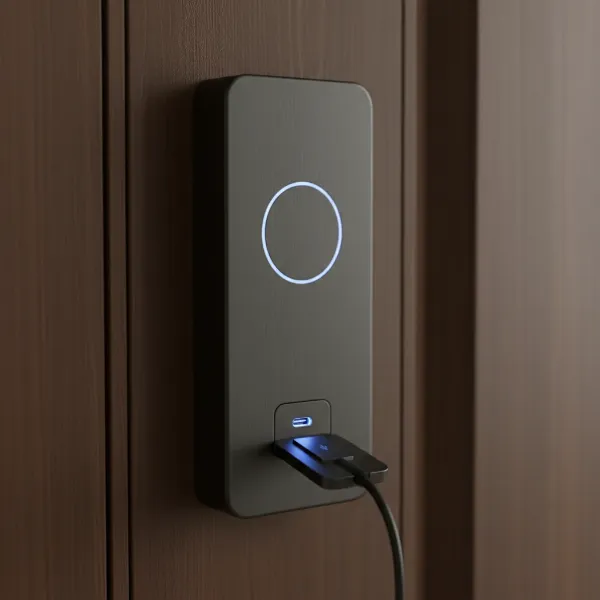 Sleek, modern keyless smart lock with visible USB-C charging port for emergency power.
Navigating Your Choice: When is a Physical Key Backup Right for You?
Deciding whether a physical key backup is necessary for your smart lock comes down to balancing your priorities: ultimate digital convenience versus absolute mechanical fail-safe.
Consider your comfort level with technology. If you prefer a traditional fallback for peace of mind, or if you live in an area prone to frequent power outages, a smart lock with a physical key override might be the best choice. Look for models where the keyway is well-concealed and features high-grade lock cylinders for added security.
Conversely, if you’re an early adopter who embraces cutting-edge technology and values absolute keyless convenience, you might gravitate towards fully keyless designs. In this case, ensure the lock offers robust electronic emergency access, such as USB-C charging ports and reliable low-battery alerts. Regardless of your preference, prioritize smart locks from reputable manufacturers known for strong security protocols and dependable engineering.
The Future of Smart Lock Security
The trajectory of smart lock technology points towards increasingly sophisticated and redundant electronic backup systems. We’re seeing more locks with integrated, long-lasting backup batteries and universal charging ports, making mechanical keys less critical for power-related issues. The debate will likely shift from if physical keys are needed to when we can confidently eliminate them, relying solely on highly secure, multi-layered digital and power-management solutions. However, the fundamental desire for a “never-fail” entry method means physical backups will likely remain an option, at least for the foreseeable future, catering to varied user preferences and regulatory landscapes. True security lies not in eliminating options, but in making each option as resilient as possible.
Conclusion
The question of whether a physical key backup is still necessary for smart locks remains a nuanced one, balancing the unparalleled convenience of smart technology with the foundational need for reliable access. While smart locks offer incredible features like remote control and keyless entry, physical keys provide an indispensable mechanical failsafe against electronic malfunctions or power outages. Many contemporary smart locks smartly integrate both, offering the best of both worlds with concealed, high-security keyways alongside advanced digital features. Ultimately, the ideal choice depends on individual comfort with technology, specific security concerns, and a preference for either total digital immersion or a reassuring physical backup. What level of preparedness best suits your peace of mind in securing your home?
Frequently Asked Questions
Do all smart locks come with a physical key backup?
No, not all smart locks include a physical key backup. While many mainstream models incorporate a mechanical keyway as an emergency override due to safety standards and consumer demand, some high-security or minimalist smart locks are designed to be entirely keyless, relying solely on electronic and power backup solutions.
What happens if my smart lock battery dies and I don’t have a physical key?
If your smart lock’s battery dies and you lack a physical key, most modern keyless locks offer alternative emergency access methods. These often include external power ports (like USB-C or 9V battery contacts) to temporarily power the lock, allowing you to use your code, fingerprint, or app to unlock the door.
Are smart locks with physical key backups less secure?
The security of a smart lock with a physical key backup depends on the quality of its mechanical cylinder. While a poorly designed keyway can be a vulnerability, many reputable smart locks use high-grade, pick-resistant cylinders that maintain a strong defense. The key is in the overall engineering and robust construction of the lock.
Can I install a smart lock that has no keyway?
Yes, you can install smart locks designed without a traditional keyway. These locks are often marketed as fully keyless and prioritize electronic security and advanced backup power options. They are chosen by users who want to eliminate the mechanical vulnerabilities associated with physical keys.
Where should I keep my physical backup key for a smart lock?
It is recommended to store your physical backup key in a secure location outside your home, but easily accessible in an emergency. This could be with a trusted neighbor, in a secure lockbox, or in your vehicle, ensuring it’s available if you’re locked out but not easily found by unauthorized individuals.