Imagine walking into your home with arms full of groceries, or settling into bed only to wonder if you remembered to lock the front door. In these moments, the appeal of a smart lock with voice control becomes undeniably clear. This technology offers unparalleled convenience, transforming your daily routine with simple spoken commands. But with such advanced features, a crucial question arises: how can you leverage voice control for your smart lock while ensuring your home remains absolutely secure?
This comprehensive guide will walk you through the world of voice-controlled smart locks, exploring how they work, the essential security measures to implement, and how to set them up with popular voice assistants. By the end, you’ll be equipped to confidently integrate this modern convenience into your home security strategy, enjoying both peace of mind and effortless control.
What is Smart Lock Voice Control and Why Use It?
Smart lock voice control refers to the ability to operate your door locks using spoken commands through a connected smart assistant. These intelligent systems integrate your smart lock with platforms like Amazon Alexa, Google Assistant, or Apple HomeKit/Siri, allowing for hands-free management of your home’s entry points.
The primary benefit of voice control is immense convenience. You can lock your doors as you leave the house with a quick “Alexa, lock the front door,” or check their status from across the room. This hands-free operation is particularly useful when your hands are full, or for individuals with mobility challenges, making daily tasks simpler and more accessible. Furthermore, voice control can be integrated into broader smart home routines, enabling you to secure your entire home with a single command, such as locking doors, turning off lights, and adjusting the thermostat as part of a “Goodnight” routine.
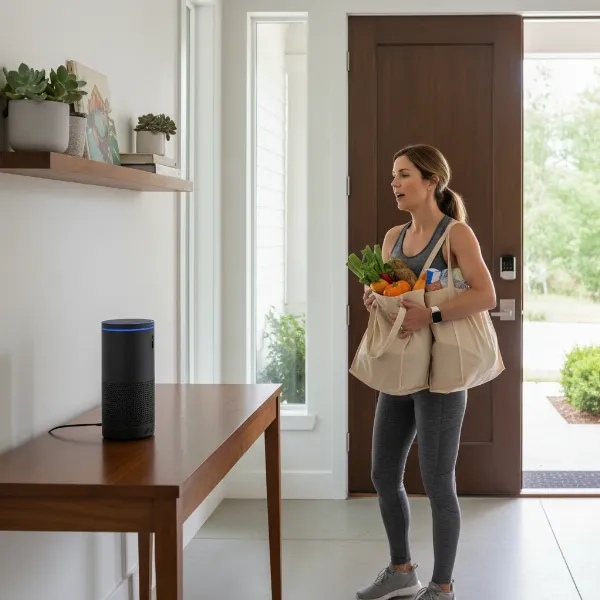 Woman with groceries using voice command for smart lock convenience
Navigating the Security Landscape of Voice-Controlled Smart Locks
While the convenience of voice-controlled smart locks is clear, security remains paramount. It’s essential to understand both the potential risks and the robust measures available to keep your home safe.
Understanding the Risks
|
Our Picks for the Best Smart Lock in 2026
As an Amazon Associate I earn from qualifying purchases.
|
||
| Num | Product | Action |
|---|---|---|
| 1 | Schlage Encode Smart WiFi Deadbolt Lock for Front Door - Keyless Entry with App or Touchscreen - Works with Alexa, Hey Google, & Airbnb - Create Codes for Guests - Matte Black |

|
| 2 | Philips Wi-Fi Door Lock, WiFi Smart Lock Keyless Entry Deadbolt for Front Door, Compatible with Alexa & Google Assistant, Remote Control, Built-in WiFi, APP Fingerprint Passcode Unlock, Auto Locking |
|
| 3 | TEEHO TE001 Keyless Entry Door Lock with Keypad - Smart Deadbolt Lock for Front Door with 2 Keys - Auto Lock - Easy Installation - Matte Black |
|
| 4 | ULTRALOQ U-Bolt Pro WiFi Smart Lock with Door Sensor, 8-in-1 Keyless Entry Door Lock with Fingerprint ID, App Remote Control, Built-in WiFi Keypad Deadbolt, Auto Unlock, IP65 Waterproof, Easy Install |
|
| 5 | Philips Wi-Fi Door Lock, WiFi Smart Lock Keyless Entry Deadbolt for Front Door, Remote Control, Built-in WiFi, APP Fingerprint Passcode Unlock, Auto Locking |
|
| 6 | TEEHO TE001 Keyless Entry Door Lock with Keypad - Smart Deadbolt Lock for Front Door with 2 Keys - Auto Lock - Easy Installation - Satin Nickel |
|
| 7 | Electronic Passwords Keyless Entry Door Locks Smart Deadbolt Metal Lock Auto Time Delay Locking Secure Durable Low Battery Alert Type-C Port for Emergency Charging |
|
| 8 | eufy Security Smart Lock C220, Fingerprint Keyless Entry Door Lock, Built-in Wi-Fi, App Remote Control, Front Door Smart Deadbolt, IP53 Waterproof, 8-Months Battery, Nickel |
|
| 9 | eufy Security Smart Lock C220, Fingerprint Keyless Entry Door Lock, Built-in Wi-Fi, App Remote Control, Front Door Smart Lock Deadbolt, 8Months Battery, Reliable Power, IP53 Waterproof, BHMA Grade 3 |
|
| 10 | TEEHO TE001 Keyless Entry Door Lock with Keypad - Smart Deadbolt Lock for Front Door with 2 Keys - Auto Lock - Easy Installation - Oil-Rubbed Bronze |
|
One of the most significant concerns for homeowners is the risk of unauthorized access. Could someone shout a command through an open window to unlock your door? While smart lock systems have evolved to address this, it was an early concern. Another potential vulnerability involves voice imitation or unauthorized individuals gaining access to your voice assistant device. Without proper safeguards, the same convenience that benefits you could, in theory, be exploited by others.
Essential Security Measures
Fortunately, smart lock manufacturers and voice assistant platforms have implemented multiple layers of security to mitigate these risks.
- PINs/Voice Codes for Unlocking: Most major voice assistants (like Amazon Alexa and Google Assistant) require a unique PIN or voice code to be spoken before they will execute an “unlock” command. This crucial step prevents casual or shouted commands from compromising your security. You can typically set this up within the voice assistant’s companion app.
- Multi-Factor Authentication: Apple HomeKit/Siri takes a slightly different approach, often requiring an authorized iOS device (like your iPhone or Apple Watch) to be physically present and unlocked to perform an “unlock” command via voice. This adds a layer of device authentication to your voice command.
- Activity Logs and Alerts: Nearly all smart locks maintain detailed activity logs, recording every lock and unlock event, including when and how the door was accessed. Paired with real-time alerts sent to your smartphone, you’re immediately notified of any activity, providing a transparent overview of your home’s security.
- Secure Network: Ensuring your home Wi-Fi network is secure with a strong password and WPA2/WPA3 encryption is fundamental. Your smart lock relies on this network for communication, so a robust network is your first line of defense.
- Regular Firmware Updates: Smart locks, like any connected device, receive firmware updates to patch vulnerabilities and introduce new security features. Always keep your lock’s firmware and your voice assistant’s software up to date.
- Unique, Strong Voice Commands: While some commands are standard, consider customizing phrases where possible, making them less obvious to outsiders.
- Placement of Voice Assistant Devices: Be mindful of where you place your smart speakers. Positioning them away from open windows or easily accessible areas can reduce the risk of commands being overheard or exploited by someone outside your home.
 Secure smart lock with voice assistant requiring PIN for access
Choosing the Right Voice Assistant for Your Smart Lock
The effectiveness and security features of voice control can vary slightly depending on the smart assistant you choose. The three dominant platforms are Amazon Alexa, Google Assistant, and Apple HomeKit/Siri.
Amazon Alexa
Alexa, found in Amazon Echo devices and integrated into many third-party smart products, is a popular choice for smart lock voice control. It supports a wide array of smart lock brands, including August, Yale, Schlage, and Aqara. For locking your door, a simple command like “Alexa, lock the front door” is usually sufficient. However, for unlocking, Alexa will prompt you for a previously set voice code, ensuring that only authorized individuals can gain entry. Setup typically involves enabling the smart lock’s “skill” within the Alexa app and linking your accounts.
Google Assistant
Google Assistant, available on Google Home/Nest devices and Android phones, also integrates seamlessly with many smart locks from brands like Nest x Yale, August, and Ultraloq. Like Alexa, Google Assistant allows easy voice commands for locking doors and checking their status (“Hey Google, lock the back door” or “Hey Google, is the garage door locked?”). For unlocking, Google Assistant also requires a security PIN, which is often configured within the Google Home app or the smart lock’s native app, providing an essential layer of protection.
Apple HomeKit/Siri
Apple’s HomeKit ecosystem, controlled by Siri on iOS devices (iPhones, iPads, Apple Watches) and HomePods, offers a highly integrated and often more restrictive approach to smart lock security. HomeKit-compatible locks, such as those from August and Schlage Sense, can be locked and unlocked via Siri. For unlocking, Siri typically requires your iOS device to be unlocked and physically in your hand, or confirmation on your Apple Watch. Standalone HomePod speakers generally do not permit voice unlocking directly, prioritizing security by requiring device authentication. You can also incorporate lock actions into HomeKit scenes, like a “Leaving Home” scene that locks all doors.
| Voice Assistant | Locking Command | Unlocking Security | Key Feature |
|---|---|---|---|
| Amazon Alexa | “Alexa, lock the [door name]” | Requires a user-set voice code/PIN | Broad compatibility with various brands |
| Google Assistant | “Hey Google, lock the [door name]” | Requires a user-set PIN | Seamless integration with Google ecosystem |
| Apple HomeKit/Siri | “Hey Siri, lock the [door name]” | Requires an unlocked iOS device in hand (or Apple Watch) | Strong focus on device authentication and privacy |
Step-by-Step Guide to Setting Up Secure Voice Control
Setting up voice control for your smart lock is a straightforward process, but following these steps carefully ensures both functionality and robust security.
Select a Compatible Smart Lock
Before anything else, choose a smart lock that is compatible with your preferred voice assistant. Brands like August, Yale, Schlage, Kwikset, Ultraloq, Aqara, Xiaomi, and Tapo offer a range of options. Look for clear indications of “Works with Alexa,” “Works with Google Assistant,” or “HomeKit Enabled” on the product packaging or specifications. Consider your door type, existing deadbolt, and desired features (e.g., auto-lock, activity logging).
Physical Installation
Once you have your smart lock, follow the manufacturer’s instructions for physical installation on your door. This usually involves removing your old deadbolt and installing the new smart lock. Most smart locks are designed for DIY installation, often requiring just a screwdriver and a few minutes. Ensure the lock is properly aligned and operates smoothly manually before proceeding with smart features.
Integrating with Your Voice Assistant
This is where the magic happens.
- Download the App: Ensure you have the native app for your smart lock (e.g., August app, Yale Access app) and your chosen voice assistant’s app (Amazon Alexa, Google Home, Apple Home).
- Set Up Smart Lock: Follow your smart lock’s app instructions to connect it to your home Wi-Fi or Bluetooth, create an account, and register your lock.
- Link Accounts:
- For Alexa: Open the Alexa app, navigate to “Skills & Games,” search for your smart lock brand’s skill, and enable it. You’ll be prompted to link your smart lock account.
- For Google Assistant: Open the Google Home app, tap the “+” icon, select “Set up device,” then “Works with Google.” Find your smart lock manufacturer, then sign in and authorize Google’s access.
- For HomeKit/Siri: Open the Apple Home app, tap “Add Accessory,” and use your iPhone camera to scan the HomeKit code (usually on the lock or its packaging). Follow the prompts to name your lock and assign it to a room.
- Discover Devices: After linking, your voice assistant app may automatically discover the new lock. If not, initiate a device discovery within the app (e.g., “Alexa, discover devices” or “Hey Google, sync my devices”).
Customizing Voice Commands and Security Settings
This is a critical step for secure operation.
- Set PINs/Voice Codes for Unlocking: Immediately after integration, access the settings for your smart lock within the Alexa or Google Home app. You will find an option to enable voice unlocking and set a secure PIN or voice code. Make this code unique, easy for you to remember, but difficult for others to guess or overhear.
- Define Voice Commands: While standard commands like “lock the front door” work, explore if your smart lock or voice assistant allows for custom phrases or routines.
- Create Routines/Scenes: Leverage routines (Alexa/Google Assistant) or scenes (HomeKit) to group actions. For example, a “Goodnight” routine could lock all doors, turn off lights, and arm your security system with one command.
Testing and Training
Thoroughly test your voice commands. Try locking and unlocking (with the PIN/code) from various distances and locations within your home. Ensure your voice assistant consistently recognizes your commands and that the lock responds as expected. Finally, educate all household members on how to use the system securely, emphasizing the importance of unlock PINs and safe command practices.
Maximizing Your Smart Lock’s Security with Voice Control
Beyond the basic setup, several advanced strategies can enhance both the security and convenience of your voice-controlled smart lock.
Consider leveraging advanced features like geofencing. This technology allows your smart lock to detect when you leave or enter a predefined perimeter around your home, automatically locking or unlocking doors based on your presence. This means you’ll never again have to wonder if you locked up after rushing out for work; your home can secure itself as you drive away.
Integrating your smart lock with other smart home devices significantly boosts overall security. Connect your lock with security cameras to visually verify who is at your door before granting access, even remotely. Link it with your alarm system so that locking your door automatically arms your home, or unlocking it disarms the system. You can even set up routines where locking the door triggers smart lights to turn on, creating an occupied appearance. These interconnected systems provide a more comprehensive and proactive defense for your home.
For optimal performance and longevity, regular maintenance is key. Always apply firmware updates for your smart lock and keep your voice assistant apps updated. These updates often include crucial security patches and new features. Periodically review your lock’s activity logs to monitor access patterns and quickly identify any unusual activity.
Essential Smart Lock Accessories for Enhanced Voice Control
While a smart lock and voice assistant are the core components, certain accessories can significantly improve your voice-controlled security setup.
- Smart Home Hub: For smart locks using Zigbee or Z-Wave protocols, a central smart home hub (like an Aeotec Smart Home Hub, Samsung SmartThings, or equivalent) acts as a bridge, enabling communication between your lock, other smart devices, and your Wi-Fi network. This is crucial for seamless voice control, especially if your lock doesn’t have built-in Wi-Fi.
- Dedicated Voice Assistant Devices: While your smartphone can issue voice commands, dedicated smart speakers (Amazon Echo, Google Nest Hub, Apple HomePod mini) offer always-on, hands-free convenience, making voice control more accessible throughout your home.
- Door/Window Sensors: These small sensors can be invaluable for enhanced voice control. They can confirm if a door is truly closed before a lock command is executed, prevent locking an open door, and trigger “door left open” alerts, giving you peace of mind.
- Battery Backup: Smart locks rely on power, typically batteries. Having a plan for battery replacement or even a small UPS (uninterruptible power supply) for your smart home hub can ensure your system remains operational during power outages.
Conclusion
Embracing voice control for your smart lock transforms how you interact with your home’s security, offering a blend of unmatched convenience and modern sophistication. From hands-free locking when your arms are full to integrating with sophisticated smart home routines, the benefits are clear. However, true smart home living lies in balancing these advantages with robust security. By understanding the inherent protections of voice assistants, implementing strong PINs for unlocking, staying diligent with updates, and thoughtfully integrating with other security devices, you can ensure your voice-controlled smart lock provides both effortless access and unwavering protection. Are you ready to speak your way to a more secure and convenient home?
Frequently Asked Questions
Is voice control for smart locks truly secure?
Yes, when configured correctly, voice control for smart locks is secure. Major voice assistants employ safeguards like mandatory PINs for unlocking and multi-factor authentication (e.g., requiring an unlocked phone for Siri) to prevent unauthorized access. Regular updates and secure network practices further enhance security.
Can someone outside my home unlock my door with a voice command?
Voice assistant platforms have implemented security measures to prevent this. For unlocking, most assistants require a specific PIN or voice code, or physical access to an authenticated device (like an unlocked smartphone for Siri). Placing your smart speaker away from open windows also adds a layer of protection.
Which voice assistant is best for smart lock security?
Each major voice assistant—Amazon Alexa, Google Assistant, and Apple HomeKit/Siri—offers strong security features. Alexa and Google Assistant use PINs for unlocking, while HomeKit/Siri often requires an unlocked iOS device in hand. The “best” choice often depends on your existing smart home ecosystem and personal preferences for security protocols.
What should I do if my voice assistant misinterprets a command?
If your voice assistant frequently misinterprets commands, first check for background noise or ensure you’re speaking clearly. Verify your lock’s firmware is updated and the voice assistant app is current. You may also need to retrain your voice assistant to recognize your voice more accurately within its app settings.
Do I still need a physical key with a voice-controlled smart lock?
Yes, it is highly recommended to keep a physical key as a backup. While voice control and other digital methods offer primary access, a physical key provides a reliable override in case of battery failure, Wi-Fi issues, or other unexpected technical problems.
