Encountering a “Motor Jammed” alert can be incredibly frustrating, halting the operation of your device and leaving you wondering what went wrong. Whether it’s your automatic gate, a smart lock, or another motorized appliance, this alert signals a critical issue that demands immediate attention. Understanding the root causes and knowing how to systematically troubleshoot can save you time, money, and restore your device’s functionality. As a seasoned technician, I’ve seen firsthand how these issues arise and the best ways to tackle them. This guide will walk you through diagnosing and resolving “Motor Jammed” alerts, empowering you to keep your systems running smoothly and securely.
Decoding the “Motor Jammed” Alert: What It Means for Your Device
A “Motor Jammed” alert indicates that the internal motor of your device is unable to complete its intended movement due to excessive resistance or a complete blockage. Essentially, the motor is working against an immovable force, triggering a safety mechanism to prevent damage to itself or the system it powers. This resistance can stem from various sources, ranging from simple obstructions to more complex mechanical or electrical failures.
This alert is a critical warning. Ignoring it can lead to overheating, motor burnout, or further damage to the device’s internal components. While the specific manifestation of a “motor jammed” alert might vary across devices—be it a smart lock struggling to retract a deadbolt, an automatic gate refusing to open, or a feeder unable to dispense—the underlying principle remains the same: something is impeding the motor’s operation.
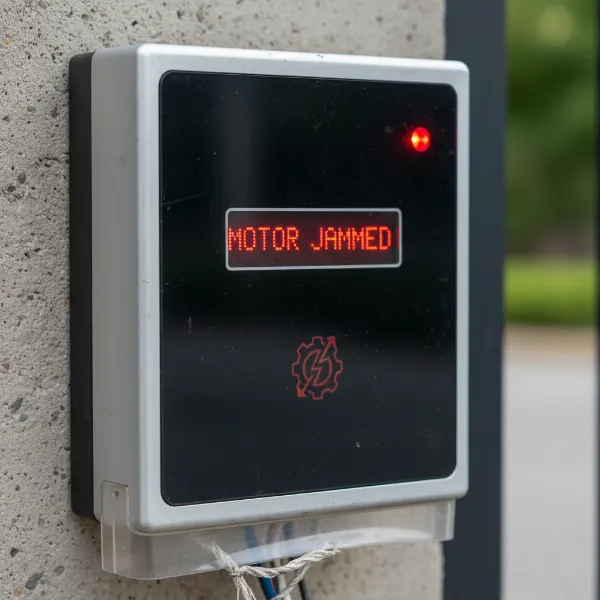 A device displaying a "Motor Jammed" alert, indicating internal motor blockage.
Common Culprits Behind a Jammed Motor
Identifying the exact cause of a jammed motor is the first step toward a successful resolution. Here are the most common reasons you might encounter this frustrating alert:
Physical Obstructions and Debris
|
Our Picks for the Best Smart Lock in 2026
As an Amazon Associate I earn from qualifying purchases.
|
||
| Num | Product | Action |
|---|---|---|
| 1 | Schlage Encode Smart WiFi Deadbolt Lock for Front Door - Keyless Entry with App or Touchscreen - Works with Alexa, Hey Google, & Airbnb - Create Codes for Guests - Matte Black |

|
| 2 | ULTRALOQ U-Bolt Pro WiFi Smart Lock with Door Sensor, 8-in-1 Keyless Entry Door Lock with Fingerprint ID, App Remote Control, Built-in WiFi Keypad Deadbolt, Auto Unlock, IP65 Waterproof, Easy Install |
|
| 3 | TEEHO TE001 Keyless Entry Door Lock with Keypad - Smart Deadbolt Lock for Front Door with 2 Keys - Auto Lock - Easy Installation - Oil-Rubbed Bronze |
|
| 4 | TEEHO TE001 Keyless Entry Door Lock with Keypad - Smart Deadbolt Lock for Front Door with 2 Keys - Auto Lock - Easy Installation - Matte Black |
|
| 5 | Philips Wi-Fi Door Lock, WiFi Smart Lock Keyless Entry Deadbolt for Front Door, Compatible with Alexa & Google Assistant, Remote Control, Built-in WiFi, APP Fingerprint Passcode Unlock, Auto Locking |
|
| 6 | TEEHO TE001 Keyless Entry Door Lock with Keypad - Smart Deadbolt Lock for Front Door with 2 Keys - Auto Lock - Easy Installation - Satin Nickel |
|
| 7 | Philips Wi-Fi Door Lock, WiFi Smart Lock Keyless Entry Deadbolt for Front Door, Remote Control, Built-in WiFi, APP Fingerprint Passcode Unlock, Auto Locking |
|
| 8 | eufy Security Smart Lock C220, Fingerprint Keyless Entry Door Lock, Built-in Wi-Fi, App Remote Control, Front Door Smart Lock Deadbolt, 8Months Battery, Reliable Power, IP53 Waterproof, BHMA Grade 3 |
|
| 9 | eufy Security Smart Lock C220, Fingerprint Keyless Entry Door Lock, Built-in Wi-Fi, App Remote Control, Front Door Smart Deadbolt, IP53 Waterproof, 8-Months Battery, Nickel |
|
| 10 | Electronic Passwords Keyless Entry Door Locks Smart Deadbolt Metal Lock Auto Time Delay Locking Secure Durable Low Battery Alert Type-C Port for Emergency Charging |
|
Often, the simplest explanation is the correct one. Foreign objects, debris, or even accumulated dirt and grime can physically impede a motor’s movement. For example, leaves, small stones, or ice can block the tracks of an automatic gate, while clumped feed might jam a dispenser. In smart locks, a tiny fragment lodged in the bolt mechanism could cause a jam.
Mechanical Wear and Misalignment
Over time, components can wear out or become misaligned. Worn gears, bent tracks, stiff hinges, or damaged couplings can create friction and resistance that the motor cannot overcome. For instance, a gate that has shifted off its alignment or a smart lock with a slightly misaligned deadbolt can put undue stress on the motor, leading to a jam. These issues are often a result of continuous use without proper maintenance.
Electrical and Power Supply Issues
A motor requires a consistent and adequate power supply to operate effectively. If the device isn’t receiving enough power, the motor might struggle and eventually jam. This could be due to a weak battery, loose or corroded electrical connections, a faulty fuse, a tripped circuit breaker, or even an issue with the power outlet itself. Without the necessary current, the motor lacks the torque to overcome even minor resistance.
Sensor Malfunctions (in automated systems)
Many automated systems, like automatic gates, rely on safety sensors to detect obstructions in their path. If these sensors are dirty, misaligned, or faulty, they can erroneously detect an obstruction, preventing the motor from operating or causing it to stop and “jam” as a safety measure. This is a common issue for outdoor devices constantly exposed to the elements.
Overload or Incorrect Operation
Sometimes, a motor jams because it’s being asked to do too much. Attempting to move something that exceeds the device’s weight capacity or operating it in conditions it wasn’t designed for (e.g., trying to force a frozen gate open) can lead to an overload. Similarly, incorrect calibration, such as setting a feeder to dispense more than its motor can handle, can result in increased load and a jam.
Your Step-by-Step Troubleshooting Guide
When faced with a “Motor Jammed” alert, a systematic approach is key. Follow these steps to diagnose and resolve the issue safely and efficiently.
Safety First: Disconnect Power
Before you begin any inspection or intervention, always disconnect the power to the device. For battery-operated devices like smart locks, remove the batteries. For wired devices, unplug them from the outlet or turn off the circuit breaker that controls the power supply. This crucial step prevents accidental activation, electrical shock, and further damage to the motor or yourself.
Conduct a Thorough Visual Inspection
With the power off, carefully examine the entire mechanism connected to the motor. Look for anything out of the ordinary:
- Obvious obstructions: Debris, tools, branches, or anything physically blocking moving parts.
- Damage: Bent components, frayed wires, cracked casings, or visible signs of wear and tear.
- Misalignment: Check if gates are off track, smart lock bolts aren’t aligning with the strike plate, or other moving parts are crooked.
- Accumulated dirt: Dust, grime, or rust that might impede movement.
Carefully Clear Any Obstructions
If you find any physical obstructions, carefully remove them. Use appropriate tools like pliers, brushes, or a vacuum cleaner to dislodge debris. For clumped materials, like in a feeder, you may need to empty and clean the container completely. Ensure that the path of the motor’s operation is completely clear and free of any foreign objects.
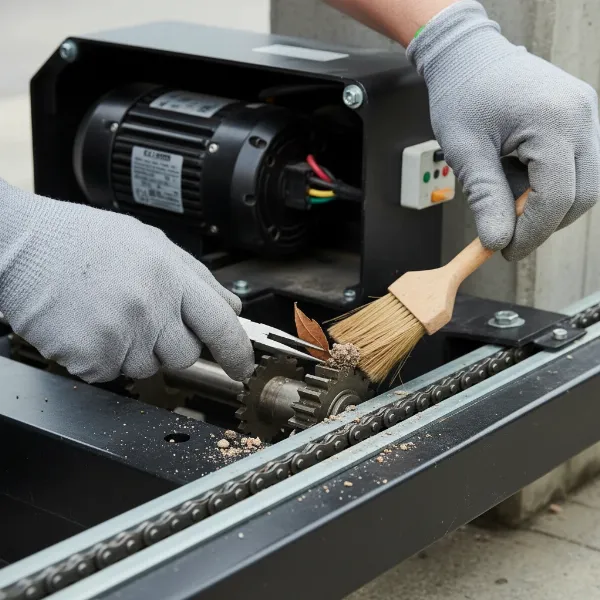 Hands carefully removing debris from a motor mechanism to clear an obstruction.
Verify Power Supply and Electrical Connections
Once obstructions are ruled out, turn your attention to the power supply:
- Check Batteries: Replace old or low batteries in battery-powered devices.
- Inspect Power Cords/Outlets: Ensure cords are securely plugged in and undamaged. Test the outlet with another appliance to confirm it’s working.
- Circuit Breakers/Fuses: Check your home’s electrical panel for tripped circuit breakers or blown fuses related to the device. Reset or replace as necessary.
- Wiring: Visually inspect accessible wiring for any cuts, frays, or loose connections. Tighten any loose terminals. If you notice any damaged wiring, it’s best to call a professional.
Examine and Test Mechanical Components
Manually test the movement of the parts the motor drives (if safe to do so). For example, try to manually slide a gate or extend/retract a smart lock bolt.
- Resistance: Does it move smoothly, or do you feel significant resistance or grinding?
- Lubrication: Check if moving parts (like gate hinges, tracks, or internal lock mechanisms) are adequately lubricated. Dry, rusty components can cause jams. Apply appropriate lubricant if needed, following manufacturer guidelines.
- Worn Parts: Look for signs of wear on gears, rollers, belts, or chains. Heavily worn parts may need replacement.
Address Sensor-Related Issues (if applicable)
For automated systems with sensors (like gate openers):
- Clean Sensors: Wipe down photo eyes or safety sensors with a soft, damp cloth to remove dirt, dust, or spiderwebs.
- Align Sensors: Ensure sensors are properly aligned and facing each other, if applicable. Refer to your device’s manual for specific alignment instructions.
Consider a System Reset or Recalibration
After checking the physical and electrical components, if the issue persists, a system reset can sometimes clear a temporary glitch. Disconnect power for a few minutes, then restore it. For some devices, especially those with programmable limits or intelligent features, recalibration might be necessary if the original settings are causing an overload. Consult your device’s manual for instructions on how to perform a factory reset or recalibration.
Lubrication and Preventative Maintenance
A “motor jammed” alert can often be a symptom of neglect. Regularly lubricating moving parts with the manufacturer-recommended lubricant and keeping the device clean can prevent many future jams. This is especially true for outdoor equipment or frequently used devices.
When Professional Help Becomes Essential
While many “Motor Jammed” alerts can be resolved with DIY troubleshooting, there are times when professional assistance is indispensable.
- Persistent Issues: If you’ve gone through all the troubleshooting steps and the alert reappears or the device still doesn’t function correctly, it’s time to call an expert.
- Complex Internal Damage: If your visual inspection reveals damaged internal gears, burnt wiring, or a visibly failing motor, these are repairs best left to a qualified technician. Attempting to fix complex internal components without specialized knowledge can lead to further damage or safety risks.
- Safety Concerns: Any repair involving high voltage, heavy machinery, or components that could cause injury should be handled by a professional. Never compromise your safety.
- Warranty Considerations: Attempting DIY repairs on a device still under warranty might void it. Check your warranty terms before proceeding with complex fixes.
Proactive Measures to Prevent Future Motor Jams
Prevention is always better than cure. By implementing a routine maintenance schedule, you can significantly reduce the likelihood of experiencing a “Motor Jammed” alert.
- Regular Cleaning: Keep the device and its surrounding area free of debris, dust, and grime. Pay special attention to tracks, hinges, and sensor lenses.
- Scheduled Lubrication: Apply the recommended lubricants to moving parts at regular intervals, as specified in your device’s manual.
- Avoid Overloading: Be mindful of your device’s capacity limits. Do not attempt to force it to move objects that are too heavy or operate it under conditions it wasn’t designed for.
- Prompt Attention to Minor Issues: Address unusual noises, slow operation, or minor misalignments immediately. Small issues can escalate into major problems if ignored.
- Proper Installation: Ensure that any motorized device is installed correctly and securely. A well-installed system is less prone to misalignment and mechanical stress.
“Many motor jams stem from simple neglect. A few minutes of proactive cleaning and lubrication can save hours of frustration and expensive repairs down the line.” – John Smith, Smart Lock & Automation Expert
Conclusion
A “Motor Jammed” alert, while disruptive, is a clear signal that your device needs attention. By understanding the common causes—from physical obstructions and mechanical wear to electrical faults and sensor issues—you can approach troubleshooting with confidence. Always prioritize safety by disconnecting power before inspection, and follow a systematic guide to identify and resolve the problem. While many issues are DIY-friendly, knowing when to call a professional ensures both your safety and the longevity of your device. Regular maintenance is your best defense against future jams, keeping your automated systems, including your smart locks, operating smoothly and reliably for years to come. What proactive steps will you take this week to ensure your motorized devices are running without a hitch?
Frequently Asked Questions
What exactly causes a motor to jam?
A motor jams when it encounters excessive resistance or a complete blockage, preventing its intended movement. This can be due to physical obstructions, worn-out mechanical parts, insufficient power supply, faulty safety sensors, or attempting to operate the motor beyond its design limits.
Can I safely fix a jammed motor myself?
Often, yes. Many motor jam issues can be resolved safely by the user, especially those caused by simple obstructions, dirty sensors, or minor power supply problems. However, always disconnect power first, and if the issue involves complex internal components, high voltage, or heavy machinery, it’s best to consult a professional to avoid injury or further damage.
How often should I perform maintenance to prevent motor jams?
Maintenance frequency depends on the device and its usage. For high-use items or outdoor equipment like gate openers, monthly visual checks and quarterly lubrication might be appropriate. For indoor devices or smart locks, a semi-annual check for obstructions and ensuring adequate power can be sufficient. Always refer to your device’s manufacturer manual for specific recommendations.