Upgrading to a smart lock promises convenience and enhanced security, but a door that’s even slightly out of alignment can quickly turn that promise into frustration. Unlike traditional locks you can force with a jiggle, smart locks rely on precise mechanics. When the deadbolt binds, the motor encounters resistance, causing “jammed” errors, rapid battery drain, or even complete failure to lock. Ensuring your door is perfectly aligned is not just about aesthetics; it’s fundamental to your smart lock’s reliability and longevity. This guide will walk you through diagnosing and fixing common door alignment issues, helping you achieve seamless smart lock operation.
What is Door Alignment and Why is it Crucial for Smart Locks?
Door alignment refers to how well your door fits within its frame, ensuring all components—the door slab, hinges, latch, and deadbolt—work together smoothly. For traditional locks, minor misalignment might go unnoticed because you can manually apply extra force to engage the bolt. Smart locks, however, operate with internal motors that have a set torque limit. If the deadbolt encounters resistance from a misaligned strike plate or frame, the motor will stop to protect itself, triggering error messages or preventing the lock from fully engaging. This sensitivity means that good door alignment is paramount for a smart lock to function correctly, extend battery life, and provide the security it’s designed for. Proper alignment ensures the latch meets the strike without lifting or dragging, the deadbolt throws fully into its pocket, and sensors accurately detect closed and locked positions.
Identifying Common Door Misalignment Issues
Before you grab your tools, knowing how to spot misalignment is key. Often, the signs are subtle until your smart lock starts acting up.
Visual Cues: Gaps, Uneven Reveals, Door Sag
|
Our Picks for the Best Smart Lock in 2026
As an Amazon Associate I earn from qualifying purchases.
|
||
| Num | Product | Action |
|---|---|---|
| 1 | Electronic Passwords Keyless Entry Door Locks Smart Deadbolt Metal Lock Auto Time Delay Locking Secure Durable Low Battery Alert Type-C Port for Emergency Charging |

|
| 2 | Philips Wi-Fi Door Lock, WiFi Smart Lock Keyless Entry Deadbolt for Front Door, Remote Control, Built-in WiFi, APP Fingerprint Passcode Unlock, Auto Locking |
|
| 3 | eufy Security Smart Lock C220, Fingerprint Keyless Entry Door Lock, Built-in Wi-Fi, App Remote Control, Front Door Smart Lock Deadbolt, 8Months Battery, Reliable Power, IP53 Waterproof, BHMA Grade 3 |
|
| 4 | ULTRALOQ U-Bolt Pro WiFi Smart Lock with Door Sensor, 8-in-1 Keyless Entry Door Lock with Fingerprint ID, App Remote Control, Built-in WiFi Keypad Deadbolt, Auto Unlock, IP65 Waterproof, Easy Install |
|
| 5 | TEEHO TE001 Keyless Entry Door Lock with Keypad - Smart Deadbolt Lock for Front Door with 2 Keys - Auto Lock - Easy Installation - Satin Nickel |
|
| 6 | eufy Security Smart Lock C220, Fingerprint Keyless Entry Door Lock, Built-in Wi-Fi, App Remote Control, Front Door Smart Deadbolt, IP53 Waterproof, 8-Months Battery, Nickel |
|
| 7 | TEEHO TE001 Keyless Entry Door Lock with Keypad - Smart Deadbolt Lock for Front Door with 2 Keys - Auto Lock - Easy Installation - Oil-Rubbed Bronze |
|
| 8 | Philips Wi-Fi Door Lock, WiFi Smart Lock Keyless Entry Deadbolt for Front Door, Compatible with Alexa & Google Assistant, Remote Control, Built-in WiFi, APP Fingerprint Passcode Unlock, Auto Locking |
|
| 9 | TEEHO TE001 Keyless Entry Door Lock with Keypad - Smart Deadbolt Lock for Front Door with 2 Keys - Auto Lock - Easy Installation - Matte Black |
|
| 10 | Schlage Encode Smart WiFi Deadbolt Lock for Front Door - Keyless Entry with App or Touchscreen - Works with Alexa, Hey Google, & Airbnb - Create Codes for Guests - Matte Black |
|
Look closely at your closed door. Do you see uneven gaps (reveals) between the door and the frame on the top, bottom, and sides? A properly aligned door should have consistent gaps all around. If the gap at the top is wider on one side and narrower on the other, or if the door rubs against the frame at a particular spot, these are visual indicators of misalignment. Sagging can also occur, where the top of the door appears to drop towards the strike side, causing friction.
Functional Cues: Door Binding, Difficulty Locking/Unlocking, Strange Noises
Pay attention to how your door closes. Does it drag or bind against the frame or the floor? Do you have to push or pull the door to get it to latch? When you manually try to lock or unlock the deadbolt with the door closed, does it feel tight, stiff, or require extra effort compared to when the door is open? Any resistance, grinding, or sticking indicates an issue. You might also hear unusual noises when the smart lock attempts to engage, signaling that it’s struggling.
Smart Lock Specific Cues: Error Messages, Repeated Attempts to Lock/Unlock, Battery Drain
Your smart lock itself provides direct clues. Frequent error messages like “jammed,” “failed to lock,” or “bolt not extended” are strong indicators of alignment problems. If the lock repeatedly tries to engage the deadbolt before succeeding, or if its battery life seems unusually short, the increased strain on the motor due to misalignment is likely the culprit. Smart locks typically have sensors that confirm the door is closed and locked, and misalignment can prevent these sensors from registering correctly.
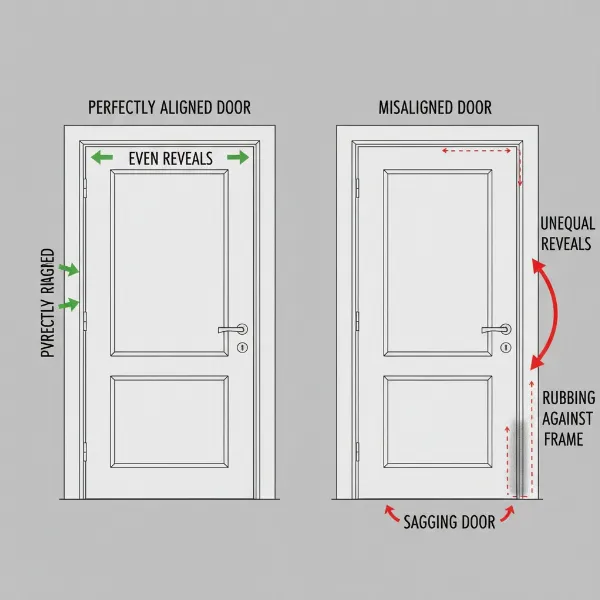 Visual cues of door misalignment showing uneven gaps, door sagging, and rubbing points.
Tools You’ll Need for Door Alignment
Most door alignment adjustments can be handled with basic household tools. Here’s a list of what you’ll likely need:
- Screwdriver set: Phillips and flathead, for hinges and strike plates.
- Chisel: For enlarging strike plate openings in the door frame.
- Utility knife or box cutter: For trimming weatherstripping.
- Hammer: For light tapping of strike plates or shims.
- Wood shims or cardboard pieces: To adjust strike plate depth or hinge position.
- Pencil: For marking adjustments.
- Tape measure: To check gaps and measurements.
- Lubricant spray (e.g., silicone spray): For hinges and latch mechanisms.
- Longer screws (3-inch or 4-inch): To replace short hinge screws that don’t bite into the door frame studs.
Step-by-Step Guide to Align Your Door for Smart Lock Perfection
Achieving perfect alignment for your smart lock typically involves a few key adjustments, starting with the most common culprits.
Check and Tighten Hinges: Addressing Door Sag
Door sag is a frequent cause of misalignment. Over time, hinge screws can loosen, or the door’s weight can pull them out of the jamb, causing the door to drop.
- Inspect hinges: Open the door and check for any loose screws on the hinges, both on the door side and the frame side.
- Tighten existing screws: Use a screwdriver to firmly tighten all visible hinge screws.
- Replace short screws with longer ones: For the top hinge (and possibly middle hinge), replace one screw in each hinge (on the frame side) with a 3-inch or 4-inch wood screw. These longer screws will bite into the framing studs behind the jamb, providing much stronger support and often lifting the door back into square. This is a common and effective fix for a sagging door.
Adjusting the Strike Plate: The Most Common Fix
The strike plate is where your deadbolt enters the door frame. Minor adjustments here can make a significant difference.
- Identify the exact point of contact: With the door closed, slowly try to engage the deadbolt. Note exactly where the bolt rubs against the strike plate or the wood of the door frame. You might see a shiny rub mark on the strike plate or a scuff on the wood.
- Mark the deadbolt position: Apply a small piece of painter’s tape over the strike plate area on the frame. Close the door and fully engage the deadbolt so it leaves an impression on the tape. This precisely shows where the deadbolt wants to go.
- Adjust the strike plate opening:
- If the deadbolt hits the top or bottom of the opening: Remove the deadbolt strike plate. Use a small, sharp chisel to carefully enlarge the opening in the wood frame, either upwards or downwards, to match your marking. Reinstall the strike plate, checking alignment.
- If the deadbolt hits the side of the opening: Remove the strike plate. Carefully chisel out the wood towards the direction the bolt needs to go. Sometimes, you may need to fill the original screw holes with wood filler or toothpicks and wood glue, then redrill new pilot holes slightly offset to move the entire strike plate horizontally.
- Adjust the strike plate depth: If the deadbolt engages but feels tight, or if the door doesn’t close flush with the frame, you might need to adjust the strike plate’s depth.
- For deeper engagement: Remove the strike plate and carefully chisel out a thin layer of wood from behind the plate.
- For shallower engagement: Remove the strike plate and place thin shims (e.g., small pieces of cardboard or specialized plastic shims) behind it before screwing it back into place. This brings the strike plate slightly forward.
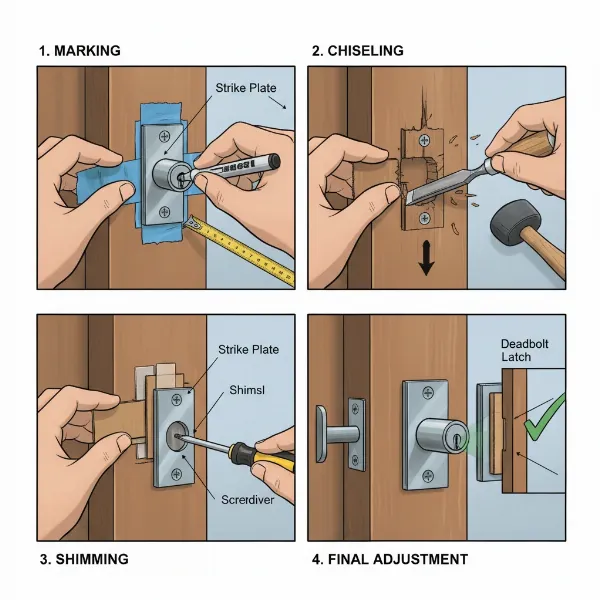 Step-by-step adjustment of a deadbolt strike plate using a chisel and shims.
Addressing Door Binding and Gaps: Minor Frame Adjustments, Weatherstripping
Sometimes, the entire door shifts, causing binding or uneven gaps.
- Adjust the latch strike plate: The strike plate for the primary door latch (not the deadbolt) often has a small, adjustable tab. Using a flathead screwdriver, gently pry this tab outwards. This will make the door close more snugly against the door stop and weatherstripping, potentially pulling the deadbolt into better alignment with its strike plate. This is an excellent first step if your door closes loosely.
- Check weatherstripping: Inspect the weatherstripping around your door. If it’s old, damaged, or too thick in certain spots, it can prevent the door from closing completely flush or create excessive resistance for the smart lock. Trim or replace damaged weatherstripping as needed. Ensure even compression when the door is closed.
- Minor frame adjustments: For slight binding, you might gently sand or plane the edge of the door or the inside of the door frame where it rubs. This should be done cautiously, removing very little material at a time.
Lubricating Moving Parts: Hinges, Latch
Lubrication can improve the overall smoothness of your door.
- Apply a silicone-based lubricant or a few drops of light machine oil to your door hinges.
- Spray a small amount of lubricant into the door latch mechanism.
- Wipe away any excess. This reduces friction and allows the door to move more freely, easing the smart lock’s job.
Advanced Tips and When to Call a Professional
While many alignment issues are DIY-friendly, some situations might require expert intervention.
- Checking door frame squareness: If your door frame itself is significantly out of square or plumb, it’s a more complex issue. You can check this with a carpenter’s square or a level. Major frame issues usually require a professional carpenter.
- Addressing warped doors: A severely warped door slab cannot be easily aligned with simple adjustments. Warping is often due to humidity or poor construction and may necessitate replacing the door.
- When to seek professional help: If you’ve tried the above steps and your smart lock continues to malfunction, or if you encounter structural issues with your door or frame (e.g., rotted wood, severely sagging frame that won’t tighten), it’s best to consult a professional locksmith or carpenter. They have specialized tools and expertise to diagnose and fix more complex problems.
Maintaining Optimal Door Alignment for Long-Term Smart Lock Performance
Once your door is perfectly aligned, a little maintenance goes a long way to keep your smart lock performing flawlessly.
- Regular checks: Periodically (e.g., every six months), perform the quick alignment check: slowly close the door, observe the latch and deadbolt movement, and check for even gaps.
- Preventative measures:
- Address humidity changes: In areas with significant humidity swings, wood doors can swell or shrink. Ensure good climate control in your home.
- Inspect hardware: Regularly check hinge screws and strike plate screws for looseness and tighten as needed.
- Importance of quality hardware: Investing in a well-constructed door and quality hinges can reduce the likelihood of alignment issues over time. If you’re installing a new door, ensure the installation is done professionally and precisely.
Conclusion
A perfectly aligned door is the silent hero behind every smoothly operating smart lock. By understanding the common signs of misalignment and knowing how to make essential adjustments to your hinges, strike plate, and door, you can prevent frustrating errors, extend battery life, and ensure your smart lock delivers the convenience and security you expect. Taking the time to properly align your door isn’t just a fix; it’s an investment in the seamless, reliable performance of your smart home security. Ready to experience the true potential of your smart lock?
Frequently Asked Questions
Why is my smart lock saying “jammed” even though nothing is blocking it?
A “jammed” error typically means the smart lock’s motor encountered resistance while trying to extend or retract the deadbolt. This is almost always due to the door being out of alignment, causing the deadbolt to rub against the strike plate or door frame, rather than an electronic malfunction.
Can old hinges cause smart lock problems?
Yes, absolutely. Loose, worn, or incorrectly installed hinges can lead to door sag, causing the door to drop and misalign with the strike plate. This misalignment puts extra strain on your smart lock, making it difficult for the deadbolt to engage smoothly.
How often should I check my door alignment for my smart lock?
It’s a good practice to perform a quick visual and functional check of your door alignment every six months, or immediately if you notice your smart lock starting to act inconsistently, display errors, or experience unusual battery drain.
Is it normal for my smart lock battery to drain quickly due to door alignment?
If your door is misaligned, the smart lock’s motor has to work harder and longer to overcome resistance each time it locks or unlocks. This increased effort consumes significantly more power, leading to much faster battery drain than under normal, smooth operating conditions.
Can I align my door myself, or do I need a professional?
Many common door alignment issues, such as tightening hinges or adjusting strike plates, can be successfully addressed by a homeowner with basic tools and a little patience. However, if the issue stems from a severely warped door or a structural problem with the door frame, a professional carpenter or locksmith may be necessary.