Have you ever paused to consider where that unique digital imprint of your finger goes when you unlock your phone or log into an app? In an era where biometric authentication has become commonplace, offering unparalleled convenience, a critical question arises: how secure is your fingerprint data, and more importantly, where is it actually stored? Understanding the mechanisms behind biometric data storage is crucial for safeguarding your digital identity and privacy in an increasingly connected world.
This comprehensive guide will demystify biometric data, explore its various storage locations, detail the robust security measures in place, and shed light on the inherent privacy risks, equipping you with the knowledge to navigate this technological landscape with confidence.
What is Biometric Data and Why is it Used?
Biometric data refers to unique physical or behavioral characteristics that can be used to identify an individual. These include fingerprints, facial patterns, iris configurations, voice patterns, and even gait. Unlike traditional passwords or PINs, which can be forgotten, lost, or stolen, biometric traits are intrinsically linked to you, making them a powerful tool for identity verification.
When you register your fingerprint, the system doesn’t store a raw image of it. Instead, it converts your unique print patterns into a complex mathematical representation, often called a “biometric template.” This template is a string of encrypted numbers and codes that represents your fingerprint’s distinct features. When you later attempt to authenticate, the system takes a new scan, converts it into a template, and compares it to the stored version. If they match, access is granted. This process is both highly secure and incredibly convenient, streamlining access to devices, applications, and services across various sectors like finance, healthcare, and personal security.
 Diagram showing a fingerprint being converted into an encrypted mathematical biometric template.
Where Are Your Fingerprint and Biometric Data Stored?
The storage location of your fingerprint and other biometric data is a primary determinant of its security. There are generally two main categories: on-device storage and server-based storage, with some variations.
On-Device Storage (Local)
For most personal devices like smartphones and laptops, your fingerprint data is primarily stored locally, directly on the device itself. This method is often considered the most secure for individual users because the data typically never leaves your device.
- Secure Enclaves and Trusted Execution Environments (TEEs): Modern smartphones (like Apple iPhones with Secure Enclave or Android devices with TEEs and Keystore) utilize specialized hardware components designed to isolate and protect sensitive data. Your fingerprint template resides within these secure areas, completely separate from the device’s main operating system. This isolation means that even if your device is compromised by malware or a hacker gains root access, the biometric data within the secure enclave remains inaccessible.
- Integrated Sensor Modules: Some biometric sensors, particularly in older or specialized devices, may store the template directly within the sensor module itself, performing the matching process onboard without involving the main processor or memory.
|
Our Picks for the Best Smart Lock in 2026
As an Amazon Associate I earn from qualifying purchases.
|
||
| Num | Product | Action |
|---|---|---|
| 1 | Philips Wi-Fi Door Lock, WiFi Smart Lock Keyless Entry Deadbolt for Front Door, Remote Control, Built-in WiFi, APP Fingerprint Passcode Unlock, Auto Locking |

|
| 2 | eufy Security Smart Lock C220, Fingerprint Keyless Entry Door Lock, Built-in Wi-Fi, App Remote Control, Front Door Smart Deadbolt, IP53 Waterproof, 8-Months Battery, Nickel |
|
| 3 | TEEHO TE001 Keyless Entry Door Lock with Keypad - Smart Deadbolt Lock for Front Door with 2 Keys - Auto Lock - Easy Installation - Matte Black |
|
| 4 | TEEHO TE001 Keyless Entry Door Lock with Keypad - Smart Deadbolt Lock for Front Door with 2 Keys - Auto Lock - Easy Installation - Oil-Rubbed Bronze |
|
| 5 | Electronic Passwords Keyless Entry Door Locks Smart Deadbolt Metal Lock Auto Time Delay Locking Secure Durable Low Battery Alert Type-C Port for Emergency Charging |
|
| 6 | Philips Wi-Fi Door Lock, WiFi Smart Lock Keyless Entry Deadbolt for Front Door, Compatible with Alexa & Google Assistant, Remote Control, Built-in WiFi, APP Fingerprint Passcode Unlock, Auto Locking |
|
| 7 | Schlage Encode Smart WiFi Deadbolt Lock for Front Door - Keyless Entry with App or Touchscreen - Works with Alexa, Hey Google, & Airbnb - Create Codes for Guests - Matte Black |
|
| 8 | ULTRALOQ U-Bolt Pro WiFi Smart Lock with Door Sensor, 8-in-1 Keyless Entry Door Lock with Fingerprint ID, App Remote Control, Built-in WiFi Keypad Deadbolt, Auto Unlock, IP65 Waterproof, Easy Install |
|
| 9 | TEEHO TE001 Keyless Entry Door Lock with Keypad - Smart Deadbolt Lock for Front Door with 2 Keys - Auto Lock - Easy Installation - Satin Nickel |
|
| 10 | eufy Security Smart Lock C220, Fingerprint Keyless Entry Door Lock, Built-in Wi-Fi, App Remote Control, Front Door Smart Lock Deadbolt, 8Months Battery, Reliable Power, IP53 Waterproof, BHMA Grade 3 |
|
When data is stored on-device, the organization implementing the biometric verification process often doesn’t have direct control over it, enhancing user privacy.
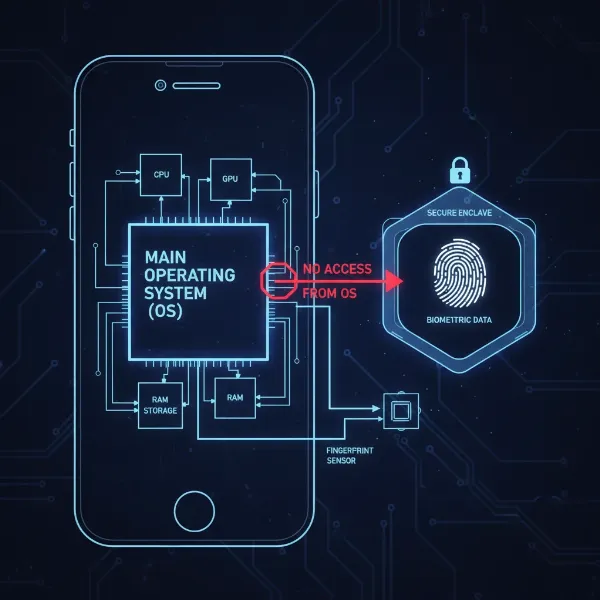 Visual representation of a smartphone's secure enclave protecting biometric data from the main OS.
Server-Based Storage (Cloud/Centralized)
While on-device storage is prevalent for personal authentication, large-scale identity verification systems, such as those used by governments, financial institutions, or national ID programs, may store biometric data on centralized servers or in the cloud.
- Centralized Databases: In these scenarios, your biometric template might be uploaded to and stored on secure remote servers. This allows for multi-location verification and easier management for large user bases.
- Hybrid Approaches: Some systems might employ a hybrid approach, storing a primary template on a server while a secondary, often less detailed, template is kept on the device for faster local authentication.
While server-based storage offers convenience for administrators, it introduces potential vulnerabilities. A single breach of a centralized server could expose a vast amount of sensitive biometric data, making robust security measures absolutely critical.
Other Storage Methods
Beyond the main categories, biometric data can also be found in other forms:
- Portable Tokens: Some high-security applications may store biometric templates on smart cards or USB tokens, requiring physical possession for authentication.
- Control Boards: Certain access control systems for buildings might store templates on dedicated control boards.
- Split Across Hardware: In advanced security systems, biometric data might even be split and stored across multiple pieces of hardware to prevent a single point of failure.
How is Biometric Data Secured?
Given the immutable nature of biometric data—you can’t change your fingerprint like you can a password—its security is paramount. Several layers of protection are employed to keep your biometric information safe:
- Data Minimization: The most fundamental security measure is that raw biometric images (like a full fingerprint scan) are almost never stored. Instead, only the mathematical “biometric template” is retained. This template is designed to be irreversible, meaning it’s computationally impossible to reconstruct your actual fingerprint image from the stored template.
- Encryption at Rest and in Transit: Your biometric template is heavily encrypted both when it is stored (at rest) and when it is transmitted across networks (in transit). Strong encryption algorithms, such as AES-256 for storage and TLS 1.3 for transmission, scramble the data, making it unreadable without the correct decryption key.
- Hardware-Backed Security: As mentioned, Secure Enclaves and Trusted Execution Environments are dedicated, isolated hardware components that act as fortresses for your biometric data. They operate independently from the main operating system, protecting data even from sophisticated software attacks.
- Access Controls and Authentication: Strict protocols ensure that only authorized applications or system processes can access biometric data. Multi-factor authentication (MFA) is often used for sensitive operations, requiring a fingerprint scan in conjunction with another factor like a PIN or password.
- Data Integrity and Tamper Detection: Cryptographic hashing and digital signatures are used to verify that the biometric data has not been altered or tampered with since its initial enrollment. Regular checks ensure the integrity of stored templates.
- Storage Limitation Principle: Responsible data handling dictates that biometric information should only be kept for as long as it is necessary for its intended purpose. Organizations are expected to have clear retention policies and processes to regularly review and delete unneeded data.
Understanding Biometric Privacy Risks
Despite the advanced security measures, storing biometric data carries unique privacy risks that users must understand.
The most significant risk stems from the immutable nature of biometrics. If a password or PIN is compromised, you can change it. If your fingerprint or facial scan is stolen, it’s permanently compromised because you cannot change your unique biological characteristics. This makes a biometric data breach far more severe than a password breach.
Potential risks include:
- Identity Theft: Compromised biometric data could lead to sophisticated identity theft, as it’s a fundamental identifier.
- Unauthorized Tracking and Surveillance: In centralized systems, the misuse of biometric data could enable unauthorized tracking or surveillance of individuals.
- Discriminatory Practices: Biometric data, especially facial recognition, has raised concerns about its potential use in discriminatory practices if not handled ethically and transparently.
- Spoofing: While difficult, advanced techniques could potentially create “spoofs” (fake fingerprints or faces) that might bypass less secure biometric systems.
“While biometric technology offers immense convenience, its immutability means that any compromise of your biometric data carries a lifelong risk to your identity. Vigilance in understanding how your data is handled is key.” – Dr. Anya Sharma, Cybersecurity Ethicist
Safeguarding Your Biometric Privacy
Protecting your biometric privacy requires a combination of informed choices and proactive measures:
- Choose Reputable Devices and Services: Opt for devices and services from established manufacturers known for their robust security features, particularly those that utilize hardware-backed secure enclaves for biometric storage.
- Understand Permissions: Be mindful of the permissions you grant to applications, especially those requesting access to your biometric sensors. Only provide access to trusted apps that genuinely require it.
- Be Skeptical of Centralized Systems: Exercise caution when enrolling your biometrics in large, centralized databases, particularly those without transparent privacy policies and strong data protection regulations.
- Keep Software Updated: Regularly update your device’s operating system and applications. These updates often include critical security patches that protect against newly discovered vulnerabilities.
- Use Strong Secondary Authentication: Even with biometrics, always maintain strong PINs, passwords, or passcodes as a fallback, and consider enabling multi-factor authentication whenever possible.
- Review and Manage Your Data: Periodically review the biometric data stored on your devices and in services, removing any unused or unnecessary enrollments.
Conclusion
Biometric authentication has undeniably revolutionized how we secure our digital lives, offering unparalleled ease and speed. However, this convenience comes with the critical responsibility of understanding where your most unique identifier—your fingerprint—is stored and how it’s protected. While on-device, hardware-backed storage within secure enclaves provides a high level of protection by keeping your biometric template isolated, server-based storage in large systems necessitates rigorous encryption and adherence to privacy regulations to mitigate risks. By staying informed about the security measures in place and exercising caution, you can embrace the benefits of biometrics while actively safeguarding your invaluable digital privacy.
What steps will you take today to better understand and protect your biometric footprint?
Frequently Asked Questions
Is it possible to recreate my actual fingerprint from the stored biometric template?
No, generally it is not possible to recreate your actual fingerprint from the stored biometric template. The template is a mathematical representation, not a raw image, and the process of creating it is designed to be irreversible for security purposes, preventing your original fingerprint from being reconstructed.
Is my fingerprint data ever sent to the cloud when I use my smartphone?
For most personal devices like smartphones, your fingerprint data, or more accurately its template, is stored securely within a dedicated hardware component (like a Secure Enclave or TEE) on the device itself and typically never leaves it. Cloud storage is more common for large-scale, centralized biometric systems.
What happens to my fingerprint data if I sell or lose my smartphone?
When you perform a factory reset on your smartphone, all personal data, including your biometric templates stored in the secure enclave, should be wiped from the device. This ensures that your fingerprint data is not accessible to a new owner, but always verify the reset process.
Are all biometric systems equally secure in storing fingerprint data?
No, not all biometric systems offer the same level of security. Systems utilizing hardware-backed secure enclaves or Trusted Execution Environments for on-device storage are generally considered more secure than those relying solely on software-based encryption or centralized server storage without robust safeguards.
Can my biometric data be hacked or spoofed?
While biometric systems are designed to be highly secure, no system is entirely immune to sophisticated hacking attempts or “spoofing” techniques (creating fake biometrics). Continuous advancements in security measures are necessary to mitigate these evolving threats and protect your data.