Imagine arriving home, hands full, and effortlessly gaining entry with a single touch. No fumbling for keys, no remembering complex passcodes – just instant, secure access. This convenience is at the heart of modern smart living, and fingerprint-enabled smart locks are leading the charge, particularly those engineered for lightning-fast recognition. If you’re looking to upgrade your home security with a blend of cutting-edge technology and unparalleled speed, understanding the top options in fingerprint smart locks is crucial. This comprehensive guide will delve into what makes these locks stand out, compare leading brands, and help you choose the perfect high-speed biometric solution for your home.
What Are Smart Locks? Why Should You Use Them?
Smart locks represent a significant evolution from traditional mechanical locks, integrating advanced technology to offer enhanced convenience, control, and security for your home or property. At their core, smart locks are electronic locking devices that can be controlled and monitored remotely or via various keyless entry methods. They typically employ technologies such as Bluetooth, Wi-Fi, Z-Wave, or Zigbee to communicate with your smartphone, smart home hub, or other connected devices.
The primary appeal of smart locks lies in their multifaceted benefits compared to conventional locks. Foremost among these is unparalleled convenience; users can unlock doors using a smartphone app, numerical keypad codes, RFID cards, voice commands, or, most notably for speed and simplicity, a fingerprint scan. This eliminates the need for physical keys, reducing the risk of being locked out or losing keys. Beyond convenience, smart locks bolster security through features like auto-locking, which ensures your door is always secured after a set period, and real-time activity logs that provide a digital record of who enters and exits your property. For property owners, smart locks simplify access management, allowing temporary or scheduled access for guests, cleaners, or service providers without needing to cut or retrieve physical keys. These devices are widely applied in various settings, from private residences and vacation rentals to offices and hotels, transforming how we secure and interact with our spaces.
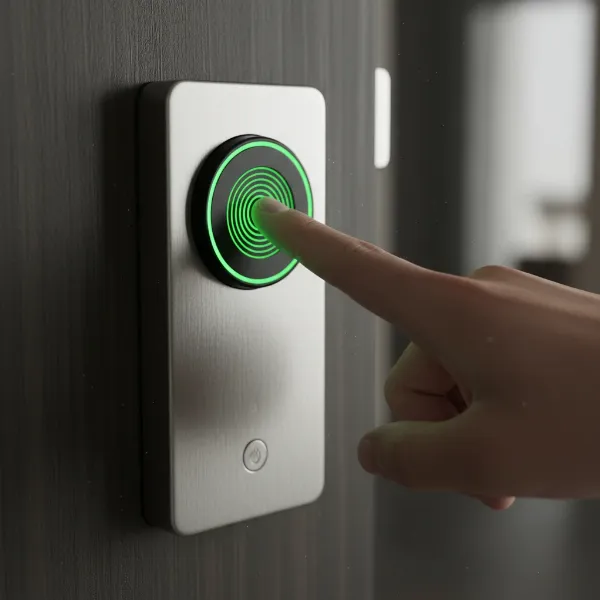 Close-up of a hand quickly unlocking a smart lock with a fingerprint.
Popular Types of Smart Locks
The smart lock market offers a diverse range of options, each leveraging different technologies to provide keyless entry and enhanced security. Understanding these types is essential when deciding which lock best fits your lifestyle and security needs.
Fingerprint Smart Locks
|
Our Picks for the Best Smart Lock in 2026
As an Amazon Associate I earn from qualifying purchases.
|
||
| Num | Product | Action |
|---|---|---|
| 1 | ULTRALOQ U-Bolt Pro WiFi Smart Lock with Door Sensor, 8-in-1 Keyless Entry Door Lock with Fingerprint ID, App Remote Control, Built-in WiFi Keypad Deadbolt, Auto Unlock, IP65 Waterproof, Easy Install |

|
| 2 | Electronic Passwords Keyless Entry Door Locks Smart Deadbolt Metal Lock Auto Time Delay Locking Secure Durable Low Battery Alert Type-C Port for Emergency Charging |
|
| 3 | TEEHO TE001 Keyless Entry Door Lock with Keypad - Smart Deadbolt Lock for Front Door with 2 Keys - Auto Lock - Easy Installation - Satin Nickel |
|
| 4 | TEEHO TE001 Keyless Entry Door Lock with Keypad - Smart Deadbolt Lock for Front Door with 2 Keys - Auto Lock - Easy Installation - Oil-Rubbed Bronze |
|
| 5 | Schlage Encode Smart WiFi Deadbolt Lock for Front Door - Keyless Entry with App or Touchscreen - Works with Alexa, Hey Google, & Airbnb - Create Codes for Guests - Matte Black |
|
| 6 | Philips Wi-Fi Door Lock, WiFi Smart Lock Keyless Entry Deadbolt for Front Door, Remote Control, Built-in WiFi, APP Fingerprint Passcode Unlock, Auto Locking |
|
| 7 | TEEHO TE001 Keyless Entry Door Lock with Keypad - Smart Deadbolt Lock for Front Door with 2 Keys - Auto Lock - Easy Installation - Matte Black |
|
| 8 | eufy Security Smart Lock C220, Fingerprint Keyless Entry Door Lock, Built-in Wi-Fi, App Remote Control, Front Door Smart Deadbolt, IP53 Waterproof, 8-Months Battery, Nickel |
|
| 9 | Philips Wi-Fi Door Lock, WiFi Smart Lock Keyless Entry Deadbolt for Front Door, Compatible with Alexa & Google Assistant, Remote Control, Built-in WiFi, APP Fingerprint Passcode Unlock, Auto Locking |
|
| 10 | eufy Security Smart Lock C220, Fingerprint Keyless Entry Door Lock, Built-in Wi-Fi, App Remote Control, Front Door Smart Lock Deadbolt, 8Months Battery, Reliable Power, IP53 Waterproof, BHMA Grade 3 |
|
Fingerprint smart locks utilize biometric technology to grant access, recognizing an individual’s unique fingerprint pattern. These locks are highly prized for their speed and ease of use; a quick scan is often all it takes to unlock your door, making them ideal when your hands are full. Many modern fingerprint scanners can recognize a print in less than a second, sometimes as quickly as 0.3 seconds. Key advantages include instant, keyless entry and a high level of security, as fingerprints are virtually impossible to duplicate. They are particularly suitable for busy households, individuals seeking ultimate convenience, or anyone who frequently forgets or misplaces keys. However, potential drawbacks can include occasional recognition issues with wet, dirty, or damaged fingers, and the need for a power source, typically batteries, to operate the biometric scanner.
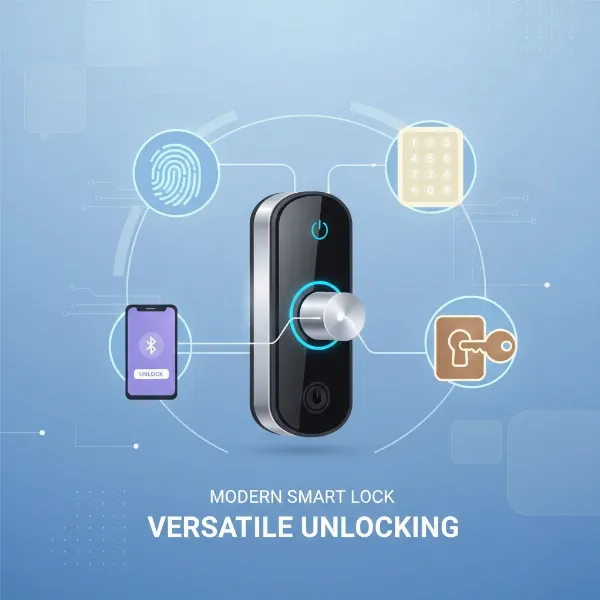 Illustration showing different ways to unlock a smart lock: fingerprint, keypad, phone app.
Passcode Smart Locks
Passcode smart locks rely on a numerical keypad where users enter a unique code to gain entry. These are among the most common types of smart locks, offering a straightforward and familiar method of keyless access. Benefits include the ability to create multiple user-specific codes, easy management of temporary access for guests, and the absence of physical keys. Many models also feature “anti-peeping” functions, allowing users to input random digits before or after their actual code to prevent others from guessing it based on finger smudges. Passcode locks are versatile and work well for families, rental properties, and offices. The main disadvantage is the reliance on memory, as forgetting a code can be frustrating, though most locks offer backup entry methods.
RFID Card Smart Locks
RFID (Radio-Frequency Identification) card smart locks grant access when a programmed card or tag is tapped or waved near the lock’s sensor. This technology is commonly found in hotels and commercial buildings but is increasingly available for residential use. They offer a fast and convenient entry method, similar to a physical key but with enhanced management capabilities. Owners can easily activate or deactivate cards, providing granular control over access. RFID card locks are excellent for environments with multiple users, such as businesses or large families, where issuing and revoking access is a frequent need. The primary con is the possibility of losing the RFID card, though many systems allow remote deactivation and offer alternative entry methods.
Remote Control Smart Locks
Remote control smart locks primarily rely on smartphone applications or dedicated remote fobs for locking and unlocking doors. These locks leverage Bluetooth or Wi-Fi connectivity, enabling users to control their door from anywhere with an internet connection. The advantage of remote control is paramount for convenience, allowing you to unlock the door for a visitor when you’re not home, check the lock status, or grant temporary access from afar. Many integrate with smart home ecosystems like Alexa, Google Assistant, or Apple HomeKit for voice control. While offering immense flexibility, a potential downside is reliance on smartphone battery life or internet connectivity, though most models include physical key backups.
Hybrid Smart Locks
Hybrid smart locks combine multiple unlocking methods into a single device, offering the utmost flexibility and redundancy. A common hybrid might include a fingerprint scanner, a numerical keypad, and Bluetooth/Wi-Fi connectivity for app control, often with a traditional key override. This multi-modal approach ensures that users always have a reliable way to enter, even if one method is temporarily unavailable (e.g., dead battery for fingerprint, forgotten code for keypad). Hybrid locks provide the best of all worlds, catering to diverse user preferences and mitigating the downsides of single-method locks. They are ideal for users who prioritize maximum convenience, security, and fail-safes. The only real “disadvantage” might be a slightly higher cost due to the integrated technologies.
Comparing Top Smart Lock Brands for Speed
When seeking the fastest fingerprint smart locks, several brands consistently stand out for their quick recognition times and robust performance. While specific models often dictate the exact speed, here’s a comparison of leading brands known for their rapid fingerprint access.
| Brand | Notable Fingerprint Models | Fingerprint Recognition Speed | Key Features Focused on Speed/Reliability | Other Notable Features |
|---|---|---|---|---|
| ULTRALOQ | Bolt Fingerprint, U-Bolt Pro | < 1 second (often 0.3-0.5s) | First to market with fingerprint, 99.8% accuracy, adaptive learning | Multiple unlock methods (up to 7-in-1), built-in Wi-Fi, durable, IP65 weather rating |
| eufy | E330, FamiLock S3 Max | 0.3 seconds | Advanced biometric recognition, high accuracy, integrated security features | 2K HD camera, video doorbell, multiple access methods, long battery life, IP65 weatherproof |
| Aqara | U100, N100 Zigbee | < 0.5 seconds (often < 300ms) | 3D semiconductor technology, 98.6-98.7% identification rate, multi-position recognition | Apple HomeKey, Matter-over-Thread support, NFC, UWB auto-unlock (U400), robust security |
| Desloc | D110 Plus, B200 | “Relatively speedy” | Reliable fingerprint sensor, anti-peeping keypad | Wi-Fi connectivity, multiple access methods, DIY friendly installation, aluminum alloy build |
| Lockly | Secure Plus, Visage Zeno Series | Fast | Patented PIN Genie keypad (digit scrambling), facial recognition (Visage) | Multiple entry options, offline access codes, strong encryption, high-grade materials |
| Yale | Assure Lock 2 (with fingerprint module) | Fast (optional module) | Seamless integration with smart home ecosystems, reliable sensor | Versatile design, various finishes, Matter compatibility, Apple HomeKey support, long battery life |
Ultraloq is frequently highlighted for its pioneering role and continuous innovation in fingerprint technology. Their locks, such as the Bolt Fingerprint, consistently deliver recognition and unlock times under one second, often cited as quick as 0.3 to 0.5 seconds, with a remarkable 99.8% accuracy rate. This makes them a top contender for users prioritizing speed.
eufy offers a strong proposition with models like the E330, boasting a 0.3-second fingerprint unlock. Their focus extends beyond just speed to comprehensive security, often integrating cameras and video doorbells directly into the smart lock, providing both rapid access and enhanced monitoring.
Aqara models, including the U100 and N100 Zigbee, are noted for their advanced 3D semiconductor fingerprint technology, achieving recognition in less than 0.5 seconds, some even under 300 milliseconds. Their high identification rates (over 98%) combined with support for modern smart home standards like Matter and Apple HomeKey make them a powerful choice.
Desloc locks, like the D110 Plus, are praised for their reliable and “relatively speedy” fingerprint readers. While not always boasting the absolute fastest times, they offer a solid balance of performance, affordability, and practical features like anti-peeping passcodes.
Lockly locks, particularly the Secure Plus, feature a reliable fingerprint reader. While specific speed metrics are less frequently quoted as explicitly as Ultraloq or eufy, Lockly emphasizes the overall secure and convenient experience, including their unique PIN Genie keypad which enhances security around numeric entry, indirectly contributing to a faster, more confident user experience. The Visage series further integrates facial recognition.
Yale with its Assure Lock 2, when equipped with the optional fingerprint module, offers fast and reliable biometric access. Yale’s strength lies in its long-standing reputation for lock reliability and its seamless integration with major smart home platforms, making it a dependable choice for those already invested in a smart ecosystem.
Choosing the right brand ultimately depends on a blend of desired speed, additional security features (like cameras or unique keypads), smart home compatibility, and budget. For sheer speed, Ultraloq, eufy, and Aqara often lead the pack.
Buying Guide: Choosing the Right Smart Lock
Selecting the perfect smart lock, especially one prioritizing fast fingerprint access, requires careful consideration of several factors to ensure it meets your specific needs and seamlessly integrates with your home.
Identify Your Usage Needs
Before diving into features, assess what you truly need. Consider your door type (e.g., deadbolt, lever, mortise) and its thickness, as compatibility varies between models. What level of security do you desire? Basic keyless entry, or advanced features like tamper alarms and video monitoring? Crucially, what is your budget? High-speed biometric locks can range significantly in price, so setting a realistic budget upfront will help narrow your choices. Think about who will be using the lock: is it just for you, or will multiple family members, guests, or service providers need access? This will influence the number of fingerprints or user codes the lock needs to store.
Key Features and Unlocking Methods
Beyond fingerprint scanning, evaluate the other unlocking methods offered. Many advanced locks are hybrid, providing multiple entry options such as a numerical keypad, smartphone app control (Bluetooth or Wi-Fi), traditional physical keys, or even RFID cards. For speed, look for locks that boast recognition times of 0.5 seconds or less. Consider connectivity: do you want a lock that integrates with your existing smart home system (Alexa, Google Home, Apple HomeKit, Matter)? Wi-Fi enabled locks offer remote control without a separate bridge, enhancing convenience. Smart features like auto-lock (to secure the door automatically), auto-unlock (when you approach), and activity logs are also valuable for daily use and security oversight.
Evaluate Security Standards and Technology
The security of your smart lock is paramount. Look for locks with ANSI/BHMA (American National Standards Institute/Builders Hardware Manufacturers Association) certifications, which indicate robust construction and resistance to forced entry. Grade 1 offers the highest residential security, followed by Grade 2 and 3. In terms of biometric technology, inquire about False Acceptance Rate (FAR) and False Rejection Rate (FRR) – lower percentages are better for both, indicating fewer unauthorized entries and fewer legitimate users being denied. Advanced features like liveness detection (to prevent spoofing with fake fingerprints), multi-position recognition (for awkward angles), and adaptive learning (where the sensor improves over time) contribute significantly to both security and speed. Ensure the lock uses strong encryption for data transmission if it connects to the internet.
Read User Reviews and Expert Opinions
Before making a final decision, delve into what other users and independent experts are saying. Online reviews often provide invaluable insights into the real-world performance of a lock, including its fingerprint recognition speed and reliability in various conditions (e.g., cold weather, wet fingers). Pay attention to comments regarding installation difficulty, battery life, app functionality, and customer support. Expert reviews from reputable tech and home security websites can offer detailed testing results and comparisons.
Choose a Reputable Supplier
Finally, purchase your smart lock from a reputable vendor or directly from the manufacturer. This ensures you receive an authentic product, valid warranties, and access to reliable technical support. Good customer service is crucial for smart home devices, as troubleshooting or setup assistance may be needed. A strong warranty also provides peace of mind, covering potential defects or issues with the advanced electronics.
Installation and Usage Guide
Installing and getting the most out of your fingerprint smart lock can be a straightforward process, but understanding some key steps and maintenance tips will ensure optimal performance and longevity.
Basic Installation Steps
Most smart locks are designed for DIY installation, typically replacing an existing deadbolt. While exact steps vary by model, the general process involves:
- Remove Old Lock: Unscrew and remove your current deadbolt.
- Install New Deadbolt Latch: Insert the new latch into the door’s edge, ensuring it’s oriented correctly.
- Mount Exterior Assembly: Place the exterior keypad/fingerprint unit onto the door, threading the cable through the door’s cross-bore hole.
- Install Interior Mounting Plate: Secure the mounting plate on the interior side, connecting the cable.
- Attach Interior Assembly: Connect the cable to the interior smart lock unit and attach it to the mounting plate.
- Insert Batteries: Load the required batteries (usually AA) into the battery compartment.
- Calibrate/Program: Follow the manufacturer’s instructions to calibrate the lock, enroll fingerprints, and set up passcodes via the lock itself or its companion app.
Many manufacturers provide detailed video tutorials, which can be incredibly helpful. Ensure your door alignment is correct for smooth operation; a misaligned door can cause wear and tear on the smart lock’s motor.
Utilizing Smart Features
Once installed, explore the full suite of smart features.
- Fingerprint Enrollment: Carefully follow instructions for enrolling fingerprints. Most locks recommend enrolling multiple angles of the same finger to improve recognition accuracy and speed. Enroll fingerprints for all authorized users.
- App Control: Download the dedicated smartphone app. This is typically where you manage user access, view activity logs, set up temporary passcodes, and control the lock remotely (if Wi-Fi enabled).
- Auto-Lock/Unlock: Configure these convenient features to automatically lock your door after a set time or unlock it as you approach. Ensure the auto-unlock feature is reliable in your environment before relying solely on it.
- Smart Home Integration: Connect your lock to your smart home ecosystem (Alexa, Google Home, Apple HomeKit) to enable voice commands and integrate it into automated routines. For instance, have your lights turn on when you unlock the door.
Maintenance and Longevity Tips
Regular maintenance can significantly extend the life and performance of your smart lock:
- Battery Management: Smart locks are battery-powered. Pay attention to low-battery alerts in the app or on the lock. Replace batteries proactively, typically every 6-12 months depending on usage and type (lithium batteries often last longer). Keep spare batteries handy. Many locks have emergency power ports (e.g., USB-C or 9V battery terminals) for temporary power if batteries die.
- Sensor Cleaning: Periodically clean the fingerprint scanner and keypad with a soft, dry, lint-free cloth to remove dirt, oils, and residue.
