Smart locks have revolutionized home security, offering unparalleled convenience and control at your fingertips. While a basic smart lock provides a fantastic upgrade from traditional deadbolts, its true potential for seamless integration and robust management is often unlocked by essential accessories: Wi-Fi bridges and keypads. These components don’t just add features; they transform your smart lock into a comprehensive, interconnected security system, offering peace of mind whether you’re at home or miles away.
This article will delve into the world of smart lock accessories, highlighting how Wi-Fi bridges and keypads function, the myriad benefits they bring, and how to select the perfect additions to your smart home ecosystem. We’ll explore their capabilities, provide a guide to choosing compatible options, and offer insights into installation and maintenance, ensuring you maximize your smart lock’s performance and bolster your home’s security.
Understanding Smart Lock Accessories: Wi-Fi Bridges and Keypads
To truly appreciate the value these accessories offer, it’s vital to grasp their individual roles. A Wi-Fi bridge acts as a crucial link, translating signals between your smart lock and your home’s Wi-Fi network. Many smart locks primarily use Bluetooth for local communication, which is energy-efficient but limited in range. The bridge extends this local Bluetooth connection to your internet router, enabling global access and broader smart home integration.
A smart lock keypad, on the other hand, provides a physical interface for keyless entry using numerical codes. While many smart locks offer app-based unlocking, keypads serve as a practical alternative, granting access without the need for a smartphone or traditional keys. Both accessories are not mere add-ons; they are fundamental enhancements that elevate the functionality, convenience, and overall security of your smart lock system, moving beyond basic app control to create a truly connected and versatile home access solution.
Wi-Fi Bridges: The Gateway to Remote Control and Smart Home Integration
The Wi-Fi bridge is arguably the most transformative accessory for a Bluetooth-enabled smart lock, acting as its vital link to the digital world. This small device typically plugs into a standard power outlet, establishing a Bluetooth connection with your smart lock and a Wi-Fi connection with your home router. This dual connectivity allows your smart lock to communicate with the internet, opening up a realm of possibilities that local Bluetooth alone cannot provide.
 Diagram showing smart lock connecting to internet via Wi-Fi bridge for remote access
The benefits of integrating a Wi-Fi bridge are extensive:
- Remote Lock/Unlock & Monitoring: Imagine needing to let a family member in when you’re stuck in traffic, or checking if you remembered to lock the door after leaving for vacation. A Wi-Fi bridge enables you to lock and unlock your door from anywhere in the world using your smartphone app, as well as confirm its real-time status.
- Guest Access Management: Remotely create, modify, or revoke temporary access codes for guests, dog walkers, or service providers. This eliminates the need for physical key exchanges and allows for precise control over who enters your home and when.
- Real-time Alerts & Activity Logs: Receive instant notifications on your smartphone whenever your door is locked, unlocked, or if there’s any unusual activity. The bridge ensures your activity feed is always up-to-date, providing a comprehensive audit trail of all entry and exit events.
- Seamless Smart Home Integration: A Wi-Fi bridge is essential for connecting your smart lock with popular smart home ecosystems like Amazon Alexa, Google Assistant, and Apple HomeKit. This integration allows for voice control commands to lock or unlock your door, as well as the ability to incorporate your lock into automated routines.
- Automatic Firmware Updates: A constant internet connection via a bridge ensures that your smart lock receives automatic firmware updates, keeping its software current with the latest security patches and feature enhancements without manual intervention.
While many smart locks initially rely on Bluetooth for energy efficiency, a Wi-Fi bridge overcomes its range limitations. Without a bridge, your smart lock’s app control and notifications are typically restricted to when you are within Bluetooth proximity. Some advanced smart locks, such as the Schlage Encode Plus or Yale Assure Lock 2, come with built-in Wi-Fi capabilities, negating the need for a separate bridge accessory. However, for many popular retrofit locks like August and Level, a dedicated Wi-Fi bridge (e.g., August Connect, Yale Connect, Level Connect) is a necessary component to unlock these powerful remote features.
Smart Lock Keypads: Convenience at Your Fingertips
While remote control via a Wi-Fi bridge offers incredible flexibility, a smart lock keypad provides a foundational layer of convenience and accessibility that’s hard to beat. Keypads offer a tactile, code-based entry system, serving as a reliable alternative or complement to smartphone unlocking and traditional keys.
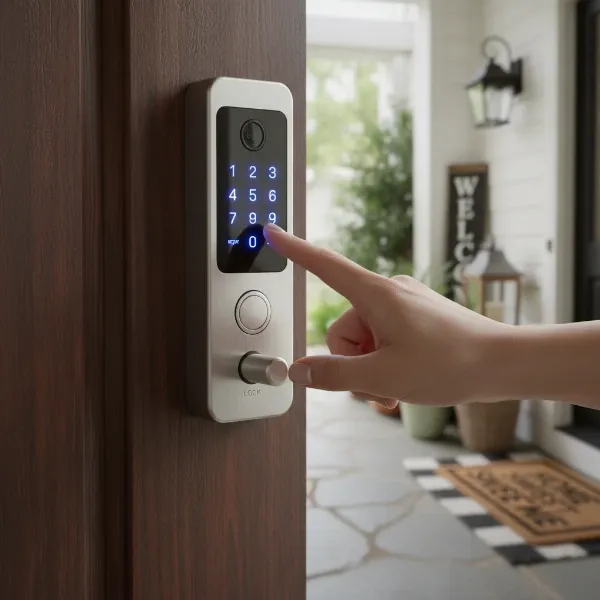 Person typing code on a smart lock keypad on a modern front door
The advantages of integrating a keypad into your smart lock setup are significant:
- Keyless Convenience: For moments when your phone battery is dead, or you simply prefer not to carry keys, a keypad allows quick and easy access with a memorable code. This is particularly useful for children, elderly family members, or anyone who might not have a smartphone.
- Easy Guest and Service Provider Access: Keypads simplify granting temporary access to visitors, babysitters, cleaners, or maintenance personnel. You can provide them with a unique code that can be easily set, changed, or deactivated from your smart lock app, often even remotely if paired with a Wi-Fi bridge.
- Reliable Backup Entry Method: A keypad acts as an excellent backup if your primary unlocking method, such as your smartphone or smart key, is unavailable. This ensures you’re never locked out due to technical glitches or forgotten devices.
- Enhanced Security Features: Many modern keypads incorporate advanced security measures. For instance, “anti-peep” technology allows you to enter random digits before or after your actual code, preventing onlookers from discerning your true PIN. Some keypads also feature randomized number displays to prevent fingerprint analysis, adding another layer of protection against unauthorized access.
Keypads can be either integrated directly into the smart lock itself, as seen in many Schlage and Yale models, or offered as standalone accessories, such as the August Smart Keypad. Integrated keypads provide a sleek, all-in-one solution, while standalone options offer flexibility for smart locks that don’t include this feature natively. Regardless of the type, a keypad significantly enhances the user experience by providing diverse and secure entry options for every scenario.
Choosing the Right Wi-Fi Bridge and Keypad for Your Smart Home
Selecting the ideal Wi-Fi bridge and keypad involves careful consideration to ensure seamless integration and optimal performance within your existing smart home ecosystem. It’s not just about features, but also compatibility, security, and ease of use.
Compatibility is Key
|
Our Picks for the Best Smart Lock in 2026
As an Amazon Associate I earn from qualifying purchases.
|
||
| Num | Product | Action |
|---|---|---|
| 1 | TEEHO TE001 Keyless Entry Door Lock with Keypad - Smart Deadbolt Lock for Front Door with 2 Keys - Auto Lock - Easy Installation - Matte Black |

|
| 2 | TEEHO TE001 Keyless Entry Door Lock with Keypad - Smart Deadbolt Lock for Front Door with 2 Keys - Auto Lock - Easy Installation - Satin Nickel |
|
| 3 | Schlage Encode Smart WiFi Deadbolt Lock for Front Door - Keyless Entry with App or Touchscreen - Works with Alexa, Hey Google, & Airbnb - Create Codes for Guests - Matte Black |
|
| 4 | TEEHO TE001 Keyless Entry Door Lock with Keypad - Smart Deadbolt Lock for Front Door with 2 Keys - Auto Lock - Easy Installation - Oil-Rubbed Bronze |
|
| 5 | eufy Security Smart Lock C220, Fingerprint Keyless Entry Door Lock, Built-in Wi-Fi, App Remote Control, Front Door Smart Lock Deadbolt, 8Months Battery, Reliable Power, IP53 Waterproof, BHMA Grade 3 |
|
| 6 | Electronic Passwords Keyless Entry Door Locks Smart Deadbolt Metal Lock Auto Time Delay Locking Secure Durable Low Battery Alert Type-C Port for Emergency Charging |
|
| 7 | eufy Security Smart Lock C220, Fingerprint Keyless Entry Door Lock, Built-in Wi-Fi, App Remote Control, Front Door Smart Deadbolt, IP53 Waterproof, 8-Months Battery, Nickel |
|
| 8 | Philips Wi-Fi Door Lock, WiFi Smart Lock Keyless Entry Deadbolt for Front Door, Remote Control, Built-in WiFi, APP Fingerprint Passcode Unlock, Auto Locking |
|
| 9 | Philips Wi-Fi Door Lock, WiFi Smart Lock Keyless Entry Deadbolt for Front Door, Compatible with Alexa & Google Assistant, Remote Control, Built-in WiFi, APP Fingerprint Passcode Unlock, Auto Locking |
|
| 10 | ULTRALOQ U-Bolt Pro WiFi Smart Lock with Door Sensor, 8-in-1 Keyless Entry Door Lock with Fingerprint ID, App Remote Control, Built-in WiFi Keypad Deadbolt, Auto Unlock, IP65 Waterproof, Easy Install |
|
The foremost consideration is compatibility with your current smart lock. Most Wi-Fi bridges and standalone keypads are designed to work within specific brand ecosystems. For example, an August Connect bridge will only work with August smart locks, and a Yale Access Keypad pairs with Yale smart locks. Ensure the accessories you choose are explicitly listed as compatible with your smart lock model to avoid functionality issues. If you’re starting from scratch, consider buying a smart lock system that offers a complete suite of accessories.
Connectivity Options
Understand the connectivity standards your smart lock and desired accessories use.
- Bluetooth: Standard for most smart locks, providing local control.
- Wi-Fi (Built-in vs. Bridge): Locks with built-in Wi-Fi (e.g., Schlage Encode, Yale Assure Lock 2) do not require a separate bridge for remote access. For Bluetooth-only locks, a Wi-Fi bridge is essential for internet connectivity.
- Zigbee & Z-Wave: These are alternative smart home communication protocols that require a compatible hub, which might serve as a “bridge” for locks using these standards. Ensure your hub and lock speak the same language.
Security Features
Prioritize security, especially for keypads.
- ANSI Ratings: For the smart lock itself, look for an ANSI Grade 1 certification, indicating the highest level of residential security (often found in Schlage locks).
- Anti-Peep Technology: Keypads offering this feature allow you to enter random numbers before or after your actual code, deterring shoulder-surfing.
- Randomized Keypads: Some touchscreen keypads randomize digit placement to prevent fingerprint residue from revealing your code.
- Auto-Lock: Ensures your door locks automatically after a set period, a crucial security feature.
Ease of Installation & Setup
Consider whether you prefer a DIY-friendly installation or if professional help might be needed. Most Wi-Fi bridges are plug-and-play, requiring only pairing through an app. Standalone keypads often involve simple mounting with screws. Locks with integrated keypads typically follow the lock’s installation process. Look for clear instructions and user-friendly apps that guide you through programming codes and managing settings.
Battery Life & Power
Keypads are usually battery-powered (often AA or AAA batteries), so check the estimated battery life and ensure easy replacement. Wi-Fi bridges typically plug into a standard outlet and consume minimal power, ensuring continuous connectivity without frequent battery changes.
Budget & Brand Ecosystem
Weigh the cost of accessories against their added value. Sometimes, investing in a slightly more expensive smart lock with integrated Wi-Fi and keypad can be more cost-effective than buying separate accessories. Also, consider brand loyalty; sticking to a single brand often ensures the most seamless integration and user experience.
“Choosing the right smart lock accessories is about extending your control and convenience without compromising security. Think of them as the unsung heroes that complete your smart home’s defense system.” – Alex Chen, Smart Home Security Expert
Popular Wi-Fi Bridges and Keypads on the Market
The market offers a variety of reliable Wi-Fi bridges and keypads designed to enhance different smart lock brands. Here’s a look at some of the top contenders:
Top Wi-Fi Bridges
These devices are essential for bringing Bluetooth-only smart locks online, enabling remote access and smart home integration.
- August Connect: A highly popular choice for August Smart Locks, the August Connect seamlessly bridges your August lock to your home Wi-Fi, enabling remote locking/unlocking, guest code management, and integration with Alexa, Google Assistant, and HomeKit.
- Yale Connect Wi-Fi Bridge: Designed for Yale Smart Locks, this bridge offers similar functionalities to the August Connect, providing remote control, activity alerts, and smart home compatibility for Yale Assure series locks that don’t have built-in Wi-Fi.
- Level Connect: For the discreet Level Lock, the Level Connect Wi-Fi bridge provides constant remote connectivity, allowing you to operate your lock, add keypad codes (if using a Level Keypad), and view activity history from anywhere.
- Built-in Wi-Fi Locks (Alternatives): Many newer smart locks integrate Wi-Fi directly, eliminating the need for a separate bridge.
- Schlage Encode Plus: Features built-in Wi-Fi and a robust keypad, offering remote access and Apple HomeKey compatibility.
- Yale Assure Lock 2: Available with an optional Wi-Fi module, providing direct internet connectivity without a separate bridge.
- Kwikset Halo Touchscreen Wi-Fi Smart Lock: Combines a touchscreen keypad with built-in Wi-Fi for remote control.
Top Smart Lock Keypads
Keypads offer convenient, code-based entry, either integrated into the lock or as a separate accessory.
- August Smart Keypad: This standalone keypad is specifically designed for August Smart Locks, allowing users to enter a code for keyless entry without their phone or keys. It’s easy to install and manage guest codes through the August app.
- Yale Assure Lock Keypads: Many Yale Assure series locks feature integrated touchscreens or physical keypads, providing a sleek, all-in-one solution for code-based access. The Yale Assure Lock 2 Touch, for example, offers an intuitive keypad experience.
- Schlage Keypads: Schlage is renowned for its robust locks, many of which come with integrated keypads. The Schlage Encode and Schlage Sense models offer reliable code entry, often with advanced security features and sturdy construction.
- Ultraloq U-Bolt Pro Wi-Fi: This lock is known for its versatility, featuring an integrated keypad alongside fingerprint, smartphone, and mechanical key access options.
- Lockly Secure Pro: Offers a unique PIN Genie® touchscreen keypad that randomizes digit locations after each use to prevent code detection by repeated finger marks.
| Accessory Type | Brand Ecosystem | Key Features |
|---|---|---|
| Wi-Fi Bridge | August | Remote access, smart home integration |
| Wi-Fi Bridge | Yale | Remote control, activity alerts |
| Wi-Fi Bridge | Level | Remote connectivity, activity history |
| Standalone Keypad | August | Keyless code entry, guest management |
| Integrated Keypad | Yale | Touchscreen/physical keypad, sleek design |
| Integrated Keypad | Schlage | Robust, secure code entry, built-in Wi-Fi (some) |
| Integrated Keypad | Ultraloq | Multi-modal access (code, fingerprint, app) |
| Integrated Keypad | Lockly | Anti-peep PIN Genie® keypad |
Installation and Maintenance for Optimal Accessory Performance
Ensuring your smart lock accessories perform reliably requires proper installation and ongoing maintenance. While specific steps vary by brand and model, here are general guidelines to help you get started and keep your system running smoothly.
Wi-Fi Bridge Setup
- Placement: Plug your Wi-Fi bridge into a power outlet within the recommended proximity of your smart lock (often within 2-20 feet). Optimal placement minimizes signal interference.
- App Configuration: Open your smart lock’s companion app and follow the on-screen instructions to add and pair the bridge. This usually involves a few simple steps, connecting the bridge to your home Wi-Fi network and then linking it to your smart lock.
- Testing: After setup, test remote access by trying to lock and unlock your door from outside your home’s Wi-Fi range using the app. Confirm that activity logs are updating in real-time.
Keypad Installation
- Mounting (for standalone keypads): Choose a convenient location near your door, typically on the doorframe or wall. Use the provided template and hardware to securely mount the keypad.
- Pairing: Follow the smart lock app’s instructions to pair the keypad with your smart lock.
- Programming Codes: Set up your primary access codes and any temporary or guest codes through the app. Take advantage of features like schedule-based access for specific codes.
Common Issues & Troubleshooting
- Connectivity Problems: If your bridge or keypad loses connection, first check your home Wi-Fi network. Ensure the bridge is plugged in and within range of both your lock and router. Restarting the bridge or re-pairing through the app can often resolve issues.
- Battery Life: For keypads, monitor battery levels through your smart lock app and replace batteries proactively. Low batteries can cause intermittent performance or failure. Some apps provide low battery alerts.
- Code Entry Errors: Double-check that codes are programmed correctly. If using a touchscreen, ensure the surface is clean and dry.
- Firmware Updates: Regularly check your app for firmware updates for both your lock and its accessories. These updates often improve performance, add features, and patch security vulnerabilities.
Maintenance Tips
- Battery Replacement: Replace keypad batteries when indicated by the app or at regular intervals (e.g., annually) to prevent unexpected lockouts.
- Cleaning: Keep keypads clean, especially touchscreens, to ensure optimal responsiveness. Use a soft, damp cloth.
- Network Stability: Maintain a strong and stable Wi-Fi network at home to ensure consistent connectivity for your bridge and remote functionalities.
- Physical Inspection: Periodically check that all components are securely mounted and free from damage.
Proper installation and routine maintenance will ensure that your Wi-Fi bridges and keypads operate efficiently, providing reliable convenience and security for your smart home for years to come.
Conclusion
Smart locks are undoubtedly a cornerstone of modern home security, offering unparalleled ease and control. However, it’s the strategic addition of Wi-Fi bridges and keypads that truly unlocks their full potential, transforming a convenient device into a comprehensive and interconnected home access solution. Wi-Fi bridges provide the vital link for remote management, real-time alerts, and seamless integration with your wider smart home ecosystem, while keypads offer robust, keyless entry options for every user and situation.
By carefully considering compatibility, security features, and ease of use, you can select the perfect accessories to complement your smart lock, creating a more secure, convenient, and intelligent home. Investing in these essential components not only enhances your daily routine but also fortifies your peace of mind, knowing your home is protected and accessible on your terms. What enhancements will you choose to elevate your smart lock experience?
Frequently Asked Questions
Do all smart locks need a Wi-Fi bridge?
No, not all smart locks require a Wi-Fi bridge. Many newer smart locks, like the Schlage Encode Plus and some Yale Assure Lock 2 models, have built-in Wi-Fi capabilities, allowing them to connect directly to your home network for remote access without an additional bridge. However, smart locks that primarily use Bluetooth for local communication will need a Wi-Fi bridge to enable remote control and smart home integration from outside Bluetooth range.
Can I use any keypad with any smart lock?
Generally, no. Most smart lock keypads are designed to be compatible with specific brands or even particular models within a brand’s ecosystem. For example, an August Smart Keypad is intended for August smart locks. Always check the accessory’s compatibility list to ensure it works with your specific smart lock before purchasing.
How far can a Wi-Fi bridge be from my smart lock?
The optimal distance for a Wi-Fi bridge from your smart lock varies by manufacturer, but it’s typically recommended to place it within 2 to 20 feet (approximately 0.6 to 6 meters) of the smart lock. This ensures a strong and stable Bluetooth connection between the lock and the bridge, which is then extended to your Wi-Fi network.
What is anti-peep technology on a keypad?
Anti-peep technology on a smart lock keypad is a security feature that helps prevent others from learning your access code by “shoulder surfing.” It allows you to enter a series of random digits before or after your actual PIN, making it harder for onlookers to identify the correct sequence, even if they are watching you type.
How do Wi-Fi bridges save battery life on smart locks?
Wi-Fi bridges don’t directly save battery life on smart locks; rather, they enable the smart lock to use a lower-power communication protocol (like Bluetooth Low Energy) for its direct connection to the bridge. The bridge then handles the more power-intensive Wi-Fi connection to the internet, offloading this demand from the lock itself. This design allows smart locks to maintain longer battery life while still offering remote functionalities.
