Smart locks promise unparalleled convenience, transforming how we interact with our homes. Imagine unlocking your front door with a tap on your phone, a fingerprint scan, or even just by approaching it. This blend of cutting-edge technology and everyday security has made smart locks a popular upgrade for many homeowners. However, with any technology connected to our most private spaces, questions about security naturally arise: Are smart locks truly safe from hacking? What are the real risks, and how do they compare to traditional locks? This article dives deep into the security landscape of smart locks, separating fact from fiction and equipping you with the knowledge to make informed decisions about your home’s protection.
Understanding Smart Lock Security: How They Work and What’s at Stake
At their core, smart locks serve the same fundamental purpose as traditional locks: to secure your entryways. The key difference lies in how they achieve this. Instead of a physical key, smart locks use digital credentials, often communicated via wireless technologies like Bluetooth, Wi-Fi, or Z-Wave. These systems typically integrate with a mobile app, allowing you to control access remotely, monitor activity, and manage user permissions.
The security of a smart lock hinges on several layers of protection. Firstly, strong encryption protocols, such as AES 128-bit or 256-bit, are crucial for securing the digital communication between the lock, your smartphone, and any connected hubs. This encryption ensures that data transmitted – like your unique PIN or biometric data – remains unreadable to unauthorized parties. Secondly, authentication protocols verify that only authorized devices and users can issue commands to the lock. This often includes features like multi-factor authentication (MFA), requiring a second form of verification beyond just a password. Finally, the physical construction of the lock itself remains vital, incorporating robust materials and tamper-resistant designs to withstand physical attacks. Understanding these components is essential to appreciating the comprehensive security framework that well-designed smart locks offer.
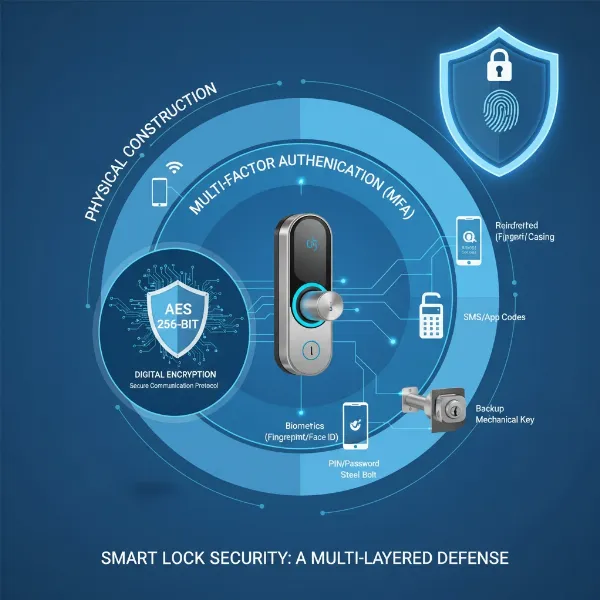 Diagram showing smart lock security layers, including encryption, authentication, and physical design.
Common Smart Lock Security Myths Debunked
The rise of smart locks has, understandably, been accompanied by a host of misconceptions and fears. Let’s debunk some of the most pervasive myths that often deter people from embracing this technology.
Myth 1: “Smart Locks Are Easily Hacked by Anyone.”
|
Our Picks for the Best Smart Lock in 2026
As an Amazon Associate I earn from qualifying purchases.
|
||
| Num | Product | Action |
|---|---|---|
| 1 | eufy Security Smart Lock C220, Fingerprint Keyless Entry Door Lock, Built-in Wi-Fi, App Remote Control, Front Door Smart Lock Deadbolt, 8Months Battery, Reliable Power, IP53 Waterproof, BHMA Grade 3 |

|
| 2 | eufy Security Smart Lock C220, Fingerprint Keyless Entry Door Lock, Built-in Wi-Fi, App Remote Control, Front Door Smart Deadbolt, IP53 Waterproof, 8-Months Battery, Nickel |
|
| 3 | ULTRALOQ U-Bolt Pro WiFi Smart Lock with Door Sensor, 8-in-1 Keyless Entry Door Lock with Fingerprint ID, App Remote Control, Built-in WiFi Keypad Deadbolt, Auto Unlock, IP65 Waterproof, Easy Install |
|
| 4 | Schlage Encode Smart WiFi Deadbolt Lock for Front Door - Keyless Entry with App or Touchscreen - Works with Alexa, Hey Google, & Airbnb - Create Codes for Guests - Matte Black |
|
| 5 | TEEHO TE001 Keyless Entry Door Lock with Keypad - Smart Deadbolt Lock for Front Door with 2 Keys - Auto Lock - Easy Installation - Satin Nickel |
|
| 6 | Philips Wi-Fi Door Lock, WiFi Smart Lock Keyless Entry Deadbolt for Front Door, Compatible with Alexa & Google Assistant, Remote Control, Built-in WiFi, APP Fingerprint Passcode Unlock, Auto Locking |
|
| 7 | TEEHO TE001 Keyless Entry Door Lock with Keypad - Smart Deadbolt Lock for Front Door with 2 Keys - Auto Lock - Easy Installation - Oil-Rubbed Bronze |
|
| 8 | TEEHO TE001 Keyless Entry Door Lock with Keypad - Smart Deadbolt Lock for Front Door with 2 Keys - Auto Lock - Easy Installation - Matte Black |
|
| 9 | Philips Wi-Fi Door Lock, WiFi Smart Lock Keyless Entry Deadbolt for Front Door, Remote Control, Built-in WiFi, APP Fingerprint Passcode Unlock, Auto Locking |
|
| 10 | Electronic Passwords Keyless Entry Door Locks Smart Deadbolt Metal Lock Auto Time Delay Locking Secure Durable Low Battery Alert Type-C Port for Emergency Charging |
|
This is perhaps the most common fear, fueled by sensationalized headlines. The reality is that while any connected device can theoretically be targeted, hacking a modern, high-quality smart lock is far from easy. Reputable smart locks employ advanced encryption protocols, often the same standards used in online banking, making digital intrusion extremely difficult and costly for a potential attacker. A successful hack would require sophisticated techniques, specialized tools, and considerable expertise, far beyond the capabilities of the average opportunistic burglar. Most burglars are more likely to resort to physical brute force methods like kicking in a door or smashing a window than attempting a complex digital exploit.
Myth 2: “If the Internet Goes Down, My Smart Lock Stops Working.”
Another widespread concern is being locked out during a power outage or internet disruption. However, most smart locks are designed with redundancy in mind. Many models offer multiple ways to unlock, including fingerprint recognition, a physical keypad for PIN codes, RFID cards, or even a traditional mechanical key override. Bluetooth-enabled locks can often be controlled locally via your smartphone without needing an active internet connection. Furthermore, smart locks are typically battery-powered, ensuring they continue to function even if your home loses electricity. The companion app will usually provide low-battery warnings well in advance.
Myth 3: “All Smart Locks Offer the Same Level of Security.”
This couldn’t be further from the truth. Just as with traditional locks, there’s a wide spectrum of quality and security features among smart lock brands. Entry-level models may have basic encryption and fewer physical safeguards, while premium smart locks from established manufacturers invest heavily in robust physical construction, advanced cryptographic security, and rigorous testing. The level of encryption, the quality of materials, the inclusion of multi-factor authentication, and the manufacturer’s commitment to regular firmware updates all contribute to the overall security posture of a smart lock. Choosing a reputable brand that prioritizes security is paramount.
Myth 4: “Physical Tampering is Easier with Smart Locks.”
Some believe that the electronic components of smart locks make them inherently weaker against physical attacks compared to traditional deadbolts. In truth, many high-quality smart locks are built to the same robust physical standards as their traditional counterparts, often exceeding them. They incorporate anti-tamper alarms, reinforced mechanisms, and durable materials designed to resist drilling, picking, and prying. While no lock is entirely impervious to a determined physical attack, a well-constructed smart lock typically provides comparable or superior physical security, often with the added benefit of alerting you to such attempts.
Real Hacking Risks and How to Mitigate Them
While the likelihood of a sophisticated hack is low for most homeowners, understanding the actual risks associated with smart locks is crucial for proactive security. Addressing these vulnerabilities with best practices can significantly enhance your home’s protection.
Weak Passwords and PINs
The most common point of failure for any digital security system is weak credentials. Using simple, easily guessed PINs (like “1234” or birthdays) or reusing passwords across multiple accounts creates a significant vulnerability. Brute-force attacks, where an attacker systematically tries many combinations, can eventually succeed if your PIN is too short or predictable.
Mitigation: Always use strong, unique PINs and passwords for your smart lock and its associated app. Opt for longer codes with a mix of digits that don’t follow obvious patterns. Enable multi-factor authentication (MFA) whenever available, adding an extra layer of security that requires a second form of verification.
Outdated Software Vulnerabilities
Like any software-driven device, smart locks can have vulnerabilities in their firmware or companion apps. Manufacturers regularly discover and patch these security flaws through updates. If you neglect to update your lock’s software, you leave it exposed to known exploits.
Mitigation: Regularly check for and install firmware updates for your smart lock and ensure your smartphone’s operating system and the smart lock app are always up to date. Many locks offer automatic updates, which is an excellent feature to enable.
Phishing and Social Engineering
Attackers might attempt to trick you into revealing your login credentials through phishing emails, fake websites, or social engineering tactics. If they gain access to your smart lock account, they can control your lock remotely.
Mitigation: Be extremely cautious about clicking suspicious links or providing personal information online. Use strong, unique passwords for all your online accounts, especially those linked to home security devices. Enable MFA on your smart lock app and email accounts for added protection.
Compromised Mobile Devices or Accounts
If your smartphone is lost, stolen, or compromised, and it’s linked to your smart lock app, it could provide a direct path for an attacker to gain control.
Mitigation: Secure your smartphone with a strong PIN or biometric authentication. Enable remote wipe features so you can delete sensitive data if your device is stolen. If a device is lost, immediately revoke its access through your smart lock’s web portal or another authorized device.
Physical Bypassing and Lock Picking
No lock, smart or traditional, is entirely unpickable or immune to brute-force physical attacks. While smart locks often include anti-tamper features, a highly skilled intruder with specialized tools and sufficient time could potentially bypass the physical mechanism.
Mitigation: Choose smart locks with high physical security ratings and robust construction. Consider additional physical deterrents, such as reinforced door frames or secondary locking mechanisms. The electronic security of a smart lock often provides alerts for physical tampering, giving you an advantage.
Best Practices for Enhancing Your Smart Lock’s Security
Maximizing the safety of your smart lock involves a combination of smart purchasing decisions and diligent ongoing practices.
Choose Reputable Brands with Proven Security Records
Invest in smart locks from well-established manufacturers known for their commitment to security. Look for products with certifications that attest to their physical and digital robustness, such as ANSI Grade 1 or certifications for encryption standards. Reputable brands invest heavily in research and development, regularly release security updates, and have robust customer support to address any concerns.
Implement Strong, Unique Passcodes and Multi-Factor Authentication
Your passcodes are the first line of digital defense. Create long, complex PINs and passwords that are difficult to guess or brute-force. Utilize password managers to keep track of unique credentials for all your accounts. Always enable multi-factor authentication (MFA) on your smart lock app and any associated accounts. This often involves a secondary verification step, such as a code sent to your phone or a biometric scan, making it significantly harder for unauthorized users to gain access even if they somehow obtain your password.
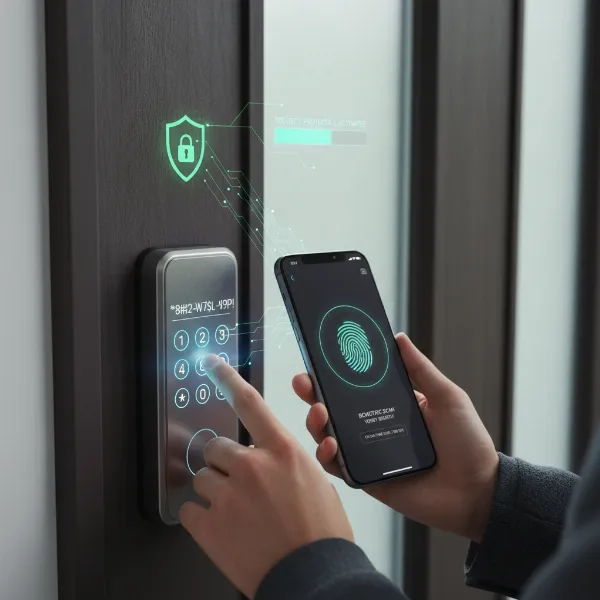 Illustration of strong smart lock authentication, including unique passcodes and multi-factor authentication.
Keep Firmware and Apps Updated
Manufacturers frequently release firmware updates for smart locks and updates for their companion apps. These updates often contain critical security patches that address newly discovered vulnerabilities. Enable automatic updates whenever possible, or make it a routine to manually check for and install them regularly. Keeping your smartphone’s operating system updated is equally important, as vulnerabilities in the device itself can compromise your smart lock’s security.
Secure Your Home Network
Since many smart locks connect to your home Wi-Fi network, securing your network is paramount. Use a strong, unique password for your Wi-Fi router. Change the default router login credentials. Enable WPA2 or WPA3 encryption on your network. Consider setting up a guest network for visitors to keep your main home network, and thus your smart lock, isolated from potential vulnerabilities.
Understand and Utilize All Security Features
Take the time to explore all the security features your smart lock offers. Many locks provide activity logs, allowing you to monitor who enters and exits your home and when. Utilize features like auto-lock, which ensures your door locks automatically after a set period, preventing accidental unlatching. Geofencing can also add convenience and security by locking or unlocking as you leave or arrive.
Consider Professional Installation for Complex Systems
While many smart locks are designed for DIY installation, professional installation can be beneficial for complex systems or if you’re unsure about the process. A professional can ensure the lock is correctly installed, configured optimally for security, and integrated properly with your existing home network, avoiding common setup errors that could create vulnerabilities.
What to Look For When Buying a Secure Smart Lock (Buying Guide Focused on Security)
When choosing a smart lock, prioritizing security features is key. Here’s a guide to help you make an informed decision:
Encryption Standards
Look for locks that use strong encryption, preferably AES 128-bit or 256-bit. This is the industry standard for securing digital communications and data storage, providing a robust defense against digital eavesdropping and tampering.
Physical Construction and Anti-Tamper Features
Examine the physical build quality. Does the lock feel solid and durable? Look for features like reinforced deadbolts, anti-drill plates, and tamper alarms that alert you to forced entry attempts. Consider locks that have achieved high security ratings from independent testing organizations (e.g., ANSI Grade 1 or SKG*** certification).
Authentication Methods
Evaluate the range and security of authentication methods offered. PIN pads should be fingerprint-resistant to prevent common code guessing. Biometric options (fingerprint, facial recognition) offer high convenience and security. Always look for multi-factor authentication (MFA) capabilities for the associated app.
Network Protocol Security (Bluetooth, Wi-Fi, Z-Wave, Zigbee)
Understand how the lock communicates. Bluetooth Low Energy (BLE) generally offers strong local security. If it’s a Wi-Fi lock, ensure it has robust cloud security and encrypted communication. For Z-Wave or Zigbee locks, verify they use the latest security protocols (e.g., S2 for Z-Wave Plus).
Software & App Security
Research the manufacturer’s reputation for software security. Do they have a track record of timely updates and addressing vulnerabilities? Read reviews about the companion app’s security features, ease of use, and privacy policy. A reputable developer is crucial for ongoing digital protection.
Battery Life and Backup Options
Reliable power is a security feature. Look for locks with long battery life and clear low-battery warnings. Ensure there are always backup entry methods, such as a mechanical key or an external battery jump-start port, so you’re never locked out due to power failure.
“The greatest vulnerability in any smart home security system isn’t the technology itself, but the user’s habits. Strong passwords, regular updates, and understanding how your devices work are far more effective than any single lock feature.” – Dr. Alistair Finch, Cybersecurity Expert
Conclusion
Smart locks offer a compelling blend of convenience and advanced security features, making them a valuable addition to modern homes. While the notion of “hacking” can be intimidating, the reality is that well-chosen and properly maintained smart locks are generally very safe. The risks are often mitigated by strong encryption, robust physical construction, and most importantly, vigilant user practices. By debunking common myths and understanding real vulnerabilities, you can make informed decisions to enhance your home’s security.
Choosing reputable brands, utilizing strong, unique passwords, enabling multi-factor authentication, and keeping your software updated are your strongest defenses against potential threats. Smart locks are not just about opening doors with ease; they’re about providing peace of mind through enhanced control and monitoring. So, are smart locks truly safe? With the right choices and habits, they absolutely can be. How will you integrate smart lock security into your home protection strategy?
Frequently Asked Questions
Are smart locks more secure than traditional locks?
With proper selection and setup, many smart locks offer comparable or even superior security to traditional locks. They add layers of digital protection like encryption and multi-factor authentication, while also often including robust physical designs and features like tamper alerts that traditional locks lack.
Can hackers really open my smart lock remotely?
While theoretically possible for poorly secured locks, it’s extremely difficult for high-quality smart locks from reputable brands. These locks use advanced encryption and robust authentication protocols, making remote hacking a rare and sophisticated endeavor that most opportunistic criminals would avoid.
What happens if my smart lock battery dies?
Most smart locks are designed with backup power options. They typically provide low-battery warnings well in advance. If the battery dies completely, you can usually still access your home using a traditional mechanical key, a backup battery jump-start, or other alternative entry methods specific to your lock model.
Is it safe to use my fingerprint for a smart lock?
Yes, using your fingerprint for a smart lock is generally safe. Modern biometric sensors are highly secure, and the data is typically encrypted and stored locally on the device or in a highly secure, non-reversible format. This method often offers both convenience and a strong layer of authentication.
How often should I update my smart lock’s software?
You should update your smart lock’s firmware and associated app whenever updates become available. Manufacturers release these updates to address security vulnerabilities and improve performance. Enabling automatic updates is often the best practice to ensure your lock always has the latest security protections.
Can smart locks be picked like regular locks?
High-quality smart locks are often designed with advanced physical security features that make traditional lock picking techniques ineffective. While no lock is entirely unpickable, many smart locks are built to resist picking, drilling, and other physical bypass methods, often to a higher standard than basic traditional locks.
What is the most secure type of smart lock?
The most secure smart lock is typically one from a reputable brand that combines robust physical construction (e.g., ANSI Grade 1 rating), strong encryption (AES 128/256-bit), multi-factor authentication, regular firmware updates, and reliable communication protocols (like secure Bluetooth or Z-Wave S2).
