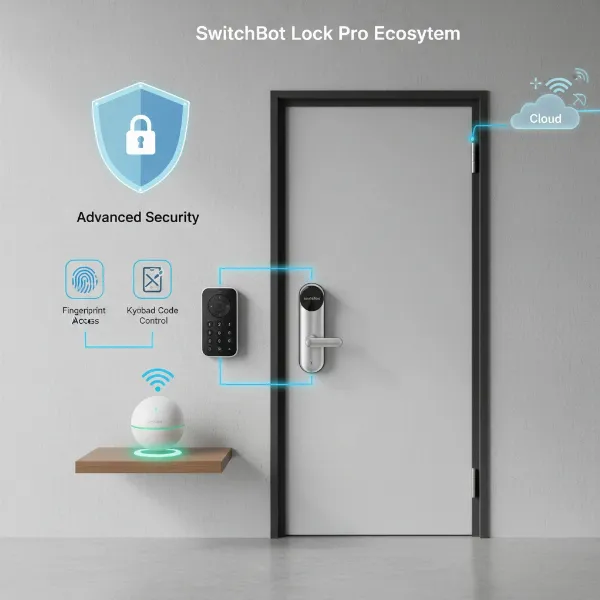
In the evolving landscape of home security, smart locks offer a blend of convenience and enhanced control, moving us beyond the traditional key. Among the myriad options, the Philips 1000 Series Smart Deadbolt emerges as a popular choice, promising a balance of modern features and straightforward functionality. But does this electronic deadbolt truly stand up to its claims, and more importantly, is it the right security upgrade for your home? This comprehensive review will delve into its features, performance, security aspects, and overall value, helping you decide if the Philips 1000 Series Smart Deadbolt aligns with your needs and expectations.
What is the Philips 1000 Series Smart Deadbolt?
The Philips 1000 Series Smart Deadbolt is an electronic deadbolt designed to modernize your home’s entry system. It integrates multiple keyless access methods, including fingerprint recognition, a touchscreen keypad for PIN codes, and traditional mechanical keys, offering diverse ways to unlock your door. Positioned as a “semi-smart” lock by some reviewers, it focuses on enhancing local access convenience rather than extensive smart home integration that requires constant online connectivity. This approach makes it appealing to users seeking smart features without the complexities or potential vulnerabilities of a fully connected smart lock system. Its primary purpose is to offer a secure, convenient, and key-free entry experience for residential and small office environments.
Key Features and Specifications
The Philips 1000 Series Smart Deadbolt is packed with features designed to simplify daily access and bolster security. Understanding these core components is essential to appreciating its capabilities.
Multiple Access Methods
The versatility of the Philips 1000 Series Smart Deadbolt lies in its diverse unlocking options. You can gain entry using:
- Fingerprint Recognition: Store up to 50 unique fingerprints, allowing for quick and secure access with a simple touch. This biometric method is often praised for its speed and convenience.
- PIN Code: The responsive touchscreen keypad supports up to 20 permanent user PIN codes. Additionally, you can generate unlimited one-time PIN codes via the Philips Home Access app, ideal for visitors, service providers, or temporary access needs without requiring a Wi-Fi bridge or Bluetooth connection for generation.
- Mechanical Key: For traditionalists or in emergency situations, two physical backup keys are provided, ensuring you’re never locked out. This mechanical override is a crucial security feature.
|
Our Picks for the Best Smart Lock in 2026
As an Amazon Associate I earn from qualifying purchases.
|
||
| Num | Product | Action |
|---|---|---|
| 1 | Schlage Encode Smart WiFi Deadbolt Lock for Front Door - Keyless Entry with App or Touchscreen - Works with Alexa, Hey Google, & Airbnb - Create Codes for Guests - Matte Black |

|
| 2 | Philips Wi-Fi Door Lock, WiFi Smart Lock Keyless Entry Deadbolt for Front Door, Remote Control, Built-in WiFi, APP Fingerprint Passcode Unlock, Auto Locking |
|
| 3 | Electronic Passwords Keyless Entry Door Locks Smart Deadbolt Metal Lock Auto Time Delay Locking Secure Durable Low Battery Alert Type-C Port for Emergency Charging |
|
| 4 | eufy Security Smart Lock C220, Fingerprint Keyless Entry Door Lock, Built-in Wi-Fi, App Remote Control, Front Door Smart Deadbolt, IP53 Waterproof, 8-Months Battery, Nickel |
|
| 5 | TEEHO TE001 Keyless Entry Door Lock with Keypad - Smart Deadbolt Lock for Front Door with 2 Keys - Auto Lock - Easy Installation - Oil-Rubbed Bronze |
|
| 6 | TEEHO TE001 Keyless Entry Door Lock with Keypad - Smart Deadbolt Lock for Front Door with 2 Keys - Auto Lock - Easy Installation - Satin Nickel |
|
| 7 | TEEHO TE001 Keyless Entry Door Lock with Keypad - Smart Deadbolt Lock for Front Door with 2 Keys - Auto Lock - Easy Installation - Matte Black |
|
| 8 | eufy Security Smart Lock C220, Fingerprint Keyless Entry Door Lock, Built-in Wi-Fi, App Remote Control, Front Door Smart Lock Deadbolt, 8Months Battery, Reliable Power, IP53 Waterproof, BHMA Grade 3 |
|
| 9 | ULTRALOQ U-Bolt Pro WiFi Smart Lock with Door Sensor, 8-in-1 Keyless Entry Door Lock with Fingerprint ID, App Remote Control, Built-in WiFi Keypad Deadbolt, Auto Unlock, IP65 Waterproof, Easy Install |
|
| 10 | Philips Wi-Fi Door Lock, WiFi Smart Lock Keyless Entry Deadbolt for Front Door, Compatible with Alexa & Google Assistant, Remote Control, Built-in WiFi, APP Fingerprint Passcode Unlock, Auto Locking |
|
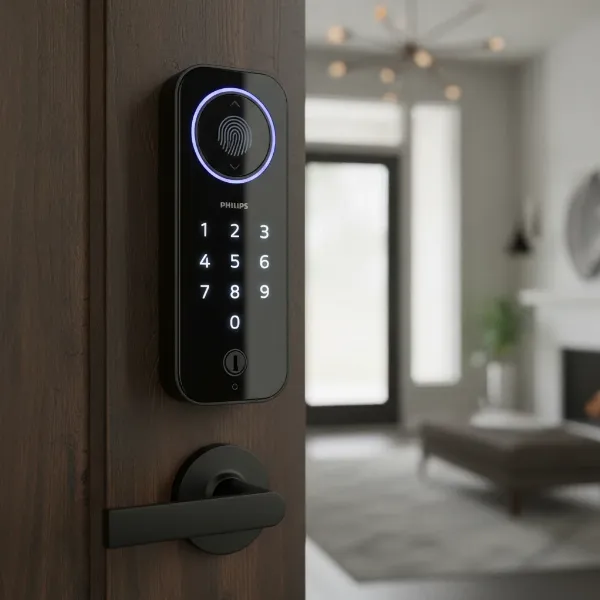 Philips 1000 smart deadbolt showing fingerprint scanner, keypad, and keyhole.
Smart Functions
While not a fully integrated smart home device, the Philips 1000 Series includes several intelligent features:
- Auto-Lock: This feature automatically locks your door after a set period, eliminating the worry of forgetting to secure your home.
- Voice Guide: The lock provides clear voice-guided instructions during setup and operation in multiple languages (English, French, Spanish), simplifying the user experience and programming process.
- Multiple Alert Functions: It includes a low battery alert, a lockout alarm, and “away mode” and “privacy mode” for enhanced security and peace of mind.
Design and Durability
The Philips 1000 Series boasts a modern, sleek design that complements various door styles. Available in finishes like Satin Nickel or Matte Black, it features a high-quality touchscreen keypad. The robust construction is designed for everyday use, ensuring long-term reliability.
Power and Battery Life
The deadbolt is powered by four AA alkaline batteries, offering an impressive battery life of up to one year under typical usage (based on 8 PIN unlocks, 8 auto-locks, 4 manual unlocks, and 4 manual locks per day). A low battery alert notifies you when it’s time for a change, preventing unexpected lockouts. Some models within the 1000 series (e.g., DDL210X25KM0/37) also include a Type-C interface for emergency power, a thoughtful addition if the batteries completely die before you can replace them.
Performance in Real-World Use
In practical application, the Philips 1000 Series Smart Deadbolt generally performs well, delivering on its promise of convenient keyless entry.
The touchscreen keypad is highly responsive and well-lit, making it easy to use even in low light conditions. Reviewers often note its tactile feedback and quick reaction time. The fingerprint scanner is particularly efficient and accurate. Users report that fingerprint registration is straightforward, and even a quick swipe of a registered thumb is effective at unlocking the deadbolt swiftly. This biometric authentication works seamlessly, providing a fast and effortless entry.
The voice-guided instructions are a significant advantage during both installation and daily programming. They make the setup process fairly intuitive, guiding users through steps like adding fingerprints or changing settings directly from the lock itself. This feature is especially beneficial for those who prefer not to rely solely on a mobile app for initial configuration.
However, the mobile app functionality receives mixed reviews. While the Philips Home Access app is praised for its ability to remotely generate one-time PIN codes without needing a Wi-Fi bridge or Bluetooth connection, its capabilities for managing other lock settings, such as adding fingerprints or adjusting auto-lock parameters, can be limited. Many of these functions still require direct interaction with the lock’s touchscreen, which some users find less convenient compared to a fully app-controlled smart lock. This limitation contributes to its “semi-smart” categorization, as it lacks the comprehensive remote management features found in more advanced, Wi-Fi-enabled smart locks.
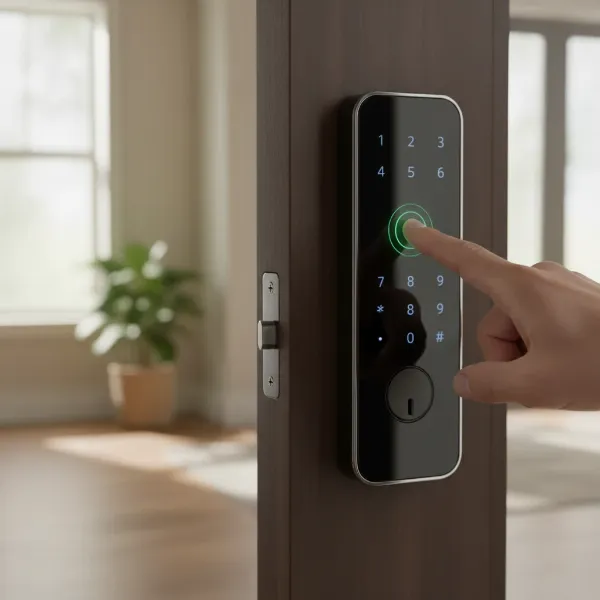 Person using fingerprint scanner on Philips 1000 smart deadbolt for entry.
Security Concerns and Considerations
While convenience is a major draw, security remains paramount for any locking mechanism. The Philips 1000 Series Smart Deadbolt offers several security features, but it’s important to be aware of certain vulnerabilities.
The lock includes a physical keyhole, which is secreted beneath the fingerprint scanner and pivots out of the way for access. This mechanical override is a vital backup, ensuring entry even if the electronic systems fail. Additionally, the lock is equipped with multiple alert functions, such as a lockout alarm that triggers after multiple incorrect entry attempts, a low battery alert, and modes like “away mode” and “privacy mode” that enhance security when you’re not home or desire complete privacy.
However, a significant security concern was highlighted by a reputable security expert, the LockPickingLawyer. Their review indicated a vulnerability to picking for some models within the Philips 1000 Series, suggesting that the mechanical lock cylinder hidden behind the fingerprint reader could be easily compromised. This finding is critical for potential buyers, as it suggests that despite its high-tech appearance, the physical security of the deadbolt itself might not be as robust as expected.
Therefore, while the electronic features add layers of convenience and deter casual tampering, the underlying mechanical security aspect warrants careful consideration. Users should weigh the convenience of the smart features against this reported physical security vulnerability, especially if their primary concern is maximum pick resistance.
Installation and Setup Experience
The installation process for the Philips 1000 Series Smart Deadbolt is generally considered user-friendly, catering to DIY enthusiasts.
Philips markets the installation as requiring “just a screwdriver” and being suitable for most standard door preparations (door thickness between 35-50 mm). This makes it an accessible upgrade for many homeowners. The voice-guided instructions are a standout feature during setup, providing clear, step-by-step audio prompts that can largely eliminate the need to constantly refer to a manual.
However, some reviewers have noted “installation headaches.” While the general process (installing the latch, exterior assembly, interior assembly, and batteries) is straightforward, fine-tuning and calibration, particularly the “door handing” process, can sometimes be tricky. The lock needs to learn the locked and unlocked positions of your specific door, which is critical for proper operation. Following the instructions precisely, especially during the door-handing step (often initiated by holding a reset button), is crucial to avoid issues where the lock turns in the wrong direction or fails to operate correctly.
Despite these potential minor frustrations, the overall consensus is that the installation is manageable for most individuals with basic DIY skills. The included detailed user manual and the internal voice prompts are valuable aids in getting the Philips 1000 Series Smart Deadbolt up and running.
Pros and Cons
To help summarize, here’s a balanced look at the advantages and disadvantages of the Philips 1000 Series Smart Deadbolt:
| Pros | Cons |
|---|---|
| Multiple keyless entry methods (fingerprint, PIN, key) | Limited mobile app functionality for managing settings |
| Fast and accurate fingerprint recognition | Reported vulnerability to physical picking |
| Responsive and well-lit touchscreen keypad | “Semi-smart” – lacks full remote control and smart home integration |
| Voice-guided setup and programming | No emergency backup power (USB-C) on all models |
| Auto-lock feature for peace of mind | Potential installation headaches for some users |
| Long battery life (up to 1 year) | |
| Generates one-time PINs remotely via app |
Philips 1000 Series vs. Competitors
When comparing the Philips 1000 Series Smart Deadbolt to other options on the market, its “semi-smart” nature is a defining characteristic.
Compared to fully smart locks (e.g., August, Yale, Schlage Encode): These competitors often offer robust Wi-Fi or Zigbee/Z-Wave integration, allowing for comprehensive remote control of all lock settings, real-time activity alerts, and seamless integration with broader smart home ecosystems (like Google Home, Alexa, Apple HomeKit). This means you can add fingerprints, adjust auto-lock timers, or check lock status from anywhere in the world via their respective apps. The Philips 1000 Series, while offering remote one-time PIN generation via its app, doesn’t provide this level of extensive remote management or smart home connectivity, which is a key differentiator. Its price point typically reflects this, often being more affordable than its fully connected counterparts.
Compared to basic electronic deadbolts (keypad-only): The Philips 1000 Series offers a significant upgrade with its fingerprint scanner, which provides a faster and more convenient entry method than simply typing a code. The voice guidance and the ability to generate one-time PINs via the app also add layers of convenience not typically found in simpler electronic locks.
The Philips 1000 Series is best positioned for users who prioritize local convenience (fingerprint, keypad, auto-lock) and budget-friendliness over extensive smart home integration or advanced remote control capabilities. It provides a solid step up from traditional locks and basic electronic keypads without the higher cost and complexity of a fully networked smart lock.
Is the Philips 1000 Series Smart Deadbolt Right for You?
Choosing the right smart lock depends heavily on your specific needs, priorities, and existing smart home ecosystem. The Philips 1000 Series Smart Deadbolt offers a compelling package for a particular segment of the market.
Consider this lock if:
- You prioritize convenience and local access: If quick entry via fingerprint or PIN, coupled with an auto-lock feature, is your main goal, this lock excels.
- You prefer a less connected, “semi-smart” solution: If you’re wary of extensive Wi-Fi connectivity for security reasons or simply don’t need deep smart home integration, its focus on local control might appeal to you.
- You’re on a budget: It generally offers advanced features like fingerprint recognition at a more accessible price point compared to many fully connected smart locks.
- You need temporary access solutions: The ability to generate one-time PINs remotely for guests or service providers is a valuable feature.
You might want to consider other options if:
- Maximum physical security is your absolute top priority: Given the reported picking vulnerability, those seeking the highest level of pick resistance might look elsewhere.
- You desire full remote control and smart home integration: If you want to lock/unlock from anywhere, receive real-time alerts, or integrate seamlessly with Alexa, Google Home, or Apple HomeKit, a fully Wi-Fi-enabled smart lock would be a better fit.
- You require app-based management for all lock settings: If changing codes, adding users, or adjusting auto-lock settings from your phone is essential, the Philips 1000 Series’ limited app functionality might be a drawback.
Ultimately, the Philips 1000 Series Smart Deadbolt is an excellent choice for individuals and families looking for an affordable, reliable, and convenient keyless entry solution with a good set of “smart enough” features.
Conclusion
The Philips 1000 Series Smart Deadbolt offers a robust and feature-rich electronic deadbolt experience, primarily focusing on local access convenience through its responsive touchscreen keypad and highly accurate fingerprint scanner. Its voice-guided setup and auto-lock function contribute to a user-friendly experience, making it a significant upgrade over traditional locks. While the mobile app provides useful remote one-time PIN generation, it’s essential to understand its “semi-smart” nature, which means limited comprehensive remote control and smart home integration compared to fully connected devices. Potential buyers should also consider the reported physical picking vulnerability alongside its electronic security features.
For those prioritizing local keyless entry, ease of use, and an attractive price point without the need for extensive smart home ecosystem integration, the Philips 1000 Series Smart Deadbolt stands as a strong contender. It represents a practical and modern solution for securing your home with the convenience of cutting-edge technology. Could the Philips 1000 Series Smart Deadbolt be the missing piece to elevate your home security?
Frequently Asked Questions
What are the main unlocking methods for the Philips 1000 Series Smart Deadbolt?
The Philips 1000 Series Smart Deadbolt offers multiple unlocking methods, including a highly accurate fingerprint scanner, a touchscreen keypad for PIN codes (supporting up to 20 permanent codes), and traditional mechanical keys for backup access. Additionally, you can generate unlimited one-time PIN codes via the Philips Home Access app.
Does the Philips 1000 Series Smart Deadbolt connect to Wi-Fi for full remote control?
No, the Philips 1000 Series Smart Deadbolt is considered “semi-smart” and does not offer full Wi-Fi connectivity for comprehensive remote control of all settings or seamless integration with smart home systems like Alexa or Google Home. Its app primarily facilitates remote generation of one-time PIN codes.
How long do the batteries last in the Philips 1000 Series Smart Deadbolt?
The lock is powered by four AA alkaline batteries and can last up to one year under typical usage conditions. It also features a low battery alert to notify you when the batteries need replacing, preventing unexpected lockouts. Some models may also offer a Type-C interface for emergency power.
Is the Philips 1000 Series Smart Deadbolt easy to install?
Installation is generally considered DIY-friendly, requiring only a screwdriver for most standard door preparations. The lock features voice-guided instructions that assist users throughout the setup process, though some users might find the door-handing calibration a bit tricky.
Are there any known security vulnerabilities with the Philips 1000 Series Smart Deadbolt?
While the lock offers electronic security features like a lockout alarm, a security expert (LockPickingLawyer) has reported a vulnerability to physical picking of the mechanical cylinder hidden behind the fingerprint reader. Users prioritizing maximum physical pick resistance should be aware of this potential concern.