In an increasingly connected world, protecting your Personal Identification Number (PIN) is paramount. This small sequence of digits is often the gateway to your finances, personal accounts, and even your home’s security, yet it remains a primary target for fraudsters. The seemingly simple act of entering a PIN can expose you to prying eyes, sophisticated scams, and the risk of identity theft. Understanding the vulnerabilities and implementing proactive measures are essential steps to securing your digital life and maintaining peace of mind.
What is a PIN Code and Why is its Security Crucial?
A Personal Identification Number (PIN) is a secret numeric code used to authenticate your identity when accessing systems or services. Typically a short string of 4 to 6 digits, PINs are widely employed across various sectors, from banking and mobile devices to smart locks and restricted access areas. They serve as a fundamental layer of identity verification, ensuring that only authorized individuals can perform transactions or gain entry.
The security of your PIN is critical because its compromise can lead to severe consequences. If a malicious actor obtains your PIN, they could gain unauthorized access to your bank accounts, draining funds or making fraudulent purchases. Similarly, a compromised PIN for a smart lock could grant an intruder physical access to your home or office. In the digital realm, PINs protect everything from mobile banking apps to online payment systems, making their safeguarding a top priority for preventing financial loss and identity theft.
Creating a Fort Knox PIN: Tips for Uncrackable Combinations
The first step in protecting your PIN is to create one that is difficult to guess. Many people unwittingly choose easily discoverable or predictable combinations, leaving their accounts vulnerable.
Ditch the Obvious: Avoiding Common Pitfalls
When selecting a PIN, steer clear of patterns and personal information that can be easily deduced:
- Sequential or Repeated Numbers: Avoid simple sequences like
1234,4321, or repeating digits such as0000,1111,2222. These are among the most common and easiest PINs to crack. - Personal Information: Never use birthdates, anniversaries, the last four digits of your social security number, or any part of your phone number. Much of this information can be found through public records or social media, making it simple for scammers to guess.
- Keyboard Patterns: Avoid patterns on the keypad like
2580(a straight line down the middle column) or diagonal sequences. These visual patterns are often the first an observer might try to decipher.
|
Our Picks for the Best Smart Lock in 2026
As an Amazon Associate I earn from qualifying purchases.
|
||
| Num | Product | Action |
|---|---|---|
| 1 | Electronic Passwords Keyless Entry Door Locks Smart Deadbolt Metal Lock Auto Time Delay Locking Secure Durable Low Battery Alert Type-C Port for Emergency Charging |

|
| 2 | eufy Security Smart Lock C220, Fingerprint Keyless Entry Door Lock, Built-in Wi-Fi, App Remote Control, Front Door Smart Lock Deadbolt, 8Months Battery, Reliable Power, IP53 Waterproof, BHMA Grade 3 |
|
| 3 | ULTRALOQ U-Bolt Pro WiFi Smart Lock with Door Sensor, 8-in-1 Keyless Entry Door Lock with Fingerprint ID, App Remote Control, Built-in WiFi Keypad Deadbolt, Auto Unlock, IP65 Waterproof, Easy Install |
|
| 4 | TEEHO TE001 Keyless Entry Door Lock with Keypad - Smart Deadbolt Lock for Front Door with 2 Keys - Auto Lock - Easy Installation - Matte Black |
|
| 5 | eufy Security Smart Lock C220, Fingerprint Keyless Entry Door Lock, Built-in Wi-Fi, App Remote Control, Front Door Smart Deadbolt, IP53 Waterproof, 8-Months Battery, Nickel |
|
| 6 | TEEHO TE001 Keyless Entry Door Lock with Keypad - Smart Deadbolt Lock for Front Door with 2 Keys - Auto Lock - Easy Installation - Oil-Rubbed Bronze |
|
| 7 | Philips Wi-Fi Door Lock, WiFi Smart Lock Keyless Entry Deadbolt for Front Door, Remote Control, Built-in WiFi, APP Fingerprint Passcode Unlock, Auto Locking |
|
| 8 | Schlage Encode Smart WiFi Deadbolt Lock for Front Door - Keyless Entry with App or Touchscreen - Works with Alexa, Hey Google, & Airbnb - Create Codes for Guests - Matte Black |
|
| 9 | TEEHO TE001 Keyless Entry Door Lock with Keypad - Smart Deadbolt Lock for Front Door with 2 Keys - Auto Lock - Easy Installation - Satin Nickel |
|
| 10 | Philips Wi-Fi Door Lock, WiFi Smart Lock Keyless Entry Deadbolt for Front Door, Compatible with Alexa & Google Assistant, Remote Control, Built-in WiFi, APP Fingerprint Passcode Unlock, Auto Locking |
|
Smart Strategies for Strong PINs
Instead, adopt strategies that enhance the complexity and memorability of your PIN without sacrificing security:
- Opt for Longer PINs: If a system allows for more than four digits, utilize the option for a longer PIN. The more digits, the exponentially harder it is to guess.
- Unique PINs for Different Accounts: Just as you wouldn’t use the same key for every lock, don’t use the same PIN across multiple accounts or devices. A breach in one place shouldn’t compromise all your other securities.
- Memorable but Non-Obvious: Create a PIN based on a memorable phrase or event that is not publicly linked to you. For example, assign numbers to a word using the phone keypad (e.g.,
HOMEbecomes4663), or use a date of a personal, non-public event. - Random Generation (with Secure Memorization): Consider using a truly random number sequence and then employing a secure method for memorizing it, such as integrating it into a mental story or mnemonic device.
 Illustration of a person thinking about secure PIN creation, using a phone keypad.
The Art of Stealth: Protecting Your PIN During Entry
Even the strongest PIN can be compromised if you’re not careful during its entry. “Shoulder surfing” – where someone secretly observes your PIN as you type it – is a prevalent threat.
Physical Shielding: Your First Line of Defense
Always assume someone is watching, especially in public spaces:
- Cover Your Hand: When entering your PIN at an ATM, point-of-sale (POS) terminal, or any public keypad, use your free hand, wallet, or even a piece of paper to shield the keypad from view. This simple act significantly reduces the risk of visual theft.
- Be Aware of Your Surroundings: Before entering your PIN, take a quick scan of the area. Look for anyone standing unusually close, holding a camera, or appearing overly interested in your transaction.
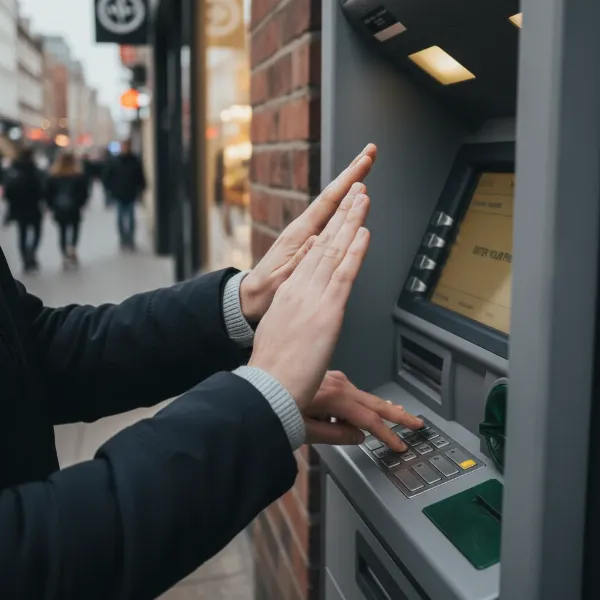 A hand covering another hand entering a PIN at an ATM or POS terminal.
Vigilance Against Skimmers and Hidden Cameras
Criminals often use technology to steal PINs:
- Inspect Machines: Before using an ATM or POS machine, gently tug on the card reader and keypad. Look for anything that seems loose, bulky, or out of place. Card skimmers are devices illegally attached to card readers to steal card data, often paired with miniature cameras or fake keypads to capture PINs.
- Unusual Keypads: If a keypad feels different, like it’s rubbery or raised, it could be a fake overlay designed to record your entry. If something feels suspicious, avoid using the machine and report it.
Secure Digital Input Practices
Protecting your PIN extends to your digital devices:
- Biometric Authentication: Whenever possible, use biometric alternatives like fingerprint or facial recognition on your smartphones and smart locks. These methods often provide an additional layer of security beyond a traditional PIN.
- Limit Accessibility Features: On mobile devices, restrict accessibility features like screen readers or magnification during PIN entry. These features, while helpful for some, could inadvertently expose sensitive information.
- Avoid Public Wi-Fi for Sensitive Transactions: Entering your PIN or other sensitive information over unsecured public Wi-Fi networks can expose it to interception. Use a secure, trusted network or cellular data for such actions.
Secure Storage: Where to Keep Your PIN (and Where Not To)
The way you store your PIN is just as important as how you create and enter it. Many breaches occur due to insecure storage practices.
The Golden Rule: Never Write it Down (Especially on the Card!)
- Avoid Physical Notes: Never write your PIN directly on your debit/credit card, nor on a piece of paper kept in your wallet or purse alongside your cards. This is akin to leaving the key next to the treasure chest.
- No Obvious Digital Storage: Refrain from saving your PIN in easily accessible digital notes on your phone or computer, especially if those devices are not themselves highly secured.
Smart Alternatives for Memorization
If you find it challenging to remember multiple strong PINs, consider these methods:
- Disguise Your PIN: If you must write a PIN down as a memory aid, disguise it within a longer, unrelated string of numbers or a fictitious contact entry in your phone, ensuring it’s not obviously identifiable as a PIN.
- Secure Password Managers: For digital PINs or those used with online accounts, consider using a reputable password manager. These tools encrypt and securely store your credentials, requiring only one master password to access them.
- Cognitive Trapdoor Games: While more advanced, some innovative systems use methods where the actual PIN is hidden within a series of interactions, making it difficult for an observer to discern the correct input without knowledge of the specific “game.”
“True security isn’t just about having a strong lock; it’s about how you handle the key. Your PIN is that key, and neglecting its protection is an open invitation to compromise.” – Admin, SmartLockChoice.com
Beyond the Digits: Protecting Your PIN from Digital Threats and Scams
PIN security extends beyond physical interaction to the digital landscape, where cunning scams can trick you into revealing your information.
Phishing and Social Engineering Awareness
Be highly skeptical of unsolicited requests for your PIN:
- Recognize Phishing Attempts: Scammers often send emails or text messages impersonating banks, government agencies, or well-known companies, asking you to “verify” your PIN or account details by clicking on a link. These are phishing scams designed to steal your information.
- Verify Through Official Channels: If you receive a suspicious message, do not click on any links. Instead, contact the organization directly using a verified phone number or by navigating to their official website manually (not through a link in the message). Remember, legitimate institutions will rarely ask for your full PIN via email or text.
- Never Share Your PIN: No bank, service provider, or reputable entity will ever ask you for your full PIN over the phone or via email. If someone asks, it’s a scam.
The Power of Multi-Factor Authentication (MFA)
MFA provides an additional layer of defense:
- Beyond the PIN: Multi-factor authentication requires two or more pieces of evidence to verify your identity. This might involve something you know (your PIN/password), something you have (a code from your phone, a security key), and/or something you are (a fingerprint or face scan).
- Adds Robustness: Even if a scammer somehow obtains your PIN, MFA can prevent unauthorized access because they would still need the second factor of authentication, making your accounts significantly harder to breach. Always enable MFA wherever it’s available.
Conclusion
Protecting your PIN code from prying eyes is a continuous effort that requires a blend of smart choices, physical awareness, and digital vigilance. From creating strong, unpredictable combinations to diligently shielding your input in public and recognizing the signs of online scams, every action you take contributes to a more secure personal and financial life. By treating your PIN with the seriousness it deserves, you empower yourself against potential threats. What proactive steps will you take today to secure your digital keys?
Frequently Asked Questions
How often should I change my PIN?
While less frequent than password changes, regularly updating your PIN (e.g., every 6-12 months) can reduce the risk of compromise over time. Always choose a new, strong, and unique combination when you do.
Is it safe to use my fingerprint or facial recognition instead of a PIN?
Yes, biometric authentication methods like fingerprint and facial recognition often offer a more secure and convenient alternative to PINs for device access and many applications. They add an extra layer of security, as biometrics are much harder to replicate or steal than a simple numeric code.
What should I do if I suspect my PIN has been compromised?
If you believe your PIN has been compromised, immediately change it. Contact your bank or the service provider associated with the compromised PIN to report the incident and inquire about any unusual activity or necessary security measures.
Can PINs be hacked even if I cover my hand?
While covering your hand significantly reduces the risk of shoulder surfing, sophisticated criminals might use hidden cameras or card skimmers with their own keypads. Always inspect machines for tampering, and be aware of your surroundings even when shielding your PIN.
Are 6-digit PINs inherently more secure than 4-digit PINs?
Yes, mathematically, a 6-digit PIN offers significantly more possible combinations (1,000,000) compared to a 4-digit PIN (10,000). This makes a 6-digit PIN much harder to guess through brute-force methods, provided it’s not based on easily predictable patterns.
