In today’s fast-paced world, convenience and security are paramount, especially when it comes to your home. Smart locks offer a revolutionary way to manage access, providing peace of mind whether you’re at home or miles away. If you’re already leveraging the power of Google Home and Assistant to streamline your daily life, integrating a compatible smart lock is the next logical step to truly smarten your entryway. This comprehensive guide will navigate you through the world of Google Home-compatible smart locks, helping you choose, install, and utilize the perfect device to secure your sanctuary.
What is a Smart Lock and Why Pair it with Google Home?
A smart lock is an electromechanical lock designed to perform locking and unlocking operations on a door when it receives instructions from an authorized device using a wireless protocol and cryptographic key. These modern devices transcend traditional key-and-tumbler systems, offering a suite of advanced features that significantly enhance security and convenience. Beyond simply securing your door, smart locks often provide keyless entry, remote access management, and real-time activity logging.
The real magic happens when you pair a smart lock with your Google Home ecosystem. This integration unlocks a new level of control and automation for your home security. Imagine arriving home with arms full of groceries and simply saying, “Hey Google, unlock the front door.” Or, as you head to bed, uttering, “Hey Google, lock all doors.” This hands-free operation is incredibly convenient, making daily routines smoother and more efficient. Google Home integration also allows for seamless remote access, enabling you to lock or unlock your door from anywhere via the Google Home app on your smartphone. You can also receive instant notifications about who enters and exits, or if someone attempts to tamper with your lock, keeping you informed about your home’s security status. Furthermore, you can create customized routines, such as having your doors automatically lock when your smart thermostat switches to “Away” mode, ensuring your home is always secure without a second thought.
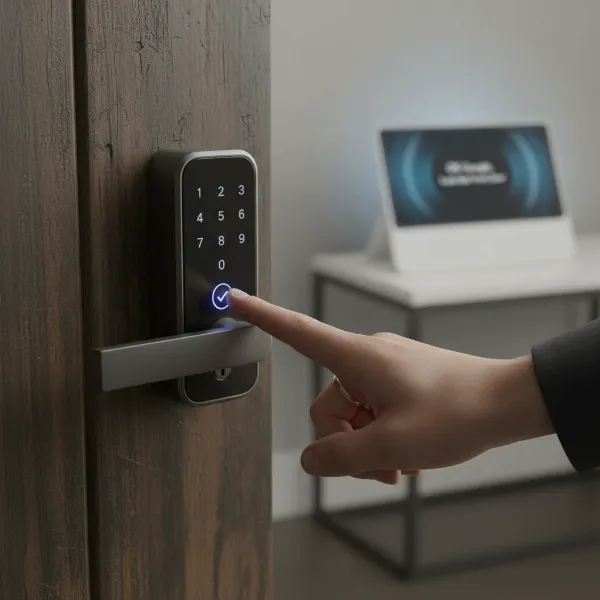 A person using voice commands with Google Assistant to lock a smart door lock.
Types of Smart Locks Compatible with Google Home
The market offers a diverse range of smart locks, each employing different methods for access and operation. Understanding these types will help you determine which best fits your lifestyle and security preferences.
Keypad Smart Locks
|
Our Picks for the Best Smart Lock in 2026
As an Amazon Associate I earn from qualifying purchases.
|
||
| Num | Product | Action |
|---|---|---|
| 1 | TEEHO TE001 Keyless Entry Door Lock with Keypad - Smart Deadbolt Lock for Front Door with 2 Keys - Auto Lock - Easy Installation - Satin Nickel |

|
| 2 | Schlage Encode Smart WiFi Deadbolt Lock for Front Door - Keyless Entry with App or Touchscreen - Works with Alexa, Hey Google, & Airbnb - Create Codes for Guests - Matte Black |
|
| 3 | eufy Security Smart Lock C220, Fingerprint Keyless Entry Door Lock, Built-in Wi-Fi, App Remote Control, Front Door Smart Lock Deadbolt, 8Months Battery, Reliable Power, IP53 Waterproof, BHMA Grade 3 |
|
| 4 | Philips Wi-Fi Door Lock, WiFi Smart Lock Keyless Entry Deadbolt for Front Door, Compatible with Alexa & Google Assistant, Remote Control, Built-in WiFi, APP Fingerprint Passcode Unlock, Auto Locking |
|
| 5 | Philips Wi-Fi Door Lock, WiFi Smart Lock Keyless Entry Deadbolt for Front Door, Remote Control, Built-in WiFi, APP Fingerprint Passcode Unlock, Auto Locking |
|
| 6 | TEEHO TE001 Keyless Entry Door Lock with Keypad - Smart Deadbolt Lock for Front Door with 2 Keys - Auto Lock - Easy Installation - Oil-Rubbed Bronze |
|
| 7 | TEEHO TE001 Keyless Entry Door Lock with Keypad - Smart Deadbolt Lock for Front Door with 2 Keys - Auto Lock - Easy Installation - Matte Black |
|
| 8 | ULTRALOQ U-Bolt Pro WiFi Smart Lock with Door Sensor, 8-in-1 Keyless Entry Door Lock with Fingerprint ID, App Remote Control, Built-in WiFi Keypad Deadbolt, Auto Unlock, IP65 Waterproof, Easy Install |
|
| 9 | Electronic Passwords Keyless Entry Door Locks Smart Deadbolt Metal Lock Auto Time Delay Locking Secure Durable Low Battery Alert Type-C Port for Emergency Charging |
|
| 10 | eufy Security Smart Lock C220, Fingerprint Keyless Entry Door Lock, Built-in Wi-Fi, App Remote Control, Front Door Smart Deadbolt, IP53 Waterproof, 8-Months Battery, Nickel |
|
Keypad smart locks replace your traditional deadbolt with a numerical pad. You or authorized guests can enter a unique code to unlock the door. These locks are often a favorite for families and rental properties, eliminating the need for physical keys. They are particularly useful if you frequently have visitors or service providers who need temporary access. Many models allow you to create and manage multiple unique codes, which can be easily revoked or set to expire after a certain period. The convenience of not carrying keys and the ability to grant access remotely make keypad locks a popular choice.
Fingerprint Smart Locks
For ultimate biometric convenience, fingerprint smart locks allow you to unlock your door with a simple touch. These locks utilize advanced fingerprint recognition technology to grant access to registered users, offering a highly secure and incredibly fast entry method. They are ideal for individuals seeking the highest level of personal security and convenience, as you can’t lose a fingerprint like you can a key or forget a code. Most models can store numerous fingerprints, making them suitable for multiple family members. However, it’s worth noting that some models may have limitations in extreme weather conditions.
App-Controlled Smart Locks
App-controlled smart locks primarily rely on your smartphone for operation, often connecting via Bluetooth or Wi-Fi. Many also integrate seamlessly with Google Assistant for voice commands and remote management through the Google Home app. This type of lock offers significant flexibility, allowing you to lock or unlock your door from anywhere, check its status, and manage user access directly from your phone. Some app-controlled locks are designed as retrofits, meaning they can be installed over your existing deadbolt, preserving the exterior look of your door while adding smart functionality. Others replace the entire deadbolt for a complete smart upgrade.
Multi-Method Smart Locks
The most versatile smart locks combine several unlocking methods, offering the best of all worlds. These locks might feature a keypad, fingerprint reader, physical key override, and app control, all in one device. This combination ensures that you always have a way to access your home, even if one method is unavailable (e.g., a dead phone battery). Multi-method locks cater to diverse needs within a household and provide excellent redundancy for peace of mind. They are often chosen by those who want maximum flexibility and security, ensuring that every family member or guest has a convenient way to enter.
Top Smart Lock Brands for Google Home Integration
When selecting a smart lock for your Google-powered smart home, certain brands stand out for their robust integration and reliable performance. Here’s a comparison of some leading options:
| Brand/Model | Key Features | Connectivity | Unlocking Methods | Google Home Integration Notes |
|---|---|---|---|---|
| Google Nest x Yale | Seamless Nest ecosystem integration, tamper alerts, auto-lock | Bluetooth (requires Nest Connect) | Keypad, App | Excellent for Nest users, voice locking only |
| Yale Assure Lock 2 | Sleek design, multiple finishes, robust app, HomeKey support | Wi-Fi, Bluetooth, Matter/Thread | Keypad, App, Fingerprint (select models), Apple HomeKey | Highly versatile, good all-around performance |
| August Wi-Fi Smart Lock (4th Gen) | Retrofit existing deadbolt, auto-unlock, DoorSense | Wi-Fi | App, Physical Key (retains existing) | Strong remote access and monitoring, easy installation |
| Schlage Encode Plus | Built-in Wi-Fi, Apple Home Key, durable design | Wi-Fi | Keypad, App, Apple HomeKey, Physical Key | Reliable, good for mixed Apple/Google homes |
| Eufy Smart Lock C30 | Built-in Wi-Fi, multiple entry methods, auto-lock, remote access | Wi-Fi | Fingerprint, Keypad, App, Physical Key | Direct Wi-Fi connection, no hub needed |
| Nuki Smart Lock | Retrofit, auto-unlock, door sensor, Matter/Thread support | Bluetooth, Wi-Fi (via Bridge), Thread/Matter | App, Keypad (add-on), Fingerprint (add-on), Physical Key | European market leader, strong Matter integration for US |
| Lockly Secure Pro/Elite | Patented peek-proof keypad, fingerprint reader, built-in camera (Visage) | Wi-Fi, Bluetooth | Fingerprint, Keypad, App, Physical Key, Voice | Advanced security features, robust design |
| Xiaomi Smart Lock | Multiple unlocking methods, integrated with Xiaomi Home app, security alerts | Wi-Fi, Bluetooth | Fingerprint, Keypad, App, Physical Key | Cost-effective option, good for Xiaomi ecosystem users |
- Google Nest x Yale Smart Lock: This lock is engineered for Google’s ecosystem, offering deep integration with other Nest products. It’s a key-free deadbolt with a sleek keypad and robust app control. While it requires a Nest Connect to bridge to your Wi-Fi, it offers reliable performance and strong security alerts. It supports voice locking but not voice unlocking for enhanced security, a common feature among many smart locks.
- Yale Assure Lock 2: As a successor to popular models, the Yale Assure Lock 2 is highly rated for its ease of installation, attractive design, and broad compatibility with major smart home platforms including Google Home, Alexa, and Apple HomeKit. It offers various models with different unlocking methods, including keypads, fingerprint readers, and even Apple Home Key support. Its support for Matter and Thread connectivity positions it as a future-proof choice.
- August Wi-Fi Smart Lock: The August Smart Lock is renowned for its ability to retrofit over your existing deadbolt, preserving your exterior lock hardware and keys. The 4th-generation Wi-Fi model no longer requires a separate hub for remote access, simplifying setup. Its DoorSense technology tells you if your door is securely closed and locked, providing added peace of mind. August is excellent for seamless auto-unlocking as you approach your door and locking when you leave.
- Schlage Encode Plus: This lock is a top contender, especially for those in a mixed smart home environment. It features built-in Wi-Fi for direct connection to your home network and robust Google Home integration. Its standout feature is Apple Home Key support, allowing iPhone or Apple Watch users to tap to unlock. Schlage is known for its durable, high-security traditional locks, and the Encode Plus carries that legacy into the smart lock space.
- Eufy Smart Lock C30: The Eufy C30 offers direct Wi-Fi connectivity, eliminating the need for an additional bridge. It boasts multiple ways to unlock, including fingerprint, keypad, app, and a traditional key, ensuring you’re never locked out. Its auto-lock feature and remote management capabilities via the Eufy Security app make it a convenient and secure choice for Google Home users.
- Nuki Smart Lock: Popular in Europe and gaining traction in the US, Nuki offers a retrofit solution that turns your existing lock into a smart one. It excels in auto-unlocking and auto-locking, providing precise control over your door. With Matter and Thread support, it promises improved connectivity and responsiveness within your Google Home setup. Optional accessories like a keypad or fingerprint scanner further enhance its versatility.
“The true power of smart home technology lies in seamless integration. When your smart lock communicates effortlessly with your Google Assistant, you’re not just getting convenience; you’re building a more responsive and intuitive living space.” – Alex Chen, Smart Home Integration Specialist
How to Choose the Best Smart Lock for Your Google Smart Home (Buying Guide)
Selecting the right smart lock involves more than just picking a popular brand. Consider these factors to ensure it perfectly matches your needs and integrates smoothly with your Google Home.
Assess Your Needs
Begin by evaluating your specific requirements. What type of door do you have (standard, heavy-duty, glass)? What level of security do you desire (basic convenience or maximum protection)? What’s your budget range? Do you prefer a full replacement or a retrofit that works with your existing deadbolt? If you live in an apartment, a retrofit option might be better to avoid modifying the door extensively. Consider who will be using the lock: individuals who prefer codes, fingerprints, or smartphone access?
Understand Key Features
Delve into the functionalities offered.
- Connectivity: Look for locks with built-in Wi-Fi for direct connection, or ensure you’re willing to invest in a compatible hub/bridge if a lock relies on Bluetooth, Zigbee, or Z-Wave for remote access. Newer standards like Matter and Thread offer promising benefits for reliability and interoperability within the Google ecosystem.
- Unlocking Methods: Decide which methods are most important to you: keypad, fingerprint, smartphone app, voice command, or a traditional key override. A physical key backup is always a good idea.
- Auto-Lock/Auto-Unlock: Many smart locks can automatically lock your door after a set period or unlock it as you approach, adding a layer of hands-free convenience.
- Guest Access: The ability to create temporary or scheduled access codes for visitors or service providers is a valuable feature.
- Battery Life: Smart locks are typically battery-powered. Check the estimated battery life and ensure it’s sufficient for your usage, along with low-battery alerts.
Prioritize Security
While convenience is a major draw, security should never be compromised.
- ANSI/BHMA Rating: This rating indicates the lock’s resistance to forced entry, typically Grade 1 (highest security), Grade 2, or Grade 3. Aim for Grade 1 or 2 for exterior doors.
- Encryption: Ensure the lock uses strong encryption protocols for wireless communication to prevent unauthorized access or hacking.
- Voice Command Limitations: For security, many smart locks (like Nest x Yale) only allow voice locking and status checks, not unlocking, to prevent unauthorized persons from gaining entry by shouting commands through a window. Be aware of these nuances.
- Tamper Alerts: Features that notify you of forced entry attempts or tampering can be crucial.
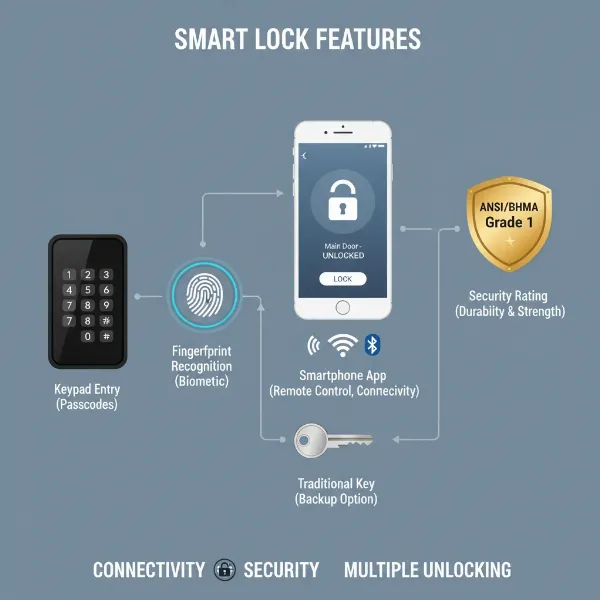 Various smart lock features like keypad, fingerprint, app control, and security ratings.
Read User Reviews
Real-world experiences can offer invaluable insights into a lock’s performance, ease of use, and reliability. Check reviews on multiple platforms to get a balanced perspective on battery life, app stability, and actual Google Home integration. Pay attention to feedback regarding installation difficulties or common issues.
Consider Installation and Support
Determine if you are comfortable with a DIY installation or if professional installation is required. Some locks are designed for easy self-installation, while others may be more complex. Also, research the manufacturer’s warranty and customer support. Good technical support can be a lifesaver if you encounter any issues during setup or use.
Setting Up and Using Your Google Home Smart Lock
Integrating your new smart lock into your Google smart home is a straightforward process, designed to get you up and running quickly.
Basic Installation Steps
While specific steps vary by model, most smart locks follow a similar installation pattern. First, remove your old deadbolt from the door. Then, follow the manufacturer’s instructions to install the new smart lock hardware, including the exterior keypad/reader, the interior thumb-turn assembly, and the strike plate on the door frame. Ensure all screws are tightened and the lock mechanism moves freely. Many smart locks include clear, step-by-step guides or even video tutorials to assist you.
Connecting to Google Home
Once the hardware is installed, you’ll connect it to your Google Home ecosystem.
- Download the Manufacturer’s App: Start by downloading the smart lock’s dedicated app (e.g., Yale Access, August, Eufy Security) and create an account.
- Pair the Lock: Follow the app’s instructions to pair your smart lock with your phone, usually via Bluetooth.
- Connect to Wi-Fi/Hub: If your lock has built-in Wi-Fi, connect it to your home network through the app. If it requires a hub or bridge (like Nest Connect for Nest x Yale), ensure the hub is powered on and connected to your Wi-Fi network, then pair the lock to the hub.
- Open Google Home App: On your smartphone or tablet, open the Google Home app.
- Add a Device: Tap the “+” icon in the top left corner, then select “Set up device.”
- Works with Google: Choose “Works with Google” and search for your smart lock’s brand (e.g., “Yale,” “August,” “Schlage”).
- Link Account: Follow the prompts to link your smart lock’s manufacturer account to your Google Home account. This usually involves signing in with your manufacturer app credentials.
- Assign to Room: Assign your smart lock to a specific room in your Google Home (e.g., “Front Door Lock” in the “Entryway”).
Utilizing Smart Features
With your lock connected, you can now enjoy its smart capabilities:
- Voice Control: Use commands like “Hey Google, lock the front door” or “Hey Google, is the back door locked?” Remember that for security, voice unlocking is often disabled.
- Remote Management: Open the Google Home app or the manufacturer’s app to check your lock’s status, lock/unlock remotely, and manage access codes from anywhere.
- Routines: Create Google Home routines. For example, a “Goodnight” routine could lock all smart locks, turn off lights, and adjust the thermostat. An “I’m leaving” routine could lock the door automatically.
- Notifications: Set up notifications to receive alerts on your phone whenever the door is locked, unlocked, or if there’s any unusual activity.
Maintenance Tips and Troubleshooting
To ensure longevity and optimal performance:
- Battery Replacement: Smart locks run on batteries. Pay attention to low-battery alerts in the app and replace batteries promptly. Keep spare batteries on hand.
- Cleanliness: Keep the keypad and fingerprint reader clean, as dirt and grime can affect functionality.
- Firmware Updates: Regularly check for and install firmware updates through the manufacturer’s app. These updates often include security patches and new features.
- Common Issues: If your lock isn’t responding, check battery levels, Wi-Fi connectivity, and ensure the lock isn’t jammed. Re-linking the account in the Google Home app can sometimes resolve integration issues.
Essential Smart Lock Accessories
While many smart locks are all-in-one solutions, certain accessories can enhance their functionality and your overall smart home experience.
- Wi-Fi Bridges/Hubs: If your chosen smart lock uses Bluetooth or another protocol that doesn’t directly connect to Wi-Fi, a compatible bridge or hub is essential for remote access and Google Home integration. These devices act as intermediaries, allowing your lock to communicate with your home network and the internet.
- Door Sensors: Some smart locks include or are compatible with door sensors (like August’s DoorSense) that detect if the door is open or closed, not just locked. This adds another layer of security and can prevent the auto-lock feature from engaging if the door is ajar.
- Keypads (for app-only locks): If your primary smart lock is app or fingerprint-only, an external wireless keypad can be a useful backup for guests or when your phone isn’t available.
- Backup Power: Consider having a 9V battery on hand, as some smart locks (like the Nest x Yale) have external terminals to temporarily power the lock if its internal batteries die, allowing you to enter your code and gain access.
Conclusion
Embracing a smart lock compatible with Google Home and Assistant offers an unparalleled blend of modern convenience and enhanced security. From voice-activated locking to remote monitoring and seamless integration into your smart home routines, these devices empower you with unprecedented control over your entryway. By carefully considering your needs, understanding the available types and features, and choosing a reputable brand, you can find the perfect smart lock to fortify your home and simplify your daily life. It’s an investment that pays dividends in peace of mind, knowing your home is safe, smart, and always within your control.
What smart lock feature are you most excited to integrate with your Google Home?
Frequently Asked Questions
Can I unlock my smart lock using Google Assistant voice commands?
For security reasons, most smart locks compatible with Google Assistant allow you to lock your door and check its status via voice commands. However, voice unlocking is often disabled to prevent unauthorized persons from gaining entry by shouting commands through an open window or from outside your home.
Do I need a special hub for my Google Home smart lock?
It depends on the smart lock model. Many newer smart locks feature built-in Wi-Fi, allowing them to connect directly to your home network and Google Home without an additional hub. However, some locks using Bluetooth, Zigbee, or Z-Wave may require a compatible bridge or hub (like the Nest Connect for Nest x Yale or August Connect for older August models) for remote access and full Google Home integration.
What is Matter and Thread, and how do they relate to Google Home smart locks?
Matter is a new, unified smart home connectivity standard designed to simplify device compatibility across different ecosystems, including Google Home. Thread is a low-power, mesh networking protocol that devices can use to communicate with each other, enhancing reliability and range. Smart locks supporting Matter and Thread are designed for seamless integration and better performance within your Google Home setup, often requiring a compatible Google device (like a Nest Hub or Nest Wifi Pro) that acts as a Matter hub and Thread border router.
How do smart locks get power, and what happens if the battery dies?
Most smart locks are battery-powered, typically using standard AA batteries. They are designed for long battery life and will usually send you low-battery alerts through their app and the Google Home app long before they die. If the batteries do run out, many locks have a physical key override or external terminals where you can temporarily connect a 9V battery to power the keypad and unlock the door.
Can I give temporary access codes to guests with a Google Home smart lock?
Yes, a key benefit of many Google Home compatible smart locks is the ability to create and manage temporary or scheduled access codes for guests, dog walkers, or service providers. You can usually do this through the lock’s dedicated mobile app, and some platforms allow integration with the Google Home app for easier management. These codes can be revoked or set to expire automatically, enhancing security.
