Imagine a life free from fumbling for keys, where a simple code or a tap on your phone grants you instant access to your home. Keypad smart locks offer exactly this convenience, blending robust security with modern accessibility, transforming how we interact with our entryways. For those seeking to upgrade their home security and embrace the future of keyless living, choosing the right keypad smart lock is a crucial step. This comprehensive guide will walk you through everything you need to know, from understanding the technology to selecting the perfect model for your needs.
What is a Keypad Smart Lock and Why Should You Consider One?
A keypad smart lock is an advanced door locking mechanism that replaces traditional keyed entry with a digital keypad, allowing access via a programmable numerical code. These devices typically integrate smart technology, connecting to your home network via Wi-Fi, Bluetooth, or other protocols, offering a spectrum of enhanced features beyond simple code entry.
Compared to conventional locks, keypad smart locks bring numerous advantages:
- Unmatched Convenience: Say goodbye to lost keys, fumbling in the dark, or hiding spare keys under a doormat. Keypad entry offers instant access, especially when your hands are full.
- Enhanced Security: Many models include advanced encryption, tamper alarms, and detailed activity logs, notifying you of who enters and exits, and when. Features like auto-locking ensure your door is never left unlocked accidentally.
- Flexible Access Management: Easily create unique, temporary codes for guests, dog walkers, or service providers. You can revoke these codes anytime, offering greater control than traditional key sharing.
- Remote Control: Depending on connectivity, you can lock or unlock your door from anywhere using a smartphone app, providing peace of mind whether you’re at work or on vacation.
- Smart Home Integration: Many keypad smart locks seamlessly integrate with popular smart home ecosystems like Amazon Alexa, Google Assistant, or Apple HomeKit, enabling voice control and automation routines.
Types of Keypad Smart Locks
Keypad smart locks come in various forms, each offering different levels of functionality and connectivity:
Standalone Keypad Locks
|
Our Picks for the Best Smart Lock in 2026
As an Amazon Associate I earn from qualifying purchases.
|
||
| Num | Product | Action |
|---|---|---|
| 1 | eufy Security Smart Lock C220, Fingerprint Keyless Entry Door Lock, Built-in Wi-Fi, App Remote Control, Front Door Smart Lock Deadbolt, 8Months Battery, Reliable Power, IP53 Waterproof, BHMA Grade 3 |

|
| 2 | TEEHO TE001 Keyless Entry Door Lock with Keypad - Smart Deadbolt Lock for Front Door with 2 Keys - Auto Lock - Easy Installation - Satin Nickel |
|
| 3 | Philips Wi-Fi Door Lock, WiFi Smart Lock Keyless Entry Deadbolt for Front Door, Compatible with Alexa & Google Assistant, Remote Control, Built-in WiFi, APP Fingerprint Passcode Unlock, Auto Locking |
|
| 4 | ULTRALOQ U-Bolt Pro WiFi Smart Lock with Door Sensor, 8-in-1 Keyless Entry Door Lock with Fingerprint ID, App Remote Control, Built-in WiFi Keypad Deadbolt, Auto Unlock, IP65 Waterproof, Easy Install |
|
| 5 | Electronic Passwords Keyless Entry Door Locks Smart Deadbolt Metal Lock Auto Time Delay Locking Secure Durable Low Battery Alert Type-C Port for Emergency Charging |
|
| 6 | eufy Security Smart Lock C220, Fingerprint Keyless Entry Door Lock, Built-in Wi-Fi, App Remote Control, Front Door Smart Deadbolt, IP53 Waterproof, 8-Months Battery, Nickel |
|
| 7 | Schlage Encode Smart WiFi Deadbolt Lock for Front Door - Keyless Entry with App or Touchscreen - Works with Alexa, Hey Google, & Airbnb - Create Codes for Guests - Matte Black |
|
| 8 | TEEHO TE001 Keyless Entry Door Lock with Keypad - Smart Deadbolt Lock for Front Door with 2 Keys - Auto Lock - Easy Installation - Matte Black |
|
| 9 | Philips Wi-Fi Door Lock, WiFi Smart Lock Keyless Entry Deadbolt for Front Door, Remote Control, Built-in WiFi, APP Fingerprint Passcode Unlock, Auto Locking |
|
| 10 | TEEHO TE001 Keyless Entry Door Lock with Keypad - Smart Deadbolt Lock for Front Door with 2 Keys - Auto Lock - Easy Installation - Oil-Rubbed Bronze |
|
These are the most basic type, offering numerical code entry without any smart home connectivity. They are a simple upgrade for keyless convenience but lack remote control or smart features. They are typically battery-powered and are a good option for those seeking basic keyless access without the complexities of smart home integration.
Smart Keypad Locks (Bluetooth, Wi-Fi, Z-Wave/Zigbee)
This category represents the core of modern keypad smart locks. They offer various connectivity options that dictate their range of smart features:
- Bluetooth Keypad Locks: Connect directly to your smartphone when you are within close proximity. They allow app-based control, code management, and activity logs when you’re near the door, but usually require a separate Wi-Fi bridge for remote access.
- Wi-Fi Keypad Locks: Connect directly to your home Wi-Fi network, providing remote control and monitoring from anywhere with an internet connection. This is ideal for managing access when you’re away from home.
- Z-Wave/Zigbee Keypad Locks: These locks integrate into a broader smart home ecosystem via a compatible hub. They offer reliable connectivity and energy efficiency, allowing them to communicate with other smart devices for advanced automation.
Keypad Locks with Biometric or Advanced Integration
Some high-end keypad smart locks combine code entry with other advanced methods:
- Keypad Locks with Biometric Integration: These models often feature a touchscreen keypad alongside a fingerprint scanner, offering dual layers of keyless security. Popular examples include the Ultraloq Bolt Fingerprint and certain Yale Assure models.
- Keypad Locks with Video Integration: A newer innovation, these locks combine a keypad with a built-in camera and doorbell functionality, providing a comprehensive smart entryway solution, such as the Eufy Video Smart Lock E330.
Top Keypad Smart Lock Brands and Models
The market for keypad smart locks is robust, with several brands leading the way in innovation, security, and user experience. Here’s a comparison of some top contenders:
| Brand | Popular Models (Keypad Focus) | Key Features | Pros | Cons |
|---|---|---|---|---|
| Yale | Assure Lock 2, Nest x Yale, Code Keypad Deadbolt | Sleek design, compact keypad, various connectivity options (Bluetooth, Wi-Fi, Matter), touchscreen or push-button, Apple HomeKey support (Assure Lock 2), integration with Google Home (Nest x Yale), durable. | User-friendly interface, strong smart home integration, reliable. | Can be pricier, some features require a separate Wi-Fi module. |
| Schlage | Encode Plus, Camelot Keypad Deadbolt, Connect | Robust construction, large tactile keypads, Wi-Fi built-in (Encode Plus), strong security ratings (BHMA Grade 1), easy installation, Apple HomeKey support (Encode Plus), durable deadbolt. | Excellent security, reliable performance, good for high-traffic doors. | Design can be utilitarian, app functionality might be less advanced. |
| Ultraloq | U-Bolt Pro, Bolt Fingerprint | Multiple entry methods (keypad, fingerprint, app, mechanical key, Apple Watch), highly accurate fingerprint reader (U-Bolt Pro, Bolt Fingerprint), auto-lock, mobile app control. | Versatile access, quick biometric unlocking, solid build quality. | App setup can be complex, some models are bulky. |
| Lockly | Visage Zeno Series, Secure Pro | Patented PIN Genie® technology (randomized keypad digits), multiple access options (keypad, fingerprint, facial recognition, physical key), built-in camera (Visage), robust security. | Advanced security features, prevents code “smudging,” comprehensive access. | Often more expensive, installation can be involved. |
| August | Wi-Fi Smart Lock (often paired with keypad) | Retrofit design (uses existing deadbolt), attaches inside door, mobile app control, auto-unlock/lock, virtual keys, activity log. Keypad sold separately for full keyless entry. | Maintains existing keys, renter-friendly, seamless auto-unlock. | Requires a separate keypad for code entry, may be bulky inside. |
| Kwikset | Halo Touch Smart Deadbolt, SmartCode 913 | Good value, various connectivity options (Wi-Fi, Bluetooth), some models with fingerprint, simple keypad entry. | Affordable, widely available, easy to install. | Security features may vary by model, app functionality can be basic. |
Key Features to Look For in a Keypad Smart Lock (Buying Guide)
Choosing the best keypad smart lock involves considering several factors to match your specific needs and ensure optimal security and convenience.
Entry Methods and Convenience
- Keypad Functionality: Look for easy-to-use, illuminated keypads. Advanced features like randomized digits (e.g., Lockly’s PIN Genie) prevent smudges from revealing frequently used numbers and enhance privacy. Lockout timers after multiple incorrect attempts are crucial for security.
- Physical Key Backup: A traditional key cylinder is a vital backup in case of battery failure, system malfunction, or power outages. Ensure it’s easily accessible but not obvious to intruders.
- Mobile App Control: A well-designed app allows for remote locking/unlocking, managing user codes, viewing activity logs, and monitoring battery status.
- Voice Control: Compatibility with Alexa, Google Assistant, or Apple HomeKit enables hands-free operation.
- Auto-Lock and Auto-Unlock: Auto-lock ensures your door secures itself after a set period, while auto-unlock (often via geofencing or Bluetooth proximity) provides seamless entry when you approach.
Connectivity
The type of wireless connection determines how your lock integrates with your smart home:
- Wi-Fi: Offers true remote access from anywhere without an additional hub.
- Bluetooth: Ideal for local control and proximity features, but often requires a Wi-Fi bridge for remote access.
- Z-Wave/Zigbee: Excellent for integration into existing smart home systems with a compatible hub, providing a stable and energy-efficient connection.
- Matter/Thread: Newer protocols offering improved interoperability and reliability across different smart home platforms.
Security Features
Beyond the keypad, a smart lock’s security is paramount:
- Encryption: Look for robust encryption standards (e.g., AES-128 or AES-256) to protect digital communications from hacking.
- ANSI/BHMA Grading: This rating indicates the lock’s strength and durability. Aim for Grade 1 (highest residential security) or Grade 2.
- Tamper Alerts & Activity Logs: Receive notifications for forced entry attempts or unusual activity. Activity logs provide a history of who entered and when.
- Two-Factor Authentication (2FA): Adds an extra layer of security for app access and settings changes.
- Anti-Peep/Scramble Codes: Allow you to enter random digits before or after your actual code, obscuring the pattern from onlookers.
Power and Durability
- Battery Life: Most keypad smart locks are battery-powered. Look for models with long battery life (6-12 months is common) and low battery alerts.
- Emergency Power: Some locks have terminals for a 9V battery or a USB port to provide temporary power for emergency access if batteries die.
- Weather Resistance: For exterior doors, ensure the lock is rated to withstand local weather conditions (e.g., IPX ratings for water and dust resistance).
Installation and Compatibility
- DIY vs. Professional: Many keypad smart locks are designed for DIY installation, replacing existing deadbolts with a screwdriver. Others, particularly full-mortise locks, may require a professional.
- Door Compatibility: Check the lock’s specifications for door thickness, backset, and bore hole requirements to ensure it fits your existing door hardware. Some locks are “retrofit” (install over existing deadbolt), while others are “full replacement.”
Smart Home Integration
Consider your current or future smart home ecosystem (Alexa, Google Home, Apple HomeKit) to ensure seamless integration and centralized control of your devices. Matter and Thread compatibility are increasingly important for future-proofing your smart home.
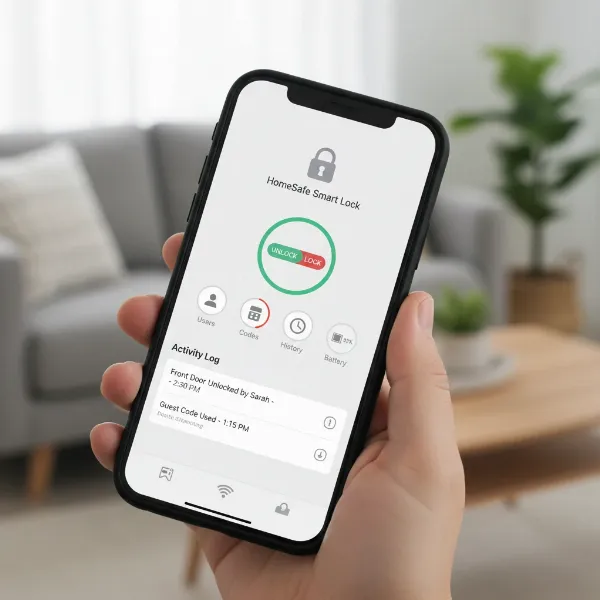 A smartphone screen displaying a smart lock app with controls for locking/unlocking and managing access.
Ensuring the Security of Your Keypad Smart Lock
While keypad smart locks offer advanced security, maximizing their protection requires user awareness and best practices:
- Choose Strong, Unique PIN Codes: Avoid easily guessable codes like “1234,” “0000,” or birthdates. Opt for longer, more complex combinations.
- Utilize Advanced Keypad Features: If your lock has anti-peep or randomized keypad features, use them diligently to prevent shoulder surfing or code detection from smudges.
- Enable Two-Factor Authentication (2FA): Always enable 2FA for your smart lock app and any associated smart home accounts. This adds a critical layer of security against unauthorized digital access.
- Keep Software and Firmware Updated: Manufacturers regularly release updates to patch security vulnerabilities and improve performance. Ensure your lock’s software is always current.
- Secure Your Wi-Fi Network: A strong, unique password for your home Wi-Fi and using WPA3 encryption (if available) are essential to prevent network-based attacks.
- Be Mindful of Biometric Data: If your lock uses fingerprint or facial recognition, understand how your biometric data is stored and managed by the manufacturer. Choose brands with strong privacy policies.
- Regularly Check Activity Logs: Periodically review the entry and exit history through your app to identify any suspicious activity.
- Have a Backup Plan: Always know where your physical backup key is stored, and ensure emergency power options (e.g., 9V battery terminal) are readily available.
Installation and Maintenance Tips
Installing and maintaining your keypad smart lock is generally straightforward, but a few tips can enhance your experience and prolong the lock’s lifespan.
Basic Installation Steps
Most smart locks are designed to replace an existing deadbolt. The general process involves:
- Remove Old Lock: Unscrew and remove your current deadbolt.
- Install New Deadbolt: Insert the new deadbolt mechanism into the door edge.
- Install Exterior Keypad: Mount the exterior keypad assembly, ensuring the spindle correctly engages the deadbolt.
- Install Interior Assembly: Attach the interior portion, connecting any necessary wiring and securing it to the exterior part.
- Insert Batteries: Install the required batteries, usually AA.
- Calibrate & Program: Follow the manufacturer’s instructions for calibrating the lock to your door and programming your initial master code.
Always refer to your specific lock’s manual for detailed, step-by-step instructions.
Using Smart Features
- App Management: Download the companion app to your smartphone. This is your central hub for creating new user codes, setting schedules, viewing activity logs, and adjusting settings.
- Temporary Codes: Utilize the ability to generate temporary or single-use codes for visitors. Set specific durations or times for access, then easily delete them when no longer needed.
- Automations: Explore integration possibilities with your smart home hub. You can set routines such as “lock the door when everyone leaves” or “turn on the lights when the door unlocks after sunset.”
Maintenance and Troubleshooting
- Battery Maintenance: Batteries typically last 6-12 months. Pay attention to low battery alerts from the lock or app, and replace them promptly with high-quality alkaline batteries. Keeping a spare set of batteries on hand is a good practice.
- Cleaning: Regularly wipe down the keypad with a soft, damp cloth to prevent grime and smudges from accumulating, which can reveal frequently pressed digits. Avoid harsh chemicals.
- Connectivity Issues: If your lock loses connection, first check your Wi-Fi router. Sometimes a simple router or lock reboot can resolve the issue. Ensure your lock’s firmware is updated.
- Keypad Unresponsiveness: If the keypad isn’t responding, check the batteries first. If the issue persists, a factory reset (following manufacturer instructions) may be necessary.
Essential Smart Lock Accessories
While many keypad smart locks are comprehensive on their own, certain accessories can enhance their functionality:
- Wi-Fi Bridge/Hub: For Bluetooth-only keypad locks, a Wi-Fi bridge is essential to enable remote control and smart home integration from anywhere.
- Door Sensors: These can provide more accurate information on whether your door is open or closed, not just locked or unlocked, improving security alerts.
- Rechargeable Battery Packs: Some high-end locks come with or support swappable rechargeable battery packs, minimizing downtime during charging.
- Smart Home Hubs: If you opt for Z-Wave or Zigbee locks, a compatible smart home hub (like Samsung SmartThings, Hubitat, or Amazon Echo with built-in hub) is necessary to integrate them into your broader smart home ecosystem.
Using these accessories can significantly extend the capabilities and convenience of your keypad smart lock setup, creating a more cohesive and secure smart home experience.
Conclusion
Keypad smart locks represent a significant leap forward in home security and convenience. They free you from the burdens of traditional keys, offering a seamless, keyless entry experience backed by advanced features like remote access, customizable codes, and robust security protocols. By carefully considering the various types, features, and security aspects discussed, you can confidently select a keypad smart lock that not only meets your security needs but also integrates effortlessly into your smart home, providing unparalleled peace of mind. Embrace the future of home access and enjoy the freedom that comes with a smart, secure, and convenient entryway.
Frequently Asked Questions
Are keypad smart locks secure?
Yes, keypad smart locks are generally very secure. They often incorporate features like strong encryption, auto-locking, tamper alarms, and the ability to create temporary codes, which can offer greater protection and control than traditional locks. Reputable brands also adhere to high security standards like BHMA ratings.
What happens if the battery dies in a keypad smart lock?
Most keypad smart locks are designed with backup options. Many include a traditional key cylinder for manual entry, and some have emergency power terminals (e.g., for a 9V battery) or USB ports to temporarily power the lock and allow entry. The mobile app also typically provides low battery alerts well in advance.
Can I still use a physical key with a keypad smart lock?
Many keypad smart locks, particularly full replacement models, include a physical key override as a crucial backup. This ensures you can always gain entry even if there’s a power outage, battery failure, or a smart lock malfunction. Retrofit smart locks also allow you to continue using your original keys.
Do keypad smart locks integrate with smart home systems?
Absolutely. Most modern keypad smart locks are designed to integrate seamlessly with popular smart home platforms such as Amazon Alexa, Google Assistant, and Apple HomeKit. They often use Wi-Fi, Bluetooth, Z-Wave, Zigbee, or newer protocols like Matter/Thread to connect, enabling voice control, automation, and centralized management.
How do I give temporary access to guests with a keypad smart lock?
One of the key benefits of keypad smart locks is the ability to easily manage guest access. Through the lock’s companion smartphone app, you can create unique, temporary PIN codes for visitors, service providers, or family members. These codes can be set to expire after a certain period or a specific number of uses, giving you precise control over who enters your home and when.