Transforming your interior doors with smart technology offers unparalleled convenience, enhanced security, and a touch of modern sophistication. Whether you’re securing a home office, adding privacy to a bedroom, or managing access for a guest suite, smart lever locks provide a seamless keyless experience that traditional locks simply can’t match. Forget fumbling for keys or worrying about who has access; these advanced devices integrate into your smart home ecosystem, offering control right from your fingertips. This guide will navigate the world of smart lever locks, helping you choose the perfect solution to protect your home with safety and ease.
What Are Smart Lever Locks and Why Choose Them for Interior Doors?
Smart lever locks are innovative door handles equipped with electronic mechanisms that allow for keyless entry and advanced control features. Unlike traditional deadbolts, which primarily secure main entry points, lever locks are common on interior doors and can now be upgraded with smart capabilities. They typically integrate technologies like keypads, fingerprint readers, Bluetooth, or Wi-Fi connectivity, replacing the need for physical keys.
Choosing a smart lever lock for an interior door offers numerous benefits over conventional locks. They provide enhanced privacy and security for specific rooms, such as a home office, children’s bedroom, or a utility closet, preventing unauthorized access. The convenience of keyless entry means you can unlock doors using a code, fingerprint, or a smartphone app, eliminating lost keys or accidental lockouts. Furthermore, many smart lever locks seamlessly integrate with existing smart home systems, allowing for remote management, activity logs, and even voice control. This makes them ideal for various applications, including private home offices, rental units (like Airbnb rooms where temporary access codes are invaluable), and even storage areas.
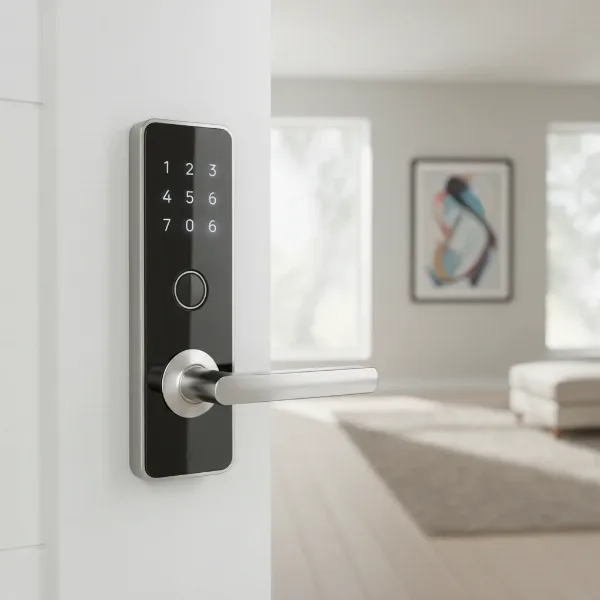 Modern smart lever lock with keypad and fingerprint sensor on a white interior door.
Types of Smart Lever Locks on the Market
The smart lock industry offers a diverse range of lever locks, each with unique features catering to different needs and preferences. Understanding these types is crucial for making an informed decision.
Fingerprint Smart Lever Locks
Fingerprint smart lever locks offer biometric authentication, allowing access with just a touch.
- Pros: Highly secure, extremely convenient (no keys or codes to remember), quick entry.
- Cons: Can sometimes be affected by dirt or moisture, may not be suitable for young children or elderly individuals with faint prints.
- Best for: High-security interior doors, home offices, private bedrooms where ultimate convenience and biometric security are desired.
|
Our Picks for the Best Smart Lock in 2026
As an Amazon Associate I earn from qualifying purchases.
|
||
| Num | Product | Action |
|---|---|---|
| 1 | eufy Security Smart Lock C220, Fingerprint Keyless Entry Door Lock, Built-in Wi-Fi, App Remote Control, Front Door Smart Lock Deadbolt, 8Months Battery, Reliable Power, IP53 Waterproof, BHMA Grade 3 |

|
| 2 | Philips Wi-Fi Door Lock, WiFi Smart Lock Keyless Entry Deadbolt for Front Door, Compatible with Alexa & Google Assistant, Remote Control, Built-in WiFi, APP Fingerprint Passcode Unlock, Auto Locking |
|
| 3 | TEEHO TE001 Keyless Entry Door Lock with Keypad - Smart Deadbolt Lock for Front Door with 2 Keys - Auto Lock - Easy Installation - Satin Nickel |
|
| 4 | Schlage Encode Smart WiFi Deadbolt Lock for Front Door - Keyless Entry with App or Touchscreen - Works with Alexa, Hey Google, & Airbnb - Create Codes for Guests - Matte Black |
|
| 5 | TEEHO TE001 Keyless Entry Door Lock with Keypad - Smart Deadbolt Lock for Front Door with 2 Keys - Auto Lock - Easy Installation - Matte Black |
|
| 6 | TEEHO TE001 Keyless Entry Door Lock with Keypad - Smart Deadbolt Lock for Front Door with 2 Keys - Auto Lock - Easy Installation - Oil-Rubbed Bronze |
|
| 7 | eufy Security Smart Lock C220, Fingerprint Keyless Entry Door Lock, Built-in Wi-Fi, App Remote Control, Front Door Smart Deadbolt, IP53 Waterproof, 8-Months Battery, Nickel |
|
| 8 | Electronic Passwords Keyless Entry Door Locks Smart Deadbolt Metal Lock Auto Time Delay Locking Secure Durable Low Battery Alert Type-C Port for Emergency Charging |
|
| 9 | ULTRALOQ U-Bolt Pro WiFi Smart Lock with Door Sensor, 8-in-1 Keyless Entry Door Lock with Fingerprint ID, App Remote Control, Built-in WiFi Keypad Deadbolt, Auto Unlock, IP65 Waterproof, Easy Install |
|
| 10 | Philips Wi-Fi Door Lock, WiFi Smart Lock Keyless Entry Deadbolt for Front Door, Remote Control, Built-in WiFi, APP Fingerprint Passcode Unlock, Auto Locking |
|
Keypad Smart Lever Locks
These locks feature a numerical keypad for entering a PIN code.
- Pros: Easy to use, multiple user codes, simple guest access, no need for a smartphone.
- Cons: Codes can be forgotten or shared, potential for “shoulder surfing” (others seeing your code).
- Best for: Common interior doors, pantries, or areas where multiple people need access and easy code management is a priority.
Card/Fob Smart Lever Locks
Some smart lever locks use RFID cards or key fobs for access.
- Pros: Quick and easy entry, good for managing multiple users without distributing codes.
- Cons: Cards/fobs can be lost, requiring replacement or deactivation.
- Best for: Offices, shared workspaces within a home, or areas where a physical token is preferred over codes or biometrics.
Remote-Controlled Smart Lever Locks
These locks can be operated via a smartphone app, often using Bluetooth or Wi-Fi.
- Pros: Ultimate convenience with remote access, monitoring door status, integration with smart home ecosystems.
- Cons: Relies on smartphone and connectivity, potential for app glitches.
- Best for: Modern smart homes, Airbnb hosts needing remote management, or busy individuals who want to monitor and control their interior doors from anywhere.
Hybrid Smart Lever Locks
Many modern smart lever locks combine multiple access methods. For instance, a lock might feature both a keypad and a fingerprint reader, along with app control.
- Pros: Maximized flexibility and redundancy, catering to diverse user preferences and situations.
- Cons: Can be more complex to set up and manage, potentially higher cost.
- Best for: Users who want the highest level of flexibility and convenience, ensuring access is always possible through multiple methods.
Comparing Leading Smart Lever Lock Brands
When selecting a smart lever lock for your interior doors, several brands stand out for their reliability, features, and design. Here’s a comparison of some top contenders:
| Brand/Model | Key Features | Connectivity | Unlock Methods | Ideal Use |
|---|---|---|---|---|
| Schlage Encode Smart Wi-Fi Lever | Built-in Wi-Fi, voice control, access history, customizable alerts | Wi-Fi | Keypad, App, Voice | Smart homes, remote access, high-traffic rooms |
| Yale Assure Lever Lock | Touchscreen/Pushbutton keypad, integrates with various smart modules (Wi-Fi, Z-Wave) | Bluetooth (modules for Wi-Fi/Z-Wave) | Keypad, App, Key (optional) | Versatile for various smart home ecosystems, secure offices |
| Ultraloq Latch 5 | Built-in Wi-Fi, 5-in-1 keyless entry, fingerprint sensor, auto-lock | Wi-Fi, Bluetooth | Fingerprint, Keypad, App, Key, Shake to Open (Bluetooth) | Comprehensive security, high convenience |
| Lockly Secure Pro (Latch Edition) | PIN Genie® keypad, 3D biometric fingerprint, offline access codes | Wi-Fi, Bluetooth | Fingerprint, PIN Genie keypad, App, Key | High-security, anti-peep keypad, privacy rooms |
| Kwikset 912 SmartCode (Lever) | Z-Wave Plus, 30 user codes, SmartKey re-key technology | Z-Wave | Keypad, Key | Z-Wave smart homes, easy re-keying |
Brand Highlights:
- Schlage: Known for robust security and reliable performance. The Encode Smart Wi-Fi Lever is particularly popular for its built-in Wi-Fi, eliminating the need for a separate hub for remote access. It’s a great choice for those seeking direct smart home integration and dependable daily use.
- Yale: A long-standing name in locks, Yale offers excellent build quality and a range of options with its Assure Lever series. Their modular approach allows users to add Wi-Fi or Z-Wave connectivity modules, providing flexibility to integrate with different smart home platforms.
- Ultraloq: Often praised for its versatile unlocking methods, including a fast fingerprint scanner and a responsive keypad. The Latch 5 model with built-in Wi-Fi offers a complete package for interior doors, blending security with high-tech convenience.
- Lockly: Stands out with its patented PIN Genie® keypad, which constantly shuffles numbers to prevent code deciphering. Their 3D biometric fingerprint sensor is also highly regarded for accuracy and speed, making it an excellent choice for privacy and security-conscious users.
- Kwikset: Offers a balance of affordability and smart features, particularly with Z-Wave integration. The Kwikset 912 lever is ideal for those already invested in a Z-Wave smart home system and appreciate the convenience of its SmartKey re-key technology.
Buying Guide: Choosing the Right Smart Lever Lock for Your Interior Door
Selecting the best smart lever lock involves considering several factors to ensure it meets your specific needs and integrates seamlessly with your home.
Determine Your Usage Needs and Door Type
First, clarify the primary purpose of the smart lock. Are you securing a personal office, a child’s room, or an Airbnb guest room?
- Door Type: Most interior doors have a single bore hole for the handle. Smart lever locks are designed to fit this standard. Check your door’s thickness and backset (distance from the door edge to the center of the bore hole) to ensure compatibility. Many smart levers are designed for doors with no deadbolt, just a standard knob/lever.
Explore Important Features
Consider the key functionalities that matter most to you:
- Unlocking Methods: Do you prefer fingerprint, keypad, smartphone app, or a combination? More options offer greater flexibility.
- Connectivity: Wi-Fi allows direct remote control. Bluetooth is suitable for proximity control. Z-Wave or Matter offer broader smart home integration but often require a hub.
- Auto-Locking: This feature automatically locks the door after a set period, providing peace of mind.
- Temporary Codes: Essential for guest access or service providers, allowing you to set time-sensitive or single-use codes.
- Activity Logs: Keep track of who enters and exits and at what times.
- Voice Control: Integration with Alexa, Google Assistant, or Apple HomeKit for hands-free operation.
Smart Home Ecosystem Compatibility
If you already have a smart home setup, ensure the lever lock is compatible.
- Alexa, Google Home, Apple HomeKit: Check for direct integration or compatibility via a bridge/hub.
- SmartThings, Home Assistant: These platforms offer broader device integration.
Evaluate Security and Durability
While interior doors typically require less stringent security than exterior ones, durability and encryption are still vital.
- Construction Materials: Look for metal construction rather than plastic for better longevity.
- Encryption: Ensure data transmitted between the lock and your phone/hub is encrypted.
- Battery Life and Backup: Good battery life (6-12 months) is standard. Look for locks with low-battery alerts and emergency backup options (e.g., a 9V battery terminal or a physical key override).
Budget and Aesthetics
Smart lever locks come in a range of prices. Set a budget, but remember that investing in a reliable lock often translates to better security and fewer headaches. Also, consider the finish and style to match your interior decor.
Installation and Maintenance Tips for Smart Lever Locks
Installing and maintaining your smart lever lock correctly will ensure optimal performance and longevity.
Basic Installation Steps
Most smart lever locks are designed for DIY installation and can typically be installed in 15-30 minutes using basic tools.
- Remove Old Hardware: Take off your existing lever handle and latch.
- Install Latch Bolt: Insert the new smart lock’s latch bolt into the door edge.
- Mount Exterior Assembly: Place the exterior part of the smart lever lock onto the door, threading any wires through the bore hole.
- Install Interior Assembly: Connect the interior component, ensuring wires are properly routed and screws are tightened.
- Insert Batteries: Install the required batteries, typically AA or AAA.
- Test: Manually test the lever and latch, then proceed with the initial setup via the app.
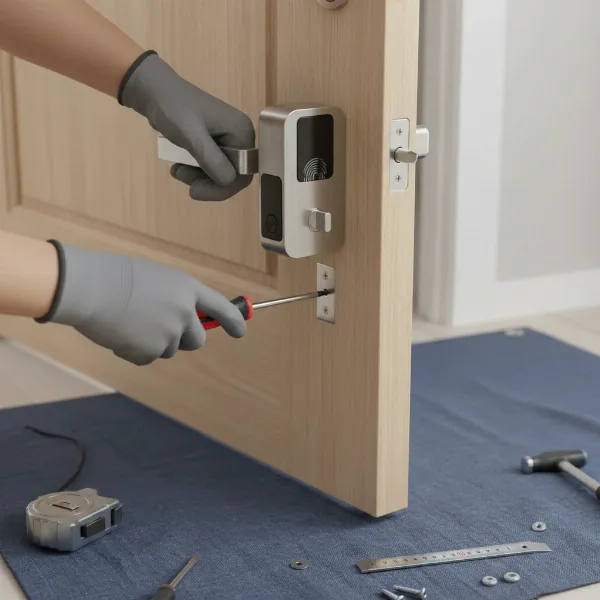 Hands installing a smart lever lock on an interior wooden door, tools visible.
Using Smart Features
- App Setup: Download the brand-specific app and follow instructions to pair your lock.
- User Management: Create and manage user codes or fingerprints through the app. Assign temporary access as needed.
- Automations: Set up auto-lock timers, or integrate with other smart devices (e.g., lights turn on when the door unlocks).
Battery Management and Longevity
- Monitor Battery Life: Regularly check the battery status via the app.
- Use Quality Batteries: Alkaline batteries are generally recommended for consistent performance. Avoid rechargeable batteries unless specifically recommended by the manufacturer.
- Replace Proactively: Don’t wait for the battery to die completely. Replace batteries when low-battery alerts appear.
Troubleshooting Common Issues
- Connectivity Issues: Ensure your Wi-Fi router is within range. If using Bluetooth, keep your phone close to the lock. Restarting your router or the lock can often resolve temporary glitches.
- Keypad Not Responding: Check battery levels. Clean the keypad surface if it’s a touchscreen.
- Fingerprint Reader Not Working: Ensure the sensor is clean and your finger is dry. Re-registering fingerprints can also help.
- Lock Not Engaging: Check for obstructions in the door frame or if the latch bolt is misaligned. Ensure all screws are tight.
Essential Smart Lock Accessories
While many smart lever locks are self-contained, certain accessories can enhance their functionality and convenience.
- Wi-Fi Bridge/Hub: If your smart lever lock uses Bluetooth or Z-Wave, a Wi-Fi bridge or hub (like those from August, Yale, or a general smart home hub) is essential for remote access and integration with broader smart home ecosystems. These devices allow your lock to communicate over your home network.
- Extra Key Fobs/Cards: If your lock supports them, having extra fobs or cards can be useful for multiple users or as backups.
- Backup Battery Packs: While most locks use standard batteries, some advanced models might offer dedicated rechargeable packs. Always ensure you have spare standard batteries on hand for emergencies.
- Door Sensors: While not strictly for the lock itself, integrated door sensors can tell you if the door is merely locked or also closed, adding another layer of monitoring.
Conclusion
Smart lever locks are a game-changer for interior door security and convenience, bringing keyless entry and intelligent control to areas often overlooked by traditional smart deadbolts. From biometric access for a private study to remote code management for a guest room, these devices offer tailored solutions for modern living. By understanding the different types, comparing leading brands, and carefully considering your specific needs, you can select a smart lever lock that not only enhances your home’s security but also seamlessly integrates into your smart lifestyle. Upgrade your interior doors today and experience the effortless control and peace of mind that smart lever locks provide. Which smart lever lock will be the first step in transforming your interior spaces?
Frequently Asked Questions
How do smart lever locks differ from smart deadbolts?
Smart lever locks replace the entire handle and locking mechanism, commonly found on interior doors or side doors without a separate deadbolt. Smart deadbolts, conversely, typically replace only the locking mechanism above a standard handle, primarily used on exterior main entry doors for higher security. Lever locks often offer less robust security than deadbolts but are perfect for internal privacy.
Can I install a smart lever lock on any interior door?
Most smart lever locks are designed to fit standard interior door preparations with a single bore hole. However, it’s crucial to check the specific product’s requirements for door thickness and backset measurement to ensure compatibility before purchasing. Installation is generally DIY-friendly.
Do smart lever locks require Wi-Fi to function?
Not all smart lever locks require Wi-Fi. Many use Bluetooth for proximity-based control via a smartphone app. For remote access and integration with smart home ecosystems like Alexa or Google Assistant, a Wi-Fi connection (either built-in or through a separate bridge/hub) is typically necessary.
What happens if the battery dies on my smart lever lock?
Smart lever locks are designed with safeguards for battery failure. Most provide low-battery alerts well in advance. If the battery does die, many models include emergency power options, such as a 9V battery terminal for a temporary power boost, or a physical key override as a last resort.
Are smart lever locks secure enough for a home office?
Yes, smart lever locks provide excellent security for interior spaces like a home office. While not as robust as a heavy-duty deadbolt on an exterior door, they offer significant privacy and controlled access within the home, preventing unauthorized entry through features like keypads, fingerprints, and activity logs.
Can I grant temporary access to guests or service providers?
Absolutely. One of the primary advantages of smart lever locks is the ability to generate temporary access codes or schedules. You can set codes that work only for specific dates, times, or a limited number of uses, making them ideal for managing access for housekeepers, pet sitters, or short-term guests without needing to cut or retrieve physical keys.
