Have you ever wished for a smarter home, starting with a lock that offers both security and unparalleled convenience, without the hassle of a complete door overhaul? The Yale Linus Smart Lock (Retrofit Design) might just be the solution you’re searching for. As a seasoned technician with a decade of expertise in smart lock technology, I’ve seen countless innovations, and the Linus stands out for its elegant approach to upgrading existing doors. This comprehensive review will delve into everything you need to know about the Yale Linus, from its innovative retrofit design and advanced features to its installation, performance, and how it stacks up against the competition. Let’s unlock the world of smarter home security together.
What is the Yale Linus Smart Lock? Why Choose a Retrofit Design?
The Yale Linus Smart Lock is a sophisticated device designed to transform your existing deadbolt into a smart lock without requiring a full replacement of your door hardware. It’s a “retrofit” solution, meaning it installs on the inside of your door, directly over your current Euro cylinder lock. This ingenious design ensures that the exterior of your door remains unchanged, preserving your home’s aesthetic and allowing you to continue using your original keys from the outside.
Choosing a retrofit smart lock like the Yale Linus offers several distinct advantages. For renters, it’s an ideal choice as it typically doesn’t require permanent modifications to the door, making it easy to remove when moving out. Homeowners who appreciate their existing door hardware or want to avoid complex installations also benefit greatly. The Linus provides all the modern conveniences of a smart lock—keyless entry, remote access, and activity monitoring—while maintaining a traditional appearance from the outside. It’s a perfect blend of old-world charm and cutting-edge technology.
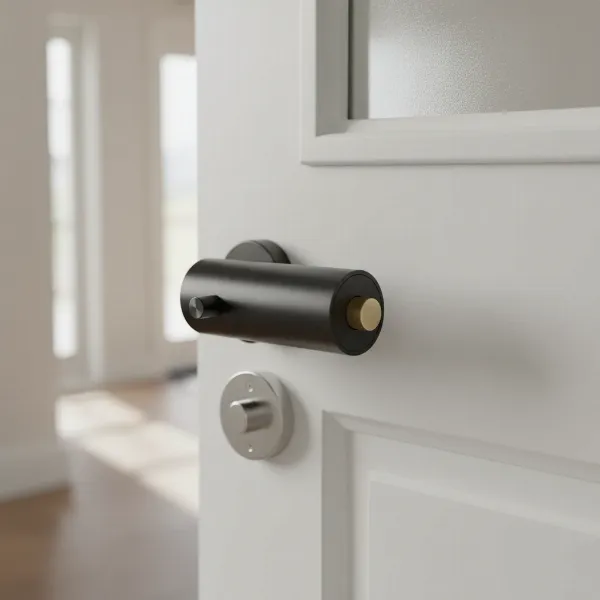 Yale Linus smart lock installed on the interior of a door over a Euro cylinder.
The core benefits of adopting the Yale Linus include enhanced convenience, robust security, and simplified access management. Imagine your door unlocking automatically as you approach, or granting temporary access to a cleaner or guest with just a few taps on your smartphone. The Linus brings these capabilities to life, offering peace of mind and effortless control over your home’s entry.
Key Features and Technology of the Yale Linus Smart Lock
The Yale Linus Smart Lock is packed with features designed to make your daily life easier and your home more secure. Its technology ecosystem is built around user-friendliness and robust protection.
Keyless Entry & Auto-Unlock/Lock
|
Our Picks for the Best Smart Lock in 2026
As an Amazon Associate I earn from qualifying purchases.
|
||
| Num | Product | Action |
|---|---|---|
| 1 | TEEHO TE001 Keyless Entry Door Lock with Keypad - Smart Deadbolt Lock for Front Door with 2 Keys - Auto Lock - Easy Installation - Matte Black |

|
| 2 | TEEHO TE001 Keyless Entry Door Lock with Keypad - Smart Deadbolt Lock for Front Door with 2 Keys - Auto Lock - Easy Installation - Oil-Rubbed Bronze |
|
| 3 | TEEHO TE001 Keyless Entry Door Lock with Keypad - Smart Deadbolt Lock for Front Door with 2 Keys - Auto Lock - Easy Installation - Satin Nickel |
|
| 4 | ULTRALOQ U-Bolt Pro WiFi Smart Lock with Door Sensor, 8-in-1 Keyless Entry Door Lock with Fingerprint ID, App Remote Control, Built-in WiFi Keypad Deadbolt, Auto Unlock, IP65 Waterproof, Easy Install |
|
| 5 | Philips Wi-Fi Door Lock, WiFi Smart Lock Keyless Entry Deadbolt for Front Door, Remote Control, Built-in WiFi, APP Fingerprint Passcode Unlock, Auto Locking |
|
| 6 | Electronic Passwords Keyless Entry Door Locks Smart Deadbolt Metal Lock Auto Time Delay Locking Secure Durable Low Battery Alert Type-C Port for Emergency Charging |
|
| 7 | Philips Wi-Fi Door Lock, WiFi Smart Lock Keyless Entry Deadbolt for Front Door, Compatible with Alexa & Google Assistant, Remote Control, Built-in WiFi, APP Fingerprint Passcode Unlock, Auto Locking |
|
| 8 | Schlage Encode Smart WiFi Deadbolt Lock for Front Door - Keyless Entry with App or Touchscreen - Works with Alexa, Hey Google, & Airbnb - Create Codes for Guests - Matte Black |
|
| 9 | eufy Security Smart Lock C220, Fingerprint Keyless Entry Door Lock, Built-in Wi-Fi, App Remote Control, Front Door Smart Lock Deadbolt, 8Months Battery, Reliable Power, IP53 Waterproof, BHMA Grade 3 |
|
| 10 | eufy Security Smart Lock C220, Fingerprint Keyless Entry Door Lock, Built-in Wi-Fi, App Remote Control, Front Door Smart Deadbolt, IP53 Waterproof, 8-Months Battery, Nickel |
|
One of the most compelling features is keyless entry, transforming your smartphone or Apple Watch into your new key. Through the intuitive Yale Access app, you can lock and unlock your door from anywhere. The Linus also boasts an auto-unlock feature, utilizing geofencing to detect your approach and unlock the door automatically, so you never have to fumble for keys. Conversely, auto-lock ensures your door secures itself after a set period once it closes, adding an extra layer of security and eliminating worries about forgetting to lock up.
Remote Access & Connectivity
For remote functionality, the original Yale Linus Smart Lock typically requires a separate accessory: the Yale Connect Wi-Fi Bridge. This bridge plugs into a power outlet near your door and establishes a Wi-Fi connection, allowing you to control your lock, receive instant alerts, and manage access from anywhere in the world. The newer Yale Linus L2, however, offers a significant upgrade by integrating Wi-Fi directly into the lock, eliminating the need for a separate bridge and simplifying its setup and footprint. Both models utilize Bluetooth Low Energy (BLE) technology for local communication with your smartphone.
Enhanced Security
Security is paramount with any lock, and the Yale Linus takes it seriously. The Yale Access account is safeguarded by two-factor authentication, requiring identity verification via email or phone number in addition to your password. The lock itself employs bank-level AES 128-bit and TLS encryption to protect communication between the lock and your devices. Additionally, an optional DoorSense sensor can be installed to monitor whether your door is open or closed, providing an extra layer of awareness and security by alerting you to its status.
Smart Home Integration
The Yale Linus ecosystem is designed to integrate seamlessly with various smart home platforms. It works with popular voice assistants such as Amazon Alexa and Google Assistant, allowing for convenient voice control. For Apple users, the Linus L2 stands out with its Matter support over Wi-Fi, making it compatible with Apple HomeKit and other Matter-enabled devices, expanding its utility within diverse smart home environments.
Guest Management and Activity Monitoring
Managing access for friends, family, or service providers is effortless with the Yale Access app. You can grant virtual keys instantly, scheduling specific days and times for access, and easily revoke them as needed. The app also provides a 24/7 activity feed, allowing you to track exactly who entered your home and when, giving you complete oversight and peace of mind.
Yale Linus Smart Lock Models: Original vs. L2
While the core functionality of the Yale Linus series remains consistent, there are notable differences between the original Yale Linus Smart Lock and its successor, the Linus L2. Understanding these distinctions is crucial for choosing the right model for your needs.
The original Yale Linus Smart Lock is known for its reliable retrofit design and extensive smart features. However, for remote access capabilities beyond Bluetooth range, it necessitates the Yale Connect Wi-Fi Bridge. This separate device connects the lock to your home Wi-Fi, enabling control from anywhere. The original Linus typically runs on four AA alkaline batteries. Reviewers have occasionally noted its motor sound and speed as areas for improvement.
The Yale Linus L2 represents the next evolution, addressing some of the feedback from the original model. The most significant upgrade is the built-in Wi-Fi, which eliminates the need for the external Yale Connect Bridge. This means a cleaner installation with one less device occupying a power socket. The L2 also boasts twice the speed and a quieter operation compared to its predecessor, significantly enhancing the user experience. Furthermore, it features a rechargeable lithium battery, offering a more convenient power solution than disposable AAs. The L2 also includes Matter support, providing broader compatibility with smart home ecosystems like Apple HomeKit.
For users prioritizing integrated Wi-Fi, faster operation, quieter performance, and a rechargeable power source, the Linus L2 is a clear upgrade. However, the original Linus, especially if bundled with the Wi-Fi bridge, still offers a comprehensive smart lock experience at a potentially lower price point.
Installation of the Yale Linus Smart Lock: A DIY-Friendly Upgrade
One of the standout advantages of the Yale Linus Smart Lock’s retrofit design is its straightforward, DIY-friendly installation process. It’s engineered to fit over most existing Euro cylinder locks, making the upgrade accessible without needing a locksmith or specialized tools.
Compatibility
The Yale Linus is primarily designed to work with Euro cylinder type locks. For optimal compatibility, Yale also offers an adjustable cylinder, which can be used if your existing cylinder doesn’t meet the specific requirements or if you desire further customization. This adjustable cylinder allows for precise length adjustments to ensure a perfect fit with varying door thicknesses and internal/external protrusions. It’s important to note that the Linus Smart Lock mounts on the inside face of the door.
Step-by-Step Installation Process
The installation typically takes less than 10 minutes for those with a compatible cylinder. Here’s a general overview of the steps:
- Measure: Before starting, measure how far your existing cylinder protrudes from your internal door furniture. This helps in selecting the correct spacers for the new cylinder.
- Remove Existing Cylinder: Unscrew the cylinder fixing screw located below the deadbolt. Then, insert your key and wiggle it about 15 degrees to extract the cylinder from the door.
- Adjust and Install New Cylinder (if needed): If using the Yale adjustable cylinder, you’ll match its length to your old cylinder using provided spacers and faceplates. Ensure the tail-bar, which turns the lock, fits correctly and allows free rotation.
- Mount Linus Unit: Attach the mounting plate onto the internal side of the cylinder, ensuring a 3mm extension for proper fixation. Then, secure the Linus unit onto this mounting plate. The unit typically clips into place.
- Insert Batteries: For the original Linus, insert the four AA batteries. For the Linus L2, install the rechargeable lithium battery. The lock comes with batteries pre-installed; simply remove any plastic tabs to activate.
Videos and detailed instructions are available through the Yale Home app and Yale’s official channels, guiding you through each step.
Initial Setup and Calibration (Yale Access App)
Once the physical installation is complete, the next step involves setting up the lock via the free Yale Access app (available on iOS and Android).
- Account Setup: Download the app, create a new account, or sign in.
- Device Pairing: Scan the QR code on the Linus unit or manually enter its serial number.
- Calibration: The app will guide you through a calibration process where you open and close the lock completely. This allows the Linus to learn the full range of motion of your deadbolt, ensuring smooth and accurate operation.
- Connect Bridge (for original Linus): If you have the original Linus, you’ll set up the Yale Connect Wi-Fi Bridge by plugging it into a socket within Bluetooth range of the lock and pairing it through the app.
The app also allows you to configure optional features like DoorSense and integrate with other smart home systems.
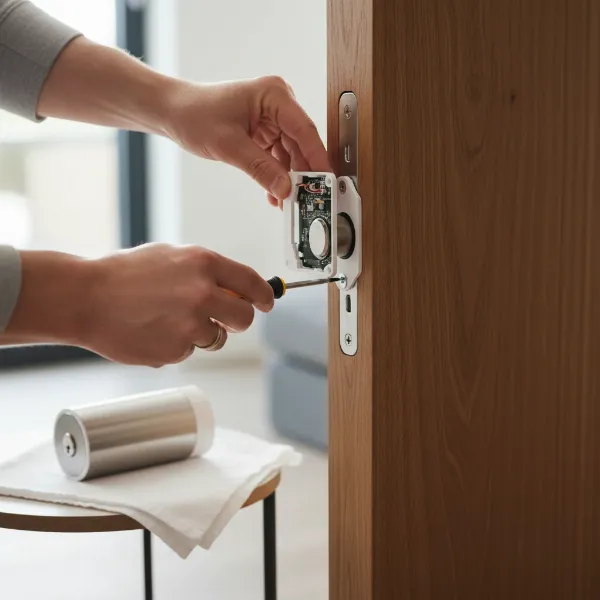 Hands installing a Yale Linus smart lock mounting plate over a Euro cylinder on a door.
Pros and Cons of the Yale Linus Smart Lock
The Yale Linus Smart Lock, particularly in its retrofit design, offers a compelling package, but like any technology, it comes with its own set of advantages and considerations.
| Pros | Cons |
|---|---|
| Effortless Retrofit Installation: Installs over existing Euro cylinder, keeping your original keys and external hardware intact. Ideal for renters. | External Wi-Fi Bridge (Original Linus): Requires a separate Yale Connect Wi-Fi Bridge for remote access, which can occupy a power outlet and may be seen as an extra component. |
| Sleek and Discreet Design: Minimalist aesthetic that blends well with various door styles. | Motor Noise (Original Linus): Some users report the motor can be noisy during operation. The L2 model is noted to be quieter. |
| Advanced Security: Features 2-factor authentication, AES 128-bit, and TLS encryption for robust digital security. | Battery Life Concerns: Wi-Fi locks generally consume more power. While the L2 has a rechargeable battery, constant remote use might require more frequent charging. |
| Flexible Access Management: Grant virtual keys, schedule access, and monitor activity 24/7 via the Yale Access app. | Not the Smallest Footprint: The device, particularly the original, can be somewhat bulky on the interior side of the door. |
| Auto-Lock and Auto-Unlock (Geofencing): Provides hands-free convenience, automatically securing and opening your door as you arrive or leave. | Geofencing Reliability: Auto-unlock performance can sometimes be inconsistent, requiring manual entry. |
| Broad Smart Home Compatibility: Integrates with Amazon Alexa, Google Assistant, and Apple HomeKit (especially L2 with Matter). | No Built-in Keypad: Requires an optional Yale Smart Keypad for PIN entry, adding to the overall cost. |
| DoorSense Technology: Optional sensor informs you if the door is ajar or closed. | AV-Test Certification: The Yale Linus was not re-certified by AV-Test, unlike some competitors. |
| Rechargeable Battery (Linus L2): Convenient power solution, though a spare battery might be useful for continuous operation during charging. |
“The true value of a retrofit smart lock like Yale Linus lies in its ability to deliver modern security and convenience without forcing homeowners to compromise on their door’s existing aesthetics or functionality.” – Admin, Smartlockchoice.com
How the Yale Linus Compares to Other Retrofit Smart Locks
The market for retrofit smart locks is competitive, with several strong contenders offering similar benefits. The Yale Linus holds its own by combining trusted brand security with user-friendly technology. Here’s a brief look at how it compares to some key rivals:
- August Smart Lock: Often considered a direct competitor, the August Smart Lock also focuses on a retrofit design, installing over your existing deadbolt from the inside. Like the original Linus, August typically requires a separate Wi-Fi Connect bridge for remote access. Both offer similar features like auto-unlock, guest access, and activity monitoring. August is praised for its sleek design, but some find it bulky, similar to the Linus.
- Nuki Smart Lock: Popular in Europe, Nuki is another prominent retrofit smart lock. The Ultion Nuki Plus Smart Lock, for instance, boasts built-in Wi-Fi and Matter support, similar to the Yale Linus L2, eliminating the need for a bridge. Nuki is generally seen as very flexible and secure, often designed for specific European cylinder types.
- Level Bolt: The Level Bolt distinguishes itself as the “invisible” smart lock, as it installs inside your door’s deadbolt, making it virtually undetectable from both the interior and exterior. This provides an unparalleled level of discretion. However, it also requires a Wi-Fi bridge for full remote functionality and may offer more minimal activity logging compared to Linus.
The Yale Linus, particularly the L2 model, competes strongly with its built-in Wi-Fi, Matter support, and improved speed. Its robust security features and the convenience of the Yale Access app make it a formidable choice for those seeking a reliable and feature-rich retrofit solution that maintains key functionality.
Maximizing Your Yale Linus Experience with Accessories
While the Yale Linus Smart Lock is a powerful device on its own, several optional accessories can further enhance its functionality, providing even greater convenience and flexibility for accessing and managing your home.
- Yale Smart Keypad: For those who prefer keyless entry without a smartphone, the Yale Smart Keypad is an essential accessory. This battery-operated keypad can be installed near your door and allows you to unlock the Linus by simply entering a PIN code. It’s ideal for children, housekeepers, or guests who might not have the Yale Access app. You can create custom codes and manage them directly from the Yale Access app.
- Yale Dot: The Yale Dot is a small NFC (Near Field Communication) tag that offers a unique unlocking method for Android users. By sticking the Dot near your door, you can tap your Android phone to it to unlock the Linus L2, providing a quick and easy alternative to opening the app.
- Yale Connect Wi-Fi Bridge: As mentioned, for the original Yale Linus Smart Lock, the Yale Connect Wi-Fi Bridge is crucial for remote access features. It plugs into a standard power outlet and links your Linus lock to your home Wi-Fi network, enabling control from anywhere in the world and integration with voice assistants. While the Linus L2 has built-in Wi-Fi, the bridge remains a vital component for earlier models.
- Yale Linus Adjustable Cylinder: If your existing door cylinder isn’t directly compatible or you want to ensure the perfect fit for the Linus, the Yale Linus Adjustable Cylinder is a recommended accessory. This allows you to customize the cylinder length to match your door’s specifications precisely, ensuring optimal performance and easy installation of the smart lock.
These accessories allow you to tailor your Yale Linus setup to your specific lifestyle and security preferences, making your smart home experience even more seamless and convenient.
Conclusion
The Yale Linus Smart Lock (Retrofit Design) offers a compelling solution for anyone looking to upgrade their home security with smart technology without committing to a full lock replacement. Its ingenious retrofit design preserves your door’s exterior aesthetics while delivering a wealth of modern features, from keyless entry and remote access to advanced security protocols and seamless smart home integration. Whether opting for the original Linus with its reliable functionality and Wi-Fi bridge, or the enhanced Linus L2 with built-in Wi-Fi and faster performance, you’re investing in a system backed by Yale’s long-standing reputation for security expertise.
The ease of installation, coupled with flexible access management and robust encryption, makes the Yale Linus a top contender in the smart lock market. While considerations like motor noise in the original model or the need for an external bridge (for non-L2 versions) exist, the overall package of convenience, control, and peace of mind is undeniable. Are you ready to embrace the future of home security and transform your entry experience with the Yale Linus Smart Lock?
Frequently Asked Questions
What kind of batteries does the Yale Linus Smart Lock use?
The original Yale Linus Smart Lock uses four AA alkaline batteries. The newer Yale Linus L2 model features a rechargeable lithium battery for enhanced convenience.
Can I still use my traditional keys with the Yale Linus Smart Lock?
Yes, absolutely. The Yale Linus Smart Lock is a retrofit design that installs on the inside of your door, allowing you to keep and use your original physical keys from the outside.
Does the Yale Linus Smart Lock require a Wi-Fi bridge?
The original Yale Linus Smart Lock requires a separate Yale Connect Wi-Fi Bridge for remote access and smart home integrations beyond Bluetooth range. However, the newer Yale Linus L2 model has built-in Wi-Fi, eliminating the need for an external bridge.
Is the Yale Linus Smart Lock compatible with Apple HomeKit?
The Yale Linus L2 Smart Lock supports Matter over Wi-Fi, which makes it compatible with Apple HomeKit, as well as Amazon Alexa and Google Assistant.
How secure is the Yale Linus Smart Lock?
The Yale Linus Smart Lock prioritizes security with features like two-factor authentication for the Yale Access app and bank-grade AES 128-bit and TLS encryption for communication.
Can I grant temporary access to guests with the Yale Linus?
Yes, the Yale Access app allows you to easily create and manage virtual keys for guests, specifying the exact dates and times they can access your home. You can revoke these permissions at any time.