Living in a rental property shouldn’t mean sacrificing the convenience and enhanced security of a smart home. Many tenants dream of modernizing their living space, but the thought of drilling into doors or making permanent alterations often clashes with lease agreements and the risk of losing a security deposit. This common dilemma leads many renters to believe that smart lock technology is out of reach.
Fortunately, that’s no longer the case. The smart home market has evolved to offer innovative solutions specifically designed for renters: no-drill smart locks. These devices provide all the cutting-edge features of traditional smart locks—from keyless entry to remote access and guest management—without requiring a single hole to be drilled or any permanent changes to your door’s exterior. This article will guide you through the world of renter-friendly smart locks, detailing their benefits, the different types available, top models on the market, and how to choose and use the perfect one to secure your rental without upsetting your landlord.
What are Renter-Friendly Smart Locks and Why Do You Need One?
Renter-friendly smart locks are innovative door security solutions specifically engineered for temporary installation. Unlike conventional smart locks that often demand replacing the entire deadbolt mechanism or drilling new holes, these locks are designed for non-permanent setups, preserving the existing door hardware and aesthetic. They are ideal for anyone living in an apartment, condo, or house under a lease agreement, offering a modern security upgrade without breaching rental terms.
The benefits of opting for a no-drill smart lock in your rental are substantial. Primarily, they eliminate the need for landlord approval for modifications, as no damage or permanent changes are made to the property. This protects your security deposit and ensures a smooth move-out process. When it’s time to relocate, these locks are typically easy to remove and can be taken to your new home, making them a wise, long-term investment. Beyond landlord considerations, these devices offer unparalleled convenience and enhanced security. Imagine ditching your physical keys for good, granting temporary access to dog walkers or cleaners from anywhere, or automatically locking your door as you leave. These smart features bring peace of mind and simplify daily life, all while ensuring your original keys still function for traditional access, keeping landlords and property managers happy.
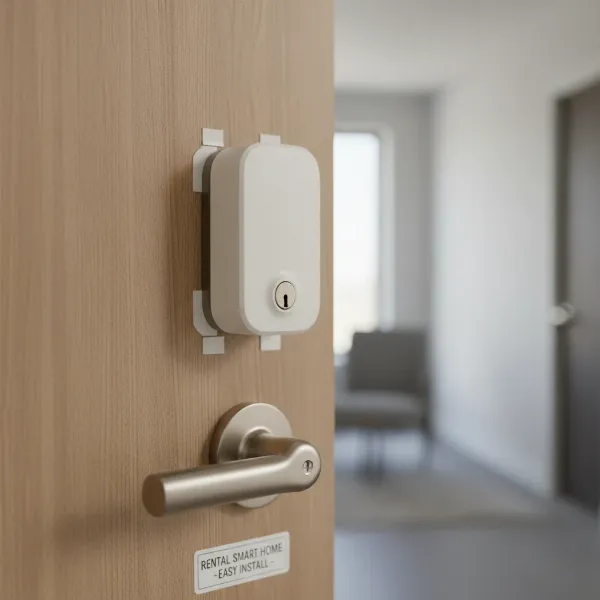 A smart lock installed on a rental door's interior, showing keyless convenience.
Types of No-Drill Smart Locks for Renters
The market for renter-friendly smart locks has diversified, offering several innovative designs that cater to various needs and preferences. Understanding these types will help you determine which solution best fits your apartment door and lifestyle.
Retrofit Smart Locks
Retrofit smart locks are perhaps the most popular choice for renters due to their ingenious design. These devices install on the inside of your door, directly over your existing deadbolt’s thumb-turn. They replace the manual turning mechanism with a smart, motorized one, leaving the exterior hardware—including the keyhole—completely untouched.
- Pros: The biggest advantage is that your door’s exterior remains identical, meaning your landlord’s keys still work, and there are no visible signs of a smart lock from the outside. Installation is typically quick and straightforward, often taking less than 10 minutes with just a screwdriver. They are also easy to remove when you move out.
- Cons: These locks are visible on the inside of your door, which might not appeal to everyone’s aesthetic. Compatibility can also be a factor, as they need to fit over specific deadbolt thumb-turn designs, though most popular models offer adapters for common types.
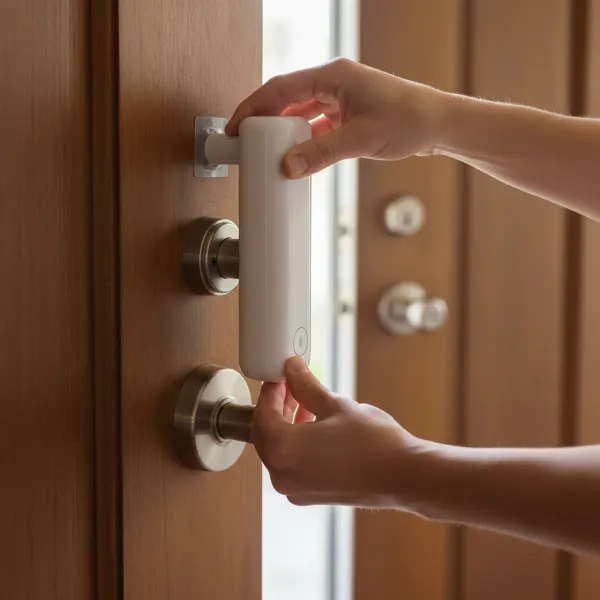 A person easily installing a retrofit smart lock over an existing deadbolt thumb-turn.
|
Our Picks for the Best Smart Lock in 2026
As an Amazon Associate I earn from qualifying purchases.
|
||
| Num | Product | Action |
|---|---|---|
| 1 | TEEHO TE001 Keyless Entry Door Lock with Keypad - Smart Deadbolt Lock for Front Door with 2 Keys - Auto Lock - Easy Installation - Satin Nickel |

|
| 2 | eufy Security Smart Lock C220, Fingerprint Keyless Entry Door Lock, Built-in Wi-Fi, App Remote Control, Front Door Smart Lock Deadbolt, 8Months Battery, Reliable Power, IP53 Waterproof, BHMA Grade 3 |
|
| 3 | Schlage Encode Smart WiFi Deadbolt Lock for Front Door - Keyless Entry with App or Touchscreen - Works with Alexa, Hey Google, & Airbnb - Create Codes for Guests - Matte Black |
|
| 4 | eufy Security Smart Lock C220, Fingerprint Keyless Entry Door Lock, Built-in Wi-Fi, App Remote Control, Front Door Smart Deadbolt, IP53 Waterproof, 8-Months Battery, Nickel |
|
| 5 | Philips Wi-Fi Door Lock, WiFi Smart Lock Keyless Entry Deadbolt for Front Door, Remote Control, Built-in WiFi, APP Fingerprint Passcode Unlock, Auto Locking |
|
| 6 | ULTRALOQ U-Bolt Pro WiFi Smart Lock with Door Sensor, 8-in-1 Keyless Entry Door Lock with Fingerprint ID, App Remote Control, Built-in WiFi Keypad Deadbolt, Auto Unlock, IP65 Waterproof, Easy Install |
|
| 7 | TEEHO TE001 Keyless Entry Door Lock with Keypad - Smart Deadbolt Lock for Front Door with 2 Keys - Auto Lock - Easy Installation - Oil-Rubbed Bronze |
|
| 8 | TEEHO TE001 Keyless Entry Door Lock with Keypad - Smart Deadbolt Lock for Front Door with 2 Keys - Auto Lock - Easy Installation - Matte Black |
|
| 9 | Electronic Passwords Keyless Entry Door Locks Smart Deadbolt Metal Lock Auto Time Delay Locking Secure Durable Low Battery Alert Type-C Port for Emergency Charging |
|
| 10 | Philips Wi-Fi Door Lock, WiFi Smart Lock Keyless Entry Deadbolt for Front Door, Compatible with Alexa & Google Assistant, Remote Control, Built-in WiFi, APP Fingerprint Passcode Unlock, Auto Locking |
|
“Stick-On” Smart Locks
For those who want to avoid even a screwdriver, “stick-on” smart locks offer the ultimate in zero-tool installation. These innovative devices typically adhere to your door using strong, removable adhesive tape. They feature a mechanical arm or gripping mechanism that physically turns your existing deadbolt’s thumb-turn.
- Pros: No tools are required whatsoever for installation, making them incredibly renter-friendly and ideal for tenants with strict “no-touch” policies. They offer near-universal compatibility with many types of deadbolts, as they simply sit on top and manipulate the existing mechanism. When removed, they leave absolutely no trace.
- Cons: The main drawback is their appearance; they can look somewhat bulky or robotic clinging to your door. Their reliance on adhesive means you must ensure a clean, flat surface for optimal attachment.
Invisible/Internal Replacement Smart Locks
If aesthetics and discretion are your top priorities, invisible smart locks are an excellent choice. These locks work by replacing the internal components of your existing deadbolt, completely hiding the smart technology within the door itself. You reuse your existing exterior keyhole and interior thumb-turn, making the smart lock virtually undetectable from both sides.
- Pros: They offer a truly invisible upgrade, maintaining the original look and feel of your door hardware. This makes them perfect for buildings with strict aesthetic rules or for renters who prefer a sleek, minimalist smart home setup. They often boast high security ratings as they integrate directly with the deadbolt’s core mechanism.
- Cons: While still considered renter-friendly as they don’t involve drilling, they do require a bit more involvement in replacing internal components compared to a simple retrofit. You’ll need to carefully store the original internal parts to swap back when you move.
Top Renter-Friendly Smart Lock Brands and Models
When selecting a no-drill smart lock, certain brands consistently stand out for their reliability, ease of installation, and robust features. Here are some of the leading options tailored for renters:
August Wi-Fi Smart Lock (4th Gen)
Often hailed as the king of retrofit smart locks for renters, the August Wi-Fi Smart Lock is a favorite for good reason. It installs directly over the inside of your existing deadbolt in under 10 minutes, leaving your exterior lock and keys completely untouched. This means your landlord retains their physical key access, and you avoid any issues with property modifications. The 4th Gen model features built-in Wi-Fi, eliminating the need for an external bridge for remote access.
- Key features: Auto-unlock as you approach, auto-lock upon leaving, virtual guest keys with customizable access schedules, 24/7 activity log, voice assistant integration (Alexa, Google Assistant, Apple HomeKit), door sense sensor for open/closed status.
- Why it’s great for renters: Extremely easy installation and removal, preserves existing exterior hardware, reliable performance, and a comprehensive set of smart features without permanent changes.
SwitchBot Lock
For the absolute easiest, “zero-tool” installation, the SwitchBot Lock is an outstanding choice. It attaches to your door with industrial-strength VHB adhesive tape and uses a robotic arm to physically turn your existing thumb-turn deadbolt. This makes it incredibly versatile and compatible with a wide range of locks.
- Key features: Adheres to the door, universal compatibility, app control, supports SwitchBot Hub Mini for remote access and smart home integration.
- Why it’s great for renters: No tools, no drilling, no damage to the door, and leaves no trace upon removal. It’s perfect for those who are hesitant about even minor DIY tasks.
Level Bolt
If an invisible smart lock is what you’re after, the Level Bolt delivers. This innovative lock fits entirely inside your door, replacing only the internal components of your deadbolt while allowing you to reuse your existing exterior keyhole and interior thumb-turn. The result is a fully functional smart lock that looks exactly like a traditional one.
- Key features: Completely hidden design, Grade 2 ANSI/BHMA security rating, keyless entry via app, geofencing for auto-unlock, guest access.
- Why it’s great for renters: Maintains the original aesthetic of your door, ideal for properties with strict appearance guidelines, and uses existing keys and hardware.
Yale Approach Lock with Wi-Fi
The Yale Approach Lock is another excellent retrofit option, offering a more compact design than some competitors. It installs over your existing deadbolt and can be bundled with an adhesive keypad for damage-free keyless entry, which is a major plus for renters.
- Key features: Compact retrofit design, Bluetooth connectivity, optional adhesive keypad, auto-lock, remote access (with Wi-Fi module), works with Alexa and Google Assistant.
- Why it’s great for renters: Easy to install and dismantle, offers a discreet aesthetic compared to bulkier options, and the adhesive keypad ensures no drilling for external access.
Choosing the Right No-Drill Smart Lock for Your Rental
Selecting the ideal no-drill smart lock involves considering several factors to ensure it meets your specific needs and complies with your rental agreement.
Assess Your Door Type and Existing Lock
Before anything else, check the compatibility of your existing deadbolt. Most renter-friendly smart locks, especially retrofit models, are designed for standard single-cylinder deadbolts. Measure your door’s thickness and the spacing around your deadbolt to ensure the smart lock can physically fit. For “stick-on” locks, confirm there’s a flat surface next to your thumb-turn for adhesion.
Consider Installation Ease
Think about your comfort level with installation. Are you looking for a truly “zero-tool” experience like the SwitchBot Lock, which only requires adhesive? Or are you comfortable with a screwdriver to replace a thumb-turn (August, Yale) or internal deadbolt components (Level Bolt)? The easier the installation, the smoother your rental experience will be.
Desired Features
Smart locks come with a variety of features. Prioritize what matters most to you:
- Remote Access: Do you need to lock/unlock your door from anywhere? (Requires Wi-Fi integration or a bridge).
- Guest Codes: Will you frequently need to grant temporary access to others?
- Auto-Lock/Unlock: Do you want the lock to secure itself automatically when you leave or unlock as you approach?
- Voice Control: Is integration with Alexa, Google Assistant, or Apple HomeKit important?
- Activity Logs: Do you want to track who comes and goes?
Aesthetic Preferences
Decide if you prefer the smart lock to be visible on the inside of your door (retrofit, stick-on) or completely hidden (invisible). This often comes down to personal taste and any specific rental property rules regarding interior modifications.
Budget
Smart lock prices vary. Set a realistic budget and compare features across different models. Sometimes, spending a little more upfront for built-in Wi-Fi or advanced features can save you money and hassle in the long run.
Read Reviews
Always consult user reviews from other renters. These real-world experiences can provide invaluable insights into a lock’s actual performance, ease of installation, battery life, and overall reliability in a rental setting.
Installation and Maintenance Tips for Renter-Friendly Smart Locks
Even with “no-drill” claims, a smooth installation and proper maintenance are key to maximizing your smart lock’s potential and ensuring it remains renter-friendly.
Basic Installation Steps
While specific instructions vary by model, most renter-friendly smart locks follow a few general principles:
- Preparation: Read the manual thoroughly. Clean the door surface around your existing deadbolt.
- Removal (if applicable): For retrofit locks like August or Yale, unscrew and remove only the interior thumb-turn assembly of your existing deadbolt. For Level Bolt, you’ll replace internal components. For SwitchBot, no removal is needed.
- Mounting: Attach the smart lock according to the manufacturer’s instructions. This might involve using existing screws (retrofit), adhesive (stick-on), or internal component replacement (invisible). Ensure it’s securely fastened and operates smoothly.
- Calibration & App Setup: Download the accompanying app, create an account, and follow the on-screen prompts to calibrate the lock and pair it with your smartphone.
Maximizing Smart Features
Once installed, delve into your smart lock’s app to customize its features. Set up auto-lock and auto-unlock preferences based on your routine. Create temporary or recurring guest access codes for visitors or service providers. Integrate your lock with voice assistants for hands-free control, or link it to other smart home devices for advanced automations (e.g., lights turning on when you unlock the door).
Battery Life and Maintenance
Most smart locks are battery-powered.
- Monitoring: Keep an eye on battery levels through the app and replace them promptly when low.
- Troubleshooting: If your lock isn’t responding, check the batteries first. Ensure your Wi-Fi or Bluetooth connection is stable for remote access features.
- Cleaning: Periodically wipe down the lock with a soft, dry cloth. Avoid harsh chemicals.
Removal When Moving Out
The beauty of renter-friendly locks is their reversibility. When you move, simply follow the uninstallation steps in reverse. For retrofit locks, remove the smart lock and reattach your original thumb-turn. For stick-on locks, carefully peel off the adhesive (most are designed for clean removal). For invisible locks, replace the smart components with the original internal deadbolt parts you saved. Always ensure your door is left in its original, undamaged condition.
Essential Smart Lock Accessories for Renters
While many smart locks are standalone solutions, certain accessories can enhance their functionality and convenience, especially for renters.
- Keypads (Adhesive Options): An adhesive keypad is invaluable, providing keyless entry for those without a smartphone, or as a backup if your phone battery dies. Look for models that use strong, damage-free adhesive for mounting, eliminating the need to drill into your door frame or wall. Brands like Yale offer this as an add-on or bundle.
- Wi-Fi Bridges/Hubs: If your chosen smart lock doesn’t have built-in Wi-Fi (some Bluetooth-only models), a Wi-Fi bridge or hub is essential for remote access, allowing you to control and monitor your lock from anywhere. These typically plug into a wall outlet near the door.
- Spare Batteries: Always keep a set of spare batteries on hand. Running out of power can lead to inconvenient lockouts, so proactive replacement is key.
- Door Sense Sensors: Many smart locks, like August, include a Door Sense sensor. This small magnet detects whether your door is open or closed, not just locked or unlocked. It provides an extra layer of security and can be crucial for auto-lock functions.
These accessories aren’t always mandatory, but they significantly improve the overall user experience and reliability of your smart lock setup, making your rental truly smarter and more secure.
“The rise of no-drill smart locks has truly democratized smart home security, making it accessible even to those navigating the complexities of rental agreements.” – Alex Nguyen, Smart Home Technology Expert
Conclusion
Embracing a smart lock in your rental property no longer requires compromising your lease agreement or damaging your home. With the advent of no-drill installation options, renters can enjoy the cutting-edge convenience and robust security features that smart locks offer. From the seamless integration of retrofit designs like the August Smart Lock to the utterly invisible Level Bolt and the tool-free simplicity of the SwitchBot Lock, there’s a perfect solution for every rental need.
These innovative devices empower you to control access to your home, manage guest entry effortlessly, and gain peace of mind through remote monitoring—all while preserving your security deposit and maintaining the integrity of your living space. By carefully considering your door type, desired features, and ease of installation, you can confidently select a smart lock that transforms your rental into a modern, secure sanctuary. Ready to experience the future of home security without the commitment of drilling?
Which no-drill smart lock feature excites you the most for your apartment?
Frequently Asked Questions
Are smart locks allowed in rental properties?
Many smart locks are allowed in rental properties, especially those that offer no-drill, non-permanent installation, such as retrofit or stick-on models. These locks leave the original hardware intact and cause no damage, making them renter-friendly and generally permissible. Always check your lease agreement or consult your landlord if you are unsure about specific modifications.
Do no-drill smart locks compromise security?
No-drill smart locks, particularly reputable brands, are designed with strong security in mind. Many offer high-grade security ratings (e.g., ANSI/BHMA Grade 2) and utilize advanced encryption for digital communication. Since they often integrate with your existing robust deadbolt, they maintain or even enhance the physical security of your door while adding digital protection and convenience features.
How long do batteries last in renter-friendly smart locks?
Battery life for renter-friendly smart locks typically ranges from 6 months to a year, depending on usage frequency, battery type, and connectivity (Wi-Fi can drain batteries faster than Bluetooth). Most smart lock apps provide low-battery alerts, allowing you ample time to replace them before they run out completely.
Can I take my smart lock with me when I move?
Yes, one of the significant advantages of no-drill smart locks is their portability. They are designed for easy removal, often requiring just a few minutes to uninstall and revert your door to its original state. This means you can take your smart lock to your new rental property, making it a reusable investment.
What’s the difference between retrofit and full replacement smart locks?
Retrofit smart locks install over the inside of your existing deadbolt, leaving the exterior untouched and allowing original keys to work. Full replacement smart locks, conversely, involve completely swapping out your entire existing deadbolt mechanism (both interior and exterior parts), which usually requires drilling and changing the key. Renters should opt for retrofit or other no-drill options to avoid permanent alterations.
