Tired of fumbling for keys or wondering if you locked the door after you’ve left? Upgrading to a smart lock often sounds appealing, but the thought of replacing your entire deadbolt, dealing with complex wiring, or spending a fortune can be a major deterrent. What if you could infuse your existing, “dumb” lock with smart capabilities without any permanent alterations or breaking the bank?
Enter the SwitchBot Lock. Designed as a clever retrofit solution, the SwitchBot Lock promises to transform your traditional deadbolt into a smart lock, offering convenience and enhanced security at an affordable price. Whether you’re a renter unable to make permanent changes, a budget-conscious homeowner, or simply prefer to keep your original keys, this review delves into how the SwitchBot Lock works, its features, advantages, and drawbacks, helping you decide if it’s the right smart upgrade for your home.
What is the SwitchBot Lock? Transforming Your Traditional Deadbolt
The SwitchBot Lock is a unique device that converts your existing deadbolt lock into a smart lock without requiring you to replace any exterior hardware. Instead of a full-scale replacement, it’s an internal module that attaches to the thumb-turn mechanism on the inside of your door. This innovative design means you can keep your original keys and maintain the exterior appearance of your door, making it an ideal solution for renters, apartment dwellers, or anyone hesitant to undertake a complicated installation.
At its core, the SwitchBot Lock operates by physically turning your deadbolt’s thumb-turn. It houses a small motor that, when activated via the SwitchBot app or other smart home integrations, rotates the thumb-turn to lock or unlock your door. This ingenious approach makes it compatible with a wide array of existing deadbolts, from standard single-cylinder locks to various European and Asian lock types, offering a universal solution that many full-replacement smart locks simply cannot. It brings modern smart home convenience to virtually any door with minimal fuss.
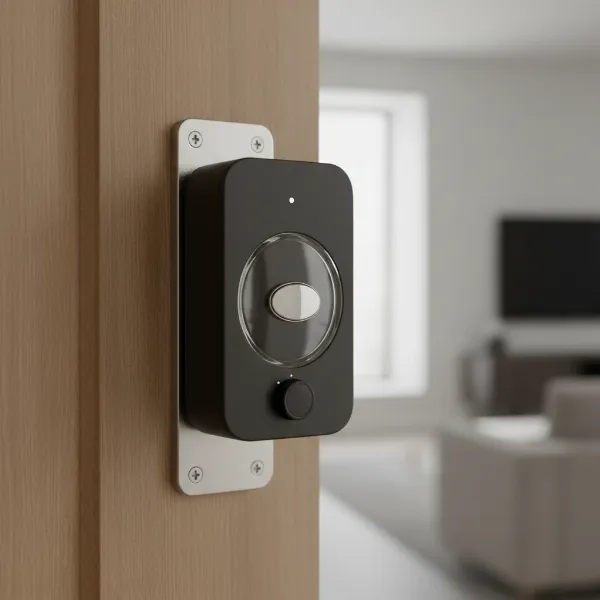 SwitchBot Lock device attached to the interior thumb-turn of a deadbolt on a wooden door.
Key Features and How SwitchBot Lock Elevates Your Home Security
The SwitchBot Lock, especially its newer Pro and Ultra versions, brings a suite of features designed to enhance both convenience and security. It offers a straightforward pathway to smart living by leveraging your existing hardware while integrating with popular smart home ecosystems.
Non-Invasive Installation
|
Our Picks for the Best Smart Lock in 2026
As an Amazon Associate I earn from qualifying purchases.
|
||
| Num | Product | Action |
|---|---|---|
| 1 | ULTRALOQ U-Bolt Pro WiFi Smart Lock with Door Sensor, 8-in-1 Keyless Entry Door Lock with Fingerprint ID, App Remote Control, Built-in WiFi Keypad Deadbolt, Auto Unlock, IP65 Waterproof, Easy Install |

|
| 2 | Schlage Encode Smart WiFi Deadbolt Lock for Front Door - Keyless Entry with App or Touchscreen - Works with Alexa, Hey Google, & Airbnb - Create Codes for Guests - Matte Black |
|
| 3 | eufy Security Smart Lock C220, Fingerprint Keyless Entry Door Lock, Built-in Wi-Fi, App Remote Control, Front Door Smart Lock Deadbolt, 8Months Battery, Reliable Power, IP53 Waterproof, BHMA Grade 3 |
|
| 4 | TEEHO TE001 Keyless Entry Door Lock with Keypad - Smart Deadbolt Lock for Front Door with 2 Keys - Auto Lock - Easy Installation - Oil-Rubbed Bronze |
|
| 5 | Philips Wi-Fi Door Lock, WiFi Smart Lock Keyless Entry Deadbolt for Front Door, Compatible with Alexa & Google Assistant, Remote Control, Built-in WiFi, APP Fingerprint Passcode Unlock, Auto Locking |
|
| 6 | Electronic Passwords Keyless Entry Door Locks Smart Deadbolt Metal Lock Auto Time Delay Locking Secure Durable Low Battery Alert Type-C Port for Emergency Charging |
|
| 7 | eufy Security Smart Lock C220, Fingerprint Keyless Entry Door Lock, Built-in Wi-Fi, App Remote Control, Front Door Smart Deadbolt, IP53 Waterproof, 8-Months Battery, Nickel |
|
| 8 | Philips Wi-Fi Door Lock, WiFi Smart Lock Keyless Entry Deadbolt for Front Door, Remote Control, Built-in WiFi, APP Fingerprint Passcode Unlock, Auto Locking |
|
| 9 | TEEHO TE001 Keyless Entry Door Lock with Keypad - Smart Deadbolt Lock for Front Door with 2 Keys - Auto Lock - Easy Installation - Satin Nickel |
|
| 10 | TEEHO TE001 Keyless Entry Door Lock with Keypad - Smart Deadbolt Lock for Front Door with 2 Keys - Auto Lock - Easy Installation - Matte Black |
|
One of the SwitchBot Lock’s most compelling features is its incredibly easy, non-invasive installation. The device simply mounts over your existing thumb-turn lock using strong adhesive tape or included screws, meaning no drilling, no special tools, and no need to remove or replace your existing lock cylinder. This makes it perfect for renters who need to remove the device without causing damage upon moving out. The process is typically quick, often taking less than 10-15 minutes, with clear in-app instructions guiding you through compatibility checks and mounting.
Diverse Unlocking Methods
Gone are the days when a physical key was your only entry method. The SwitchBot Lock offers multiple ways to access your home:
- Smartphone App Control: Lock and unlock your door directly from the SwitchBot app via Bluetooth. For remote access over Wi-Fi, you’ll need a SwitchBot Hub Mini (sold separately).
- Keypad/Keypad Touch: Enhance security and convenience with an optional Keypad or Keypad Touch accessory. The Keypad allows for PIN code entry, while the Keypad Touch adds a fingerprint scanner for swift, secure access.
- NFC Tags: Program SwitchBot NFC tags to instantly lock or unlock your door with a simple tap of your smartphone.
- Voice Control: With the SwitchBot Hub Mini, you can integrate the lock with Amazon Alexa, Google Assistant, and Apple Siri Shortcuts for hands-free voice commands.
- Apple Watch & iOS Widgets: Control your lock directly from your Apple Watch or iPhone’s widgets for quick access.
- Original Key: Critically, you always retain the ability to use your traditional physical key as a backup.
Smart Automation Capabilities
The SwitchBot Lock elevates your daily routine with intelligent automation:
- Auto-Lock and Auto-Unlock: Based on your smartphone’s proximity, the lock can automatically unlock as you approach and lock behind you. A built-in door sensor ensures the door is closed before locking, preventing accidental lock-outs.
- Notifications: Receive real-time alerts on your phone if your door is left ajar, unlocked, or if there’s any tampering attempt, providing peace of mind.
- Scenes and Routines: When paired with a SwitchBot Hub Mini, you can create custom smart home scenes. For example, have your lights turn on when the door unlocks, or arm your security system when the door locks.
Smart Home Integration
For a retrofit device, the SwitchBot Lock boasts impressive smart home compatibility, particularly with the addition of the SwitchBot Hub Mini. It integrates seamlessly with:
- Amazon Alexa: Control your door with voice commands like, “Alexa, lock the front door.”
- Google Assistant: Use phrases like, “Hey Google, unlock the back door.”
- Apple HomeKit (via Matter): Newer Pro/Ultra models, when combined with the Hub Mini, support Matter, enabling robust integration with Apple Home and other Matter-compatible ecosystems.
- IFTTT: Unlock advanced automations by connecting your SwitchBot Lock with hundreds of other devices and services through IFTTT (If This Then That).
Power and Durability
The SwitchBot Lock runs on standard batteries, offering several months of usage before needing replacement. Newer iterations, such as the Pro and Ultra, often feature improved battery efficiency, sometimes incorporating USB-C rechargeable battery packs and even secondary backup batteries to ensure uninterrupted operation during charging or unexpected power loss. While the original model had a somewhat bulky plastic design, the Pro and Ultra versions boast a more robust, all-metal construction, enhancing both aesthetics and long-term durability, even in varying temperatures.
The Pros and Cons: A Balanced Perspective
While the SwitchBot Lock presents an appealing proposition for smart home enthusiasts, it’s essential to weigh its advantages against its limitations to determine if it’s the right fit for your needs.
Advantages of the SwitchBot Lock
- Cost-Effective Smart Upgrade: Compared to full-replacement smart locks that can cost hundreds, the SwitchBot Lock offers a significantly more affordable entry point into smart home security. This makes it accessible to a wider audience, especially those on a budget.
- Easy, Non-Invasive Installation: Its primary selling point is the tool-free, adhesive-based installation. This is invaluable for renters, apartment dwellers, or anyone who wants to avoid drilling into their door or making permanent changes. You can easily remove it without damage.
- Retains Existing Keys: There’s no need to re-key your locks or manage new keys. You can continue using your traditional keys as a reliable backup, offering peace of mind in case of battery drain or tech glitches.
- Broad Compatibility: The design accommodates a wide variety of deadbolt types, making it a versatile choice for almost any door with a thumb-turn lock.
- Multiple Access Options: With the app, optional keypad (with or without fingerprint), NFC tags, and voice control, you get a highly flexible system for unlocking your door.
- Smart Home Ecosystem Integration: When paired with the SwitchBot Hub Mini, it seamlessly integrates with major platforms like Alexa, Google Assistant, Siri, and even Matter (for Pro/Ultra models), allowing for comprehensive home automation.
- Auto-Lock/Unlock and Door Sensor: Features like automatic locking/unlocking based on proximity and a door sensor that confirms the door is closed before locking add layers of convenience and security, helping prevent accidental unlocks or leaving the door ajar.
Limitations of the SwitchBot Lock
- Requires Hub for Full Functionality: To get remote Wi-Fi access, push notifications, voice control, and full smart home integration, you must purchase the SwitchBot Hub Mini separately. This adds to the overall cost and can be a surprise for buyers expecting all features out of the box.
- Design Aesthetics: The original SwitchBot Lock has been described as somewhat bulky or plain, essentially a black box attached to your door. While the Pro and Ultra versions offer improved, more premium designs, it might still not appeal to those seeking a sleek, integrated look.
- Potential Adhesive Issues: While convenient, the adhesive mounting might, in rare cases, damage paint finishes when removed, or simply not hold as securely over long periods or in extreme temperatures compared to a screw-mounted solution.
- App Experience and Sharing Limitations: Some users have reported the SwitchBot app can be clunky or lack advanced features found in more premium smart lock apps. Additionally, guest access management (sharing temporary keys) was more limited in earlier versions, potentially making it less ideal for Airbnb hosts without the advanced keypads.
- Operation Speed: While convenient, the mechanical nature of turning a physical thumb-turn can be slower than the near-instantaneous response of some full-replacement smart locks, particularly when using fingerprint or keypad entry.
- Battery Dependency: Like all battery-powered smart locks, regular battery replacement is necessary, and some specialized batteries can be more costly. Although newer models offer dual power solutions, it’s still a consideration.
SwitchBot Lock vs. The Competition: Is it the Best Cheap Smart Lock?
When evaluating smart locks, the market offers a spectrum from budget-friendly retrofit solutions to premium, full-replacement systems. The SwitchBot Lock carved its niche by offering an accessible entry point into smart home security, particularly for those with specific constraints like renting or budget limitations.
Compared to full-replacement smart locks such as the Yale Assure Lock, August Wi-Fi Smart Lock (which also has a retrofit option, but often pricier), or the Ultraloq U-Bolt Pro, the SwitchBot Lock stands out primarily on its affordability and non-invasive installation. These premium alternatives typically offer built-in Wi-Fi, more robust encryption, sleeker designs, and often more advanced features like embedded fingerprint scanners or greater temporary access scheduling, but at a significantly higher price point and requiring more involved installation. For instance, the Ultraloq U-Bolt Pro is often lauded for its comprehensive feature set, but it comes at a price that can be more than double or triple that of a basic SwitchBot Lock setup.
Within the retrofit category, SwitchBot competes with devices like the August Smart Lock (which replaces only the interior thumb-turn) and the Nuki Smart Lock. The August Smart Lock is known for its excellent app and integrations, but it often comes at a higher price than the SwitchBot, especially if you consider its Wi-Fi bridge. Nuki is another European retrofit leader, offering superb auto-unlock and integrations, but it’s typically a more premium option with a higher price tag. The Kwikset Kevo Convert is an older retrofit option that also allows you to keep your keys.
The SwitchBot Lock’s unique selling proposition is its ability to turn virtually any existing “dumb” lock smart cheaply and with minimal effort. It’s arguably the most cost-effective and least intrusive way to get smart lock functionality. While its basic model requires the Hub Mini for remote access, the combined cost is still often less than many competitors.
The SwitchBot Lock Pro and SwitchBot Lock Ultra versions represent significant advancements, closing the gap with higher-end locks. They often feature:
- Improved Build Quality: More metal components for enhanced durability.
- Faster Operation: Quicker lock/unlock speeds.
- More Integrated Access: Better support for optional keypads with fingerprint scanners and face unlock (with Keypad Vision).
- Matter Support: Offering better, more universal smart home integration out of the box (when paired with a Matter bridge).
For users prioritizing cost, ease of installation, and the ability to retain their existing keys, the SwitchBot Lock (and its advanced versions) presents a compelling argument as one of the best cheap and effective ways to upgrade your home security without a complete overhaul. It might not have every premium feature, but it delivers on its promise of making your dumb lock smart, cheaply.
Installation and Setup: A DIY-Friendly Upgrade
One of the SwitchBot Lock’s strongest appeals is its straightforward, DIY-friendly installation process. You don’t need to be a seasoned technician to get it up and running.
Basic Installation Steps
- Check Compatibility: First, ensure your existing deadbolt has a thumb-turn on the inside. SwitchBot provides various adapters to fit different thumb-turn shapes.
- Clean the Door Surface: Use the included wet wipes to clean the area around your existing thumb-turn on the inside of the door. This ensures the adhesive (if used) adheres properly.
- Mount the Bracket: The SwitchBot Lock comes with a mounting bracket. You can typically secure it using the strong 3M adhesive tape or, for a more permanent fixture, use the provided screws. The bracket is adjustable to align with your deadbolt.
- Insert the Key (if applicable): For some cylinder types, you might need to insert your key into the lock before mounting the device.
- Attach the Lock: Slide the SwitchBot Lock onto the mounted bracket, ensuring the internal mechanism correctly grips your thumb-turn.
- Mount the Magnet: Attach the small magnetic sensor to your door frame, aligned with the lock. This sensor is crucial for door open/closed detection and features like auto-lock.
- Pair with the App & Calibrate:
- Download the SwitchBot app and create an account.
- Tap the “+” icon to add a new device, then select “Lock.”
- Follow the on-screen prompts to pair the lock via Bluetooth. You’ll likely need to pull a battery tab to activate pairing mode.
- The app will guide you through a simple calibration process where the lock “learns” the full lock and unlock positions of your deadbolt. This usually takes just a few seconds.
- Attach Temporary Support Tape: Some kits include temporary tape to hold the lock in place while the adhesive fully cures, ensuring maximum stability.
Tips for a Smooth Installation
- Watch the Tutorial: SwitchBot often provides excellent in-app video tutorials or online guides. Watching these before you start can clarify any steps.
- Test Fit: Before permanently affixing anything, do a dry run to ensure the lock aligns correctly with your thumb-turn and operates smoothly.
- Ensure Clean Surface: For adhesive mounting, a thoroughly clean and dry surface is critical for long-term hold.
- Consider a Hub: If you want remote access, voice control, or smart home integrations beyond Bluetooth range, plan to install a SwitchBot Hub Mini simultaneously. Its setup is equally straightforward via the app.
Maximizing Your SwitchBot Lock Experience with Accessories
While the SwitchBot Lock provides fundamental smart locking capabilities on its own, a few key accessories can significantly enhance its functionality, transforming it into a more comprehensive and versatile smart home security system.
SwitchBot Hub Mini (or Hub 2)
This is arguably the most crucial accessory. The core SwitchBot Lock communicates via Bluetooth, meaning you can only control it when you are within close range. The SwitchBot Hub Mini (or the newer Hub 2) bridges this gap by connecting your lock to your home Wi-Fi network.
- Benefits:
- Remote Control: Lock and unlock your door from anywhere in the world using your smartphone.
- Voice Control: Enable integration with Amazon Alexa, Google Assistant, and Apple Siri Shortcuts.
- Notifications: Receive instant alerts about door status (locked/unlocked, door ajar) even when you’re away.
- Smart Home Automation: Facilitate advanced routines and scenes with other smart devices, including Matter integration for newer Lock Pro/Ultra models.
SwitchBot Keypad and Keypad Touch
These external keypads offer convenient alternative access methods beyond your smartphone. They pair directly with your SwitchBot Lock.
- SwitchBot Keypad: A numerical keypad that allows you to set PIN codes for entry. Ideal for family members, guests, or service providers.
- SwitchBot Keypad Touch: An upgraded version that includes a numerical keypad and a fingerprint scanner. This provides lightning-fast and highly secure biometric access.
- Benefits:
- Keyless Entry: No need to carry keys or a smartphone to get inside.
- Guest Access: Easily create temporary or one-time PIN codes for visitors without sharing your main codes.
- Enhanced Security: Fingerprint access adds a strong layer of biometric authentication.
SwitchBot NFC Tags
These small, programmable tags offer a quick and easy way to interact with your lock.
- Benefits:
- Instant Action: Program a tag to lock or unlock your door with a quick tap of your NFC-enabled smartphone.
- Creative Automations: Beyond just locking, NFC tags can be programmed to trigger other SwitchBot scenes or smart home routines.
By strategically adding these accessories, you can unlock the full potential of your SwitchBot Lock, creating a seamless, secure, and highly automated entryway that caters to all your needs.
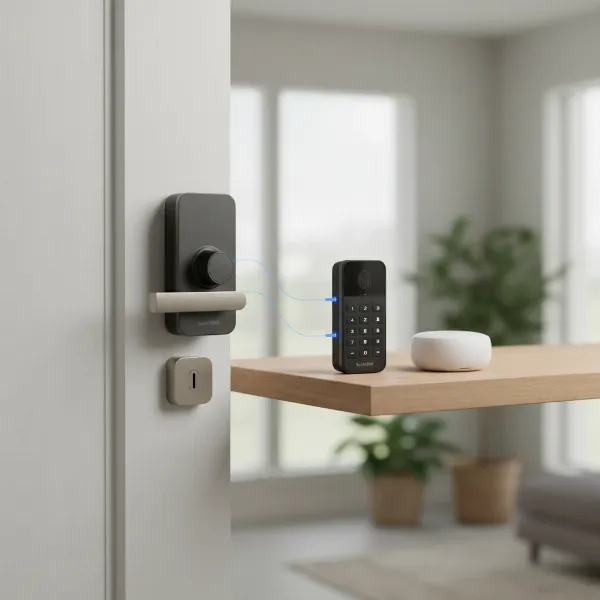 SwitchBot Lock on a door with its Keypad and Hub Mini accessories arranged nearby.
Conclusion
The SwitchBot Lock stands out as a genuinely effective and affordable solution for anyone looking to smarten up their home security without the commitment of replacing existing hardware. Its non-invasive installation, compatibility with a vast range of existing locks, and diverse unlocking methods make it a uniquely appealing choice for renters, budget-conscious homeowners, or those simply seeking convenience. While unlocking its full potential often requires the addition of a SwitchBot Hub Mini for remote access and advanced integrations, the combined cost still typically positions it as a highly competitive and economical option in the smart lock market.
It successfully bridges the gap between traditional deadbolts and modern smart home technology, offering a practical upgrade that prioritizes ease of use and affordability. If you’ve been on the fence about embracing smart locks due to cost or installation concerns, the SwitchBot Lock offers a compelling reason to make the leap. Are you ready to convert your “dumb” lock and experience the effortless convenience of a smarter home?
Frequently Asked Questions
Can the SwitchBot Lock work without the SwitchBot Hub Mini?
Yes, the SwitchBot Lock can operate via Bluetooth with your smartphone app without the Hub Mini for local control. However, for remote access (over Wi-Fi), voice control, and integration with external smart home platforms like Alexa or Google Assistant, the Hub Mini is required.
Is the SwitchBot Lock secure?
The SwitchBot Lock provides enhanced convenience and security features like auto-lock and remote monitoring. While it physically turns your existing deadbolt (maintaining its inherent security), advanced features like secure PIN codes and fingerprint access (with Keypad Touch) add layers of digital security.
How long does the battery last on the SwitchBot Lock?
Battery life varies by model and usage, but the original SwitchBot Lock typically offers around six months of use. Newer versions, like the Pro and Ultra, often have improved battery efficiency and sometimes feature dual power options or USB-C rechargeable packs for extended life.
Can I still use my original keys with the SwitchBot Lock installed?
Absolutely. One of the main benefits of the SwitchBot Lock’s retrofit design is that it allows you to retain your existing keys, providing a familiar and reliable manual override option at all times.
Is the SwitchBot Lock compatible with all door locks?
The SwitchBot Lock is designed for broad compatibility with various thumb-turn deadbolts, including US Mortise, US Single Cylinder deadbolts, Euro Profile Cylinders, UK Oval Cylinders, and Night Latches. However, it’s always recommended to check SwitchBot’s compatibility guide for your specific lock type before purchase.
