Have you ever arrived home, arms laden with groceries, fumbling for keys or your phone to unlock your door? It’s a common scenario that highlights the need for seamless home access. For Apple enthusiasts, the dream of a truly integrated smart home extends right to the front door, and that’s where the Schlage Encode Plus Smart Wi-Fi Deadbolt enters the picture. This advanced smart lock promises not just security, but unparalleled convenience, particularly for those deeply entrenched in the Apple ecosystem. But does it truly deliver on its promise as the best choice for Apple users, or are there hidden caveats behind its premium price tag?
Understanding the Schlage Encode Plus: What Makes it Stand Out?
A smart lock, at its core, is a keyless electronic lock that connects to your home network, allowing for remote control and enhanced access management. The Schlage Encode Plus takes this foundational concept and elevates it, primarily through its deep integration with Apple’s ecosystem. It combines a traditional deadbolt design with cutting-edge smart technologies, including Wi-Fi, Bluetooth, and most notably, Near Field Communication (NFC) for Apple Home Key. This blend ensures reliability alongside modern convenience.
What truly sets the Schlage Encode Plus apart is its “just works” philosophy, particularly for Apple users. While many smart locks offer app control or voice commands, the Encode Plus provides a seamless and intuitive experience, making it feel less like a gadget and more like an organic extension of your Apple devices. This integration positions it as a game-changer for anyone seeking a truly key-free lifestyle, where your iPhone or Apple Watch becomes your primary, most secure, and most convenient key.
Deep Dive into Features: The Apple Ecosystem Advantage
The Schlage Encode Plus is engineered with Apple users in mind, offering a suite of features that leverage the power and simplicity of the HomeKit ecosystem.
Apple Home Key Integration
|
Our Picks for the Best Smart Lock in 2026
As an Amazon Associate I earn from qualifying purchases.
|
||
| Num | Product | Action |
|---|---|---|
| 1 | eufy Security Smart Lock C220, Fingerprint Keyless Entry Door Lock, Built-in Wi-Fi, App Remote Control, Front Door Smart Lock Deadbolt, 8Months Battery, Reliable Power, IP53 Waterproof, BHMA Grade 3 |

|
| 2 | eufy Security Smart Lock C220, Fingerprint Keyless Entry Door Lock, Built-in Wi-Fi, App Remote Control, Front Door Smart Deadbolt, IP53 Waterproof, 8-Months Battery, Nickel |
|
| 3 | Electronic Passwords Keyless Entry Door Locks Smart Deadbolt Metal Lock Auto Time Delay Locking Secure Durable Low Battery Alert Type-C Port for Emergency Charging |
|
| 4 | ULTRALOQ U-Bolt Pro WiFi Smart Lock with Door Sensor, 8-in-1 Keyless Entry Door Lock with Fingerprint ID, App Remote Control, Built-in WiFi Keypad Deadbolt, Auto Unlock, IP65 Waterproof, Easy Install |
|
| 5 | Philips Wi-Fi Door Lock, WiFi Smart Lock Keyless Entry Deadbolt for Front Door, Remote Control, Built-in WiFi, APP Fingerprint Passcode Unlock, Auto Locking |
|
| 6 | TEEHO TE001 Keyless Entry Door Lock with Keypad - Smart Deadbolt Lock for Front Door with 2 Keys - Auto Lock - Easy Installation - Matte Black |
|
| 7 | Philips Wi-Fi Door Lock, WiFi Smart Lock Keyless Entry Deadbolt for Front Door, Compatible with Alexa & Google Assistant, Remote Control, Built-in WiFi, APP Fingerprint Passcode Unlock, Auto Locking |
|
| 8 | TEEHO TE001 Keyless Entry Door Lock with Keypad - Smart Deadbolt Lock for Front Door with 2 Keys - Auto Lock - Easy Installation - Oil-Rubbed Bronze |
|
| 9 | TEEHO TE001 Keyless Entry Door Lock with Keypad - Smart Deadbolt Lock for Front Door with 2 Keys - Auto Lock - Easy Installation - Satin Nickel |
|
| 10 | Schlage Encode Smart WiFi Deadbolt Lock for Front Door - Keyless Entry with App or Touchscreen - Works with Alexa, Hey Google, & Airbnb - Create Codes for Guests - Matte Black |
|
The standout feature of the Schlage Encode Plus is its support for Apple Home Key. This innovative technology transforms your iPhone or Apple Watch into a digital key, stored securely in your Apple Wallet. To unlock your door, you simply tap your device against the lock, much like using Apple Pay.
For added convenience, Apple’s Express Mode allows you to unlock your door without even needing to unlock your iPhone or Apple Watch first, a significant benefit when your hands are full. While you can add an optional security measure requiring Face ID authentication for unlocking, Express Mode offers unparalleled speed. A crucial safety net is the Power Reserve feature, which enables you to unlock your door for up to five hours even if your iPhone’s battery has died.
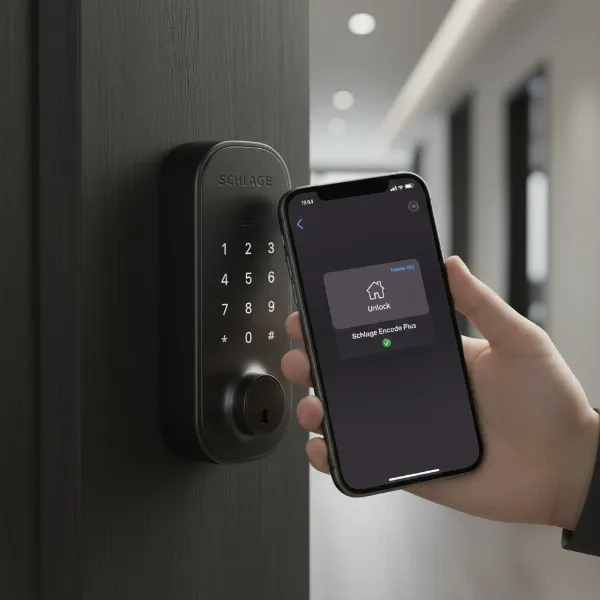 A person tapping an iPhone on a Schlage Encode Plus smart lock for Apple Home Key.
HomeKit & Thread Connectivity
The Schlage Encode Plus integrates seamlessly with Apple HomeKit, allowing for effortless setup and control directly from your Apple Home app. You can manage the lock from your iPhone, iPad, Apple Watch, or even with Siri voice commands. For remote access, automations, and incorporating the lock into HomeKit scenes, an Apple Home Hub (such as a HomePod Mini, Apple TV, or iPad) is required.
Beyond Wi-Fi, the Encode Plus also supports Thread, a low-power mesh networking protocol that significantly enhances its performance within the HomeKit environment. Thread connectivity improves battery life, often pushing it to six months or more, and ensures near-instantaneous response times when you interact with the lock. This combination of reliable Wi-Fi and efficient Thread connectivity contributes to a remarkably stable smart lock experience.
Versatile Access Options
While Apple Home Key is a major draw, the Schlage Encode Plus doesn’t put all its eggs in one basket. It offers multiple ways to access your home:
- Keypad Entry: An illuminated, touch-sensitive numeric keypad allows you to set up and manage up to 100 unique access codes. These codes can be customized for permanent, temporary, or recurring access, making it ideal for family members, guests, or service providers. Notably, the Schlage Encode Plus allows you to create passcodes directly within the Apple Home app, simplifying management for Apple users.
- Physical Key Backup: Recognizing the importance of redundancy, the lock includes a traditional physical key slot, providing an essential mechanical override. This “triple backup” system—keypad, physical key, and app control—ensures you’re never locked out.
- Schlage Home App: The dedicated Schlage Home app provides comprehensive control, including remote lock/unlock functionality, detailed activity logs, and customizable notifications. While Apple HomeKit offers core features, the Schlage Home app provides access to additional functionalities like setting schedules for access codes and connecting the lock to Wi-Fi.
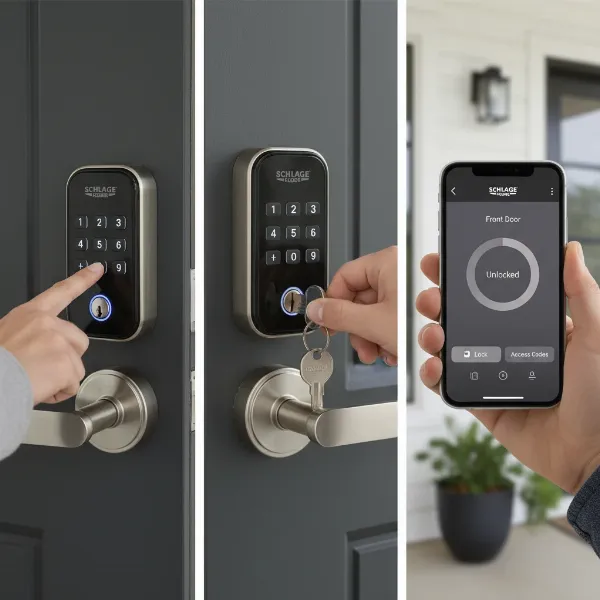 Illustrating Schlage Encode Plus multiple access methods: keypad, physical key, and smartphone app.
Smart Home Integrations Beyond Apple
Although optimized for Apple, the Schlage Encode Plus isn’t exclusive to HomeKit. It also supports integration with other popular smart home ecosystems, including Amazon Alexa and Google Assistant, allowing for voice control via the Schlage Home app. Additionally, it offers integration with platforms like Airbnb, streamlining guest access by automatically generating and sharing unique access codes.
Schlage Encode Plus vs. The Competition: A Head-to-Head Comparison
When considering a premium smart lock, especially for Apple Home Key, the Schlage Encode Plus faces strong contenders. Here’s how it stacks up against some of its main rivals:
Schlage Encode Plus vs. Yale Assure 2 Plus
Both the Schlage Encode Plus and the Yale Assure 2 Plus are popular HomeKit-compatible options with keypads.
| Feature | Schlage Encode Plus | Yale Assure 2 Plus |
|---|---|---|
| Home Key Reliability | Near-flawless (99%+ success rate) | Very good, but a “hair less consistent” than Schlage |
| Keypad Management | Codes manageable directly in Apple Home app | Responsive, but typically managed via Yale Access app |
| Design | Modern aesthetic, but some find it less visually appealing | Sleeker, often keyhole-free design (prevents picking) |
| Motor Strength | Super strong motor, powers through door alignment issues | Strong motor |
| Battery Life | Around 6 months (with Thread) | Around 3 months (some previous Yale models got 6+) |
| Unique Feature | Integrated Wi-Fi and Thread | DoorSense (alerts if door is ajar); keyhole-free design |
| Emergency Power | No 9V battery contacts for emergency power | Some models offer 9V battery contacts |
If Home Key reliability is your top priority, the Schlage Encode Plus often comes out on top. The Yale Assure 2 Plus, while a strong contender, may require a Wi-Fi module for full smart features and has shown shorter battery life in some tests.
Schlage Encode Plus vs. August Smart Lock
August smart locks, particularly the retrofit models, offer a different approach to smart home security.
| Feature | Schlage Encode Plus | August Smart Lock (e.g., 4th Gen Wi-Fi) |
|---|---|---|
| Installation Type | Full deadbolt replacement | Retrofit (keeps existing exterior lock) |
| Keypad | Built-in keypad | Optional separate keypad (August Smart Keypad) |
| Apple Home Key | Yes | Yes (on select models like August Wi-Fi Smart Lock) |
| Design | External keypad, visible smart lock components | Minimalist, internal-only smart lock for traditional exterior look |
| Connectivity | Built-in Wi-Fi and Thread | Built-Fi or Bluetooth (requires Connect Wi-Fi bridge for remote access) |
| Auto-Unlock | Location-based auto-unlock via HomeKit | Excellent auto-unlock/lock based on proximity |
| Access Codes | Up to 100 codes, managed via Schlage Home/Apple Home app | Unlimited virtual keys, managed via August app |
The choice here often comes down to installation preference: a full replacement (Schlage) or a retrofit (August). August excels in maintaining the traditional exterior aesthetic and its renowned auto-unlock feature, but its keypad is an add-on.
Schlage Encode Plus vs. Level Lock+
The Level Lock+ is known for its discreet design, often lauded for blending seamlessly with traditional door aesthetics.
| Feature | Schlage Encode Plus | Level Lock+ |
|---|---|---|
| Keypad | Built-in keypad | No built-in keypad; optional separate accessory |
| Design | Visible smart lock components, modern | Invisible; looks like a standard deadbolt |
| Home Key Reliability | Near-flawless (99%+) | Struggles a bit (approx. 10% failure rate) |
| Motor Strength | Super strong motor | Weakest motor among compared locks |
| Battery Life | Around 6 months | Around 6 months (single CR2 battery) |
| Keyhole | Yes, for physical key backup | Yes, for physical key backup (looks like traditional lock) |
For users prioritizing a completely stealthy smart lock that retains the look of a conventional deadbolt, Level Lock+ is appealing. However, it compromises on keypad functionality and, in some tests, Home Key reliability. The Schlage Encode Plus offers a more robust and feature-rich experience, albeit with a more noticeable smart lock presence.
“For an Apple user, Home Key isn’t just a feature; it’s the entire reason to buy this lock. It’s the seamless experience that makes the price tag worth it.” – Rafa Santos, Founder of Lock Smart Living
Choosing Your Ideal Smart Lock: A Buying Guide for Apple Enthusiasts
Selecting the right smart lock involves more than just picking the prettiest design. For Apple users, specific considerations will ensure the best possible experience.
Assessing Your Needs
Before diving into features, consider your personal circumstances:
- Door Type and Security Requirements: Ensure the lock is compatible with your door’s thickness and boreholes. Assess the level of security you need; a deadbolt replacement like the Schlage Encode Plus generally offers robust physical security.
- Budget Considerations: Smart locks, especially those with advanced features like Home Key, can be a significant investment. The Schlage Encode Plus has a premium price tag, so weigh the cost against the features and convenience it offers.
- Importance of Home Key: If the ability to tap your iPhone or Apple Watch is a primary motivator, then prioritizing locks with proven Home Key reliability, like the Schlage Encode Plus, is key.
- Household Users: Consider who else will be using the lock. If non-Apple users or guests are frequent, a reliable keypad and easy code management (ideally within the Apple Home app) are crucial.
Key Features to Prioritize
Look for these essential features to maximize your smart lock’s potential:
- Connectivity: Look for robust Wi-Fi and Thread support. Thread is particularly beneficial for Apple HomeKit users, offering better responsiveness and battery life.
- Access Methods: A combination of Apple Home Key, a responsive keypad, a reliable app, and a physical key backup offers the most flexibility and peace of mind.
- Smart Home Ecosystem Compatibility: Ensure the lock integrates well with your existing or planned smart home setup. For Apple users, deep HomeKit integration is paramount.
- Security Certifications: Look for locks with strong security ratings and encryption to protect against digital and physical tampering.
- App Functionality: The companion app should be user-friendly, allowing for easy code management, activity monitoring, and notification settings. The ability to manage codes directly in the Apple Home app is a significant advantage.
Reading Reviews and Support
Before making a final decision, always:
- Read User Reviews: Gain insights into real-world performance, common issues, and user satisfaction. Pay attention to feedback regarding Home Key reliability, battery life, and overall responsiveness.
- Check Warranty and Technical Support: A good warranty and accessible customer support can save you headaches down the line. Look for manufacturers with a strong reputation for reliability, like Schlage, who have been in the lock business for over a century.
Installation, Usage, and Maintenance Tips for Your Schlage Encode Plus
Optimizing your Schlage Encode Plus involves proper installation, understanding its smart features, and consistent maintenance.
Installation Process
Installing the Schlage Encode Plus is generally straightforward and can be completed in about 10-15 minutes with just a Phillips head screwdriver. However, ensure your door’s existing boreholes and strike plate align perfectly, as misalignment can lead to motor strain, rapid battery drain, and premature failure.
For Apple users, pairing the lock with HomeKit is quick by simply pressing the pairing button and holding your iPhone nearby. However, to access all features like detailed code scheduling, Wi-Fi connection, and activity history, it’s recommended to set it up through the Schlage Home app first, or simultaneously pair with both apps, as some features are exclusive to the Schlage Home app.
Maximizing Smart Features
Once installed, delve into the lock’s intelligent capabilities:
- Custom Access Codes and Schedules: Utilize the Schlage Home app or Apple Home app to create unique access codes for family, friends, or services, and set specific schedules for when these codes are active. This is perfect for dog walkers or temporary guests.
- Automations and Scenes in Apple Home: Integrate your lock into HomeKit automations. For example, have your doors lock automatically when everyone leaves home, or unlock when you arrive. You can also create scenes to control multiple devices, such as “Goodnight” which locks the door and turns off the lights.
- Activity Logs and Notifications: Keep track of who enters and exits your home with real-time activity logs. Configure push notifications to alert you when specific codes are used or if there’s an attempted break-in.
Battery Management & Troubleshooting
The Schlage Encode Plus runs on four AA batteries. While Thread connectivity can extend battery life, some users report a lifespan of around 2-3 months, while others experience 6 months or more.
- Tips for Extending Battery Life: Ensure your HomeKit hub (HomePod Mini or Apple TV) is reliably connected for Thread to function optimally. Minimize constant Wi-Fi usage if Thread is available.
- Common Issues: Some users have reported minor issues with keypad backlighting being “jagged” or potential weather sensitivity in extreme cold or humidity. While the lock is generally reliable, ensuring proper installation and strong network connectivity can prevent most problems.
- Physical Key Backup: Always remember you have a physical key as a foolproof backup, especially if batteries die unexpectedly. The Schlage Encode Plus does not offer a 9-volt battery jump-start option found on some competitor locks.
Enhancing Your Smart Lock Experience with Accessories
While the Schlage Encode Plus is a powerful standalone device, certain accessories can further enhance your smart home security and convenience:
- Smart Home Hubs (HomePod Mini, Apple TV): Essential for remote access, automations, and leveraging Thread connectivity for the Schlage Encode Plus within HomeKit. These devices act as the central brain for your Apple smart home, ensuring your lock is always connected and responsive.
- Door Sensors: Integrating door sensors with your HomeKit setup can provide additional peace of mind, allowing you to verify if a door is not just locked, but also securely closed and latched. This complements the lock’s functionality, especially if your lock doesn’t have a built-in DoorSense feature like some Yale models.
Conclusion
The Schlage Encode Plus Smart Wi-Fi Deadbolt truly stands out as a top-tier choice for Apple users, earning its reputation as one of the most reliable smart locks compatible with Home Key. Its near-flawless Home Key functionality, robust Thread integration, and versatile access methods make it a formidable guardian for your home. While it comes with a premium price tag and some minor considerations like variable battery life or keypad aesthetics, the unparalleled convenience and seamless integration into the Apple ecosystem often outweigh these points. For those prioritizing a “just works” experience with their iPhone and Apple Watch, the Encode Plus offers remarkable peace of mind.
Are you ready to embrace the future of keyless entry and make your home more secure and convenient with a smart lock designed for the Apple ecosystem?
Frequently Asked Questions
What is Apple Home Key and how does it work with Schlage Encode Plus?
Apple Home Key turns your iPhone or Apple Watch into a digital key stored in your Apple Wallet. With the Schlage Encode Plus, you simply tap your Apple device against the lock to unlock or lock your door, offering a secure and highly convenient keyless entry experience.
Does the Schlage Encode Plus require a HomeKit hub?
While the Schlage Encode Plus can be set up directly with your iPhone for basic functionality, a HomeKit hub like a HomePod Mini, Apple TV, or iPad set as a hub is necessary for remote control, automations, and shared Home Key access with other household members.
How long do the batteries last in the Schlage Encode Plus?
Battery life can vary. With Thread connectivity, many users report approximately 6 months of battery life. However, some individual experiences suggest it can be as low as 2-3 months depending on usage and network stability, highlighting the importance of efficient Thread operation.
Can I manage access codes for the Schlage Encode Plus through the Apple Home app?
Yes, a significant advantage of the Schlage Encode Plus is the ability to create and manage access codes directly within the Apple Home app after initial setup. This streamlines the management process for Apple users, minimizing the need to switch between multiple apps.
What are the backup options if my phone battery dies or I forget my code?
The Schlage Encode Plus offers multiple backup methods. You can always use the physical key provided, enter a code on the illuminated keypad, or even rely on Apple’s Power Reserve feature on your iPhone, which provides up to five hours of Home Key functionality after your phone battery is critically low.