Welcome to the future of home security! As a seasoned smart lock technician with over a decade of hands-on experience, I’ve seen these devices evolve from nascent technology to indispensable home essentials. The convenience, advanced security, and seamless control offered by modern smart locks are transforming how we protect our homes. If you’re looking to upgrade your entryway with cutting-edge technology, you’ve come to the right place. This comprehensive guide will navigate you through the best smart locks of 2026, offering detailed reviews and crucial buying insights to help you find the perfect match for your lifestyle and budget.
What is a Smart Lock and Why Should You Consider One?
A smart lock is an electronic and mechanical locking device that integrates with your home network, allowing for keyless access and remote control of your door. Unlike traditional locks, smart locks leverage technologies like Wi-Fi, Bluetooth, Zigbee, or Z-Wave to connect to your smartphone or smart home system, offering an array of advanced functionalities beyond a simple key.
The benefits of embracing smart lock technology are numerous. For starters, they offer unparalleled convenience, eliminating the need for physical keys. Imagine never fumbling for keys in the rain or wondering if you locked the door after leaving. Many smart locks feature auto-lock and auto-unlock functionalities, securing your home automatically as you leave and granting seamless entry upon your return. In terms of enhanced security, smart locks often include strong encryption, tamper alarms, and activity logs, providing real-time monitoring and alerts for unauthorized access attempts. This level of oversight gives homeowners peace of mind. Finally, simplified access management is a major advantage; you can issue temporary passcodes to guests, service providers, or family members, controlling who enters your home and when, all from a mobile app.
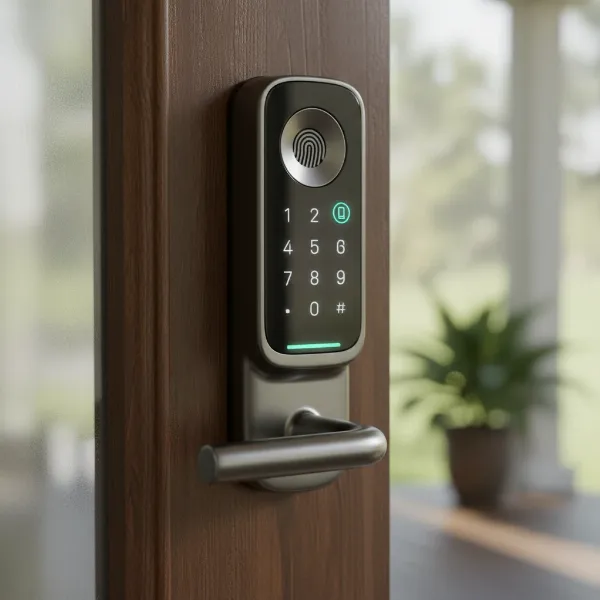 A sleek smart lock on a wooden door, showing fingerprint, keypad, and smartphone app icons for access.
Smart locks are no longer just for tech enthusiasts; they are widely applicable across various settings. Homeowners can benefit from enhanced security and convenience, while property managers and Airbnb hosts find them invaluable for remote access management and guest check-ins. Offices can also use them for streamlined employee access control and monitoring.
Types of Smart Locks Dominating the Market
The smart lock market offers a diverse range of products, each utilizing different technologies and catering to specific needs. Understanding the various types can help you pinpoint the best solution for your home.
Fingerprint Smart Locks
Fingerprint smart locks utilize biometric technology, allowing users to unlock doors with a simple touch of their registered fingerprint. This method offers swift, keyless, and highly personal access.
- Pros: Extremely convenient, eliminates keys and codes, fast entry.
- Cons: Can sometimes be affected by dirt, moisture, or slight injuries on the finger; storage capacity for fingerprints can be a limiting factor on some models.
- Ideal for: Tech-savvy individuals, busy families who want quick entry, and those prioritizing biometric security.
|
Our Picks for the Best Smart Lock in 2026
As an Amazon Associate I earn from qualifying purchases.
|
||
| Num | Product | Action |
|---|---|---|
| 1 | Philips Wi-Fi Door Lock, WiFi Smart Lock Keyless Entry Deadbolt for Front Door, Compatible with Alexa & Google Assistant, Remote Control, Built-in WiFi, APP Fingerprint Passcode Unlock, Auto Locking |

|
| 2 | Electronic Passwords Keyless Entry Door Locks Smart Deadbolt Metal Lock Auto Time Delay Locking Secure Durable Low Battery Alert Type-C Port for Emergency Charging |
|
| 3 | eufy Security Smart Lock C220, Fingerprint Keyless Entry Door Lock, Built-in Wi-Fi, App Remote Control, Front Door Smart Lock Deadbolt, 8Months Battery, Reliable Power, IP53 Waterproof, BHMA Grade 3 |
|
| 4 | TEEHO TE001 Keyless Entry Door Lock with Keypad - Smart Deadbolt Lock for Front Door with 2 Keys - Auto Lock - Easy Installation - Satin Nickel |
|
| 5 | Philips Wi-Fi Door Lock, WiFi Smart Lock Keyless Entry Deadbolt for Front Door, Remote Control, Built-in WiFi, APP Fingerprint Passcode Unlock, Auto Locking |
|
| 6 | TEEHO TE001 Keyless Entry Door Lock with Keypad - Smart Deadbolt Lock for Front Door with 2 Keys - Auto Lock - Easy Installation - Matte Black |
|
| 7 | TEEHO TE001 Keyless Entry Door Lock with Keypad - Smart Deadbolt Lock for Front Door with 2 Keys - Auto Lock - Easy Installation - Oil-Rubbed Bronze |
|
| 8 | ULTRALOQ U-Bolt Pro WiFi Smart Lock with Door Sensor, 8-in-1 Keyless Entry Door Lock with Fingerprint ID, App Remote Control, Built-in WiFi Keypad Deadbolt, Auto Unlock, IP65 Waterproof, Easy Install |
|
| 9 | Schlage Encode Smart WiFi Deadbolt Lock for Front Door - Keyless Entry with App or Touchscreen - Works with Alexa, Hey Google, & Airbnb - Create Codes for Guests - Matte Black |
|
| 10 | eufy Security Smart Lock C220, Fingerprint Keyless Entry Door Lock, Built-in Wi-Fi, App Remote Control, Front Door Smart Deadbolt, IP53 Waterproof, 8-Months Battery, Nickel |
|
Keypad/Password Smart Locks
These locks feature a numerical keypad where users input a specific code to gain entry. They are one of the most common types of smart locks and often offer robust customization for access codes.
- Pros: No physical keys needed, easy to share temporary access codes, often have anti-peeping features (like scrambling numbers).
- Cons: Codes can be forgotten or potentially observed by others, though advanced features mitigate this.
- Ideal for: Families, rental properties, and anyone who prefers code-based entry without the need for a smartphone every time.
Smart Card/RFID Smart Locks
Smart card or RFID (Radio-Frequency Identification) locks allow access by tapping a designated card or tag against the lock’s reader. This is a familiar system often seen in hotels or corporate environments.
- Pros: Quick, contactless entry, easy to issue and revoke access cards.
- Cons: Cards can be lost or stolen, requiring replacement.
- Ideal for: Businesses, hotels, multi-unit dwellings, or homes where multiple users prefer a physical token over a code or fingerprint.
Remote-Controlled Smart Locks
Remote-controlled smart locks enable users to lock or unlock their doors from a distance using a smartphone app, voice assistant, or sometimes a dedicated remote fob. This typically requires Wi-Fi connectivity or a smart home hub.
- Pros: Ultimate convenience for remote management, integration with smart home ecosystems, real-time alerts.
- Cons: Requires a stable internet connection or hub, battery life can be shorter with constant Wi-Fi usage.
- Ideal for: Homeowners who travel frequently, those with smart home ecosystems, and anyone desiring full control from anywhere.
Multi-Method Smart Locks
Many modern smart locks combine several access methods into one device, offering fingerprint, keypad, app, and traditional key access. This provides flexibility and redundancy.
- Pros: Offers maximum versatility and backup entry options, caters to diverse user preferences.
- Cons: Can be more expensive and visually bulkier due to integrated components.
- Ideal for: Any user who values multiple ways to unlock their door, ensuring entry even if one method is unavailable or preferred by different family members. Newer technologies also include facial recognition and palm vein scanning for even more advanced multi-method security.
The Top 10 Smart Locks of 2026: Detailed Reviews & Comparison
Choosing the right smart lock can be daunting with so many excellent options available. Here’s a breakdown of the top 10 smart locks dominating the market in 2026, offering diverse features for every need and budget.
-
Yale Assure Lock 2
- Description: The Yale Assure Lock 2 is an elegantly designed smart lock known for its broad smart home compatibility and versatile entry options. It’s often praised as a reliable and user-friendly choice for most households.
- Key Features: Available in keyed, keyless, and touchscreen versions, Apple Home Key support, DoorSense technology, easy installation.
- Unlocking Methods: Keypad, traditional key (optional), fingerprint reader (optional), smartphone app, Apple Home Key, Apple Watch.
- Smart Home Compatibility: Alexa, Google Home, HomeKit, SmartThings, Matter.
- Pros: Highly versatile with multiple configurations, Matter-compatible for future-proofing, sleek design, supports Apple Home Key.
- Cons: Wi-Fi models can have shorter battery life, tapping the Yale logo is an extra step to activate the lock.
- Target User: Homeowners seeking a versatile, aesthetically pleasing lock with broad smart home integration, especially Apple users.
-
Ultraloq Bolt Fingerprint (or U-Bolt Pro)
- Description: The Ultraloq Bolt Fingerprint stands out for its robust build and numerous unlocking methods, particularly its fast and accurate fingerprint scanner. It’s a top choice for comprehensive access.
- Key Features: Advanced biometric fingerprint scanner, anti-peep keypad, built-in Wi-Fi, auto-lock.
- Unlocking Methods: Fingerprint, keypad, smartphone app, traditional key, voice command.
- Smart Home Compatibility: Alexa, Google Home, HomeKit, SmartThings (via Wi-Fi).
- Pros: Multiple reliable entry options, good battery life, easy DIY installation, supports major voice assistants.
- Cons: Can be expensive, some models may not support Matter.
- Target User: Users prioritizing fast and accurate fingerprint access and a wide array of entry options.
-
August Wi-Fi Smart Lock
- Description: The August Wi-Fi Smart Lock is a popular retrofit option that transforms your existing deadbolt into a smart lock, retaining your original keys. It’s lauded for its ease of installation and powerful software features.
- Key Features: Retrofit design, built-in Wi-Fi (no separate bridge needed), DoorSense, auto-lock/unlock with geofencing.
- Unlocking Methods: Smartphone app, traditional key (uses existing deadbolt), optional keypad/fingerprint accessories.
- Smart Home Compatibility: Alexa, Google Home, HomeKit, IFTTT, SmartThings.
- Pros: Extremely easy to install (especially for renters), keeps existing keys, compact and sleek design, wide smart home compatibility.
- Cons: Shorter battery life compared to some, keypad often sold separately.
- Target User: Renters, those who want to retain their original keys, and smart home automation enthusiasts.
-
Lockly Visage Zeno Series Facial Recognition Deadbolt
- Description: This Lockly model pushes the boundaries with integrated facial recognition, offering a truly hands-free entry experience, complemented by Lockly’s unique PIN Genie keypad.
- Key Features: Binocular facial detection with radar tech, PIN Genie keypad (numbers scramble), built-in Wi-Fi.
- Unlocking Methods: Facial recognition, fingerprint, keypad, traditional key, Apple Home Keys, voice command.
- Smart Home Compatibility: Alexa, Google Assistant, HomeKit.
- Pros: Cutting-edge facial recognition, highly secure PIN Genie keypad, multiple entry methods.
- Cons: High price point, battery may require frequent charging (monthly with default settings).
- Target User: Early adopters of advanced technology, users prioritizing hands-free and biometric security, and those looking for innovative solutions.
-
Eufy FamiLock S3 Max
- Description: The Eufy FamiLock S3 Max is an all-in-one security solution, combining a smart lock with a 2K video doorbell and advanced biometric palm vein recognition.
- Key Features: Built-in 2K video doorbell, interior LCD screen (digital peephole), palm vein recognition, local video storage, Matter support.
- Unlocking Methods: Palm recognition, keypad, smartphone app, traditional key, voice control.
- Smart Home Compatibility: Alexa, Google Assistant, HomeKit, Matter.
- Pros: Comprehensive security with video doorbell and unique palm scanning, local video storage (no subscription), dual battery system for extended life.
- Cons: Expensive, bulkier design due to integrated features.
- Target User: Those seeking an integrated security solution with video monitoring, advanced biometrics, and local data storage.
-
Schlage Encode Plus
- Description: A trusted name in locks, the Schlage Encode Plus combines traditional reliability with modern smart features, offering strong Wi-Fi connectivity and robust security.
- Key Features: Built-in Wi-Fi, Apple Home Key support, durable construction, tamper alarm.
- Unlocking Methods: Keypad, traditional key, smartphone app, Apple Home Key, voice command.
- Smart Home Compatibility: Alexa, Google Assistant, HomeKit (Plus model), SmartThings.
- Pros: Exceptional build quality and reliability, excellent smart home integration especially with Apple HomeKit, easy installation.
- Cons: Can be pricey, advanced features like fingerprint readers are not always included in all models.
- Target User: Homeowners who prioritize a reputable brand, robust security, and seamless integration with Apple HomeKit.
-
Aqara U400
- Description: The Aqara U400 is an innovative smart lock particularly well-suited for Apple users, featuring Ultra Wide Band (UWB) technology for automatic unlocking as you approach.
- Key Features: UWB auto-unlock (with iPhone/Apple Watch), Matter-over-Thread support, NFC access, rechargeable battery.
- Unlocking Methods: UWB (iPhone/Apple Watch), keypad, fingerprint reader, NFC card, traditional key, smartphone app.
- Smart Home Compatibility: Alexa, Google Home, HomeKit, Matter (via compatible hub).
- Pros: Hands-free auto-unlock with UWB is highly convenient, excellent Matter support for broad compatibility, multiple entry methods.
- Cons: Auto-unlock primarily for Apple users, can be bulky and expensive.
- Target User: Apple ecosystem users (iPhone, Apple Watch) looking for advanced, hands-free entry and future-proof Matter connectivity.
-
Level Bolt
- Description: The Level Bolt is designed to be completely invisible, fitting inside your existing deadbolt hardware. It’s ideal for those who want smart lock functionality without altering their door’s aesthetic.
- Key Features: Hidden design, uses existing key, Bluetooth connectivity.
- Unlocking Methods: Smartphone app, traditional key, optional keypad accessory.
- Smart Home Compatibility: HomeKit, Alexa, Google Assistant, Ring (with optional bridge).
- Pros: Maintains traditional look of your door, uses existing keys, Grade 1 ANSI/BHMA security rating.
- Cons: Requires a separate Wi-Fi bridge for remote control, no built-in keypad or biometric option.
- Target User: Homeowners who value discreet technology, preserving their door’s appearance, and maintaining traditional key access.
-
Desloc D110 Plus
- Description: The Desloc D110 Plus offers a feature-rich smart lock experience at an affordable price, making advanced security accessible to budget-conscious consumers.
- Key Features: Reliable fingerprint sensor, anti-peeping touchscreen keypad, built-in Wi-Fi.
- Unlocking Methods: Fingerprint reader, keypad, traditional key, smartphone app.
- Smart Home Compatibility: Alexa, Google Home.
- Pros: Very affordable, includes Wi-Fi and fingerprint reader, anti-peeping feature on keypad.
- Cons: BHMA Grade 3 (lowest security rating), no HomeKit or Matter support, lacks a door sensor.
- Target User: Budget-conscious buyers who want key features like fingerprint and Wi-Fi connectivity without a high price tag.
-
Kwikset Halo Touch Fingerprint Smart Lock
- Description: Kwikset’s Halo Touch combines a stylish design with the convenience of a fingerprint scanner, offering whisper-quiet operation and reliable performance.
- Key Features: Integrated fingerprint sensor, built-in Wi-Fi, sleek design, auto-locking.
- Unlocking Methods: Fingerprint, keypad, traditional key, smartphone app, voice command.
- Smart Home Compatibility: Alexa, Google Assistant.
- Pros: Attractive and subtle design, fast fingerprint recognition, built-in Wi-Fi for remote control.
- Cons: Can be pricey, limited third-party integrations, no HomeKit support.
- Target User: Style-conscious homeowners looking for a convenient fingerprint lock that integrates well with Amazon or Google smart home ecosystems.
Smart Lock Comparison Table (Top 5 Examples)
| Feature | Yale Assure Lock 2 | Ultraloq Bolt Fingerprint | August Wi-Fi Smart Lock | Lockly Visage Zeno Series | Eufy FamiLock S3 Max |
|---|---|---|---|---|---|
| Lock Type | Deadbolt replacement | Deadbolt replacement | Deadbolt adapter | Deadbolt replacement | Deadbolt replacement |
| Primary Unlocks | Keypad, App, Home Key | Fingerprint, Keypad, App | App, Existing Key | Facial Rec., Fingerprint | Palm Rec., Video Doorbell |
| Connectivity | BT, Wi-Fi, Zigbee, Z-Wave, Matter | Wi-Fi, Bluetooth | Wi-Fi, Bluetooth | Wi-Fi, Bluetooth | Wi-Fi, Bluetooth, Matter |
| Smart Home | Alexa, Google, HomeKit, SmartThings | Alexa, Google, HomeKit, SmartThings | Alexa, Google, HomeKit, IFTTT | Alexa, Google, HomeKit | Alexa, Google, HomeKit |
| Security Rating | BHMA Grade 2 | N/A (Robust) | N/A (Robust) | Grade 2 | ANSI Grade 1 |
| Battery Life | 3-9 months | Good | 3 months | 6 months (rechargeable) | 5-6 months (dual battery) |
| Unique Feature | Apple Home Key | Versatile entry | Retrofit, DoorSense | Facial Recognition | Video Doorbell, Palm Scan |
| Price Range | Mid-High | Mid | Mid-High | High | High |
Your Ultimate Smart Lock Buying Guide
Selecting the right smart lock involves more than just picking a cool gadget. It requires careful consideration of your specific needs, home setup, and security priorities.
Assess Your Security Needs & Door Compatibility
Before anything else, evaluate your existing door. Smart locks come in various types: full deadbolt replacements, deadbolt adapters (which fit over your existing lock), and lever locks.
- Door Type & Thickness: Measure your door’s thickness and the backset of your existing deadbolt to ensure proper fitment.
- Existing Hardware: Do you want to keep your current keys as a backup? Retrofit locks like the August Wi-Fi Smart Lock allow this.
- Security Level: Consider the lock’s ANSI/BHMA grade. For residential use, Grade 1 or 2 is generally recommended.
Essential Features to Look For
Smart locks boast a wide array of features. Prioritize those that truly enhance your security and convenience.
- Unlocking Methods: Decide which methods are crucial for you: fingerprint, keypad, app control, physical key, smart card, facial recognition, or even palm vein scanning. Many users prefer multi-method locks for redundancy.
- Connectivity:
- Wi-Fi: For remote control and monitoring from anywhere.
- Bluetooth: For local control, often more battery-efficient.
- Zigbee/Z-Wave: Energy-efficient, requires a compatible hub for remote access.
- Matter/Thread: Emerging standards for universal smart home compatibility and local control.
- Smart Home Integration: Ensure compatibility with your existing smart home ecosystem (Alexa, Google Home, Apple HomeKit, SmartThings) for voice control and automation routines.
- Advanced Security: Look for features like strong encryption (e.g., AES-128), tamper alarms, anti-peeping keypads, and local storage for biometric data.
- Power Options & Battery Life: Most smart locks are battery-powered. Check for estimated battery life, low-battery warnings, and emergency power options (e.g., 9V battery terminals, physical key override).
Understanding Security Ratings (ANSI/BHMA Grades)
The American National Standards Institute (ANSI) and the Builders Hardware Manufacturers Association (BHMA) collaboratively rate lock security. These grades indicate a lock’s resistance to forced entry, impact, and repetitive use.
- Grade 1: Highest residential security, offering superior resistance to forced entry and high durability.
- Grade 2: Excellent security for residential use, providing substantial resistance.
- Grade 3: Good security, suitable for typical residential applications.
Always aim for at least a Grade 2, and ideally Grade 1, for your main entry doors to ensure robust protection.
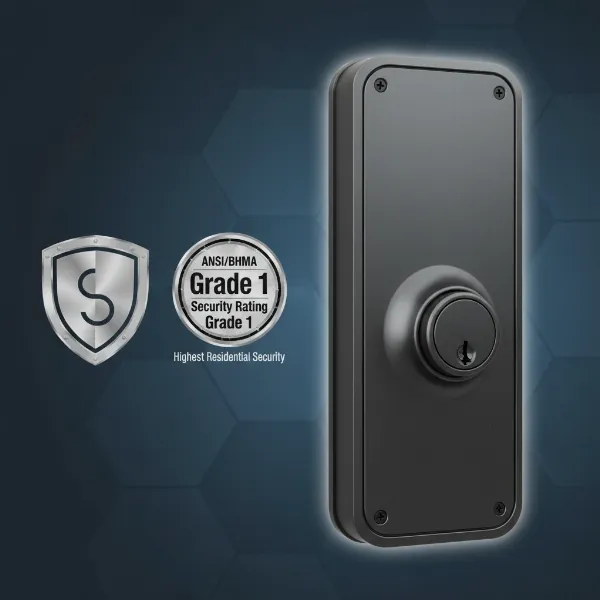 A graphic showing a smart lock with an overlay indicating high security and ANSI/BHMA Grade 1 rating.
Read User Reviews & Expert Opinions
Don’t underestimate the power of real-world feedback. User reviews can highlight practical pros and cons that specifications might not reveal, such as app reliability, actual battery life, or installation quirks. Combine these with expert reviews from reputable tech sites for a well-rounded perspective.
Consider Installation & Customer Support
- Ease of Installation: Many smart locks are designed for DIY installation. Look for clear, step-by-step instructions or video guides. Retrofit locks are generally the easiest.
- Customer Service & Warranty: A good warranty and responsive customer support are vital for any tech product. Ensure the brand offers accessible assistance for setup or troubleshooting.
Installation & Maintenance Tips for Your Smart Lock
Even with the most advanced smart lock, proper installation and regular maintenance are key to optimal performance and longevity.
Basic Installation Steps
Most smart locks are designed to replace your existing deadbolt.
- Remove Old Hardware: Unscrew and remove your existing deadbolt, including the interior and exterior components and the latch in the door frame.
- Install New Deadbolt/Latch: Insert the new smart lock’s deadbolt mechanism into the door.
- Attach Exterior Assembly: Position the exterior keypad/fingerprint reader, ensuring the cable passes through the door.
- Attach Interior Assembly: Connect the interior component, often housing the battery pack and smart modules, to the exterior piece. Secure with screws.
- Test & Calibrate: Once physically installed, follow the manufacturer’s app instructions to calibrate the lock and set up your initial access codes or biometrics.
Maximizing Smart Features
- Auto-Lock/Unlock: Utilize geofencing or time-based auto-locking to ensure your door is always secure when you leave and unlocks conveniently upon arrival.
- Temporary Access: Create temporary or scheduled passcodes for guests, dog walkers, or cleaners directly from your smartphone app.
- Activity Logs: Regularly check the activity logs in your app to monitor who enters and exits your home.
- Smart Home Routines: Integrate your smart lock with other smart devices. For example, have lights turn on when the door unlocks, or arm your security system when it locks.
Battery Care & Longevity
Since most smart locks are battery-powered, managing battery life is crucial.
- Use High-Quality Batteries: Invest in reputable alkaline or lithium batteries, as recommended by the manufacturer.
- Monitor Warnings: Pay attention to low-battery warnings from your app or the lock itself. Don’t wait until it dies completely.
- Consider Wi-Fi Usage: Constant Wi-Fi communication can drain batteries faster. If long battery life is a priority, consider Bluetooth or Z-Wave locks with a bridge, or locks with larger battery capacities.
- Emergency Backup: Always know your lock’s emergency override options, such as a physical key or external battery terminals.
Common Issues & Troubleshooting
- Connectivity Problems: If your lock isn’t connecting, check your Wi-Fi router, ensure the lock is within range, and restart both the lock and your router.
- Battery Drain: Excessive battery drain could be due to a faulty installation (friction), frequent remote commands, or a weak Wi-Fi signal.
- Unlocking Failure: Ensure fingerprints are clean, keypads are responsive, and app is updated. Recalibrate if necessary.
- Firmware Updates: Regularly update your lock’s firmware through the app. Updates often include bug fixes and security enhancements.
Essential Smart Lock Accessories
To further enhance your smart lock experience, several accessories can add convenience, functionality, and peace of mind.
- Wireless Keypads: For locks that don’t have a built-in keypad (like many retrofit models), a wireless keypad provides an additional code-based entry option, perfect for family members or guests without smartphones.
- Smart Home Hubs/Bridges: If your smart lock uses Bluetooth, Zigbee, or Z-Wave, a compatible hub (e.g., Samsung SmartThings, Amazon Echo, Apple HomePod Mini) or a Wi-Fi bridge is essential for remote access and broader smart home integration.
- Battery Backups/Emergency Power: While most locks have emergency physical key options, some offer external battery terminals (e.g., 9V battery contacts) to provide temporary power in case the internal batteries die.
- Remote Fobs: Small, handheld remotes can provide a simple, physical button to lock and unlock your door for those who prefer not to use a phone or code.
- Door Sensors (DoorSense): Some locks, like August, include these to tell you if your door is open or closed, preventing the deadbolt from engaging when the door is ajar.
These accessories allow you to customize your smart lock setup to perfectly fit your household’s needs and ensure seamless operation.
Conclusion
The evolution of smart locks has brought unprecedented levels of convenience and security to our doorsteps. The top smart locks of 2026, from biometric powerhouses like the Ultraloq Bolt Fingerprint to discreet solutions like the Level Bolt and integrated security systems like the Eufy FamiLock S3 Max, offer a spectrum of choices to suit every homeowner. By understanding the different types, prioritizing essential features like robust security ratings and smart home compatibility, and committing to proper installation and maintenance, you can transform your entryway into a fortress of modern convenience. Investing in a quality smart lock is not just about technology; it’s about investing in peace of mind for you and your loved ones. Which smart lock will be the next guardian of your home?
Frequently Asked Questions
What makes a smart lock more secure than a traditional lock?
Smart locks often offer enhanced security through advanced features like robust encryption, multi-factor authentication, tamper alarms, and activity logs. While a well-made traditional lock is secure, smart locks add layers of digital protection and monitoring, often making them a safer choice against various types of intrusion.
Can I still use a physical key with a smart lock?
Yes, many smart locks, especially deadbolt replacement models, include a traditional keyway as a backup for manual entry. Retrofit smart locks, such as the August Wi-Fi Smart Lock, are designed to work with your existing key, providing an excellent fail-safe in case of power or connectivity issues.
What happens if my smart lock’s battery dies?
Almost all smart locks are battery-powered and are designed with emergency backup options. These typically include a traditional key override or external terminals where you can temporarily connect a 9V battery to power the lock and gain entry. Your lock will usually provide low-battery warnings well in advance.
Are smart locks compatible with all smart home systems?
While many high-end smart locks offer broad compatibility with major platforms like Alexa, Google Home, and Apple HomeKit, some models might be limited. Newer standards like Matter are emerging to enhance universal compatibility across different smart home ecosystems, simplifying integration for users.
Is installation of a smart lock difficult for a DIYer?
Most smart locks are designed for relatively straightforward DIY installation, requiring basic tools like a screwdriver. Retrofit locks are generally the easiest to install, as they only replace the interior portion of your existing deadbolt. Full deadbolt replacements might take a bit longer but often come with clear instructions and video guides.
Can smart locks be hacked?
Theoretically, any internet-connected device carries some risk. However, reputable smart lock brands employ strong encryption (e.g., AES-128 or AES-256) and security protocols to make hacking extremely difficult. Ensuring your home Wi-Fi is secure, using strong passwords, and applying firmware updates significantly mitigates these risks.
What is the average battery life for a smart lock?
Battery life varies significantly based on the lock’s features, connectivity type (Wi-Fi drains faster), and usage frequency. Most smart locks last between 3 months (for Wi-Fi heavy usage) to over a year on a single set of batteries. Always check the manufacturer’s specifications and user reviews for real-world estimates.