Managing an Airbnb or short-term rental property comes with a unique set of challenges, not least of which is key management. Juggling physical keys, coordinating meet-ups for check-ins, and worrying about lost or copied keys can quickly become a host’s biggest headache. Fortunately, smart lock technology has revolutionized property access, offering a seamless, secure, and efficient solution for modern rental hosts. Embracing smart locks not only streamlines operations but also significantly enhances the guest experience, making your property more appealing and easier to manage from anywhere in the world.
What is a Smart Lock and Why is it Essential for Short-Term Rentals?
A smart lock is an electromechanical lock that can be controlled remotely via a smartphone application or other networked devices, offering keyless entry and advanced management features. These devices leverage various technologies like Wi-Fi, Bluetooth, or Z-Wave to provide connectivity and control, transforming traditional deadbolts into intelligent access points.
For short-term rental hosts, smart locks are more than just a convenience; they are an essential tool for modern property management. They eliminate the logistical nightmare of physical key exchanges, allowing guests to check themselves in with unique, temporary access codes. This not only offers unparalleled convenience for guests, who can arrive at their leisure, but also significantly boosts the security of your property. Hosts can remotely monitor entry and exit, generate time-sensitive codes for cleaners and maintenance staff, and revoke access instantly after a guest checks out, providing peace of mind and accountability. Smart locks effectively reduce the risk of lost keys and unauthorized re-entry, making your rental safer and more appealing.
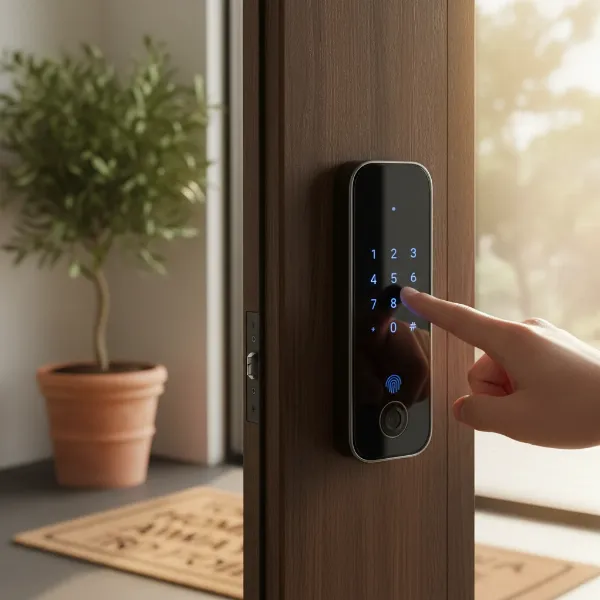 A guest smiling while using a keypad smart lock to enter an Airbnb property
Key Features to Look for in an Airbnb Smart Lock (Buying Guide)
Choosing the right smart lock for your short-term rental requires careful consideration of features that directly impact both host management and guest satisfaction. Not all smart locks are created equal, especially when it comes to the demands of a high-turnover rental property.
Remote Access and Management
The ability to control your lock from afar is paramount for rental hosts. Look for locks that allow you to:
- Generate and Manage Unique Codes: Create individual passcodes for each guest, cleaner, or service provider, with the option to set specific activation and deactivation times.
- Remote Lock/Unlock: Grant emergency access or lock up if a guest forgets.
- Activity Logs and Notifications: Receive real-time alerts on who enters and exits, providing a clear audit trail for security and accountability. This feature is invaluable for verifying check-in/check-out times and investigating any unusual activity.
|
Our Picks for the Best Smart Lock in 2026
As an Amazon Associate I earn from qualifying purchases.
|
||
| Num | Product | Action |
|---|---|---|
| 1 | Schlage Encode Smart WiFi Deadbolt Lock for Front Door - Keyless Entry with App or Touchscreen - Works with Alexa, Hey Google, & Airbnb - Create Codes for Guests - Matte Black |

|
| 2 | ULTRALOQ U-Bolt Pro WiFi Smart Lock with Door Sensor, 8-in-1 Keyless Entry Door Lock with Fingerprint ID, App Remote Control, Built-in WiFi Keypad Deadbolt, Auto Unlock, IP65 Waterproof, Easy Install |
|
| 3 | TEEHO TE001 Keyless Entry Door Lock with Keypad - Smart Deadbolt Lock for Front Door with 2 Keys - Auto Lock - Easy Installation - Satin Nickel |
|
| 4 | eufy Security Smart Lock C220, Fingerprint Keyless Entry Door Lock, Built-in Wi-Fi, App Remote Control, Front Door Smart Lock Deadbolt, 8Months Battery, Reliable Power, IP53 Waterproof, BHMA Grade 3 |
|
| 5 | Electronic Passwords Keyless Entry Door Locks Smart Deadbolt Metal Lock Auto Time Delay Locking Secure Durable Low Battery Alert Type-C Port for Emergency Charging |
|
| 6 | TEEHO TE001 Keyless Entry Door Lock with Keypad - Smart Deadbolt Lock for Front Door with 2 Keys - Auto Lock - Easy Installation - Matte Black |
|
| 7 | TEEHO TE001 Keyless Entry Door Lock with Keypad - Smart Deadbolt Lock for Front Door with 2 Keys - Auto Lock - Easy Installation - Oil-Rubbed Bronze |
|
| 8 | eufy Security Smart Lock C220, Fingerprint Keyless Entry Door Lock, Built-in Wi-Fi, App Remote Control, Front Door Smart Deadbolt, IP53 Waterproof, 8-Months Battery, Nickel |
|
| 9 | Philips Wi-Fi Door Lock, WiFi Smart Lock Keyless Entry Deadbolt for Front Door, Remote Control, Built-in WiFi, APP Fingerprint Passcode Unlock, Auto Locking |
|
| 10 | Philips Wi-Fi Door Lock, WiFi Smart Lock Keyless Entry Deadbolt for Front Door, Compatible with Alexa & Google Assistant, Remote Control, Built-in WiFi, APP Fingerprint Passcode Unlock, Auto Locking |
|
Connectivity Options
How your smart lock communicates directly impacts its reliability and functionality.
- Built-in Wi-Fi: Many hosts prefer locks with built-in Wi-Fi, as they connect directly to your home network without needing an additional hub or bridge. This simplifies installation and reduces potential points of failure. Most operate on the 2.4GHz Wi-Fi band.
- Bluetooth/Z-Wave/Thread: Some locks use Bluetooth for local control or Z-Wave/Thread, which require a separate hub for remote access. While these can sometimes offer better battery life or integrate into broader smart home ecosystems, the added hardware can increase complexity for rental properties.
Access Methods
Offering multiple ways to unlock caters to various guest preferences and ensures seamless entry.
- Keypad Entry: This is often the most preferred method for guests as it requires no app downloads, making it straightforward and universally understood. Look for responsive, backlit keypads for ease of use day and night.
- Smartphone App Access: While some guests appreciate app control, many hosts aim to minimize app downloads for a frictionless experience.
- Fingerprint Recognition: A convenient option for property owners and repeat guests/staff, but generally less practical for transient guests.
- Physical Key Backup: A crucial failsafe. Always ensure your smart lock includes a traditional keyhole for mechanical override in case of battery failure or technical issues.
Durability and Weather Resistance
Rental properties endure constant use, so a robust lock is non-negotiable.
- BHMA Certification: Look for locks with a high BHMA (Builders Hardware Manufacturers Association) grade (Grade 1 being the highest) to ensure mechanical durability and security against forced entry.
- Weatherproofing: If your rental has an exterior door directly exposed to the elements, choose a lock with a good IP (Ingress Protection) rating to withstand rain, snow, and extreme temperatures. Most smart locks are “water-resistant” and benefit from some shelter.
Battery Life and Backup Power
Smart locks rely on batteries, and unexpected battery drain can lead to frustrating lockouts.
- Extended Battery Life: Look for models known for longer battery performance (typically 6-12 months on AA batteries). Wi-Fi-enabled locks can sometimes drain batteries faster.
- Low Battery Alerts: Essential notifications that warn you when batteries need changing.
- Emergency Power Options: Some locks offer terminals for a 9V battery jump-start if internal batteries die. A physical key is the ultimate backup.
Integrations
Seamless integration with other platforms enhances automation and management.
- Property Management Systems (PMS): Integration with platforms like Guesty, RemoteLock, or Lynx can automate code generation and distribution based on reservation dates, which is a game-changer for hosts with multiple listings.
- Smart Home Ecosystems: Compatibility with Amazon Alexa, Google Assistant, or Apple HomeKit can allow for voice control or integration into broader smart home routines, though this is often secondary to rental-specific features.
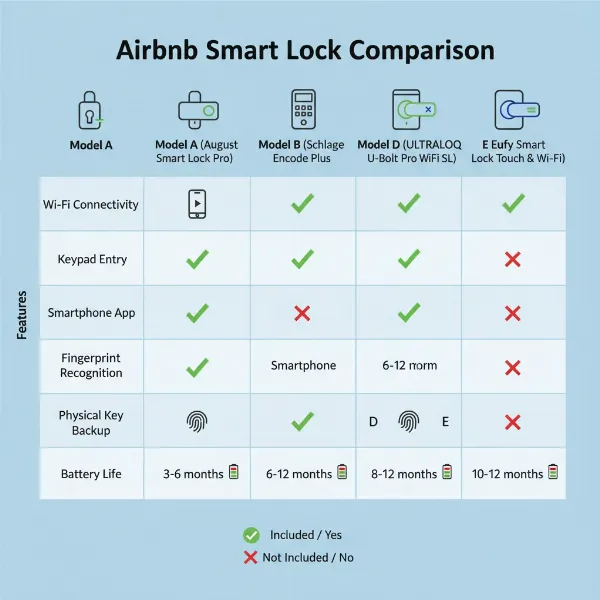 Infographic showing different smart lock features like Wi-Fi, keypad, app, and physical key backup
Top Smart Locks for Airbnb and Short-Term Rental Hosts: A Comparison
The market offers a variety of smart locks, each with unique strengths. Here’s a look at some of the top contenders favored by short-term rental hosts:
Schlage Encode
Often hailed as a top choice, the Schlage Encode features built-in Wi-Fi, eliminating the need for a separate hub. It offers a strong BHMA Grade 1 certification for durability and can store up to 100 access codes with automatic activation/expiry. Hosts appreciate its quiet operation and intuitive keypad. However, some users have reported occasional Wi-Fi connectivity issues, which can often be resolved by optimizing home network settings (e.g., separating 2.4GHz and 5GHz bands). Battery life can be shorter compared to non-Wi-Fi models due to constant connectivity.
Kwikset Halo
The Kwikset Halo provides budget-friendly built-in Wi-Fi connectivity and a fingerprint-resistant touchscreen. It can manage up to 250 user codes with individual schedules and boasts Kwikset’s SmartKey security, allowing hosts to rekey the lock themselves in seconds. It offers reliable day-to-day operation and integrates with Amazon Alexa and Google Assistant. While it’s a solid choice for essential features, direct integration with booking platforms may require third-party software.
Yale Assure Lock 2
The Yale Assure Lock 2 offers modular connectivity, allowing hosts to choose between Wi-Fi, Thread, or Bluetooth modules. This flexibility is excellent for evolving smart home setups. It holds a BHMA Grade 2 certification and can manage up to 250 access codes. Key features include an auto-lock function and a responsive touchscreen keypad. While the Wi-Fi version offers broad integrations, it may require a separate Yale Connect bridge for full remote functionality, adding an extra component.
August Wi-Fi Smart Lock
The August Wi-Fi Smart Lock is unique in that it installs over your existing deadbolt, preserving your original keys and exterior hardware. This retrofit approach makes it quick to install, especially for multiple units or when maintaining physical key access for staff is desired. It offers built-in Wi-Fi and the DoorSense sensor, which verifies if the door is actually closed and latched. While it creates unlimited virtual keys, a separate keypad accessory is needed for code-based guest access, and its battery life can be shorter (around 3-4 months).
Level Lock+
For hosts prioritizing aesthetics and discretion, the Level Lock+ is an excellent choice. It’s designed to look like a standard deadbolt from the outside, concealing its smart technology. It offers Apple Home Key support and Matter compatibility, making it highly future-proof. However, it comes at a premium price point, has a limit of 25 keys, and its installation can be more intricate, sometimes warranting professional help.
Lockly Secure Plus
The Lockly Secure Plus stands out with its patented PIN Genie technology, which scrambles numbers on the touchscreen to prevent code guessing from fingerprint smudges. It combines fingerprint recognition (up to 99 prints) with traditional code entry and built-in Wi-Fi. It offers robust security and works offline if the internet fails. First-time users might find the scrambled keypad slightly less intuitive initially.
Here’s a quick comparison table for some popular models:
| Feature | Schlage Encode | Kwikset Halo | Yale Assure Lock 2 | August Wi-Fi Smart Lock | Lockly Secure Plus |
|---|---|---|---|---|---|
| Connectivity | Built-in Wi-Fi | Built-in Wi-Fi | Wi-Fi (modular) | Built-in Wi-Fi | Built-in Wi-Fi |
| Access Codes | 100 | 250 | 250 | Unlimited (virtual) | 99 (codes), 20 (eKeys) |
| BHMA Grade | Grade 1 | Not specified (robust) | Grade 2 | N/A (retrofit) | Not specified (secure) |
| Backup Key | Yes | Yes | Yes | Yes (existing) | Yes |
| Est. Battery Life | 6-8 months (AA) | 6-12 months (AA) | 6-12 months (AA) | 3-4 months (AA) | 8-12 months (AA) |
| Unique Features | Quiet operation | SmartKey rekeying | Modular connectivity | Retrofit design | PIN Genie, Fingerprint |
Maximizing Your Smart Lock’s Potential: Installation & Usage Tips
Installing and effectively utilizing your smart lock ensures a seamless experience for both you and your guests. Proper setup and consistent management are key to reaping all the benefits.
Basic Installation Steps
Most smart locks are designed for DIY installation, typically replacing an existing deadbolt.
- Remove Old Hardware: Carefully remove your current deadbolt.
- Install New Deadbolt: Insert the new smart lock’s deadbolt mechanism.
- Mount Exterior Keypad/Assembly: Attach the exterior component of the smart lock.
- Install Interior Assembly: Secure the interior unit, ensuring all cables are correctly connected.
- Insert Batteries: Power up the device with the recommended batteries.
- Pair with App/Network: Follow the manufacturer’s instructions to connect the lock to your Wi-Fi network or smart home hub via its dedicated app.
- Test Thoroughly: Manually check the lock, test all access methods, and confirm remote control functionality. Professional installation might be worth considering for multiple units or complex door types.
Best Practices for Guest & Staff Access
Smart locks shine when managing access efficiently.
- Unique Codes for Every Guest: Always provide a distinct code for each booking. Configure codes to activate precisely at check-in time and expire immediately after checkout.
- Cleaner/Maintenance Codes: Create separate, recurring codes for your cleaning crew or set temporary codes for specific maintenance visits, revoking them once the task is complete.
- Clear Instructions: Provide guests with simple, unambiguous instructions for using the lock, including their unique code. Avoid assuming familiarity with smart technology.
- Remote Management for Peace of Mind: Actively use the remote locking feature if a guest forgets to secure the property or if you need to grant last-minute access.
Maintenance and Troubleshooting
Proactive maintenance prevents issues and extends your lock’s lifespan.
- Regular Battery Changes: Change batteries proactively, ideally before they drop below 50%. Set a reminder or check the app frequently. “Change out the batteries every time they are under 50%,” advises one experienced host, “You really do not want to risk your smart lock failing.”
- Wi-Fi Optimization: If experiencing connectivity issues, ensure your router is broadcasting a strong 2.4GHz signal, and consider giving the 2.4GHz and 5GHz bands different names to prevent devices from constantly switching.
- Door Alignment: Ensure your door and frame are properly aligned to prevent the deadbolt from sticking, which can drain batteries or cause errors.
Essential Accessories
While many smart locks are standalone, some accessories can enhance their utility.
- Optional Keypads: For retrofit locks like August, an external keypad is crucial for convenient guest code entry.
- Bridge/Hubs: If your chosen lock doesn’t have built-in Wi-Fi, a compatible bridge or hub is necessary for remote access.
- Internal Chain Locks: Guests appreciate an extra layer of security. An interior chain or deadbolt provides additional peace of mind once they are inside.
- Emergency Lockbox: Always keep a small, discreet lockbox with a physical backup key near the property as a fail-safe for any unforeseen smart lock failures.
Conclusion
Integrating smart locks into your Airbnb or short-term rental property is a transformative step towards modernizing your hosting business. From simplifying check-ins and enhancing security to streamlining management and improving the overall guest experience, the benefits are clear. By carefully selecting a smart lock with features like remote access, unique code generation, reliable connectivity, and robust durability, you can create a more secure, efficient, and appealing rental. Embrace the future of keyless entry to elevate your hosting game and provide an unforgettable stay for every guest.
What step will you take today to secure and modernize your rental property?
Frequently Asked Questions
What kind of internet connection does an Airbnb smart lock need?
Most smart locks for Airbnb require a stable 2.4GHz Wi-Fi connection for full remote functionality. Some models may use Bluetooth for local control or require a dedicated bridge/hub to connect to your Wi-Fi network. Ensure your router can provide reliable coverage to the lock’s location.
Can I manage multiple smart locks for different properties from one app?
Yes, most smart lock brands and property management software (PMS) integrations allow you to manage multiple locks across various properties from a single smartphone app or dashboard. This centralized control is highly beneficial for hosts with an expanding portfolio.
What happens if the smart lock batteries die or the Wi-Fi goes out?
In case of battery failure or Wi-Fi outage, most reputable smart locks include a physical key override as a crucial backup. Some also offer emergency power options, such as terminals for a 9V battery jump-start, to provide temporary power for code entry.
Are smart locks more secure than traditional locks for rentals?
Smart locks offer enhanced security over traditional locks by allowing unique, time-sensitive access codes for each guest, eliminating the risk of lost or copied keys. They also provide activity logs for monitoring entry/exit and the ability to remotely revoke access, significantly improving overall property security.
Do guests need to download an app to use an Airbnb smart lock?
While many smart locks offer app-based entry, the most guest-friendly options prioritize keypad entry, meaning guests only need a unique code to unlock the door, without having to download or learn a new application. This creates a smoother, more universal check-in experience.